
1. Product Overview
The Baseus Enerfill 100W USB C Charger is a versatile 3-in-1 charging device designed for high-speed power delivery. It incorporates advanced GaN 6 technology for enhanced energy efficiency and superior heat dissipation, ensuring safe and reliable operation.
This charger supports various fast charging protocols, including Power Delivery (PD) 4.0+/3.0, SCP, AFC, 5V/2.4A, and PPS. It is capable of charging a MacBook Pro 16" to 55% in approximately 30 minutes.
With two USB-C ports and one USB-A port, the Enerfill charger allows for efficient simultaneous charging of up to three devices. Its compact and lightweight design (6.5 × 4.3 × 4.4 cm, 201g) makes it an ideal solution for travel, reducing the need for multiple chargers.

This image highlights the charger's 100W maximum power, 3-in-1 port design, portability, and reliable protection. It also shows the internal circuit board and a lightning bolt icon, emphasizing its fast charging capabilities.
2. Setup Instructions
- Unpack the Charger: Carefully remove the Baseus Enerfill 100W USB C Charger from its packaging.
- Connect to Power Outlet: Plug the charger into a compatible wall power outlet (Type C – 2-pin European plug). Ensure the connection is secure.
- Connect Your Device: Use a suitable USB-C to USB-C cable or a USB-A cable to connect your device to one of the charger's available ports.
- Verify Charging: Confirm that your device indicates it is charging.

This image shows the Baseus Enerfill 100W USB C Charger connected to a wall socket and a laptop, illustrating a typical setup for charging a portable computer.
3. Operating Instructions
The Baseus Enerfill 100W charger is designed for efficient charging of various devices. Its intelligent power control system automatically adjusts output based on connected devices.
3.1 Single Port Charging
When only one device is connected, the charger can deliver its maximum power output to that device:
- USB-C1 or USB-C2: Up to 100W for compatible laptops (e.g., MacBook Pro).
- USB-A: Up to 22.5W for smartphones, tablets, or other USB-A powered devices.

This diagram illustrates single-port charging scenarios for the Baseus Enerfill 100W charger, showing power distribution when one port is in use.
3.2 Dual Port Charging
When two devices are connected, the power output is intelligently distributed:
- USB-C1 + USB-C2: Power can be distributed, for example, 70W + 30W.
- USB-C1/C2 + USB-A: Power can be distributed, for example, 70W + 22.5W.

This diagram illustrates dual-port charging capabilities, showing different power output combinations such as 70W+30W or 70W+22.5W.
3.3 Triple Port Charging
When all three ports are in use, the charger optimizes power delivery across all connected devices:
- USB-C1 + USB-C2 + USB-A: Power is distributed, for example, 65W (USB-C1) + 20W (USB-C2) + 15W (USB-A).
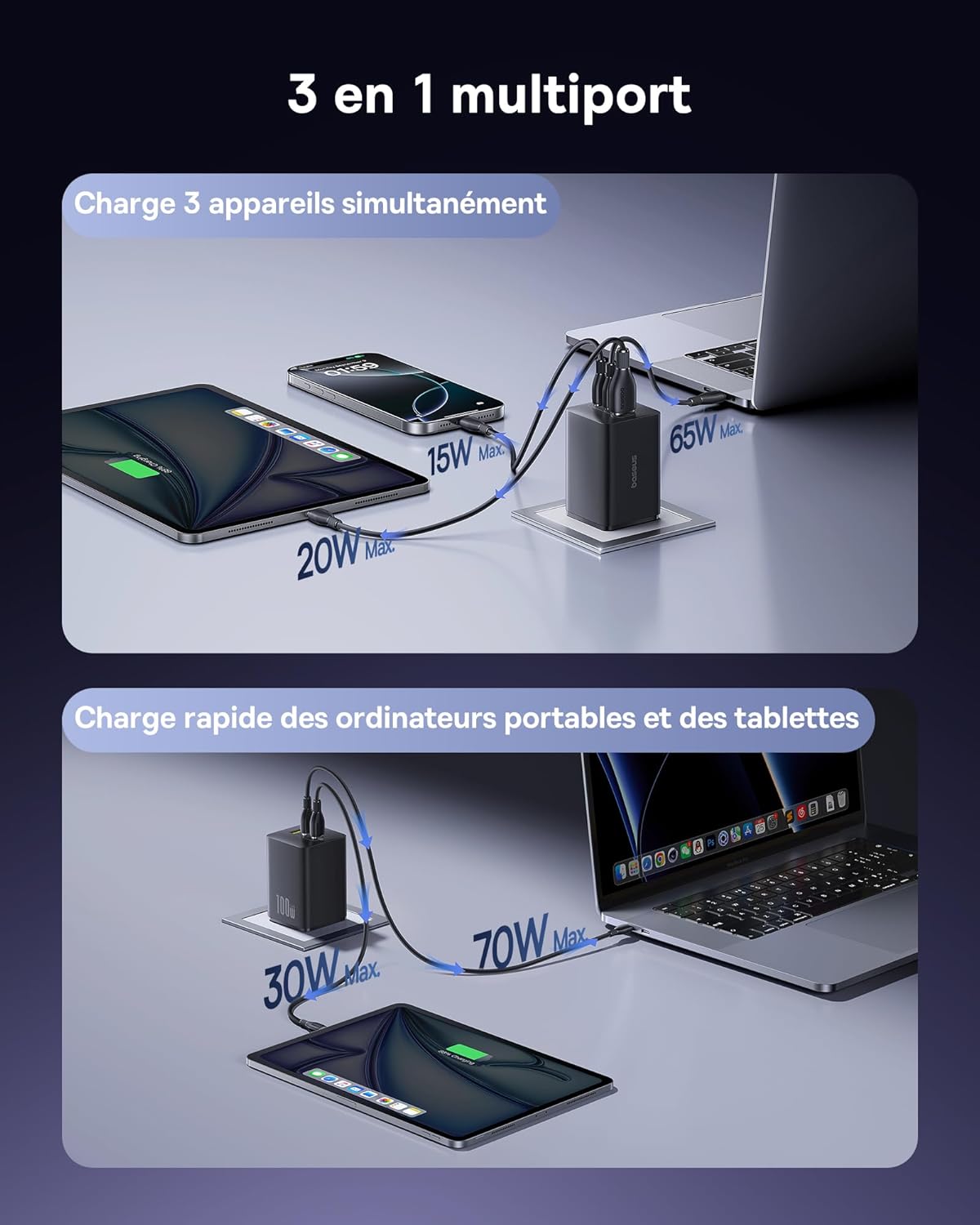
This image illustrates the charger's ability to power multiple devices at once. A laptop is connected to one USB-C port, a tablet to another USB-C port, and a smartphone to the USB-A port, showcasing efficient simultaneous charging.
3.4 Fast Charging for Smartphones
The charger provides rapid charging for compatible smartphones:
- An iPhone can be charged to 52% in 30 minutes.
- A Samsung Galaxy S23 can be charged to 56% in 30 minutes.

This image demonstrates fast charging for smartphones, showing an iPhone charging to 52% and a Samsung phone to 56% in 30 minutes.
3.5 Compatibility
The Baseus Enerfill 100W charger is compatible with a wide range of devices, including:
- Smartphones: iPhone 17/16/15/14/13 series, Samsung Galaxy S25/24/23/S22, Google Pixel 9/8/7, Huawei, Xiaomi, OPPO, Realme.
- Tablets: iPad Pro/Air, other USB-C compatible tablets.
- Laptops: MacBook Pro/Air, Dell XPS, HP Spectre X360, Microsoft Surface, Google Pixelbook, Lenovo ThinkPad.
- Other Devices: Smartwatches, Steam Deck, DJI drones, AirPods, Nintendo Switch.
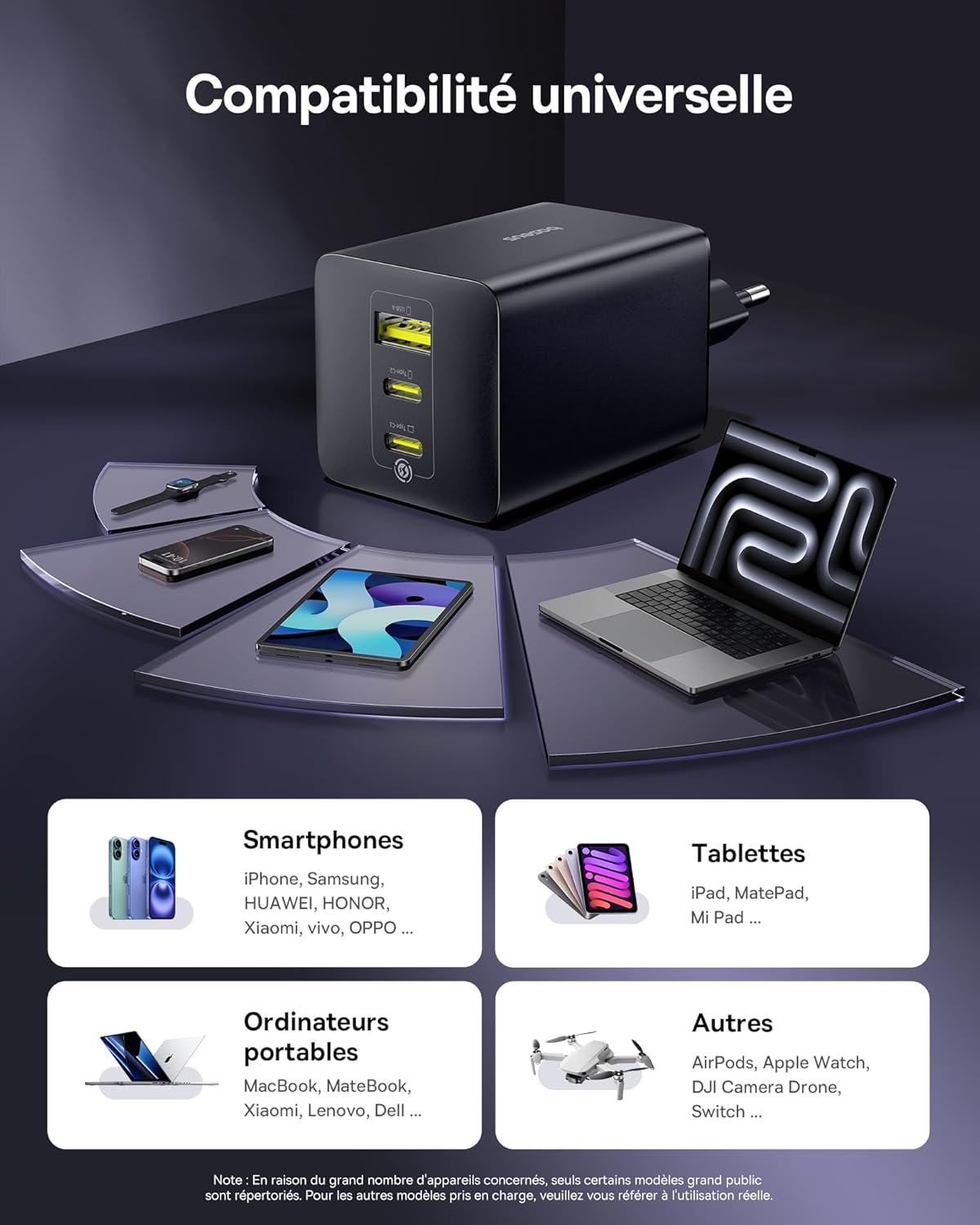
This image displays the Baseus Enerfill 100W charger alongside a variety of compatible devices, including smartphones, tablets, laptops, and drones, illustrating its broad compatibility.
This video demonstrates the Baseus Enerfill 100W USB C Charger in use, showing it plugged into a wall, charging a laptop, and then simultaneously charging a laptop, phone, and tablet. It also highlights the charger's temperature monitoring and compact design.
4. Maintenance
Proper maintenance ensures the longevity and optimal performance of your Baseus Enerfill 100W USB C Charger.
- Cleaning: Use a dry, soft cloth to clean the exterior of the charger. Avoid using liquid cleaners or solvents.
- Storage: Store the charger in a cool, dry place away from direct sunlight and extreme temperatures.
- Handling: Avoid dropping the charger or subjecting it to strong impacts. Do not attempt to disassemble the charger.
- Port Care: Keep the USB ports free from dust and debris. Avoid inserting foreign objects into the ports.

This image provides an internal view of the Baseus Enerfill 100W charger, highlighting its heat dissipation layers and GaN 6 chip, which contribute to effective temperature reduction during operation.
5. Troubleshooting
If you encounter issues with your Baseus Enerfill 100W USB C Charger, refer to the following common solutions:
- Device Not Charging:
- Ensure the charger is securely plugged into a working power outlet.
- Check the charging cable for any damage and ensure it is properly connected to both the charger and your device. Try a different cable if available.
- Verify that your device is compatible with the charger's output specifications.
- Try connecting a different device to confirm the charger is functioning.
- Slow Charging:
- Ensure you are using a high-quality cable that supports fast charging.
- Check if your device supports the fast charging protocols (PD, PPS) offered by the charger.
- When multiple devices are connected, the power output per port is distributed. Disconnect other devices to see if charging speed improves for a specific device.
- Close background applications on your device that consume significant power.
- Charger Overheating:
- It is normal for the charger to become warm during operation, especially during high-power charging.
- If the charger feels excessively hot, disconnect it immediately. Ensure it is used in a well-ventilated area and not covered.
- Avoid charging in direct sunlight or confined spaces.
If the issue persists after trying these steps, please contact Baseus customer support for further assistance.
6. Specifications
| Feature | Detail |
|---|---|
| Brand | Baseus |
| Model Number | Enerfill |
| Connector Type | USB Type C |
| Compatible Devices | Smartphones, Tablets, Laptops, Smartwatches, Steam Deck, DJI Drones, AirPods |
| Compatible Phone Models | iPhone 16 Pro, Samsung Galaxy S25 |
| Included Components | 1 x User Manual, Enerfill 100W USB-C Charger |
| Special Features | 100W High-Speed Charging, Intelligent Power Control, 3-in-1 Multi-Port Design, GaN 6 Smart Chip, Ultra-Compact and Lightweight |
| Color | Black |
| Input Voltage | 230 Volts |
| Amperage | 2.4 A |
| Total USB Ports | 3 (2x USB-C, 1x USB-A) |
| Wattage | 100 Watts |
| Output Current | 5 A |
| Output Voltage | 20 Volts |
| Power Source | AC |
| Portable | Yes |
| Compatible Plug Type | Type C – 2-pin (European plug) |
| Wired Charging Connector Type | USB Type A, USB Type C |
| Internal Material | Premium GaN 6 Material, Fire-retardant Casing, High-quality Copper Coils, Robust Plug Contacts |
| Form Factor | Compact |
7. Warranty and Support
Baseus is committed to providing high-quality products and customer satisfaction.
- Warranty: The Baseus Enerfill 100W USB C Charger comes with a 24-month warranty from the date of purchase.
- Money-Back Guarantee: A 45-day money-back guarantee is offered.
- Customer Support: Baseus provides 24/7 premium customer support. For any inquiries or issues, please contact our support team.
- Environmental Commitment: Baseus products are manufactured with environmentally friendly practices, adhering to certifications like RCS (Recycled Claim Standard), with a focus on recyclable materials.


