Introduction
Thank you for choosing the Midland T71PNK X-TALKER FRS Walkie Talkies. This manual provides comprehensive instructions for the setup, operation, maintenance, and troubleshooting of your two-way radios. Please read this manual thoroughly before use to ensure optimal performance and safety.

Image: Two Midland T71PNK X-TALKER FRS Walkie Talkies.
Key Features
- 36 FRS (Family Radio Service) Channels for communication.
- 121 CTCSS Privacy Codes for enhanced communication options.
- NOAA Weather Scan + Alert for severe weather updates.
- eVOX (Easy Voice and Sound Activated Transmission) for hands-free operation.
- Channel Scan feature to monitor active channels.
- Micro USB charging capability.
What's in the Box
Your Midland T71PNK X-TALKER package includes the following items:
- 2 x Midland T71PNK X-TALKER FRS Walkie Talkies
- 2 x Belt Clips
- 2 x 1000mAh Rechargeable Battery Packs
- 1 x Micro USB Charging Cable

Image: Contents of the Midland T71PNK X-TALKER package.
Setup
Battery Installation
- Locate the battery compartment cover on the back of the radio.
- Press down on the tab and slide the cover off.
- Insert the 1000mAh rechargeable battery pack, ensuring the contacts align correctly.
- Replace the battery compartment cover, sliding it until it clicks into place.
Charging the Batteries
Before first use, fully charge the battery packs. The radios feature a battery meter on the display.
- Connect the micro USB charging cable to the micro-USB charging port located on the side of the radio.
- Connect the other end of the USB cable to a compatible USB power source (e.g., wall adapter, computer USB port).
- The battery indicator on the display will show charging status. A full charge typically takes several hours.
- Disconnect the charging cable once charging is complete.

Image: Midland T71PNK radio highlighting rapid charge feature.
Attaching the Belt Clip
- Align the belt clip with the grooves on the back of the radio.
- Slide the belt clip downwards until it locks into place.
- To remove, lift the tab on the belt clip and slide it upwards.
Operating Instructions
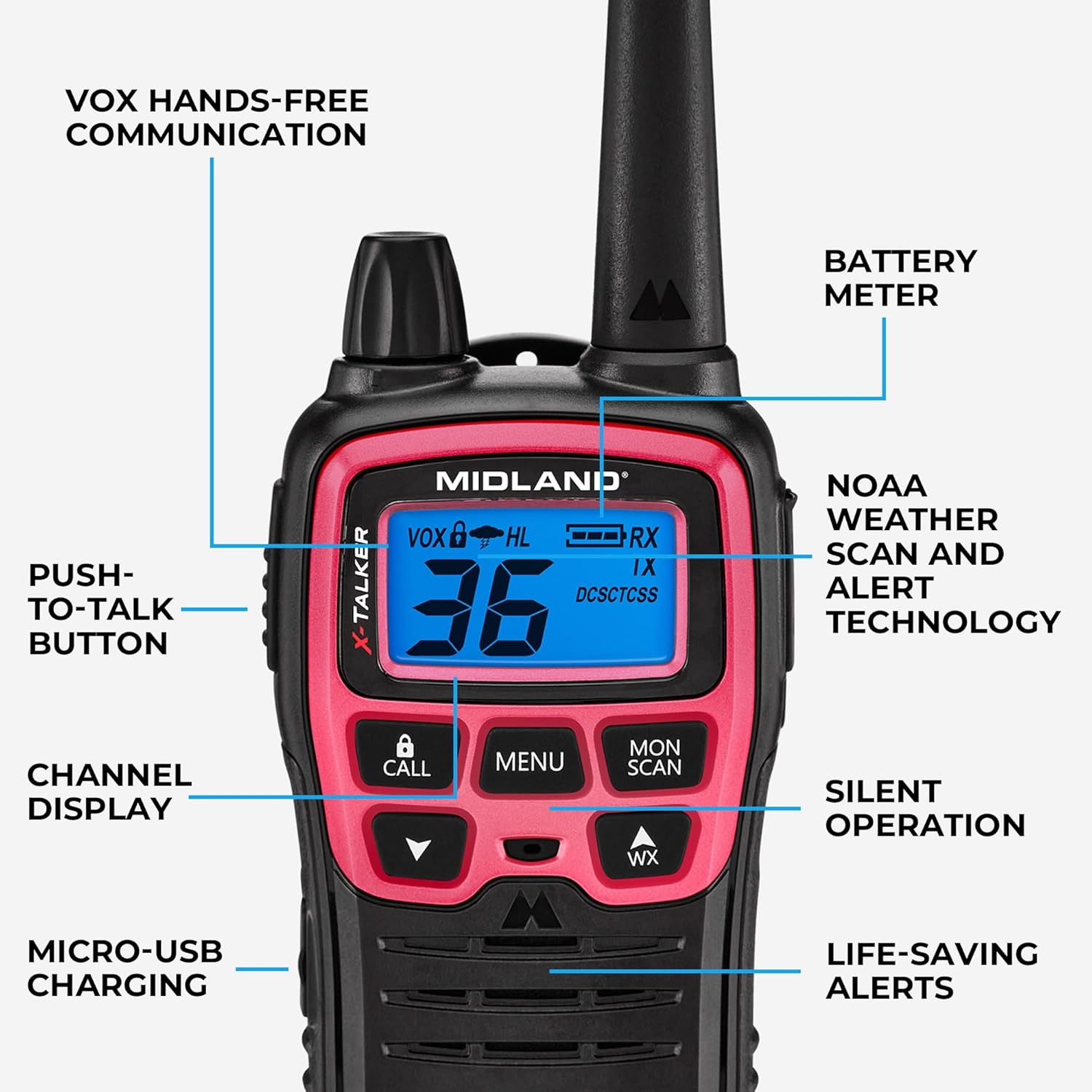
Image: Diagram of Midland T71PNK controls and features.
Power On/Off
- To power on, press and hold the POWER/MENU button until the display illuminates.
- To power off, press and hold the POWER/MENU button until the display turns off.
Adjusting Volume
- Use the UP and DOWN arrow buttons to adjust the listening volume.
Channel Selection
Your radio has 36 FRS channels.
- Press the MENU button once. The channel number will flash.
- Use the UP or DOWN arrow buttons to select your desired channel.
- Press the MENU button again or wait 5 seconds to confirm the selection.
Privacy Codes (CTCSS)
Privacy codes help reduce interference from other users on the same channel by filtering out transmissions that do not use the same code.
- Select a channel first (as described above).
- Press the MENU button twice. The privacy code number will flash.
- Use the UP or DOWN arrow buttons to select your desired privacy code (0-121).
- Press the MENU button again or wait 5 seconds to confirm.
Transmitting and Receiving
- To transmit, press and hold the PUSH-TO-TALK (PTT) button and speak clearly into the microphone.
- Release the PTT button to receive.

Image: Person using a Midland T71PNK radio for communication.
NOAA Weather Scan + Alert
The NOAA Weather Scan feature automatically scans through 10 available weather (WX) band channels and locks onto the strongest weather channel to alert you of severe weather updates.
- To activate Weather Scan, press the WX button. The radio will begin scanning.
- To exit Weather Scan, press the WX button again.
eVOX (Hands-Free Operation)
eVOX allows for hands-free transmission without pressing the PTT button. An optional headset may be required for optimal performance.
- Press the MENU button until the eVOX icon flashes.
- Use the UP or DOWN arrow buttons to select the eVOX sensitivity level (1-3, with 3 being most sensitive).
- Press the MENU button again or wait 5 seconds to confirm.
Channel Scan
The Channel Scan feature allows you to monitor all channels for activity.
- To activate Channel Scan, press the MON/SCAN button. The radio will begin scanning through channels.
- When activity is detected, the scan will pause on that channel.
- To exit Channel Scan, press the MON/SCAN button again.
Maintenance
Battery Care
- Always use the specified rechargeable battery packs.
- Avoid overcharging or completely draining the batteries to prolong their lifespan.
- If storing the radios for an extended period, remove the battery packs.

Image: Midland T71PNK radio highlighting long-lasting battery life.
Cleaning
- Clean the radio with a soft, damp cloth.
- Do not use harsh chemicals or abrasive cleaners.
Storage
- Store the radios in a cool, dry place when not in use.
- Keep away from extreme temperatures and direct sunlight.
Troubleshooting
| Problem | Possible Solution |
|---|---|
| No power | Ensure batteries are correctly installed and fully charged. |
| Cannot transmit or receive | Verify both radios are on the same channel and privacy code. Check battery level. Ensure PTT button is fully pressed. |
| Poor audio quality | Adjust volume. Move closer to the other radio. Check for obstructions. Ensure microphone is not covered. |
| Weather Alert not working | Ensure you are in an area with NOAA weather radio coverage. |
Specifications
| Feature | Detail |
|---|---|
| Model Number | T71PNK |
| Channels | 36 FRS Channels |
| Privacy Codes | 121 CTCSS Codes |
| Frequency Range | 450-470 MHz |
| Talking Range Maximum | Up to 30 Miles (unobstructed environments) |
| Power Source | 1000mAh Rechargeable Battery Pack (included) |
| Special Features | Voice Operated Transmission (eVOX), Weather Alert |
| Water Resistance Level | Water Resistant |
| Product Dimensions | 1.4 x 2.6 x 6.1 inches |
| Item Weight | 7.2 ounces |
Legal Disclaimer
This device complies with Part 15 of the FCC Rules. Operation is subject to the following two conditions: (1) this device does not cause harmful interference, and (2) this radio must accept any interference that may cause undesired operation. To maintain compliance with the FCC's RF exposure guidelines, for body-worn operation, this radio has been tested and meets the FCC RF exposure guidelines when used with Midland Radio Corp. accessories supplied or designed for this product. Use of other accessories may not ensure compliance with FCC RF exposure guidelines.
Warranty and Support
Warranty Information
Midland products are designed for reliability. For specific warranty details regarding your T71PNK X-TALKER FRS Walkie Talkies, please refer to the warranty card included in your product packaging or visit the official Midland website.
Customer Support
For technical assistance, troubleshooting, or general inquiries, please contact Midland customer support. You can find contact information and additional resources on the official Midland website: Midland Radio Store.


