
CUSHYBITE PSK106SB-PCL500B
CUSHYBITE PSK106SB-PCL500B 18V Lithium-Ion Kit: 5-1/2 inch Cordless Circular Saw User Manual
Model: PSK106SB-PCL500B
1. Introduction
This manual provides essential information for the safe operation, maintenance, and troubleshooting of your CUSHYBITE PSK106SB-PCL500B 18V Lithium-Ion Kit. This kit includes a 5-1/2 inch cordless circular saw, 2.0 Ah and 4.0 Ah lithium-ion batteries, and a charger. Please read this manual thoroughly before using the product to ensure proper function and to prevent injury.
The 5-1/2 inch circular saw operates at 4,700 RPM, designed for precise cuts. It offers a 1-11/16 inch depth of cut for 2-by material and a 0-50° bevel capacity for versatile cutting angles. The lightweight and compact design aims to minimize user fatigue, and the quick-release latches facilitate easy battery changes. An integrated fuel gauge helps monitor battery life. The batteries provide extended runtime, up to 3X more than standard lithium options, enhancing productivity.
2. General Safety Information
WARNING: Read all safety warnings, instructions, illustrations, and specifications provided with this power tool. Failure to follow all instructions listed below may result in electric shock, fire, and/or serious injury.
2.1 Work Area Safety
- Keep work area clean and well lit. Cluttered or dark areas invite accidents.
- Do not operate power tools in explosive atmospheres, such as in the presence of flammable liquids, gases, or dust. Power tools create sparks which may ignite the dust or fumes.
- Keep children and bystanders away while operating a power tool. Distractions can cause you to lose control.
2.2 Electrical Safety
- Power tool plugs must match the outlet. Never modify the plug in any way. Do not use any adapter plugs with earthed (grounded) power tools. Unmodified plugs and matching outlets will reduce risk of electric shock.
- Avoid body contact with earthed or grounded surfaces, such as pipes, radiators, ranges, and refrigerators. There is an increased risk of electric shock if your body is earthed or grounded.
- Do not expose power tools to rain or wet conditions. Water entering a power tool will increase the risk of electric shock.
2.3 Personal Safety
- Always wear eye protection. Use safety glasses or goggles.
- Dress properly. Do not wear loose clothing or jewelry. Keep your hair and clothing away from moving parts.
- Stay alert, watch what you are doing, and use common sense when operating a power tool.
2.4 Circular Saw Specific Safety
- DANGER: Keep hands away from cutting area and the blade. Keep your second hand on the auxiliary handle, or motor housing. If both hands are holding the saw, they cannot be cut by the blade.
- Do not reach underneath the workpiece. The guard cannot protect you from the blade below the workpiece.
- Adjust the cutting depth to the thickness of the workpiece. Less than a full tooth of the blade should be visible below the workpiece.
- Never hold the workpiece in your hands or across your leg while cutting. Secure the workpiece to a stable platform. It is important to support the workpiece properly to minimize body exposure, blade binding, or loss of control.
- Hold the power tool by insulated gripping surfaces when performing an operation where the cutting accessory may contact hidden wiring.
3. Package Contents
Verify that all items listed below are included in your package. If any items are missing or damaged, please contact CUSHYBITE customer service.
- 18V Cordless 5-1/2 inch Circular Saw
- 18V 2.0 Ah Lithium-Ion Battery
- 18V 4.0 Ah Lithium-Ion Battery
- 18V Battery Charger
- Circular Saw Blade (pre-installed or separate)
- Operator's Manual (this document)
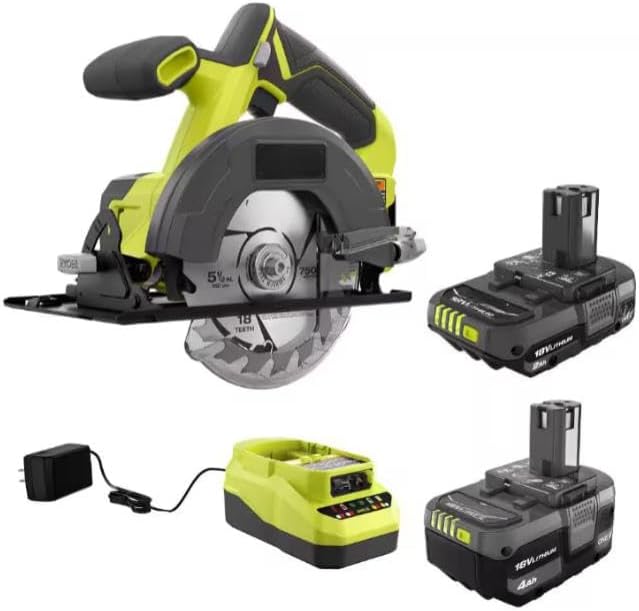
Figure 1: Overview of the CUSHYBITE 18V Lithium-Ion Kit, showing the circular saw, two batteries (2.0 Ah and 4.0 Ah), and the battery charger.
4. Components Overview
Familiarize yourself with the various parts of your circular saw, batteries, and charger before operation.
4.1 Circular Saw Features
- Blade Guard: Retracts during cutting to expose the blade.
- Depth Adjustment Lever: For setting the cutting depth.
- Bevel Adjustment Lever: For setting the cutting angle (0-50°).
- Handle/Grip: Main handle for control.
- Auxiliary Handle: For two-hand operation and improved control.
- Trigger Switch: Activates the saw.
- Lock-Off Button: Prevents accidental starting.
- Spindle Lock Button: For blade changes.
- Base Plate/Shoe: Supports the saw on the workpiece.
4.2 Battery and Charger Features
- Battery Pack: 18V Lithium-Ion (2.0 Ah and 4.0 Ah).
- Fuel Gauge: LED indicators on the battery to show charge level.
- Battery Release Latches: For removing the battery from the tool or charger.
- Charger: For recharging 18V Lithium-Ion batteries.
- Charger Indicator Lights: Show charging status (charging, charged, error).
5. Setup
5.1 Charging the Battery
- Connect the charger to a standard 120V AC outlet. The charger indicator light may illuminate.
- Slide the battery pack onto the charger, ensuring it clicks into place.
- The charger indicator light will show the charging status. Refer to the charger's specific instructions for light patterns (e.g., solid red for charging, solid green for charged).
- Once fully charged, remove the battery from the charger. Unplug the charger from the outlet when not in use.
5.2 Installing and Removing the Battery
- To Install: Align the battery pack with the battery port on the circular saw. Slide the battery into the tool until it clicks securely into place. Ensure the battery is fully seated.
- To Remove: Press the battery release latches on the sides of the battery pack. Pull the battery pack out of the tool.
5.3 Installing and Removing the Saw Blade
WARNING: Always disconnect the battery pack before installing or removing the saw blade to prevent accidental starting and serious injury.
- Remove the battery pack from the saw.
- Press and hold the spindle lock button.
- Using the provided blade wrench, loosen the blade bolt by turning it counter-clockwise.
- Lift the lower blade guard and remove the blade bolt, outer washer, and the old blade.
- Install the new blade, ensuring the teeth are pointing in the direction of rotation indicated by the arrow on the saw and blade.
- Replace the outer washer and blade bolt. Tighten the blade bolt securely by turning it clockwise while holding the spindle lock button. Do not overtighten.
- Release the spindle lock button and check that the blade rotates freely.
5.4 Adjusting Cutting Depth
- Loosen the depth adjustment lever.
- Raise or lower the saw base plate to achieve the desired cutting depth. For optimal performance and safety, set the blade depth so that only about 1/8 inch to 1/4 inch of the blade teeth extends below the workpiece.
- Tighten the depth adjustment lever securely.
5.5 Adjusting Bevel Angle
- Loosen the bevel adjustment lever.
- Tilt the saw base plate to the desired bevel angle (0-50°). Use the angle scale for reference.
- Tighten the bevel adjustment lever securely.
6. Operating Instructions
6.1 General Operation
- Ensure the workpiece is securely clamped or supported. Never attempt to cut freehand.
- Hold the saw firmly with both hands, one on the main handle and one on the auxiliary handle.
- Press the lock-off button (if applicable) and then squeeze the trigger switch to start the saw. Allow the blade to reach full speed before beginning the cut.
- Guide the saw smoothly and steadily through the workpiece. Do not force the saw; let the blade do the work.
- Maintain a clear line of sight to the cutting line.
- When the cut is complete, release the trigger switch and allow the blade to stop completely before lifting the saw from the workpiece.

Figure 2: A user demonstrating the CUSHYBITE circular saw in operation, highlighting its speed for efficient cutting.

Figure 3: The CUSHYBITE circular saw being used to make a cut, illustrating its versatility with a 1-11/16 inch depth of cut.
6.2 Cutting Techniques
- Cross-Cutting: For cutting across the grain of wood. Ensure the workpiece is well-supported.
- Rip-Cutting: For cutting along the grain of wood. Use a rip fence or straight edge guide for accuracy.
- Bevel Cuts: Adjust the bevel angle as described in Section 5.5. Be aware that the effective cutting depth will be reduced at higher bevel angles.
- Plunge Cuts: Not recommended for this type of circular saw unless specifically designed and instructed. Always start cuts from the edge of the material.
7. Maintenance
WARNING: Always remove the battery pack before performing any maintenance or cleaning to prevent accidental starting.
7.1 Cleaning
- Keep the tool's air vents clean and free of debris to prevent overheating.
- Wipe the tool with a clean, damp cloth. Do not use harsh chemicals or abrasive cleaners.
- Regularly clean the blade guard mechanism to ensure it operates smoothly.
7.2 Blade Care
- Inspect the saw blade before each use for sharpness, cracks, or missing teeth. Replace damaged blades immediately.
- Use only blades designed for circular saws and appropriate for the material being cut.
7.3 Battery Care and Storage
- Store batteries in a cool, dry place, away from direct sunlight and extreme temperatures.
- Do not store batteries in a discharged state for extended periods. Recharge them periodically if not in use.
- Do not expose batteries to water or moisture.
- Dispose of old batteries responsibly according to local regulations.
8. Troubleshooting
| Problem | Possible Cause | Solution |
|---|---|---|
| Saw does not start | Battery not charged or improperly installed; Lock-off button not pressed; Faulty switch. | Ensure battery is fully charged and properly seated. Press lock-off button before trigger. If problem persists, contact service. |
| Saw loses power during operation | Battery charge low; Overload; Dull blade. | Recharge battery. Reduce cutting pressure. Replace or sharpen blade. |
| Blade binds or smokes | Dull blade; Improper cutting depth; Workpiece not supported; Forcing the saw. | Replace or sharpen blade. Adjust cutting depth. Secure workpiece. Allow saw to cut at its own pace. |
| Inaccurate cuts | Improper depth/bevel setting; Loose blade; Unstable workpiece. | Verify depth and bevel settings. Ensure blade bolt is tight. Secure workpiece firmly. |
9. Specifications
| Feature | Specification |
|---|---|
| Model Number | PSK106SB-PCL500B |
| Brand | CUSHYBITE |
| Voltage | 18V DC |
| No-Load Speed | 4,700 RPM |
| Blade Diameter | 5-1/2 inches |
| Max. Cutting Depth (90°) | 1-11/16 inches |
| Bevel Capacity | 0-50° |
| Battery Type | Lithium-Ion |
| Battery Capacities Included | 2.0 Ah, 4.0 Ah |
10. Warranty and Support
This CUSHYBITE product is backed by a 3-year manufacturer's warranty from the date of purchase. This warranty covers defects in material and workmanship under normal use. It does not cover damage resulting from misuse, abuse, alteration, or unauthorized repair.
For warranty claims, technical support, or to purchase replacement parts, please contact CUSHYBITE customer service. Please have your model number (PSK106SB-PCL500B) and date of purchase available when contacting support.
For best results, compare the product’s image and listed dimensions to ensure proper fitment for any accessories or replacement parts.
Ask a question about this manual
Ask about setup, troubleshooting, compatibility, parts, safety, or missing instructions. Manuals+ will review the question and use this page’s manual context to help answer it.