
LAICOMEIN B110
LAICOMEIN Premium Pro Bluetooth 5.4 Transmitter Receiver User Manual
Model: B110
Introduction
The LAICOMEIN Premium Pro Bluetooth 5.4 Transmitter Receiver is a versatile 2-in-1 audio adapter designed to enhance your audio experience. It functions as both a Bluetooth transmitter (TX mode) to stream audio from non-Bluetooth devices to your wireless headphones or speakers, and a Bluetooth receiver (RX mode) to enable Bluetooth streaming on your traditional wired audio systems. This device is ideal for use with TVs, gaming consoles, in-flight entertainment systems, car stereos, home audio systems, and more, offering seamless wireless audio connectivity.
This manual provides detailed instructions on setting up, operating, and maintaining your device to ensure optimal performance and longevity.
Package Contents
Please verify that all items are present in your package:
- LAICOMEIN Premium Pro Bluetooth 5.4 Transmitter Receiver (Main Unit)
- USB Type-C Charging Cable
- 3.5mm Audio Female Plug
- RCA Audio Cable
- Dual 3.5mm Male to Female Adapter (for airplane use)
- User Manual (this document)

Figure 1: Package Contents and Device Components
Product Overview
Familiarize yourself with the device's buttons, ports, and indicators:
- Multifunction Button: Power On/Off (press and hold), Clear Pairing Records (hold for 8 seconds).
- Mode Switch (RX / TX): Toggle between Receiver (RX) and Transmitter (TX) modes.
- Pairing Button: Activates pairing mode for quick connections.
- Device 1 Status Light: Indicates connection status for the first paired device.
- Device 2 Status Light: Indicates connection status for the second paired device (supports dual pairing).
- Charging Status Indicator Light: Shows charging progress and battery status.
- Charging Port: USB Type-C port for charging.
- 3.5mm Audio Jack: Universal audio input/output port.
Figure 2: Detailed View of Device Components
Setup
1. Charging the Device
Before first use, fully charge the device. Connect the included USB Type-C charging cable to the device's charging port and the other end to a USB power source (e.g., computer USB port, wall adapter). The Charging Status Indicator Light will show charging progress. A full charge takes approximately 1.5 hours and provides over 15 hours of playtime.
2. Powering On/Off
- To Power On: Press and hold the Multifunction Button for a few seconds until the indicator lights illuminate.
- To Power Off: Press and hold the Multifunction Button for a few seconds until the indicator lights turn off.
Operating Modes
The LAICOMEIN Bluetooth adapter supports two primary operating modes: Transmitter (TX) and Receiver (RX). Use the Mode Switch (RX / TX) on the side of the device to select the desired mode.
TX Mode (Transmitter)
In TX mode, the device transmits audio from a non-Bluetooth source (e.g., TV, MP3 player, gaming console, airplane entertainment system) to your Bluetooth headphones or speakers.
- Set the Mode Switch to TX.
- Connect the device to your non-Bluetooth audio source using the 3.5mm audio cable. For TVs or other devices with RCA outputs, use the provided RCA audio cable. For airplane entertainment systems, use the dual 3.5mm male to female adapter if needed.
- Ensure your Bluetooth headphones or speakers are in pairing mode.
- Press the Pairing Button on the LAICOMEIN adapter to initiate pairing. The Device 1 Status Light will flash, indicating it's searching for devices.
- Once paired, the Device 1 Status Light will turn solid. You can now enjoy wireless audio.
- Dual Pairing (TX Mode): To connect a second pair of Bluetooth headphones/speakers, ensure the first device is connected, then put the second device into pairing mode and press the Pairing Button again. The Device 2 Status Light will illuminate when the second device is connected.
Note: For best performance in TX mode, turn off nearby Bluetooth devices (e.g., phones/iPads) when pairing to avoid interference.
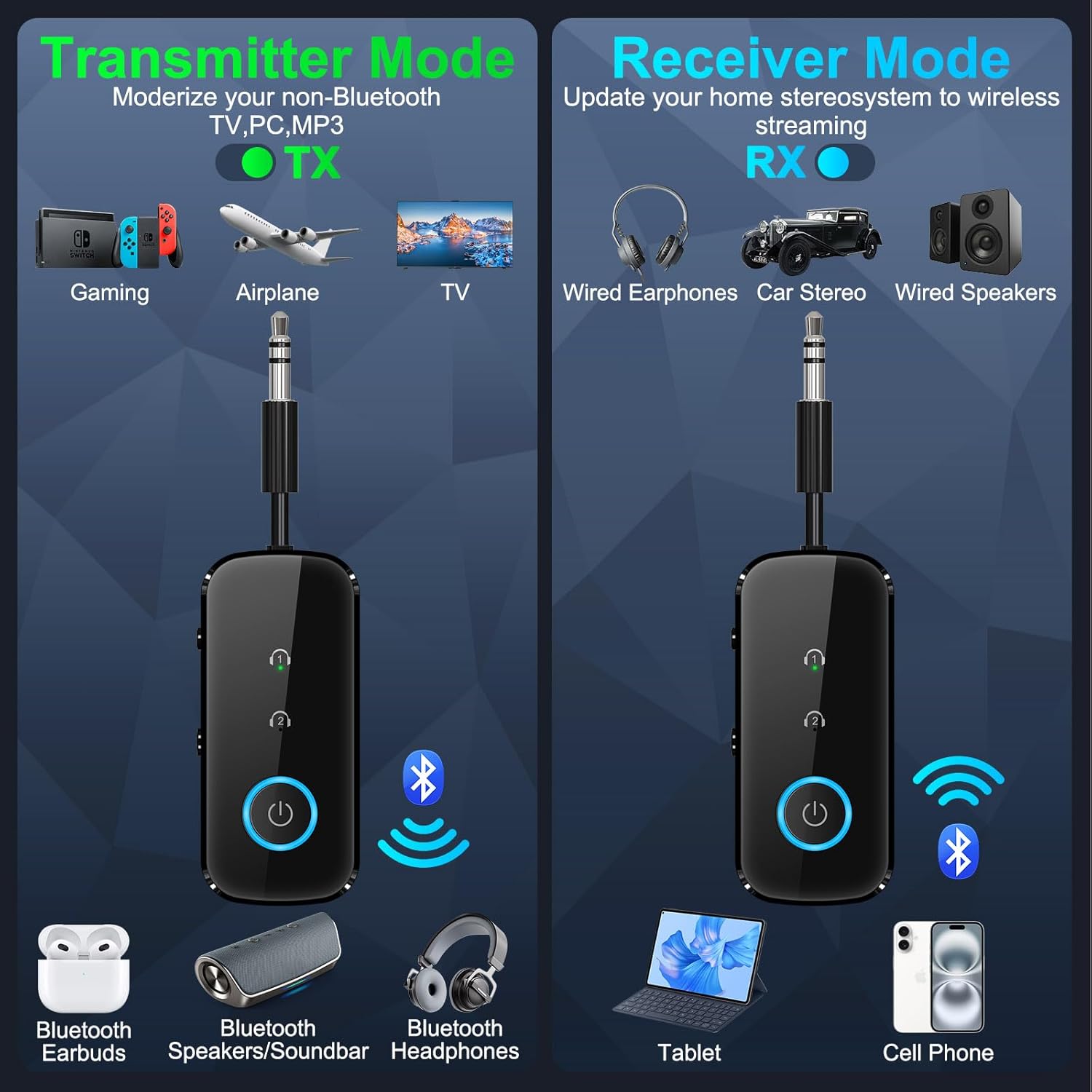
Figure 3: TX Mode and RX Mode Overview

Figure 4: Dual Pairing in TX Mode for TV Audio

Figure 5: Using TX Mode for In-Flight Entertainment

Figure 6: Using TX Mode at the Gym
RX Mode (Receiver)
In RX mode, the device receives Bluetooth audio from your smartphone, tablet, or other Bluetooth-enabled device and outputs it to a non-Bluetooth audio system (e.g., car stereo, home stereo, wired headphones).
- Set the Mode Switch to RX.
- Connect the device to your non-Bluetooth audio system (e.g., car stereo AUX input, home stereo AUX input) using the 3.5mm audio cable.
- Enable Bluetooth on your smartphone, tablet, or other audio source and search for "LAICOMEIN B110" (or similar device name) in the list of available Bluetooth devices.
- Select the device to pair. Once paired, the Device 1 Status Light will turn solid.
- You can now stream audio wirelessly from your Bluetooth device to your traditional audio system.
- Dual Pairing (RX Mode): The device can also pair with two smartphones/computers simultaneously, allowing for easy switching between audio sources.

Figure 7: Using RX Mode in a Car

Figure 8: Using RX Mode on a Boat
Maintenance
To ensure the longevity and optimal performance of your LAICOMEIN Bluetooth adapter, follow these maintenance guidelines:
- Cleaning: Use a soft, dry cloth to clean the device. Do not use liquid cleaners or aerosols.
- Storage: Store the device in a cool, dry place away from direct sunlight and extreme temperatures.
- Handling: Avoid dropping the device or subjecting it to strong impacts.
- Water Exposure: This device is not waterproof. Avoid exposure to water or high humidity.
Troubleshooting
If you encounter issues with your device, refer to the following common problems and solutions:
| Problem | Possible Cause / Solution |
|---|---|
| Device does not power on. | Battery may be depleted. Charge the device fully using the provided Type-C cable. |
| Cannot pair with Bluetooth headphones/speakers (TX Mode). |
|
| Cannot connect to car stereo/home stereo (RX Mode). |
|
| Audio quality is poor or intermittent. |
|
| LED indicators are not behaving as expected. | Refer to the "Product Overview" section for expected indicator behavior. If issues persist, try resetting the device by holding the Multifunction Button for 8 seconds while powered off. |
Specifications
Key technical specifications for the LAICOMEIN Premium Pro Bluetooth 5.4 Transmitter Receiver:
| Feature | Detail |
|---|---|
| Brand | LAICOMEIN |
| Model | B110 |
| Bluetooth Version | 5.4 |
| Hardware Interface | 3.5mm Audio, Bluetooth 5 |
| Compatible Devices | Laptop, Television, Car Stereo System, Tablet, Headphone, Smartphone |
| Audio Input Compatibility | 3.5mm AUX, RCA |
| Battery Type | Lithium-Ion (included) |
| Charging Time | Approximately 1.5 - 2 Hours |
| Playtime | 15+ hours on a single charge |
| Wireless Type | Bluetooth |
| Connector Type | RCA, Stereo Audio (3.5mm) |
| Dimensions (Package) | 13.69 x 11.51 x 1.9 cm |
| Weight | 59 g |

Figure 9: Internal Configuration Highlighting Bluetooth 5.4
Safety and Certifications
This device is certified by FCC, CE, RoHS, and BQB, meeting global safety standards. It includes built-in protections against overcurrent, short circuits, and overheating to ensure safe operation.
Warranty and Support
For warranty information or technical support, please refer to the contact details provided on the product packaging or the official LAICOMEIN website. If you have questions or require assistance with setup, operation, or troubleshooting, do not hesitate to contact customer service.
You may also scan the QR code on the product packaging for an IUG (Instructional User Guide) if available.
Ask a question about this manual
Ask about setup, troubleshooting, compatibility, parts, safety, or missing instructions. Manuals+ will review the question and use this page’s manual context to help answer it.