
1. Introduction
Thank you for choosing the MANKIW G10 Bluetooth Headset. This manual provides detailed instructions for setting up, operating, and maintaining your headset to ensure optimal performance and a clear hands-free communication experience. Please read this manual thoroughly before use.
2. Package Contents
Verify that all items listed below are present in your package:
- MANKIW G10 Bluetooth Headset
- Charging Case
- USB-C Charging Cable
- Ear Tips (various sizes)
- User Manual

3. Product Overview
The MANKIW G10 headset features an ergonomic design for comfortable wear and intuitive controls.

Key Features:
- Dual ENC Microphone: For clear calls with environmental noise cancellation.
- Bluetooth 5.3: Ensures stable and fast wireless connection.
- Multipoint Connection: Connects to two devices simultaneously.
- Long Battery Life: Up to 20 hours of playback on a single charge, extended to 60 hours with the charging case.
- Ergonomic Design: Lightweight (13.1g) with 180° swivel hook and 270° foldable arm for comfortable fit.
- Physical Buttons: Independent volume controls and multi-function button.
- Voice Assistant Activation: Quick access to your device's voice assistant.
4. Setup
4.1 Charging the Headset
Before first use, fully charge the headset and its charging case.
- Place the headset into the charging case.
- Connect the USB-C charging cable to the charging port on the case and to a power source (e.g., USB wall adapter, computer USB port).
- The LED display on the charging case will indicate the charging status and battery level.
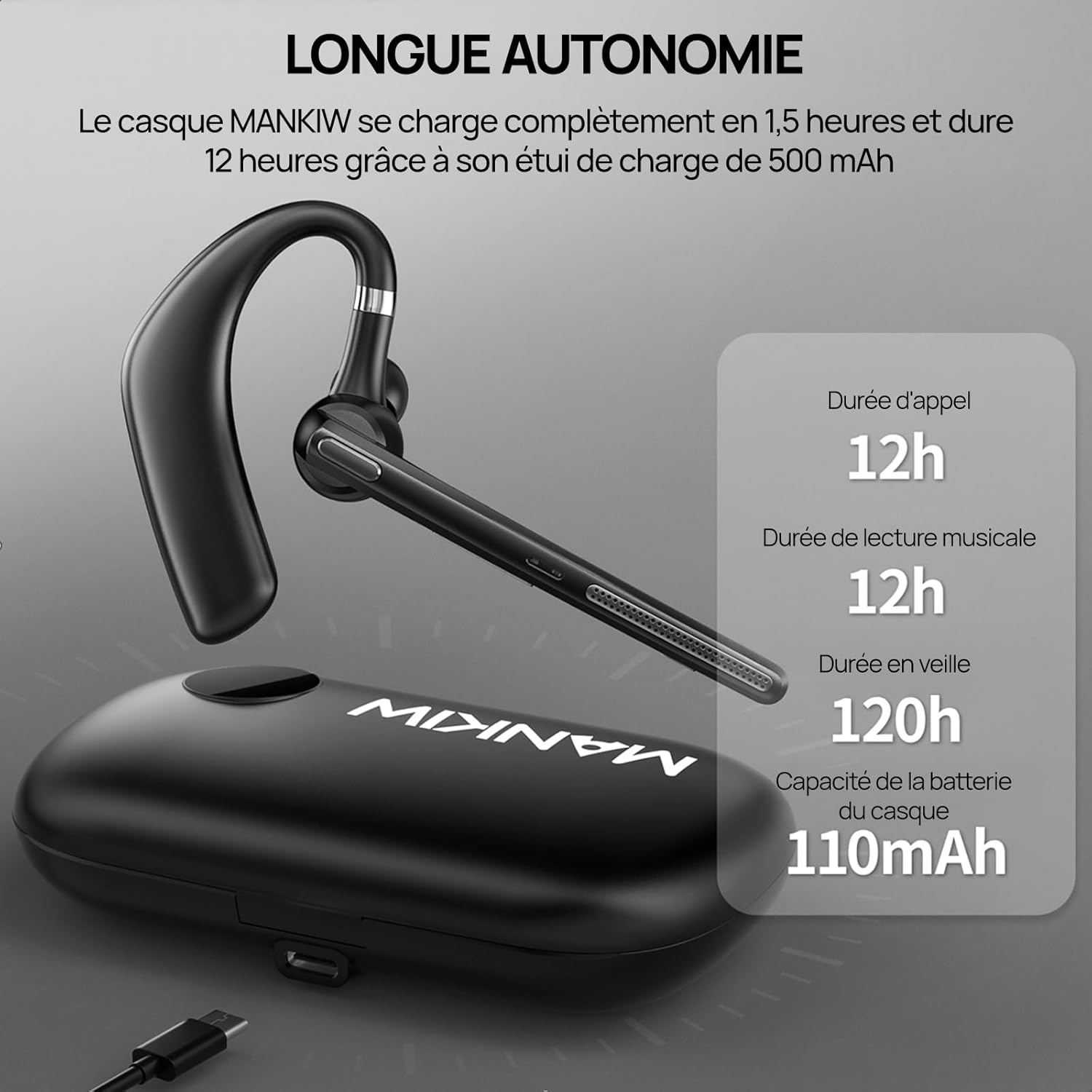
- A full charge for the headset takes approximately 1.5 hours. The charging case provides additional charges, extending total playback time to 60 hours.
4.2 Pairing with a Device
The headset uses Bluetooth 5.3 for a stable and fast connection.
- Power On: Take the headset out of the charging case, or press and hold the Multi-Function Button (MFB) for 3 seconds until the indicator light flashes.
- Pairing Mode: The headset will automatically enter pairing mode, indicated by a flashing blue and red light.
- Enable Bluetooth: On your smartphone, tablet, or laptop, go to the Bluetooth settings and turn on Bluetooth.
- Select Device: Look for "G10" in the list of available devices and select it to connect.
- Connection Confirmation: Once connected, the indicator light will stop flashing and remain solid blue, or turn off, depending on the model. A voice prompt may also confirm the connection.

4.3 Connecting to Two Devices (Multipoint)
The G10 headset supports connecting to two devices simultaneously.
- Pair the headset with the first device as described in section 4.2. Then, turn off Bluetooth on the first device.
- The headset will re-enter pairing mode. Pair it with the second device.
- Once connected to the second device, re-enable Bluetooth on the first device. The headset should automatically connect to both devices.
- You can now switch between audio sources from either device without re-pairing.

5. Operating Instructions
5.1 Power On/Off
- Power On: Take the headset out of the charging case, or press and hold the MFB for 3 seconds.
- Power Off: Place the headset back into the charging case, or press and hold the MFB for 5 seconds.
5.2 Call Management
- Answer/End Call: Press the MFB once.
- Reject Call: Press and hold the MFB for 2 seconds.
- Redial Last Number: Double-press the MFB.
5.3 Volume Control
- Increase Volume: Press the Volume + button.
- Decrease Volume: Press the Volume - button.
5.4 Music Playback
- Play/Pause: Press the MFB once.
- Next Track: Press and hold the Volume + button for 2 seconds.
- Previous Track: Press and hold the Volume - button for 2 seconds.
5.5 Voice Assistant Activation
To activate your device's voice assistant (e.g., Siri, Google Assistant), triple-press the MFB.
5.6 Wearing the Headset
The MANKIW G10 is designed for comfortable and secure fit.
- The ear hook can rotate 180° and the arm can fold 270°, allowing you to adjust it for either your left or right ear.
- Choose the appropriate ear tip size for a snug and comfortable fit.
6. Maintenance
6.1 Cleaning
- Regularly clean the ear tips and the headset's surface with a soft, dry cloth.
- Do not use harsh chemicals or abrasive materials.
- Ensure the charging contacts on both the headset and case are clean and dry.
6.2 Storage
- When not in use, store the headset in its charging case to protect it and keep it charged.
- Store in a cool, dry place away from extreme temperatures and direct sunlight.
7. Troubleshooting
If you encounter issues with your MANKIW G10 headset, refer to the following common problems and solutions:
| Problem | Possible Cause | Solution |
|---|---|---|
| Headset does not power on. | Low battery. | Charge the headset and charging case fully. |
| Cannot pair with device. | Bluetooth is off on device; headset not in pairing mode; device too far. | Ensure Bluetooth is enabled on your device. Put headset in pairing mode. Keep devices within 10 meters. |
| No sound or low volume. | Volume too low on headset or device; headset not connected. | Adjust volume on both headset and device. Reconnect the headset. |
| Call quality is poor. | Weak signal; environmental noise. | Move closer to your connected device. Ensure microphone is not obstructed. |
| Headset disconnects frequently. | Out of range; interference. | Stay within Bluetooth range. Avoid strong electromagnetic interference. |
8. Specifications
| Feature | Detail |
|---|---|
| Model Number | G10 |
| Bluetooth Version | 5.3 |
| Headset Battery Capacity | 110mAh |
| Charging Case Battery Capacity | 500mAh |
| Talk Time | Up to 12 hours |
| Music Playback Time | Up to 12 hours |
| Standby Time | Up to 120 hours |
| Charging Time | Approx. 1.5 hours (headset) |
| Microphone | Dual ENC Noise Cancellation |
| Drivers | 14.2mm Dynamic |
| Audio Codec | AAC/SBC |
| Weight | 13.1g (headset) |
| Water Resistance | Waterproof (as per product specifications) |
| Control Method | Push Button |
| Compatibility | Smartphones, Tablets, Laptops (iOS, Android) |
| Material | Plastic |
9. Warranty and Support
For warranty information or technical support, please refer to the documentation included with your purchase or contact MANKIW customer service through their official website or the retailer where the product was purchased.