
Introduction
This manual provides detailed instructions for the operation and maintenance of your Gavonde 8K Digital Camera W05. Please read this manual thoroughly before using the camera to ensure proper function and to maximize your photography and vlogging experience. Keep this manual for future reference.

Image: Gavonde 8K 64MP Digital Camera overview highlighting its main features.
What's in the Box
Verify that all items listed below are included in your package:
- 1 x Gavonde 8K Digital Camera
- 1 x 3000mAh Li-ion Battery
- 1 x 32GB TF Card
- 1 x USB Type-C Cable
- 1 x Neck Strap
- 1 x Lens Hood
- 1 x Lens Cap
- 1 x Cleaning Cloth
- 1 x User Manual

Image: Package contents of the Gavonde 8K Digital Camera.
Product Overview
Familiarize yourself with the various parts of your camera.

Image: Front and rear view of the Gavonde 8K Digital Camera with included accessories.
Key Components:
- Lens: Fixed focal length, wide-angle lens with F/2.4 aperture.
- 4-inch HD Touch Screen: For framing, focusing, and navigating menus.
- Dual-Lens Design: Allows for easy switching between front and rear cameras for selfies and vlogging.
- Built-in Flash: Provides illumination in low-light conditions.
- Hot Shoe: Standard interface for external accessories like microphones or additional lighting.
- 1/4" Standard Tripod Interface: Located at the bottom for mounting on tripods or monopods.
- Function Dial: For selecting various shooting modes.

Image: Illustration of the lens hood's function in preventing stray light.
Setup
1. Battery and SD Card Installation
Follow these steps to install the battery and SD card:
- Open the battery compartment door located at the bottom of the camera.
- Insert the 3000mAh Li-ion battery into the compartment, ensuring correct orientation.
- Insert the 32GB TF (Micro SD) card into the designated slot until it clicks into place.
- Close the battery compartment door securely.

Image: Step-by-step guide for battery and SD card installation.
2. Initial Power On
Press and hold the power button until the screen illuminates. The camera will perform a brief startup sequence.
3. Charging the Battery
Connect the camera to a power source using the provided USB Type-C cable. The charging indicator will show the charging status. A full charge ensures extended usage time.

Image: Comparison of battery capacity and the camera with a neck strap.
Operating Instructions
1. Basic Photography and Video Recording
The camera offers various modes for capturing photos and videos. Use the rotating function dial to select your desired mode.

Image: The 9 Modes-Rotating Function Dial for various shooting options.

Image: Overview of the 9 multifunctional camera modes.
Photo Modes:
- Normal Photo Mode: Standard still image capture.
- Auto Photo Mode: Camera automatically adjusts settings for optimal results.
- Timer Mode: Set a delay before taking a photo (e.g., 3s, 5s, 10s, 20s).
- Continuous Shooting: Capture multiple photos in quick succession (3fps, 5fps).
Video Modes:
- Normal Video Mode: Standard video recording.
- Time Lapse Recording: Capture frames at intervals to create a sped-up video.
- Loop Recording: Continuously record, overwriting older footage when storage is full.
- Slow Motion Recording: Capture high frame rate video for slow-motion playback.
2. Using the 4-inch HD Touch Screen
The intuitive touch screen allows for easy navigation and control. Tap to focus, adjust settings, and review your media.

Image: The upgraded 4-inch touch screen in use.
3. Dual-Lens / Selfie Function
Switch between the front and rear cameras with a single tap on the screen to capture selfies or vlogs effortlessly.

Image: Using the dual-lens for selfies with the touch screen.

Image: Innovative selfie dual lens design for front and rear camera use.
4. Zoom Function
The camera features 16X digital zoom. Use the zoom controls on the camera to adjust magnification. Note that digital zoom may affect image quality.

Image: Demonstration of 16X digital zoom capability.
5. Focus Modes
The camera supports Auto, Manual, and Fixed Focus modes.
- Auto Focus: For instant shooting, the camera automatically adjusts focus.
- Manual Focus: Provides creative freedom by allowing you to manually adjust focus.
- Fixed Focus: Maintains a set focus distance.
Note: If the camera cannot focus automatically, check if the camera is set to auto focus in the "Settings" menu.

Image: Examples of Auto Focus, Manual Focus, and Fixed Focus.
6. Flash Light Usage
The built-in flash provides supplementary lighting in dark environments. Activate the flash as needed to maintain optimal shooting conditions.
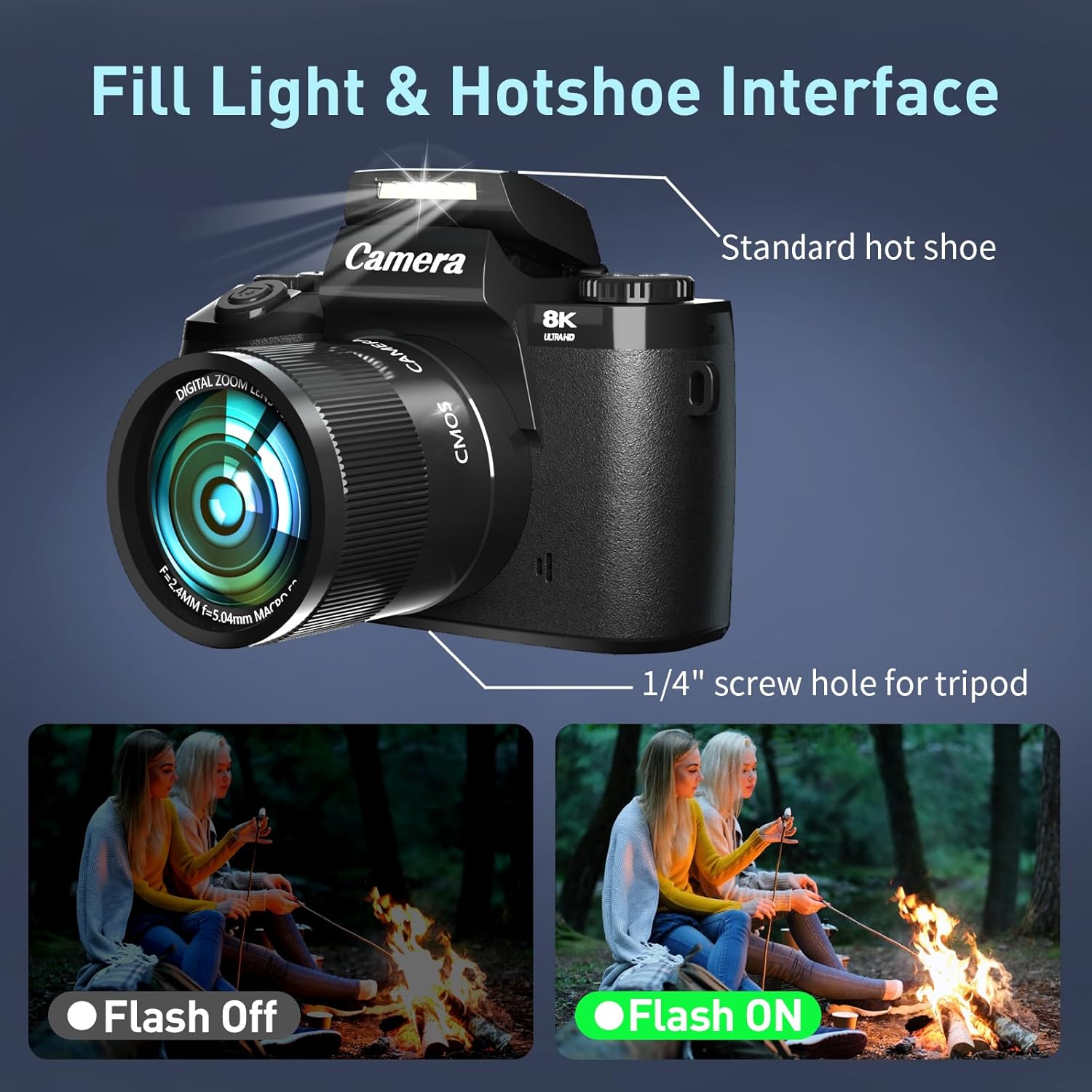
Image: Demonstration of the fill light and hot shoe interface.

Image: Flash light in use for low-light conditions.
7. Special Features
- Filters: Apply various built-in filters (e.g., Red, Green, Normal, Black and White, Nostalgic) to enhance your photos.
- Beauty Mode: Automatically enhances facial features for portraits.
- Smiling Face Capture: The camera can detect smiles and automatically capture photos.
- Framing Grid: Utilize grid lines (Crosshatch, Golden Ratio, Rule of Thirds) on the screen to compose your shots effectively.

Image: Overview of fully featured camera capabilities.

Image: More features including filters, beauty mode, and smiling face capture.

Image: Examples of 3 framing grid options for photography.
8. Webcam Function
Connect the camera to your computer via the USB Type-C cable and select "PC Camera" mode to use it as a webcam for live streaming or video calls.

Image: Webcam function for live streaming and video calls, and HDMI output.

Image: Gavonde 8K Digital Camera used as a webcam.
9. HDMI Output
Connect the camera to a TV or monitor using an HDMI cable (not included) for playback of photos and videos on a larger screen.
10. Wi-Fi Function & File Transfer
The camera has built-in Wi-Fi for easy file transfer. Connect to your mobile phone to instantly share photos and videos.

Image: Wireless WiFi function for instant sharing.
Scan QR for Wi-Fi App
Image: Easy and instant sharing options via WiFi, USB, and HDMI.
11. External Microphone (Hot Shoe Interface)
The camera is equipped with a standard hot shoe and a 3.5mm microphone jack for connecting external microphones.
- External microphones require their own power supply; the camera does not power them.
- Ensure the external microphone is a dual-channel microphone with a 3.5mm interface. Cameras without a 3.5mm MIC plug cannot use this type of microphone.

Image: Standard hot shoe interface for external accessories.
Maintenance
- Cleaning: Use the provided cleaning cloth to gently wipe the camera body and lens. For stubborn smudges on the lens, use a specialized lens cleaning solution and cloth.
- Storage: Store the camera in a cool, dry place away from direct sunlight and extreme temperatures. Remove the battery if the camera will not be used for an extended period.
- Battery Care: Avoid fully discharging the battery frequently. Charge it regularly to maintain battery health.
- Lens Hood: Use the lens hood to protect the lens from scratches and reduce lens flare.
Troubleshooting
| Problem | Possible Cause | Solution |
|---|---|---|
| Camera does not power on. | Battery is dead or incorrectly inserted. | Charge the battery or re-insert it correctly. |
| Cannot take photos/videos. | SD card is full, locked, or not inserted. | Delete files, unlock the SD card, or insert it properly. |
| Poor image/video quality. | Low light, incorrect settings, or digital zoom. | Use flash, adjust exposure/ISO, or minimize digital zoom. |
| Wi-Fi connection issues. | Incorrect password or out of range. | Verify password, move closer to the device, or restart Wi-Fi. |
| External microphone not working. | Microphone not powered or incompatible type. | Ensure microphone has its own power and is a dual-channel 3.5mm type. |
Specifications
Detailed technical specifications for the Gavonde 8K Digital Camera W05:

Image: Comprehensive list of camera specifications.
- Model Name: W05
- Photo Sensor Technology: CMOS
- Effective Still Resolution: 64 MP
- Video Resolution: 8K/15FPS, 6K/30FPS, 5K/30FPS, 4.7K/30FPS, 4K/60FPS, 4K/30FPS, 2.7K/30FPS, 1080P/60FPS, 1080P/30FPS, 720P/120FPS, 720P/60FPS, 720P/30FPS
- Digital Zoom: 16x
- Screen Size: 4 Inches (LCD Touch Screen)
- Connectivity: Wi-Fi, USB Type-C, HDMI
- Storage: Supports SD cards up to 256GB (32GB TF card included)
- Battery: 3000mAh Lithium-ion
- Dimensions (D x W x H): 2" x 5.12" x 3.94"
- Weight: 0.85 Kilograms
- Special Features: Dual-lens, Autofocus, Fill Flash, Webcam Function, Various Shooting Modes (Photo, Video, Loop, Lapse, Burst, Timer)

Image: 8K UHD and 64MP photography capabilities.

Image: Resolution comparison between 8K and 4K digital cameras.
Safety Information
- Do not expose the camera to water or moisture. It is not water resistant.
- Avoid dropping the camera or subjecting it to strong impacts.
- Keep the camera away from strong magnetic fields.
- Do not attempt to disassemble or repair the camera yourself. Contact customer support for assistance.
- Use only approved accessories and power adapters.
Warranty and Support
Gavonde provides high-quality products and responsive after-sales service. If you encounter any problems with your camera, including defects, damage, missing accessories, or dissatisfaction, please contact us. We aim to respond within 24 hours to resolve your concerns.
For support, please visit the Gavonde Store on Amazon or refer to the contact information provided in your product packaging.