
1. Introduction
This manual provides essential instructions for the safe and effective use of your CNBRO Smart Ring. Please read this manual thoroughly before using the device and retain it for future reference. The Smart Ring is designed to monitor various health and fitness metrics, offering convenience through its integrated touch screen and smart features.
2. Safety Information
- Do not expose the Smart Ring to hot water, as this may damage the device.
- Avoid disassembling or attempting to repair the device yourself. Contact customer support for assistance.
- Keep the device away from strong magnetic fields.
- This device is not a medical instrument and should not be used for medical diagnosis or treatment.
- Ensure the charging dock is used in a dry environment.
3. Package Contents
Verify that all items are present in your package:
- 1x CNBRO Smart Ring
- 1x Wireless Charging Dock
- 1x User Manual
4. Product Overview
The CNBRO Smart Ring is a versatile wearable device designed to integrate health monitoring and smart controls into a compact form factor. Key features include:
- Touch Screen Display: View time, steps, heart rate, and power directly on the ring.
- Health Monitoring: Continuous heart rate monitoring and comprehensive sleep tracking (deep sleep, light sleep, wake-up times).
- Activity Tracking: Records steps, calories burned, and distance. Supports various sport modes.
- Tasbih Prayer Counter: A dedicated feature for prayer counting.
- Smart Controls: Music control and remote camera operation via gesture interaction.
- Waterproof Design: IP68 rating for resistance to cold showering, hand washing, and rain.
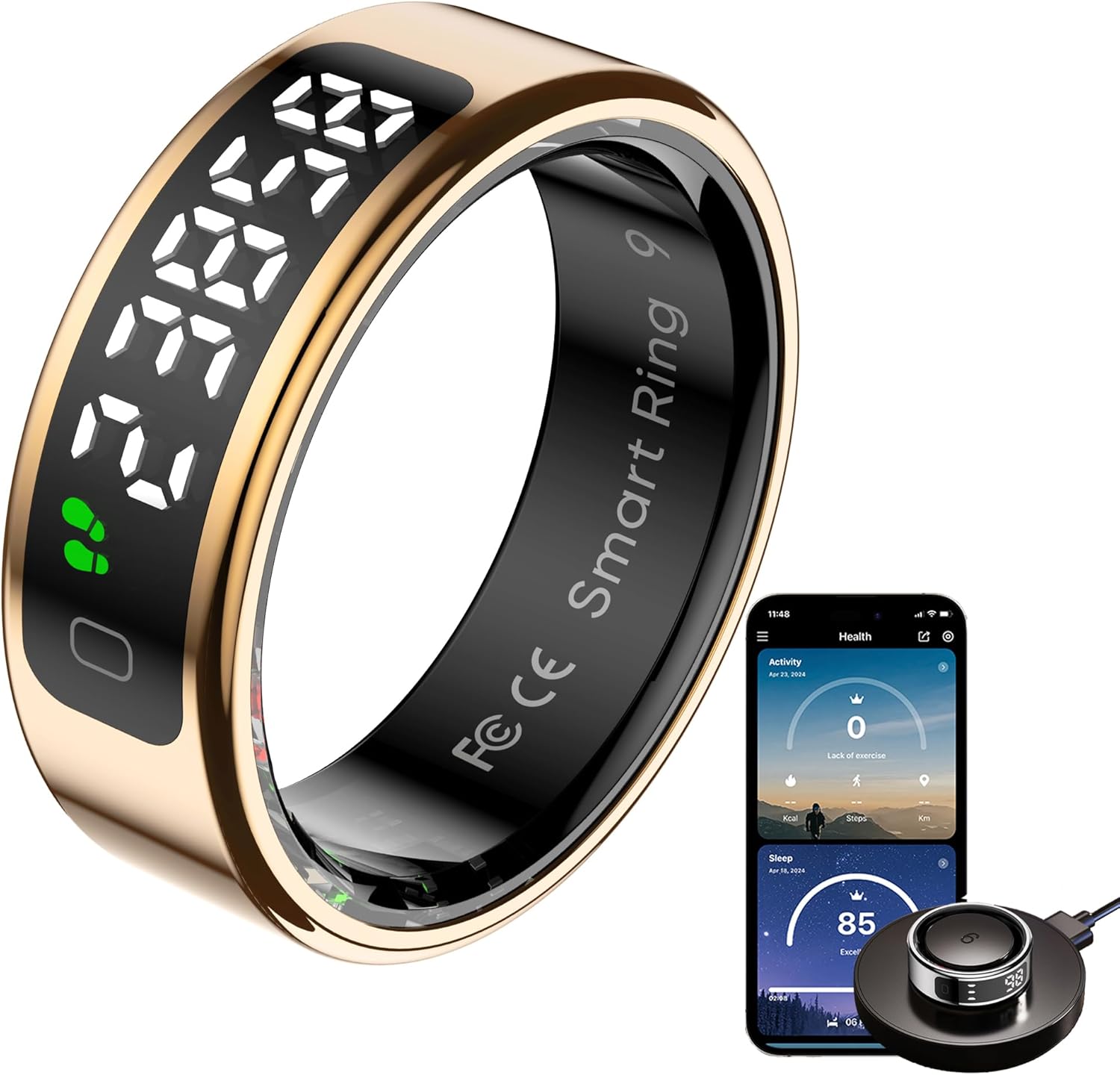
Figure 4.1: CNBRO Smart Ring, charging dock, and companion app interface.
This image displays the CNBRO Smart Ring in gold, alongside its wireless charging dock and a smartphone screen showing the companion application's health data interface. The ring itself features a digital display.
4.1 Multi-functional Display Screen
The Smart Ring features a touch screen that allows direct viewing of essential information without needing to access your smartphone. Information displayed includes:
- Current Time
- Step Count
- Heart Rate
- Battery Level

Figure 4.2: Examples of data displayed on the Smart Ring's screen.
This image highlights the various data points visible on the Smart Ring's integrated display, including step count (23858), heart rate (98), power (100%), and time (23:58).
4.2 Health Monitoring
The ring continuously monitors your heart rate and sleep patterns. Data is synchronized with the companion app for detailed analysis.
- Heart Rate: 24-hour continuous monitoring to track your heart rate during daily activities and exercise.
- Sleep Tracking: Automatic sleep duration tracking and analysis of sleep quality, including deep sleep, light sleep, and wake-up times.

Figure 4.3: Health data tracking interface and ring display.
This image illustrates the health management capabilities of the Smart Ring, showing graphs for average heart rate, sleep light/deep cycles, and average blood oxygen levels, as well as the ring displaying time and heart rate.
4.3 Activity Tracking with Sport Modes
The ring automatically tracks your steps, calories consumed, and distance. Activate sport modes within the QRing App for more detailed tracking, including route, activity time, and real-time heart rate during exercise.

Figure 4.4: Activity tracking and sport mode visualization.
This image shows the activity tracker interface with total steps (2109), total mileage (1.60), and total calories (111) displayed. It also includes images of individuals engaged in hiking and cycling, representing supported sport modes.
4.4 Tasbih Counter
The Smart Ring includes a Tasbih prayer counter function, allowing users to track their prayer repetitions directly on the device and through the companion app.

Figure 4.5: Tasbih counter feature on the Smart Ring and app.
This image illustrates the Tasbih counter functionality, showing the Smart Ring displaying a count (10:58, likely time, but context implies counting) and the companion app interface tracking daily praise repetitions (1699/3000 Times).
4.5 Gesture Control
The intelligent ring supports gesture interaction for convenient control of your smartphone. This includes remote camera photography, scrolling through short videos, and pausing/playing music.

Figure 4.6: Gesture control in action.
This image depicts a user wearing the Smart Ring and interacting with various smartphone applications (a game, a video platform, and a camera app) using gesture controls, highlighting the ring's ability to remotely control phone functions.
4.6 Waterproofing
The Smart Ring has an IP68 waterproof rating, making it suitable for activities such as washing hands, cold showering, and swimming in the sea. This allows for continuous health monitoring even when wet.

Figure 4.7: Smart Ring's waterproof capability.
This image shows the Smart Ring partially submerged in water, with splashes, illustrating its 5ATM waterproof rating and ability to function in wet conditions.
5. Setup
5.1 Choosing the Correct Size
Selecting the appropriate ring size is crucial for comfort and accurate data collection. Refer to the sizing chart and measurement instructions below.

Figure 5.1: Ring sizing chart and measurement guide.
This image provides a table with Smart Ring sizes (#8 to #13), corresponding inner diameters (18.3mm to 22.3mm), and perimeters (57.5mm to 70mm). Below the table are three steps demonstrating how to measure finger size using a strip of paper or rope, emphasizing accuracy.
How to Measure Your Finger Size:
- Step 1: Take a long non-elastic rope or paper strip and wrap it around your finger.
- Step 2: Mark the junction part on the rope or paper, ensuring it fits closely to your finger.
- Step 3: Lay the rope or paper flat and measure its length. It is recommended to measure multiple times for more accurate data.
Note: The paper or rope must be completely aligned when measuring. Misalignment may result in inaccurate measurements.
5.2 App Installation
To unlock the full functionality of your Smart Ring, download and install the companion application:
- Search for "QRing" in your smartphone's app store (Apple App Store for iOS, Google Play Store for Android).
- Alternatively, scan the QR code provided in the packaging to directly download the app.
- The app is compatible with iOS 8.0 or above and Android 5.1 or above.
- There are no subscription fees for using the QRing App.
5.3 Charging the Smart Ring
Before first use, fully charge your Smart Ring.
- Place the Smart Ring onto the provided wireless charging dock.
- Connect the charging dock to a USB power source (e.g., computer, wall adapter).
- The ring's display will indicate charging status. A full charge typically takes approximately 1-2 hours.
- The ring has a battery capacity of 15mAh.
5.4 Pairing with Your Smartphone
After installing the QRing App and charging the ring:
- Ensure Bluetooth is enabled on your smartphone.
- Open the QRing App.
- Follow the on-screen instructions within the app to search for and connect to your Smart Ring.
- Confirm the pairing request on both your phone and, if prompted, on the ring's display.
6. Operating Instructions
6.1 Using the Touch Screen
The Smart Ring's display is touch-sensitive. Swipe left or right to navigate through different data screens (time, steps, heart rate, battery). A single tap may activate certain functions or confirm selections.
6.2 Monitoring Health Data
Wear the ring consistently for accurate health data collection. All collected data, including heart rate and sleep analysis, is automatically synchronized with the QRing App when your phone is within Bluetooth range.
- Heart Rate: The ring continuously monitors your heart rate. View real-time data on the ring's display or detailed historical data in the app.
- Sleep Tracking: Wear the ring to bed for automatic sleep analysis. The app provides insights into your sleep stages and quality.
6.3 Using Sport Modes
For enhanced activity tracking during exercise:
- Open the QRing App on your smartphone.
- Navigate to the "Sport Modes" section.
- Select your desired activity (e.g., running, cycling).
- Start the activity tracking within the app. The ring will then provide more specific data for that sport.
6.4 Tasbih Counter Function
To use the Tasbih counter:
- Access the Tasbih counter mode on the ring's display by swiping.
- Tap the screen or use a designated gesture (refer to app for specific gesture) to increment the count.
- The app will record your daily praise counts.
6.5 Gesture Control for Smartphone Functions
The Smart Ring allows for remote control of certain smartphone functions:
- Remote Camera: Use a specific gesture (e.g., a light wave of the hand) to trigger your phone's camera shutter.
- Media Control: Control music playback (play/pause) or navigate short videos (scroll up/down) with intuitive gestures.
Refer to the QRing App for a complete list of supported gestures and their corresponding functions.
7. Maintenance
7.1 Cleaning Your Smart Ring
To maintain the appearance and functionality of your Smart Ring:
- Wipe the ring with a soft, damp cloth.
- Avoid using harsh chemicals, abrasive cleaners, or solvents.
- Ensure the charging contacts are clean and dry before charging.
7.2 Waterproofing Guidelines
While the Smart Ring is IP68 waterproof, observe the following:
- The device is suitable for cold showering, washing hands, and swimming in shallow water.
- Do NOT expose the ring to hot water, steam, or saunas, as this can compromise the waterproof seals.
- Avoid prolonged submersion in water deeper than 1.5 meters.
8. Troubleshooting
If you encounter issues with your CNBRO Smart Ring, try the following solutions:
- Ring not turning on: Ensure the ring is fully charged. Place it on the charging dock for at least 30 minutes.
- Cannot connect to app:
- Ensure Bluetooth is enabled on your smartphone.
- Make sure the ring is sufficiently charged.
- Restart the QRing App and your smartphone.
- Try unpairing and re-pairing the device in the app's settings.
- Inaccurate data:
- Ensure the ring is worn correctly and snugly on your finger.
- Verify that the app is up to date.
- Clean the sensors on the inside of the ring.
- Display not responding: Try charging the ring. If the issue persists, contact customer support.
If these steps do not resolve the issue, please refer to the Support section.
9. Specifications
| Feature | Detail |
|---|---|
| Brand | CNBRO |
| Model | Smart Ring |
| Connectivity Technology | Bluetooth 5.2 |
| Operating System Compatibility | Android 5.1+, iOS 8.0+ |
| Special Features | Activity Tracker, Gesture Control, Lightweight, Time Display, Touchscreen |
| Water Resistance Level | IP68 Waterproof (5ATM) |
| Battery Type | Lithium Polymer |
| Battery Capacity | 15mAh |
| Charging Type | Wireless Charging |
| Item Weight | 3.53 ounces |
| Manufacturer | ShenZhen YaWell Intelligent Technology Co.,Ltd |
10. Warranty and Support
For any questions, concerns, or technical support regarding your CNBRO Smart Ring, please contact our customer service team. We are committed to providing the best possible solution.
Please refer to your purchase documentation or the official CNBRO website for specific warranty terms and contact information.