
Thunelec BK01
Thunelec BK01 AI Translation Earbuds User Manual
Model: BK01
Introduction
The Thunelec BK01 AI Translation Earbuds are designed to provide seamless communication across language barriers, offering real-time translation, high-fidelity audio, and versatile usage modes. This manual provides comprehensive instructions for setup, operation, and maintenance to ensure optimal performance and user experience.
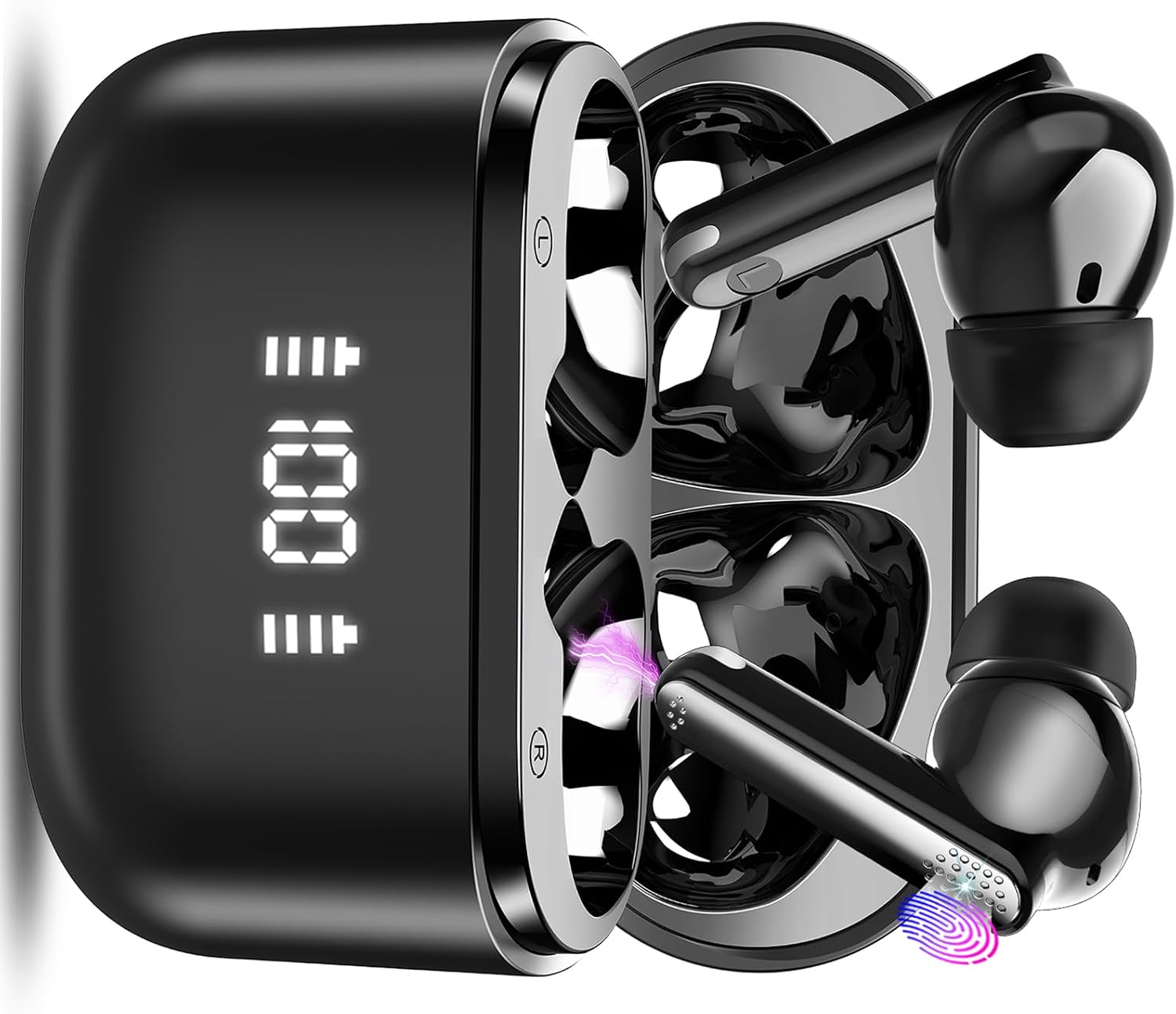
Image: Thunelec BK01 AI Translation Earbuds in their charging case, displaying a 100% charge level.
What's Included
Verify that all items are present in the package:
- 2 * BK01 Translation Earbuds (Left & Right)
- 1 * Charging Case
- 3 * Pairs of Ear Tips (S/M/L)
- 1 * User Manual
- 1 * USB-C Charging Cable
- 1 * Translation Manual
Image: A visual representation of the Thunelec BK01 package contents, including earbuds, charging case, ear tips, and cables.
Product Overview
The BK01 earbuds feature advanced AI translation capabilities, high-fidelity sound, and environmental noise cancellation (ENC) for clear communication. They are designed for comfort and stability with various ear tip sizes.

Image: A banner highlighting key features of the BK01 earbuds, including HIFI sound, ENC noise reduction, 6 translation modes, 0.5s recognition time, 98% accuracy, AI chat, 48H battery life, and support for 164 languages.
Key Features:
- Real-time Translation: Supports 164 languages with high accuracy.
- Multiple Translation Modes: Audio/Video Call, Free Talk, Headphone + Phone, Translation Machine, Voice Notes, Photo Translation, AI Chat.
- High-Fidelity Audio: 13mm double-diaphragm driver for rich sound.
- Environmental Noise Cancellation (ENC): Ensures clear calls.
- Long Battery Life: Up to 8 hours on a single charge, 48 hours with charging case.
- Ergonomic Design: Comfortable fit with multiple ear tip sizes.
- Smart Touch Control: Intuitive controls for playback, calls, and translation functions.
- IP7 Waterproof and Sweatproof: Durable for various environments.
Setup
1. Charging the Earbuds and Case
Before first use, fully charge the earbuds and the charging case. Connect the provided USB-C cable to the charging case and a power source. The digital display on the case will indicate the battery level.

Image: Illustration showing the BK01 earbuds and charging case, emphasizing 48 hours of total listening time with the case and 8 hours on a single charge.
2. Pairing with Your Device
- Ensure the earbuds are in the charging case and the case has power.
- Open the charging case lid. The earbuds will automatically enter pairing mode.
- On your mobile device, go to Bluetooth settings.
- Search for "BK01" in the list of available devices and select it to connect.
- Once connected, you will hear an audio prompt.

Image: A collage demonstrating the earbuds' ultralight design, wide compatibility with Android and iOS, one-step pairing process, and Bluetooth 5.3 technology.
3. Downloading and Connecting to the "Ear Dance" App
The "Ear Dance" app is essential for accessing the full range of translation features.
- Method 1 (QR Code): Scan the QR code provided in the physical user manual or on the product packaging to download the app.
- Method 2 (App Store): Search for "Ear Dance" on Google Play Store (for Android) or Apple App Store (for iOS) and download it.
You can also download the app directly from: https://earjoy.watchfun.cn/app-download-h5?appCode=eardance

Image: Visual guide on how to download the "Ear Dance" app using a QR code or by searching in app stores.
4. Connecting to the "Ear Dance" App and Authorization
- Ensure your earbuds are paired via Bluetooth (as per step 2).
- Launch the "Ear Dance" app. It should automatically connect to the earbuds.
- Authorization: Scan or enter the authorization code (QR code) found in your instruction manual. This code is valid indefinitely and is required to unlock all translation modes.

Image: Visual guide on connecting the earbuds to the "Ear Dance" app via Bluetooth and authorizing the device using a QR code or manual entry.
Operating Instructions
Smart Touch Controls
The earbuds feature intuitive touch controls for managing audio playback, calls, and translation functions. Refer to the diagram below for specific actions:

Image: A diagram illustrating the smart touch controls for the BK01 earbuds, including actions for double tap, triple tap, long tap, and single tap for various functions like play/pause, volume, track skipping, and call management.
- Double Tap R/L: Play/Pause
- Triple Tap R/L: Voice Assistant (or other function depending on app settings)
- Long Tap 2s R: Next Track
- Long Tap 2s L: Previous Track
- One Tap R: Volume Up
- One Tap L: Volume Down
- One Tap 2s R/L: Answer/End Call
- Long Tap 2s R/L: Reject Call
Note: To activate translation modes (e.g., Headset + Mobile Phone mode), open the "Ear Dance" app. Double-clicking the headset will activate the microphone for translation in certain modes.
Translation Modes
The "Ear Dance" app provides various translation modes to suit different communication scenarios. All modes support 164 languages unless otherwise specified.

Image: Multiple screenshots of the "Ear Dance" app interface, showcasing the various "Intelligent tools" available, including AI chat, Free Talk, Translation Machine, Headphone + Phone, and Voice Notes.
1. Audio and Video Call Translation
Supports real-time translation during voice and video calls. This mode enables barrier-free communication for business talks or connecting with family globally.

Image: Screenshots of the "Ear Dance" app showing the interface for audio and video call translation, with translated text appearing on screen.
2. Free Talk Mode
In this mode, the earbuds automatically recognize and translate spoken language without requiring manual clicks on the phone or headphones. Ideal for natural, flowing conversations.

Image: Two individuals wearing the BK01 earbuds, engaged in a conversation, illustrating the use of Free Talk Mode for seamless communication.
3. Headphone + Phone Mode
One person wears the earbuds, while the other uses the mobile phone. Clicking on the earbuds or the translation button on the phone will automatically recognize and translate speech, facilitating direct conversation.

Image: Two people interacting, one wearing the earbuds and the other holding a smartphone, demonstrating the Headphone + Phone translation mode.
4. Translation Machine Mode
Functions like a traditional handheld translator, connected to translation engines like Microsoft and Google Translate for high accuracy. Simply click the language button to translate, and the phone speaker will play the translated audio.

Image: Two men sitting at a table, one holding a smartphone, illustrating the use of Translation Machine Mode for direct translation via the phone's speaker.
5. Voice Notes (Supports 10 languages)
This mode converts spoken content from classroom lectures, videos, or audio into text notes, ensuring you don't miss important information. Note: Does not support continuous recording for too long; for recordings over 30 minutes, take notes and re-record.

Image: A young woman using a laptop, with a smartphone displaying the Voice Notes recording interface, demonstrating the feature for converting speech to text.
6. Photo Translation (Supports 20 languages)
The app automatically recognizes text from images and translates it into the target language. This is useful for quickly translating menus, road signs, and other printed text when traveling abroad.

Image: A person holding a smartphone over a book, demonstrating the Photo Translation feature where text from an image is recognized and translated.
7. AI Chat Mode (Supports 10 languages)
Accesses OpenAI ChatGPT 4.0 Mini version, providing smart, efficient, and fast responses to your queries. It can offer accurate answers to various problems.

Image: A smartphone screen displaying the AI Chat Mode interface, showing a conversation with the AI assistant and options for voice input.
General Audio Use
Beyond translation, the BK01 earbuds function as high-quality wireless headphones for music, podcasts, and calls.
- Music Playback: Enjoy a deep, rich musical experience with the 13mm double-diaphragm driver.
- Calls: Environmental Noise Cancellation (ENC) ensures your voice is captured clearly during calls, improving communication.

Image: An exploded diagram illustrating the internal components of the BK01 earbud, highlighting the 13mm double-diaphragm driver for enhanced audio quality.

Image: A visual representation of an earbud with a shield icon, indicating Environmental Noise Cancellation (ENC) for clear voice capture during calls.
Maintenance
- Cleaning: Regularly clean the earbuds and charging case with a soft, dry, lint-free cloth. Do not use abrasive cleaners or solvents.
- Ear Tips: Remove and clean the ear tips periodically with mild soap and water, then dry thoroughly before reattaching.
- Storage: When not in use, store the earbuds in their charging case to protect them and keep them charged.
- Water Resistance: The earbuds are IP7 waterproof and sweatproof, meaning they can withstand splashes and sweat. However, they are not designed for submersion in water. Avoid exposing them to excessive moisture.

Image: White BK01 earbuds shown with water splashes, illustrating their IP7 waterproof and sweatproof nano-coating design.
Ergonomic Fit
For optimal sound quality and comfort, choose the ear tips that best fit your ears. Different sizes (S, M, L) are provided to ensure a secure and comfortable fit.

Image: A man wearing an earbud, with an inset showing different sizes of ear tips (S, M, L) to illustrate the ergonomic design and customizable fit.
Troubleshooting
| Problem | Possible Cause | Solution |
|---|---|---|
| Earbuds not pairing | Low battery; out of range; not in pairing mode; previously paired to another device. | Charge earbuds and case. Ensure earbuds are in pairing mode (open case). Turn off Bluetooth on other devices. Re-attempt pairing. |
| No sound from earbuds | Not connected; volume too low; media paused. | Check Bluetooth connection. Increase volume on device and earbuds. Ensure media is playing. |
| Translation not working in app | No internet connection; app not authorized; incorrect mode selected; microphone issues. | Ensure stable internet connection. Verify app authorization code is entered. Select correct translation mode. Check microphone permissions for the app. |
| Earbuds not charging | Cable issue; dirty charging contacts; faulty power source. | Try a different USB-C cable and power adapter. Clean charging contacts on earbuds and case with a dry cotton swab. |
| Poor sound quality / dropped connection | Too far from device; interference; low battery. | Move closer to your device. Avoid areas with strong Wi-Fi or other wireless interference. Charge earbuds. |
Specifications
| Feature | Detail |
|---|---|
| Model Number | BK01 |
| Bluetooth Version | 5.3 |
| Translation Languages | 164 (for most modes) |
| Battery Life (Earbuds) | Up to 8 hours on a single charge |
| Battery Life (with Charging Case) | Up to 48 hours |
| Water Resistance Rating | IP7 (Waterproof and Sweatproof) |
| Driver Size | 13mm Double-Diaphragm |
| Item Weight | 4.2 ounces |
| Package Dimensions | 3.74 x 3.35 x 1.54 inches |
| Batteries | 3 AA batteries required (included) |
| Manufacturer | Thunelec |
Warranty and Support
Thunelec offers a Two-year free warranty for the BK01 AI Translation Earbuds. For any product inquiries, technical support, or warranty claims, please contact Thunelec customer service. We provide 24/7 after-sales service to assist you.
Please refer to the contact information provided on the product packaging or the official Thunelec website for the most up-to-date support channels.
Ask a question about this manual
Ask about setup, troubleshooting, compatibility, parts, safety, or missing instructions. Manuals+ will review the question and use this page’s manual context to help answer it.