
1. Introduction
This user manual provides detailed instructions for the setup, operation, and maintenance of your New Remotes Original MR25GA Magic Remote. This remote is designed to enhance your viewing experience with compatible LG TVs, offering advanced features such as AI voice control, a precise pointer function, and direct access to popular streaming services.
2. Key Features
- AI Voice Control: Utilize integrated AI and Alexa Voice capabilities for hands-free control and content search.
- Pointer Function: Navigate your TV screen with an intuitive, mouse-like pointer.
- Dedicated Streaming Buttons: Quick access to popular services like Netflix, Prime Video, Disney+, Rakuten TV, and LG Channels.
- Universal Compatibility: Designed for 2025 LG TVs and confirmed to work with certain 2024 and older OLED models.
- Bluetooth Connectivity: Ensures a stable and responsive connection to your television.
3. Compatibility
The MR25GA Magic Remote is primarily compatible with 2025 LG TVs. It has also been reported to work with certain 2024 and older LG OLED TV models. For a comprehensive list of compatible models, please refer to the following:
- 2025 LG TV Models:
- 32LR600BZUC, 43QNED82AAA, 43QNED82AUA, 43QNED85AAA, 43QNED85AU, 43QNED92AUA, 43QNED9MAAUA, 43UA7500ZUA, 43UA7700AUA, 43UA7700PUA, 48QNED82AAA, 48QNED82AUA, 48QNED85AAA, 48QNED85AU, 48QNED92AUA, 48QNED9MAAUA, 48UA7500ZUA, 48UA7700AUA, 48UA7700PUA, 50QNED82AAA, 50QNED82AUA, 50QNED85AAA, 50QNED85AU, 50QNED92AUA, 50QNED9MAAUA, 50UA7500ZUA, 50UA7700AUA, 50UA7700PUA, 55QNED82AAA, 55QNED82AUA, 55QNED85AAA, 55QNED85AU, 55QNED92AUA, 55QNED9MAAUA, 55UA7500ZUA, 55UA7700AUA, 55UA7700PUA, 65QNED82AAA, 65QNED82AUA, 65QNED85AAA, 65QNED85AU, 65QNED92AUA, 65QNED9MAAUA, 65UA7500ZUA, 65UA7700AUA, 65UA7700PUA, 75QNED82AAA, 75QNED82AUA, 75QNED85AAA, 75QNED85AU, 75QNED92AUA, 75QNED9MAAUA, 75UA7500ZUA, 75UA7700AUA, 75UA7700PUA, 86QNED82AAA, 86QNED82AUA, 86QNED85AAA, 86QNED85AU, 86QNED92AUA, 86QNED9MAAUA, 86UA7500ZUA, 86UA7700AUA, 86UA7700PUA, 100QNED82AAA, 100QNED82AUA, 100QNED85AAA, 100QNED85AU, 100QNED92AUA, 100QNED9MAAUA, 100UA7500ZUA, 100UA7700AUA, 100UA7700PUA
- LG OLED Models (including 2024 and older):
- OLED43B5AUA, OLED43B5PUA, OLED43C5AUA, OLED48A5AUA, OLED48B53LA.aeu, OLED48B56LA, OLED48B59LA.aeu, OLED48B5AUA, OLED48B5PUA, OLED48C5AUA, OLED48C5PUA, OLED50A5AUA, OLED50B5AUA, OLED50C5AUA, OLED55A5AUA, OLED55B53LA.aeu, OLED55B56LA, OLED55B59LA.aeu, OLED55B5AUA, OLED55B5PUA, OLED55C5AUA, OLED55C5PUA, OLED55G5PUA, OLED55G5WUA, OLED65A5AUA, OLED65B53LA.aeu, OLED65B56LA, OLED65B59LA.aeu, OLED65B5AUA, OLED65B5PUA, OLED65C5AUA, OLED65C5PUA, OLED65G5PUA, OLED65G5WUA, OLED65M5, OLED75A5AUA, OLED75B5AUA, OLED75C5AUA, OLED77B53LA.aeu, OLED77B56LA, OLED77B59LA.aeu, OLED77B5PUA, OLED77C5PUA, OLED77G5PUA, OLED77G5WUA, OLED77M5, OLED80B53LA.aeu, OLED80B56LA, OLED80B59LA.aeu, OLED83B53LA.aeu, OLED83B56LA, OLED83B59LA.aeu, OLED83B5PUA, OLED83C5PUA, OLED83G5PUA, OLED83G5WUA, OLED83M5, OLED86A5AUA, OLED86B5AUA, OLED86C5AUA, OLED97G2CUA, OLED97G5WUA, OLED97M5
4. Setup and Pairing
The MR25GA Magic Remote typically pairs automatically with compatible LG TVs. If automatic pairing does not occur, follow these steps:
- Insert Batteries: Open the battery compartment on the back of the remote and insert two AA batteries, ensuring correct polarity.
- Power On TV: Turn on your LG TV.
- Initial Pairing: Point the Magic Remote at your TV and press the Wheel (OK) button. The remote should register with the TV. A message confirming pairing may appear on screen.
- Re-pairing (if needed): If the remote does not pair or loses connection, press and hold the HOME and BACK buttons simultaneously for about 5 seconds until the LED indicator flashes. This will unpair the remote. Then, press the Wheel (OK) button again to re-pair.
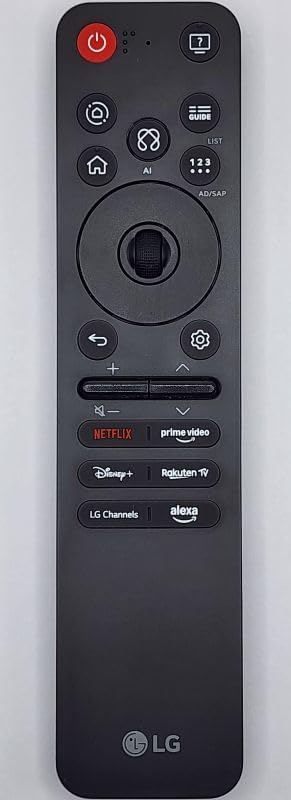
Figure 1: Front view of the MR25GA Magic Remote, displaying its various control buttons.

Figure 2: Back view of the MR25GA Magic Remote, highlighting the battery compartment and product information.
5. Operating Instructions
The MR25GA Magic Remote offers multiple ways to interact with your LG TV:
- Pointer Function: Move the remote to control the on-screen pointer. Click the Wheel (OK) button to select items.
- Wheel (OK) Button: Press to select items. Rotate to scroll through menus or channels.
- Directional Buttons: Use the up, down, left, and right buttons around the wheel for precise navigation.
- Voice Control (AI/Alexa): Press and hold the Microphone button (often labeled with a microphone icon or Alexa logo) and speak your commands or search queries. Release the button when finished.
- Dedicated Streaming Buttons: Press the Netflix, Prime Video, Disney+, Rakuten TV, or LG Channels buttons for direct access to these applications.
- Volume and Channel Control: Use the dedicated volume (+/-) and channel (up/down) buttons.
- Power Button: Turns the TV on or off.
- Home Button: Accesses the TV's home screen or smart hub.
- Back Button: Returns to the previous screen or menu.
6. Maintenance
- Cleaning: Wipe the remote with a soft, dry cloth. Do not use liquid cleaners or abrasive materials.
- Battery Replacement: Replace batteries when the remote's response becomes sluggish or it stops functioning. Always replace both batteries at the same time with new ones of the same type (AA). Dispose of old batteries responsibly.
- Storage: Store the remote in a cool, dry place away from direct sunlight and extreme temperatures.
7. Troubleshooting
- Remote Not Responding:
- Check if the batteries are inserted correctly and have sufficient charge. Replace if necessary.
- Ensure there are no obstructions between the remote and the TV.
- Try re-pairing the remote as described in Section 4.
- Pointer Not Appearing/Working:
- Gently shake the remote to activate the pointer.
- Ensure the remote is paired correctly.
- Check TV settings to ensure the Magic Remote pointer function is enabled.
- Voice Control Not Working:
- Ensure the remote is paired.
- Check your TV's network connection, as voice commands often require internet access.
- Verify that voice recognition settings are enabled on your TV.
8. Specifications
| Feature | Specification |
|---|---|
| Model Number | MR25GA |
| Brand | New Remotes |
| Connectivity Technology | Bluetooth |
| Compatible Devices | LG Televisions (2025 models and select older OLED models) |
| Special Feature | Voice Search AI, Pointer Function |
| Max Number of Supported Devices | 1 |
| Item Weight | 2.89 ounces |
| Package Dimensions | 14.88 x 7.2 x 0.75 inches |
9. Warranty and Support
For warranty information and customer support, please refer to the documentation provided with your purchase or contact the seller directly. Keep your proof of purchase for any warranty claims.

