
Dbasne MD058Awhite
Dbasne AI Translation Earbuds User Manual
Model: MD058Awhite
Introduction
Thank you for choosing the Dbasne AI Translation Earbuds. These earbuds are designed to provide seamless real-time language translation, high-definition calls, and music playback, enhancing communication and entertainment experiences across various scenarios. This manual provides detailed instructions for setup, operation, maintenance, and troubleshooting to ensure optimal performance of your device.
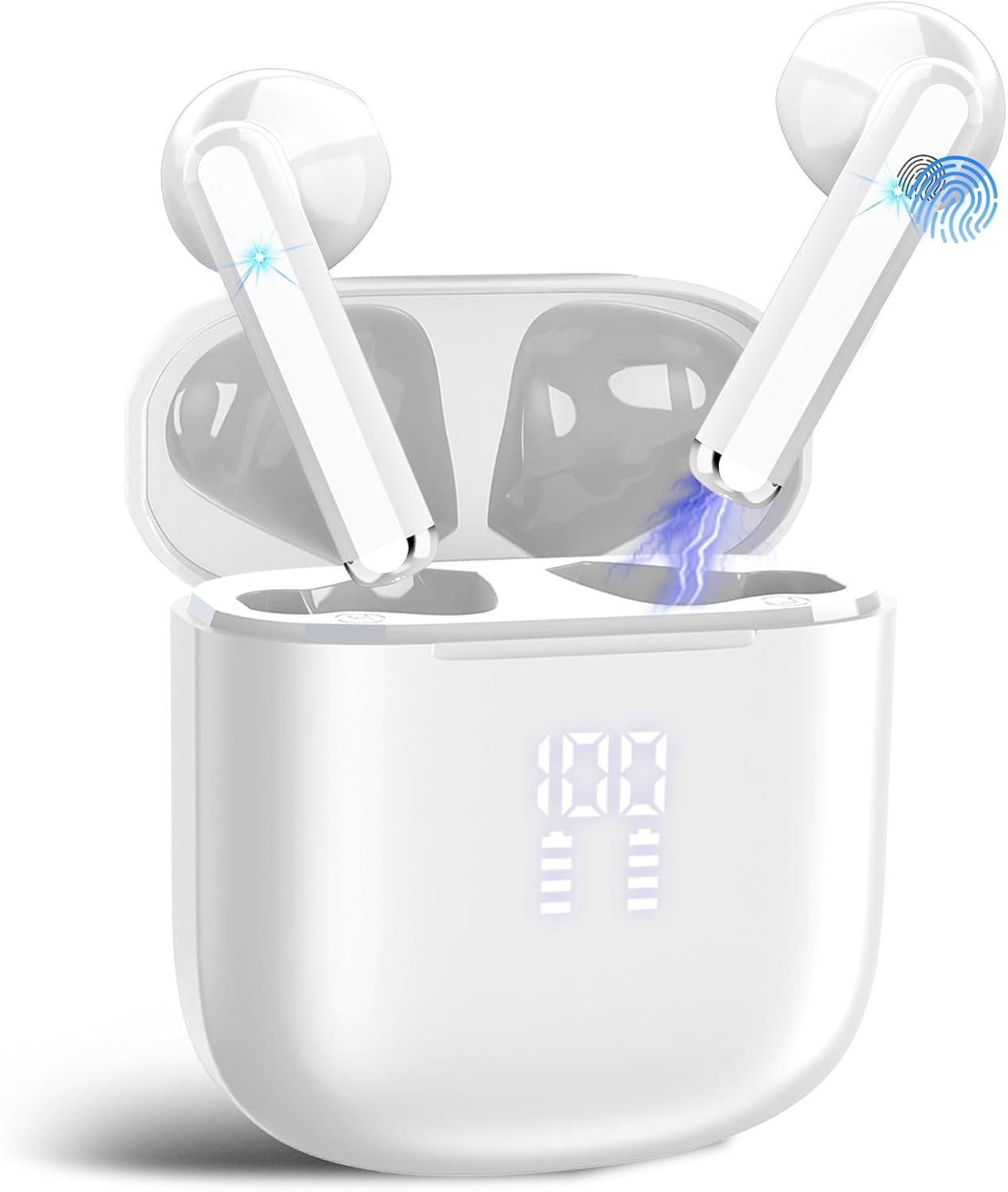
Image: Dbasne AI Translation Earbuds in their charging case, displaying a digital battery indicator.
What's in the Box
Please verify that all items are present in your package:
- 2 x MD058A Language Translator Earbuds
- 1 x Charging Box
- 3 x Pairs of Earplugs (S/M/L)
- 1 x User Manual
- 1 x Translation Manual (with built-in authorization QR)
- 1 x USB-C Charging Cable

Image: An illustration showing the MD058A AI Translation Earbuds, charging case, USB-C cable, and manuals included in the product box.
Product Features
- 3-in-1 Functionality: Combines real-time translation, HD calls, and music playback in a single device.
- Extensive Language Support: Instantly translates 164 languages with less than 0.5 seconds latency and up to 98% accuracy.
- Multiple Translation Modes: Features Free Talk, Headset+Phone, Translation Machine, Camera, Voice Memo, Audio&Video, and AI Chat modes for diverse communication needs.
- AI Assistant Integration: Built-in AI assistant provides voice-driven help and actionable responses for various queries.
- Advanced Audio Quality: Equipped with ENC noise cancellation (up to 40dB reduction) and premium 14.2mm composite drivers for clear voice capture and balanced sound.
- Bluetooth 5.4 Connectivity: Ensures ultra-stable, low-power streaming up to 15 meters.
- "EarDance" App Ecosystem: Dedicated app for iOS and Android provides access to 163 language packs, firmware updates, custom sound effects, and pronunciation coaching.
- Long Battery Life: Up to 5 hours per earbud on a single charge, with the charging case providing a total of 25 hours runtime. Features a front-facing LED display for battery percentages.
- Ergonomic Design & Durability: 45° angled in-ear shape with three silicone tip sizes for a secure, comfortable fit. IPX7 waterproof rating for sweat and splash resistance.
- Smart Touch Controls: Intuitive touch panels for play/pause, volume adjustment, call management, and voice assistant activation.

Image: A graphic summarizing key features including 164 language translations, low latency, high accuracy, AI chat, ENC noise reduction, HiFi sound, 5 translation modes, and 25-hour battery life.

Image: A person using the earbuds, illustrating the 3-in-1 functionality for listening to music, making calls, and accessing real-time translation.
Setup Guide
1. Charging the Earbuds and Case
Before first use, fully charge the earbuds and the charging case. Connect the provided USB-C cable to the charging case and a power source. The LED display on the case will indicate the charging status and battery percentages for both the case and individual earbuds.
- Fast Charge: 1 hour for quick power.
- Single Charge: Up to 5 hours of use per earbud.
- With Charging Case: Total runtime of up to 25 hours.

Image: The earbuds in their charging case, illustrating the battery life (5 hours single charge, 25 hours with case) and the LED power display.
2. Downloading the "EarDance" App
The "EarDance" app is essential for accessing all translation features and managing your earbuds. You can download it using one of the following methods:
- Method 1: Scan the QR code provided in the instruction manual or translation manual to download and install the "EarDance" app.
- Method 2: Search for "EarDance" in your device's app store (Google Play Store for Android or Apple App Store for iOS) and install it.
For direct download, visit: EarDance App Download

Image: Visual guide on how to download the "EarDance" app via QR code or app store search, and how to connect the earbuds via Bluetooth.
3. Connecting and Pairing the Earbuds
- Open the Bluetooth settings on your smartphone.
- Search for nearby Bluetooth devices.
- Select "MD058A" from the list to complete the connection.
- Launch the "EarDance" App. The app will indicate that the headphones are successfully connected.
4. Binding the Device in the App
After connecting the earbuds via Bluetooth, you need to bind them within the "EarDance" app to unlock all features.
- Enter the "My" page of the App.
- Click "Bind Device".
- You can either enter the authorization code manually (e.g., 12345678) or scan the QR code provided in the translation manual.

Image: A step-by-step guide showing how to bind the earbuds within the "EarDance" app, either by entering an authorization code or scanning a QR code.
Operating Modes
The Dbasne AI Translation Earbuds offer multiple modes to facilitate various communication scenarios:
- Free Talk Mode: Automatically detects and translates speech in real-time. Both parties wear one earbud each for seamless communication. Supports 164 languages.
- Headset+Phone Mode: One user wears an earbud, while the other person speaks into the smartphone. This allows for quick two-way interaction. Supports 164 languages.
- Translation Machine Mode: Functions similarly to a traditional handheld translator. Translations are played through your smartphone's speaker. Supports 164 languages.
- Camera Mode: Translates captured text from images. Point your phone's camera at text (e.g., menus, signs) to get an instant translation.
- Voice Memo Mode: Converts spoken language to text output in real-time. Supports 164 languages. The text content can be edited, and the maximum recording time is 30 minutes.
- Audio & Video Mode: Enables seamless live translation of both audio and video content.
- AI Chat Mode: Powered by advanced AI, this mode delivers lightning-fast, context-aware insights to resolve questions and challenges with high accuracy. Supports 10 languages.

Image: Two individuals wearing earbuds, engaged in a conversation, demonstrating the Free Talk Mode for real-time translation.

Image: A doctor and a patient interacting, with one person wearing an earbud and the other speaking into a phone, demonstrating the Headset+Phone Mode.

Image: A child and an adult using a tablet, illustrating the Translation Machine Mode where the device acts as a traditional translator.

Image: Examples of using the Photo Translation Mode to translate text from books, menus, and road signs using a smartphone camera.

Image: A student using the Voice Notes feature on a laptop, demonstrating real-time voice recording and conversion to text output.

Image: A smartphone displaying a translated conversation and a video call with multiple participants, illustrating the Audio and Video Translation Mode.

Image: Smartphone screens showing an AI chat interface with questions and answers, and a recording interface, demonstrating the AI Chat Mode.
Smart Touch Controls
The earbuds feature touch-sensitive panels for easy control of various functions:
- Play/Pause: Double-tap (x2) on either earbud.
- Switch Song: Press and hold (2S) on either earbud.
- Adjust Volume: Single-tap (x1) on either earbud.
- Answer/End Call: Double-tap (x2) on either earbud.
- Reject Call: Press and hold (2S) on either earbud.
- Voice Assistant (Siri/Google Assistant): Triple-tap (x3) on either earbud.

Image: A visual representation of the touch control gestures for play/pause, switching songs, volume adjustment, call management, and activating the voice assistant.
Maintenance
To ensure the longevity and optimal performance of your Dbasne AI Translation Earbuds, follow these maintenance guidelines:
- Cleaning: Regularly clean the earbuds and charging case with a soft, dry, lint-free cloth. Avoid using abrasive materials or harsh chemicals.
- Storage: When not in use, store the earbuds in their charging case to protect them from dust and damage. Store in a cool, dry place.
- Water Resistance: The earbuds are IPX7 waterproof, meaning they are resistant to sweat and splashes. However, they are not designed for swimming or prolonged submersion. Ensure they are dry before placing them back in the charging case.
- Charging: Use only the provided USB-C cable for charging. Avoid using damaged cables or chargers.
- Avoid Extreme Temperatures: Do not expose the earbuds to extreme hot or cold temperatures, as this can affect battery life and overall performance.
Troubleshooting
If you encounter any issues with your earbuds, refer to the following common solutions:
- Earbuds not pairing:
- Ensure both earbuds are charged.
- Turn off and on your device's Bluetooth.
- Forget the device in your Bluetooth settings and try pairing again.
- Restart your smartphone.
- No sound or low volume:
- Check the volume levels on both your earbuds and your connected device.
- Ensure the earbuds are properly seated in your ears.
- Clean any debris from the earbud speakers.
- Translation not working or inaccurate:
- Ensure the earbuds are correctly connected to the "EarDance" app and the device is bound.
- Check your internet connection, as real-time translation requires online access.
- Verify that the correct source and target languages are selected in the app.
- Speak clearly and at a moderate pace.
- App not recognizing earbuds:
- Confirm that the earbuds are paired via your phone's Bluetooth settings first.
- Ensure the "EarDance" app is updated to the latest version.
- Close and reopen the app.
- Short battery life:
- Ensure the charging case is fully charged.
- Make sure the earbuds are properly seated in the charging case to ensure contact.
- Avoid using the earbuds in extreme temperatures.
If these steps do not resolve the issue, please contact customer support for further assistance.
Specifications
| Feature | Detail |
|---|---|
| Model Number | MD058Awhite |
| Brand | Dbasne |
| Manufacturer | YJ POWER GROUP LIMITED |
| Item Weight | 3.52 ounces |
| Package Dimensions | 3.58 x 3.27 x 1.46 inches |
| Color | White |
| Batteries | 1 x 12V battery (included) |
| Bluetooth Version | 5.4 |
| Translation Languages | 164 |
| Translation Accuracy | Up to 98% |
| Translation Latency | Less than 0.5 seconds |
| Noise Cancellation | ENC (Environmental Noise Cancellation) up to 40dB |
| Driver Size | 14.2mm Dynamic Drivers |
| Earbud Battery Life | Up to 5 hours (single charge) |
| Total Battery Life | Up to 25 hours (with charging case) |
| Charging Port | USB-C |
| Waterproof Rating | IPX7 |
Warranty and Support
Your Dbasne AI Translation Earbuds are covered by a standard manufacturer's warranty. For specific warranty details, please refer to the documentation included in your product packaging or contact the retailer where you purchased the product.
For technical support, troubleshooting assistance beyond this manual, or inquiries regarding your product, please contact Dbasne customer service through their official channels. Information on how to reach customer support can typically be found on the product packaging, the official Dbasne website, or within the "EarDance" application.
Ask a question about this manual
Ask about setup, troubleshooting, compatibility, parts, safety, or missing instructions. Manuals+ will review the question and use this page’s manual context to help answer it.