
1. Introduction
Thank you for choosing the R2B 10,000 mAh Magnetic Power Bank. This device is designed to provide convenient and efficient charging for your mobile devices, featuring both magnetic wireless charging and wired USB-C output. Please read this manual carefully to ensure proper use and maintenance of your power bank.
2. Product Overview
The R2B Magnetic Power Bank combines portability with powerful charging capabilities. Key features include:
- Magnetic Design: MagSafe-compatible power bank adheres magnetically to iPhone 12/13/14/15 for stable and secure wireless charging.
- Ultra-Compact and Lightweight: Thin, light, and space-saving, ideal for pockets and travel.
- USB-C Fast Charging: USB-C input and output for rapid device charging and quick power bank recharge.
- Wireless and Wired Charging: Use with a cable or charge wirelessly up to 15W. Compatible with Samsung, iPhone, and other devices.
- Universal Compatibility: Works with Apple MagSafe, Samsung, Anker, and other devices.

Image: Front view of the R2B Magnetic Power Bank with its integrated kickstand extended, showing the magnetic charging coil and a power button.
3. Package Contents
- R2B 10,000 mAh Magnetic Power Bank
- USB-A to USB-C Charging Cable
- User Manual
4. Specifications
| Feature | Detail |
|---|---|
| Model | 10000 mAh Magnetic Power Bank |
| Battery Capacity | 10,000 mAh |
| Battery Type | Lithium-ion |
| Dimensions (L x W x H) | 10.5 x 7 x 2 cm |
| Weight | 199 g |
| Input (USB-C) | 20W Max |
| Output (USB-C) | 20W Max |
| Wireless Output | Up to 15W |
| Special Features | Digital display, Automatic shut-off, Fast charging, Compact, Integrated kickstand |
| Recommended Uses | Smartphones (iPhone, Android), Tablets, GPS, MP3 Players, Cameras |
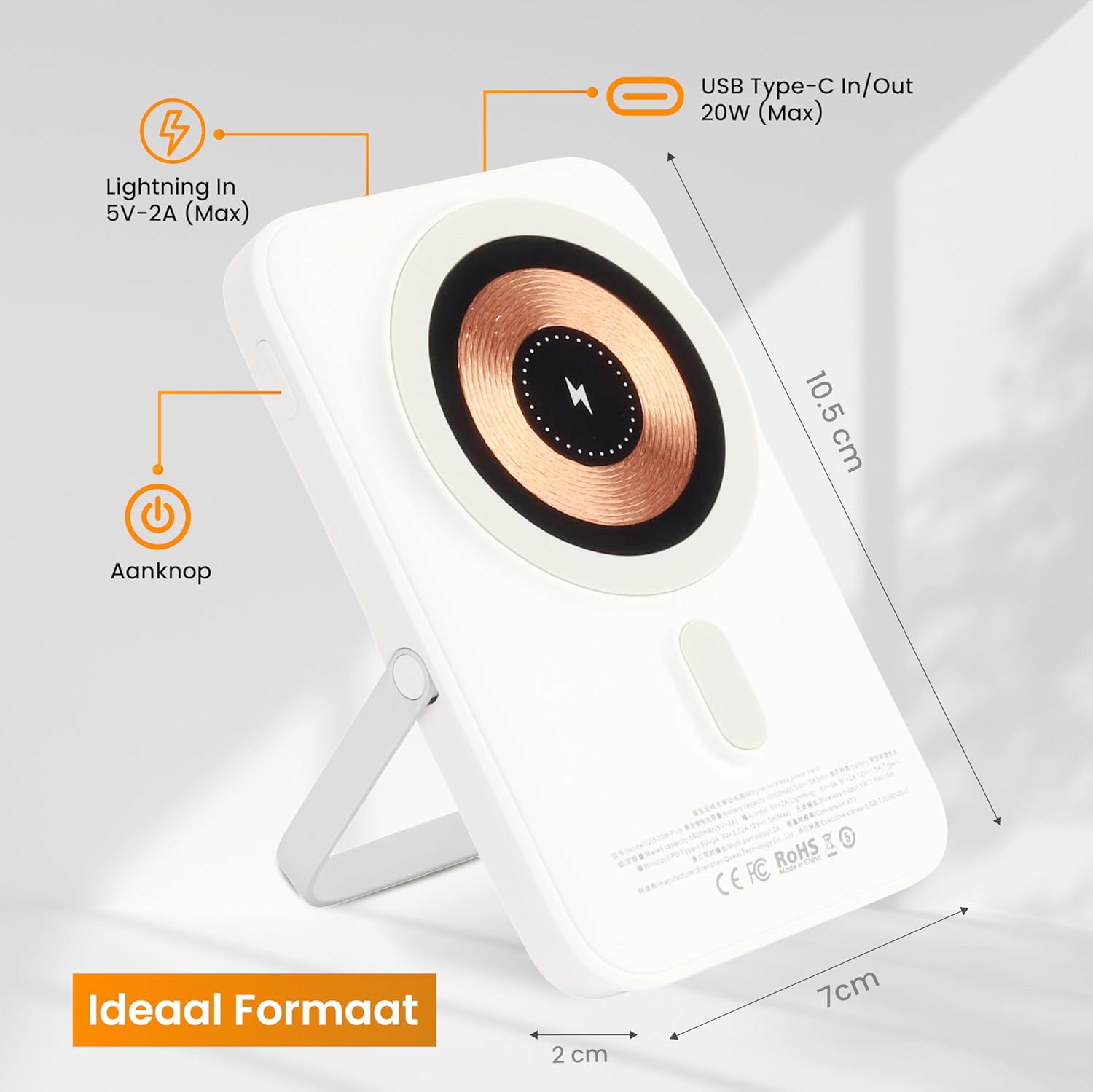
Image: Diagram illustrating the dimensions (10.5 cm length, 7 cm width, 2 cm thickness) and port locations (Lightning In, USB Type-C In/Out, Power Button) of the R2B Magnetic Power Bank.

Image: Infographic detailing the R2B Magnetic Power Bank's features: 10,000 mAh capacity, Quick Charge 2.0, 2-4 full wireless charges, MagSafe support, and included USB-USB-C charging cable.
5. Setup
5.1 Initial Charging of the Power Bank
- Connect the provided USB-A to USB-C cable to a compatible USB wall adapter (not included).
- Plug the USB-C end of the cable into the USB-C input/output port on the power bank.
- The digital display will show the charging progress. Fully charge the power bank before first use.
5.2 Powering On/Off
- To power on the power bank, press the power button once. The digital display will illuminate.
- The power bank will automatically turn off after a period of inactivity or when charging is complete.
6. Operating Instructions
6.1 Wireless Charging (MagSafe Compatible)
- Ensure your device is MagSafe compatible (iPhone 12 series or newer) or has a MagSafe-compatible case.
- Align the back of your smartphone with the magnetic charging area on the power bank. The magnets will snap into place, securing the connection.
- Wireless charging will begin automatically. The digital display on the power bank will show its remaining battery level.
- To stop charging, simply detach your phone from the power bank.

Image: The R2B Magnetic Power Bank wirelessly charging a smartphone, with the phone propped up by the power bank's kickstand on a wooden table.

Image: The R2B Magnetic Power Bank with its kickstand extended, supporting a smartphone that is wirelessly charging, shown in a travel setting like an airplane seat.
6.2 Wired Charging (USB-C)
- Connect your device's charging cable (USB-C to USB-C, or USB-A to USB-C) to the power bank's USB-C output port.
- Connect the other end of the cable to your device.
- Charging will begin automatically. The digital display on the power bank will show its remaining battery level.
7. Maintenance
- Keep the power bank dry and away from moisture.
- Avoid extreme temperatures (hot or cold).
- Clean the surface with a soft, dry cloth. Do not use harsh chemicals or abrasive materials.
- Store in a cool, dry place when not in use.
- Charge the power bank at least once every three months to maintain battery health if not used regularly.
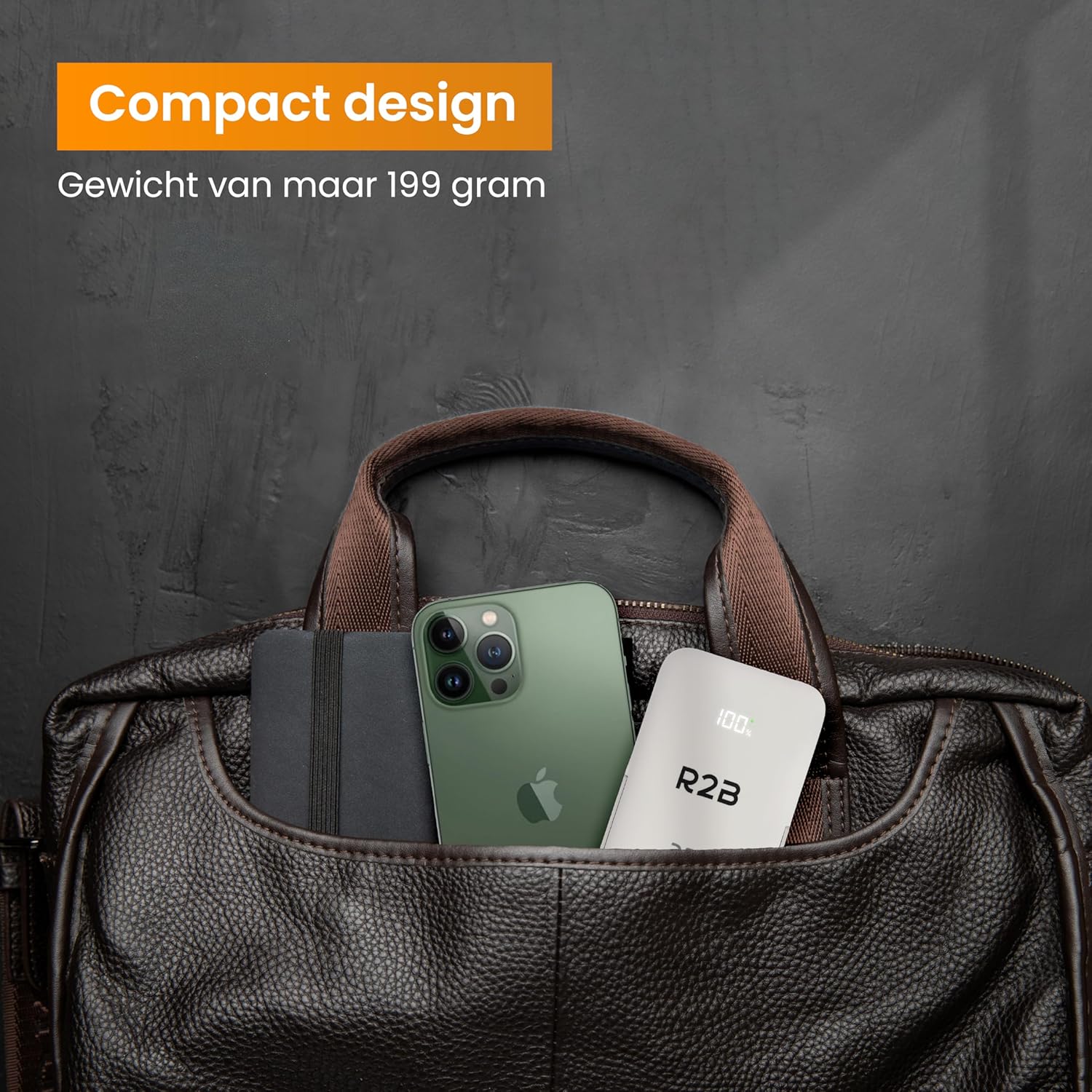
Image: The R2B Magnetic Power Bank, displaying its digital battery percentage, placed inside a brown leather bag alongside a smartphone, highlighting its compact design.
8. Troubleshooting
- Power bank not charging: Ensure the charging cable is securely connected to both the power bank and the wall adapter. Try a different cable or adapter.
- Device not charging wirelessly: Ensure your device is MagSafe compatible or has a MagSafe-compatible case. Check for any obstructions between the phone and the power bank (e.g., thick cases, metal objects). Ensure the power bank has sufficient charge.
- Device not charging via cable: Ensure the cable is securely connected to both the power bank and your device. Try a different cable or device. Ensure the power bank has sufficient charge.
- Slow charging: Ensure you are using a fast-charging compatible wall adapter for the power bank. For device charging, ensure your cable and device support fast charging.
- Power bank gets warm during use: It is normal for the power bank to become slightly warm during charging or discharging. If it becomes excessively hot, discontinue use and contact support.
9. Safety Information
- Do not disassemble, modify, or repair the device.
- Do not expose to fire, water, or extreme temperatures.
- Keep out of reach of children.
- Avoid dropping or subjecting the power bank to strong impacts.
- Dispose of the power bank according to local regulations for electronic waste.
10. Warranty and Support
This product comes with a standard manufacturer's warranty. For detailed warranty information or technical support, please refer to the product packaging or contact R2B customer service through your purchase platform.