
1. Introduction
Thank you for choosing the MOKKOM Professional 64mm Flat Burr Coffee Grinder. This high-quality appliance is designed to provide precise and consistent coffee grinding for a superior brewing experience. Featuring durable stainless steel construction, 100 grind settings, anti-static technology, and an intuitive LED display, this grinder is engineered for both performance and convenience. Please read this manual thoroughly before use to ensure proper operation, maintenance, and to maximize the lifespan of your grinder.

Figure 1.1: MOKKOM Professional 64mm Flat Burr Coffee Grinder with included burrs.
2. Important Safety Information
Please read and understand all safety instructions before using the appliance. Failure to follow these instructions may result in electric shock, fire, or serious injury.
- Always unplug the grinder from the power outlet before cleaning, assembling, or disassembling parts.
- Do not immerse the motor base, cord, or plug in water or other liquids.
- This appliance is for household use only. Do not use outdoors.
- Keep hands and utensils out of the bean hopper and ground coffee chute during operation to prevent injury.
- Ensure all parts are correctly assembled before operating the grinder.
- Do not operate the grinder with a damaged cord or plug, or after the appliance malfunctions or has been damaged in any manner.
- Supervise children closely when the appliance is in use or stored near them.
- Only grind whole roasted coffee beans. Do not grind other substances such as nuts, spices, or instant coffee.
- Avoid contact with moving parts.
3. Product Overview and Components
Familiarize yourself with the various parts of your MOKKOM coffee grinder.

Figure 3.1: Digital & Touch Display with control buttons.
Main Components:
- Bean Hopper: Holds whole coffee beans. The grinder includes both a large 350g hopper and a small single-dose hopper.
- Grind Adjustment Dial: Allows selection of 100 grind settings from fine to coarse.
- 64mm Flat Burrs: Professional-grade stainless steel burrs for uniform grinding.
- LED Display: Shows grind time and settings.
- Control Buttons:
- Grinding Time Increase/Decrease Buttons (+/-)
- Single Shot Button
- Double Shot Button
- Top-Up Button (for continuous grinding)
- Grounds Chute: Where ground coffee exits.
- Portafilter Holder: Compatible with 51-58mm portafilters.
- Dosing Container: Stainless steel container for collecting ground coffee.
- Cleaning Brush: For maintenance.
- Hexagonal Wrench: For maintenance and assembly.

Figure 3.2: Included accessories for the MOKKOM Grinder.

Figure 3.3: Large (350g) and Small (Single-Dose) Bean Hoppers.
4. Setup and First Use
4.1 Unpacking
Carefully remove all components from the packaging. Retain packaging for future storage or transport. Check for any damage during transit. If any parts are missing or damaged, contact customer support immediately.
4.2 Cleaning Before First Use
- Wipe the exterior of the grinder with a damp cloth.
- Wash the bean hopper, dosing container, and portafilter holder with warm, soapy water. Rinse thoroughly and dry completely before reassembling.
- Do not wash the main motor unit or burrs with water. Use the cleaning brush to remove any dust or debris from the burrs and grinding chamber.
4.3 Assembly
- Place the grinder on a stable, flat, and dry surface.
- Insert the desired bean hopper (large or small) onto the top of the grinder, ensuring it is securely seated.
- Ensure the grinding burrs are properly installed. The upper burr is removable for cleaning (see Maintenance section).
- Attach the portafilter holder or place the dosing container beneath the grounds chute.
- Plug the power cord into a standard 120V AC outlet.
5. Operation
5.1 Filling the Bean Hopper
Open the lid of the bean hopper and pour in whole roasted coffee beans. Do not overfill. Close the lid securely.
5.2 Adjusting Grind Settings
The MOKKOM grinder offers 100 grind settings, from 1 (finest) to 100 (coarsest). Rotate the grind adjustment dial to select your desired setting. Refer to the guide below for common brewing methods:
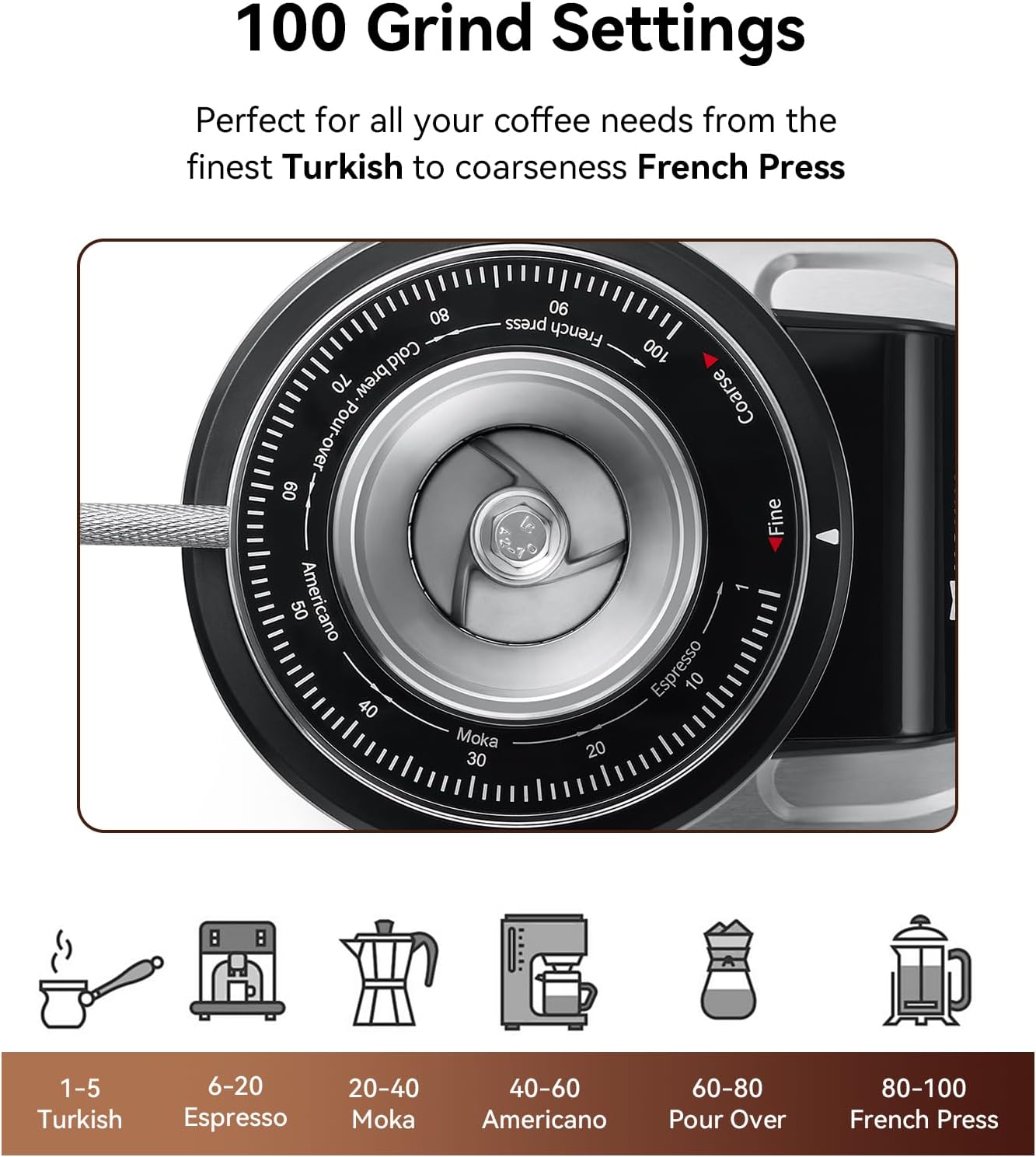
Figure 5.1: Grind Setting Guide.
- 1-5: Turkish
- 6-20: Espresso
- 20-40: Moka Pot
- 40-60: Americano / Drip Coffee
- 60-80: Pour Over
- 80-100: French Press / Cold Brew
Note: It is recommended to adjust the grind setting only when the grinder is running or empty to prevent burr damage or jamming.
5.3 Using the Digital Display and Timer
The LED display allows precise control over grinding time with 0.1-second accuracy.
- Power On: Ensure the main power switch on the side of the unit is in the 'ON' position. The LED display will illuminate.
- Set Grind Time: Use the + and - buttons to adjust the grinding duration.
- Pre-set Options:
- Press the Single Shot Button to select a pre-set time for a single espresso shot.
- Press the Double Shot Button to select a pre-set time for a double espresso shot.
- Start Grinding:
- For hands-free operation, place your portafilter or dosing container under the chute and press the Start/Stop button on the display. The grinder will operate for the set time.
- Alternatively, for direct grinding into a portafilter, press the portafilter against the activation switch located below the grounds chute. The grinder will start and stop when the portafilter is removed or the set time is reached.
- Continuous Grinding (Top-Up): Press the Top-Up Button for continuous grinding until released.
The anti-static technology helps prevent coffee grounds from flying around, keeping your workspace clean.

Figure 5.2: Innovative Anti-static Technology.
6. Maintenance and Cleaning
Regular cleaning ensures optimal performance and extends the life of your grinder.
6.1 Daily Cleaning
- After each use, tap the portafilter or dosing container to dislodge any remaining grounds.
- Use the cleaning brush to sweep away any loose grounds from the grounds chute and around the burrs.
- Wipe the exterior of the grinder with a soft, damp cloth. Do not use abrasive cleaners.
6.2 Deep Cleaning (Weekly/Bi-weekly)
- Unplug the grinder from the power outlet.
- Remove the bean hopper. Empty any remaining beans.
- Remove the upper burr. Twist counter-clockwise to unlock and lift out.
- Use the cleaning brush to thoroughly clean both the upper and lower burrs. Remove any lodged coffee particles or oils.
- Clean the grinding chamber and grounds chute with the brush.
- Wash the bean hopper, dosing container, and portafilter holder with warm, soapy water. Rinse and dry completely.
- Reassemble the upper burr by aligning it and twisting clockwise until it locks into place.
- Reattach the bean hopper.
Caution: Do not use water or liquid cleaners directly on the burrs or inside the grinding chamber. This can damage the motor and burrs.
7. Troubleshooting
Refer to this section for common issues and their solutions.
| Problem | Possible Cause | Solution |
|---|---|---|
| Grinder does not turn on. | Not plugged in; Main power switch off; Hopper not correctly seated. | Ensure power cord is securely plugged in. Check main power switch on the side. Ensure bean hopper is fully seated and locked. |
| Grinder runs but no coffee comes out. | Bean hopper empty; Grounds chute clogged; Burrs clogged. | Fill bean hopper. Unplug and clean grounds chute. Unplug and clean burrs (see Maintenance). |
| Inconsistent grind size. | Burrs are dirty or worn; Grind setting too coarse/fine for desired method. | Clean burrs thoroughly. Adjust grind setting as needed. If problem persists, burrs may need replacement. |
| Excessive static cling of grounds. | Very dry beans; High static environment. | The grinder has anti-static technology, but extreme conditions can still cause some static. Try adding a tiny drop of water to beans before grinding (Ross Droplet Technique) or increase humidity in the room. |
| Grinder jams or makes unusual noise. | Foreign object in burrs; Overloaded; Burrs loose. | Immediately unplug. Remove bean hopper and upper burr. Inspect for foreign objects. Ensure burrs are securely tightened. Do not overload with beans. |
If the problem persists after attempting these solutions, please contact MOKKOM customer support.
8. Specifications
| Feature | Detail |
|---|---|
| Model Number | BD-CG308 |
| Burr Type | 64mm Stainless Steel Flat Burrs |
| Grind Settings | 100 (Fine to Coarse) |
| Body Material | All-Metal Stainless Steel |
| Voltage | 120 Volts |
| Capacity (Large Hopper) | 350g / 12.35 oz |
| Item Weight | 10.06 pounds |
| Package Dimensions | 17.87 x 11.1 x 7.17 inches |
| UPC | 753902142940 |
9. Warranty and Customer Support
9.1 Product Warranty
MOKKOM products are manufactured to the highest quality standards. For specific warranty details, including duration and coverage, please refer to the warranty card included with your product or visit the official MOKKOM website. Keep your purchase receipt as proof of purchase for warranty claims.
9.2 Customer Support
If you have any questions, concerns, or require assistance with your MOKKOM Professional 64mm Flat Burr Coffee Grinder, please contact MOKKOM customer support. You can typically find contact information on the product packaging, the official MOKKOM website, or through your retailer's support channels.
For the latest information and support, please visit the MOKKOM Store on Amazon.