
Introduction
The AUTOOL BT360 Car Battery Tester is a professional diagnostic tool designed to analyze the health status of 12V automotive starting batteries. It accurately measures the actual cold cranking capability (CCA) and the aging extent of the battery, providing reliable data for testing and maintenance. This device supports various battery types including regular flooded, AGM flat plate, AGM spiral, and gel batteries, and adheres to multiple testing standards such as GB, BCI, CCA, EN, CA, MCA, DIN, SAE, JIS, and IEC.
The BT360 offers four primary testing modes: Quick Test, Standard Test, Starting Test, and Charging Test. Its advanced conductance testing technology assesses battery performance parameters like voltage, charge, and lifespan. The integrated standard battery testing parameter ranges facilitate data analysis and comparison, enabling technicians to quickly diagnose common faults in automotive starting and charging systems.
Safety Information
Please read and understand all safety instructions before operating the AUTOOL BT360 Car Battery Tester. Failure to follow these instructions may result in electric shock, fire, or serious injury.
- Always wear appropriate eye protection and protective clothing when working with batteries.
- Ensure proper ventilation in the work area to prevent the accumulation of explosive gases.
- Avoid sparks, flames, or smoking near batteries, as they produce flammable hydrogen gas.
- Do not touch battery terminals or cables with bare hands while testing.
- Keep the tester away from water, oil, and other liquids.
- The BT360 features Reverse Polarity Protection. This protective feature ensures that neither the device nor the battery sustains damage even if the positive and negative polarities are connected incorrectly. However, always strive to connect correctly.
- Disconnect the tester from the battery when not in use.
- Do not attempt to disassemble or modify the tester. Refer all servicing to qualified personnel.
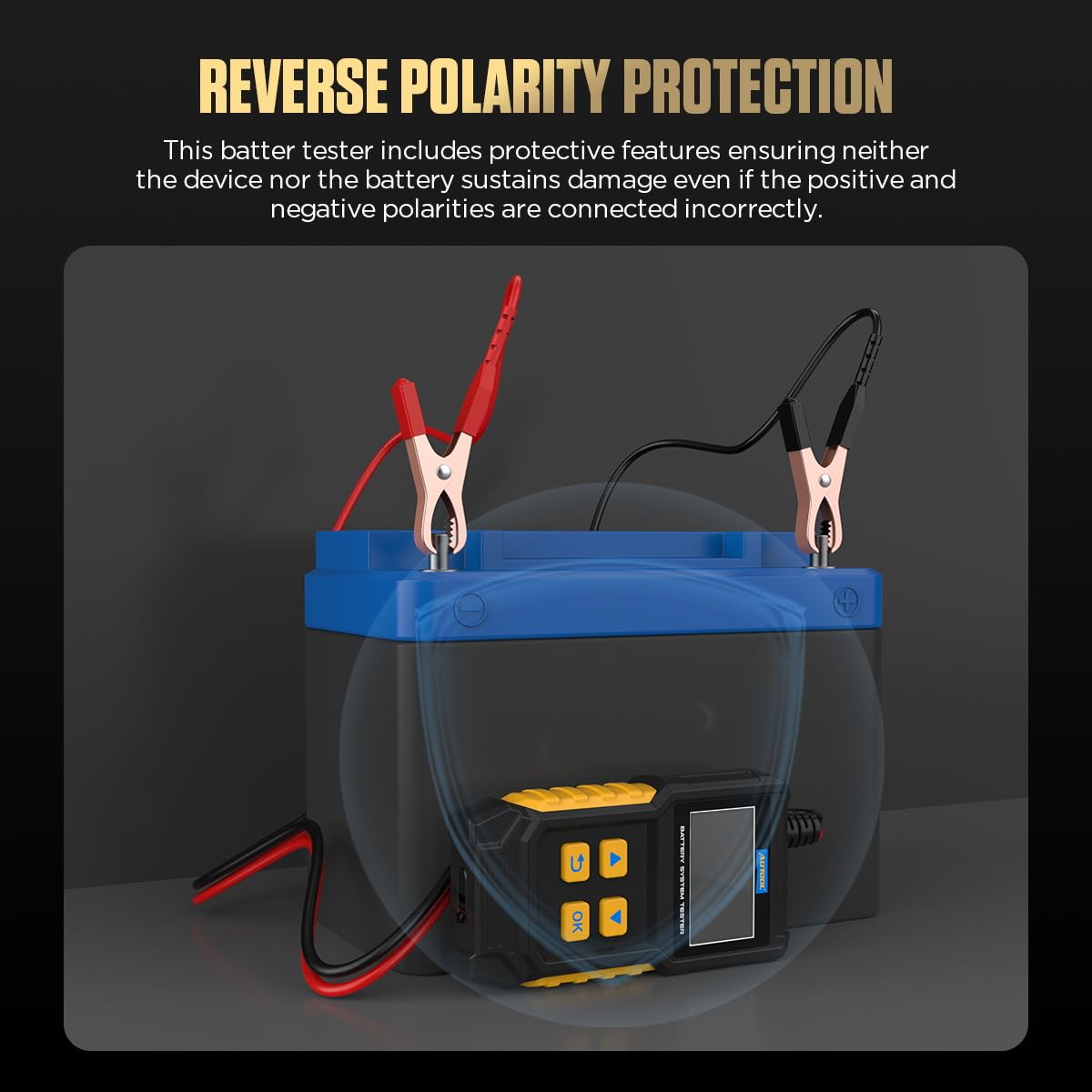
Image: The AUTOOL BT360 features reverse polarity protection, preventing damage to the device and battery if clamps are connected incorrectly. The image shows the tester connected to a battery with a protective shield graphic.
Package Contents
Upon opening the package, please verify that all items listed below are present and in good condition:
- 1 x AUTOOL BT360 Car Battery Tester Unit
- 1 x User Manual

Image: The package contents include the AUTOOL BT360 battery tester unit, its retail packaging box, and the accompanying user manual.
Product Overview
The AUTOOL BT360 is a compact and robust device designed for ease of use and portability. It features a clear LCD screen for displaying test results and intuitive buttons for navigation.

Image: The AUTOOL BT360 tester showing its main components: LCD display, navigation buttons (Up, Down, OK, Back), and positive (red) and negative (black) battery clamps. Key features like Battery Testing, Cranking Testing, Charging Testing, Data Viewing, Reverse Polarity Protection, and Multilingual Selection are indicated.
Key Features:
- Battery Voltage Measurement: Displays the current voltage of the battery.
- Cranking Testing: Evaluates the starting performance of the battery.
- Battery SOC Measurement: State of Charge measurement.
- Battery Lifespan Measurement: Assesses the overall health and remaining life of the battery.
- Reverse Polarity Protection: Prevents damage from incorrect connections.
- Data Viewing: Allows review of previous test results.
- Resistance Measurement: Measures the internal resistance of the battery.
- Charging Testing: Analyzes the vehicle's charging system.
- Language Setting: Supports multiple languages for user interface.
- Contrast Adjustment: Adjusts screen display contrast.
- Software Upgrade: Allows for firmware updates via USB.

Image: A visual representation of the BT360's features, including battery voltage, cranking, SOC, lifespan, reverse polarity protection, data viewing, resistance, charging, language settings, contrast adjustment, and software upgrade capabilities.
Specifications
The following table outlines the technical specifications of the AUTOOL BT360 Car Battery Tester:
| Parameter | Value |
|---|---|
| Voltage Measurement Range | 8V ~ 30V DC |
| Current Measurement Range | 15mA ~ 5A |
| Operating Temperature | -20°C ~ 50°C (-4°F ~ 122°F) |
| Battery Range | 30-100AH |
| Test Standard Range (CCA) | 100-2000 CCA |
| Applicable Battery Types | Regular Flooded, AGM Flat Plate, AGM Spiral, GEL, EFB |
| Applicable Vehicle Models | Cars, Motorcycles, Trucks, RVs, ATVs, SUVs, Boats, Yachts, Lawnmowers, Golf Carts |
| Dimensions (Package) | 7.36 x 6.57 x 2.32 inches |
| Item Weight | 0.38 Kilograms (13.44 ounces) |

Image: This image illustrates the wide application range of the BT360, showing its compatibility with various vehicle types (car, truck, motorcycle, boat, ATV) and battery types (Regular Flooded, AGM Flat Plate, AGM Spiral, GEL, EFB), along with voltage, battery, and test standard ranges.

Image: A detailed table outlining the various battery testing standards supported by the BT360, including CCA, BCI, CA, MCA, DIN, IEC, EN, SAE, GB, and JIS, along with their respective test ranges.
Setup
Follow these steps to prepare your AUTOOL BT360 for testing:
- Prepare the Battery: Ensure the battery terminals are clean and free of corrosion. If necessary, clean them with a wire brush.
- Connect the Clamps:
- Connect the red positive (+) clamp to the positive battery terminal.
- Connect the black negative (-) clamp to the negative battery terminal.
The tester will power on automatically once correctly connected, thanks to its passive testing approach which draws power directly from the battery.
- Initial Screen: The device will display the main menu with options like "Quick Test", "Standard", "Review data", and "Set Up".
Operating Instructions
Navigate through the menu using the Up and Down arrow buttons, and confirm selections with the OK button. Use the Back button to return to the previous screen.
1. Quick Test
This mode provides a rapid assessment of the battery's health.
- From the main menu, select "Quick Test" and press OK.
- The tester will automatically analyze the battery and display results such as voltage, CCA, life percentage, and impedance.
- The screen will indicate the battery's performance (e.g., "Good performance").
2. Standard Test
The Standard Test offers more detailed analysis, including in-vehicle and out-of-vehicle options.
- From the main menu, select "Standard" and press OK.
- Choose "In-Vehicle" or "Out-of-Vehicle" depending on your testing scenario.
- Select the battery type (e.g., Normal battery, AGM Flat Plate, AGM Spiral).
- Input the battery's rated CCA (Cold Cranking Amps) value as specified on the battery label.
- The tester will perform the test and display comprehensive results.
3. Cranking Test
This test evaluates the vehicle's starting system performance.
- From the "Standard" menu (or directly if available), select "Cranking Test".
- Follow the on-screen prompts, which typically involve starting the vehicle.
- The tester will measure the cranking voltage and time, providing an assessment of the starter's condition.
4. Charging Test
This test assesses the vehicle's charging system, including the alternator and regulator.
- From the "Standard" menu (or directly if available), select "Charging Test".
- Follow the on-screen instructions, which may include revving the engine to a specific RPM.
- The tester will measure load voltage, no-load voltage, and ripple, indicating the charging system's health (e.g., "Charging OK").
5. Review Data
Access previously saved test results for analysis.
- From the main menu, select "Review data" and press OK.
- Use the arrow buttons to scroll through stored test records.
6. System Setup
Configure various settings of the BT360.
- From the main menu, select "Set Up" and press OK.
- Options typically include:
- Language: Select your preferred language (e.g., English, German, French, Italian, Spanish, Simplified Chinese, Traditional Chinese, Japanese, Korean, Russian, Polish).
- Contrast: Adjust the display screen's contrast for better visibility.
- Software Upgrade: Initiate the software update process (see Maintenance section).

Image: The BT360's interface displaying the main menu options and examples of test results for "Good performance", "Battery abnormal", and "Charging OK", illustrating the intuitive data display.

Image: This image shows the multilingual configuration screen of the BT360, highlighting the various language options available, including English, German, French, Italian, Spanish, Simplified Chinese, Traditional Chinese, Japanese, Korean, Russian, and Polish.
Maintenance
Proper maintenance ensures the longevity and accuracy of your AUTOOL BT360 Car Battery Tester.
- Cleaning: Wipe the device with a soft, dry cloth. Do not use abrasive cleaners or solvents. Ensure the clamps are clean after each use to maintain good electrical contact.
- Storage: Store the tester in a cool, dry place, away from direct sunlight and extreme temperatures. Keep it in its original packaging or a protective case when not in use.
- Software Upgrade: The BT360 supports software upgrades to ensure continuous performance optimization and enhanced reliability.
- Connect the BT360 to a computer using a USB data cable (not included, standard USB-A to mini-USB or micro-USB depending on the port).
- Visit the official AUTOOL website to download the latest software and upgrade instructions.
- Follow the on-screen prompts on your computer to complete the upgrade process.

Image: The AUTOOL BT360 tester connected via a USB cable to a laptop, illustrating the process for software upgrades to ensure the device remains up-to-date with the latest functionalities and improvements.
Troubleshooting
If you encounter issues with your AUTOOL BT360, refer to the following common problems and their solutions:
| Problem | Possible Cause | Solution |
|---|---|---|
| Tester does not power on. | Poor connection to battery terminals; Battery voltage too low. | Ensure clamps are securely connected to clean battery terminals. Check if battery voltage is above 8V. |
| Inaccurate test results. | Dirty battery terminals; Incorrect battery type/CCA input; Battery not fully charged. | Clean terminals. Verify correct battery type and CCA value. Ensure battery is adequately charged before testing. |
| Screen display is dim or unreadable. | Contrast setting is incorrect; Extreme ambient light. | Adjust the screen contrast in the "Set Up" menu. Move to a shaded area if testing in bright sunlight. |
| Tester freezes or becomes unresponsive. | Temporary software glitch. | Disconnect the tester from the battery, wait a few seconds, then reconnect. If the issue persists, check for software updates. |
Warranty and Support
AUTOOL stands behind the quality of its products. The AUTOOL BT360 Car Battery Tester comes with a Three Years Warranty for damages caused by non-human factors. AUTOOL promises to resend parts for free within this 3-year period.
Additionally, AUTOOL provides Lifelong Maintenance for the product, ensuring long-term support and service.
For any inquiries, technical assistance, or warranty claims, please contact AUTOOL customer support. You can typically find contact information on the official AUTOOL website or through your purchase platform.

Image: Badges indicating AUTOOL's commitment to customer support (24/7), product quality (3-Year Warranty), and compliance with international standards (CE, RoHS, FCC).


