
Introduction
Thank you for choosing the zelotes T80 Ergonomic Gaming Mouse. This wired optical mouse is designed for both gaming and office use, offering adjustable DPI, customizable LED lighting, and a comfortable ergonomic design for extended use. Please read this manual carefully to ensure proper setup and operation of your new mouse.
Product Features
- 7 Buttons & Quick Fire Button: Includes forward, backward, and a rapid fire (double click) button for enhanced control in gaming and productivity.
- 5 Adjustable DPI Levels: Easily switch between 1000/1600/2400/3200/7200 DPI to match your speed and precision needs.
- 7 LED Backlit Modes: Personalize your setup with various lighting effects.
- Ergonomic Design: Crafted for comfort with skin-friendly material, sweat-resistant, and anti-slip features to prevent fatigue during long sessions.
- Wide Compatibility: Compatible with Windows 11/10/8/7 and Mac OS, suitable for various applications including MMD, FPS games, and office tasks.
Package Contents
- 1 x zelotes T80 Wired Gaming Mouse
- 1 x Instruction Manual
Setup
- Unpack: Carefully remove the mouse and its accessories from the packaging.
- Remove Protective Film: Before use, please remove the protective film from the mouse's foot pads.
- Connect: Plug the USB cable of the zelotes T80 Gaming Mouse into an available USB port on your computer (PC or Laptop).
- Driver Installation: The mouse is plug-and-play. Your operating system will automatically detect and install the necessary drivers. No additional software installation is typically required for basic functionality.
Operating Instructions
Button Explanations
The zelotes T80 mouse features 7 buttons for versatile control:
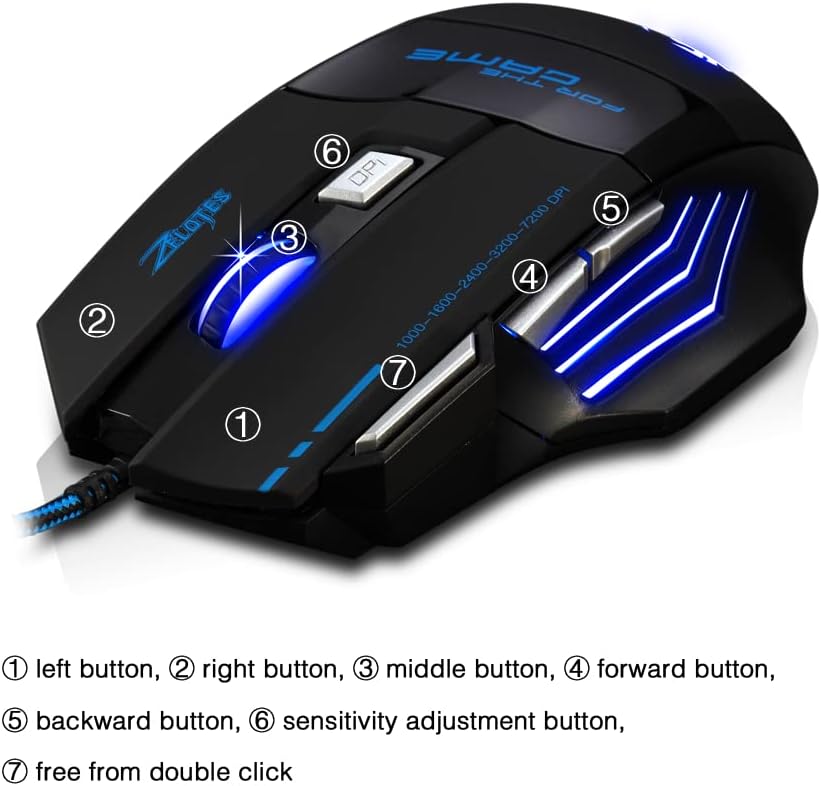
- Left Button (1): Standard left-click function.
- Right Button (2): Standard right-click function.
- Middle Button / Scroll Wheel (3): Scrolls up/down. Pressing it acts as a middle-click.
- Forward Button (4): Navigates forward in web browsers or file explorers.
- Backward Button (5): Navigates backward in web browsers or file explorers.
- DPI Button (6): Adjusts mouse sensitivity (DPI) and changes LED colors.
- Rapid Fire Button (7): Functions as a double-click of the left button, useful for continuous firing in games.
DPI Adjustment
The mouse offers 5 adjustable DPI levels to suit different tasks and preferences:
- 1000 DPI
- 1600 DPI
- 2400 DPI
- 3200 DPI
- 7200 DPI
Press the DPI button (6) to cycle through these sensitivity levels. Each change will be indicated by a corresponding LED color change.
LED Lighting Control
The mouse features 7 LED lighting modes. To change the LED color, long press the DPI button (6). The LED will flash rapidly 7 times and then remain constant on the selected color.

Maintenance
- Cleaning: Use a soft, dry cloth to clean the mouse surface. For stubborn dirt, a slightly damp cloth can be used, ensuring no liquid enters the mouse.
- Cable Care: Avoid sharp bends or excessive pulling on the USB cable to prevent damage.
- Storage: Store the mouse in a dry, cool place away from direct sunlight and extreme temperatures.
Troubleshooting
Mouse Not Responding
- Ensure the USB cable is securely plugged into a working USB port.
- Try plugging the mouse into a different USB port on your computer.
- Test the mouse on another computer to determine if the issue is with the mouse or the computer.
LED Lights Not Working/Changing
- Verify the mouse is properly connected to the computer.
- Ensure you are long-pressing the DPI button to cycle through colors. A short press changes DPI.
DPI Not Changing
- Ensure you are short-pressing the DPI button to cycle through DPI levels.
- If the issue persists, try reconnecting the mouse.
Specifications
| Feature | Detail |
|---|---|
| Model Number | T80 |
| Buttons | 7 (with scroll wheel) |
| Adjustable DPI | 1000/1600/2400/3200/7200 DPI |
| LED Lighting | 7 lighting modes |
| Connectivity | USB Wired |
| Tracking System | Optical |
| Ergonomic Design | Yes |
| Switch Life | 5 million cycles |
| Dimensions | 130x105x45mm |
| Weight | 160 ± 5g |
| USB Cable Length | 1.5m |
| Compatibility | Win11, Win10, Win8, Win7, Mac OS |
Warranty and Support
For warranty information and technical support, please refer to the product packaging or contact zelotes customer service through the retailer where the product was purchased. Keep your purchase receipt for warranty claims.


