
Introduction
Thank you for choosing the Velieta Commercial Beverage Refrigerator. This manual provides essential information for the safe and efficient installation, operation, maintenance, and troubleshooting of your new appliance. Please read these instructions thoroughly before use and retain them for future reference.
This commercial beverage refrigerator is designed for displaying and cooling various beverages in commercial settings such as shops, restaurants, and bars. It features a 15 cubic feet capacity, adjustable shelves, and a glass door for optimal product visibility.

Figure 1: Velieta Commercial Beverage Refrigerator in use.
1. Setup and Installation
1.1 Unpacking
- Carefully remove all packaging materials, including foam and tape. Inspect the refrigerator for any shipping damage.
- Retain packaging materials for potential future transport or service.
1.2 Placement
- Place the refrigerator on a firm, level surface capable of supporting its weight when fully loaded.
- Ensure adequate ventilation around the unit. Maintain a minimum clearance of 4 inches (10 cm) from walls or other appliances to allow for proper airflow and heat dissipation.
- Avoid direct sunlight or heat sources, as this can affect cooling efficiency.
- The unit is designed for freestanding or built-in installation.
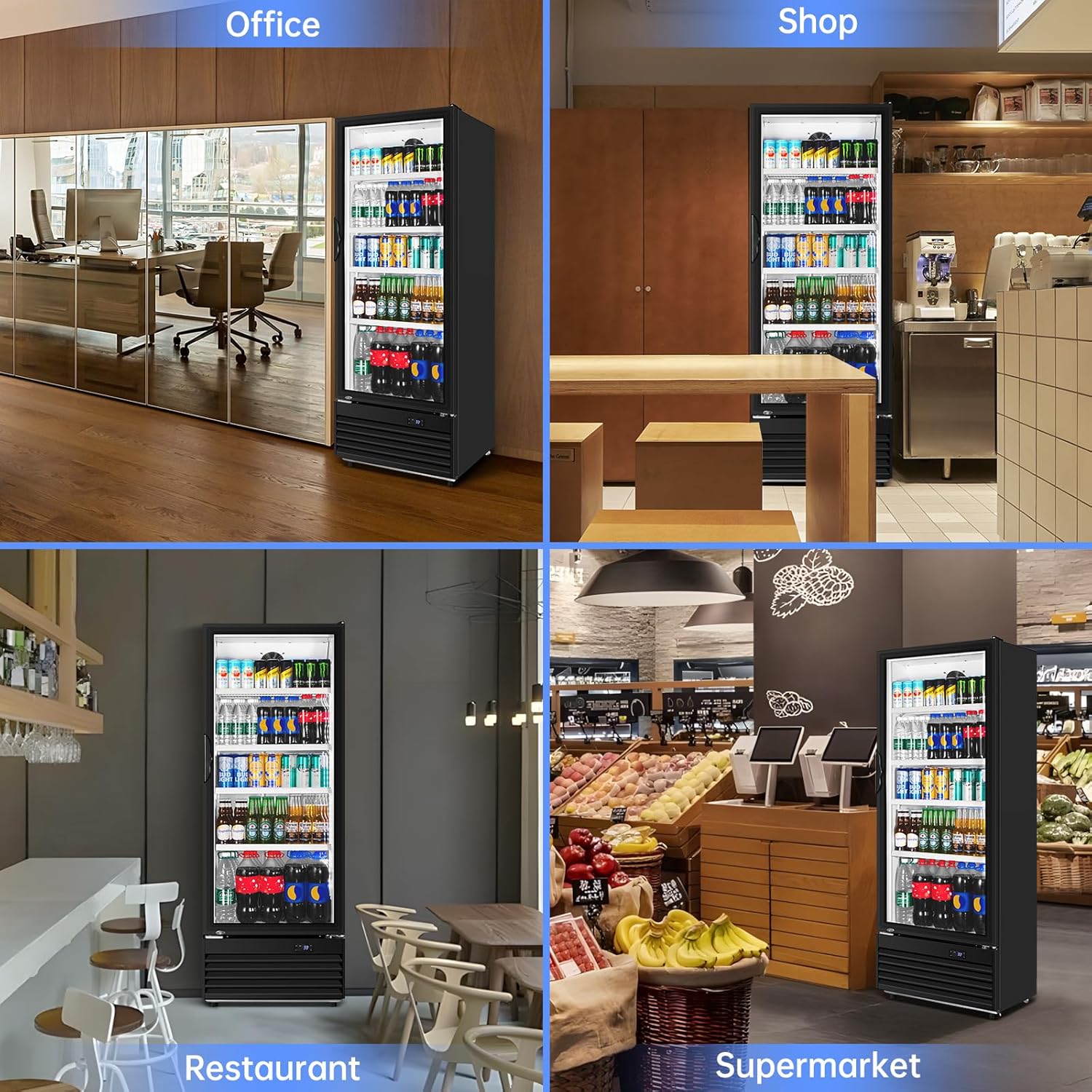
Figure 2: Recommended placement in various commercial environments.
1.3 Door Handle Installation
- Attach the door handle using the provided screws and tools. Ensure it is securely fastened.
1.4 Shelf Installation
- Insert the 4 adjustable wire shelves into the desired positions within the cabinet. Ensure they are level and securely seated in the shelf supports.

Figure 3: Key features including adjustable shelves and mobility wheels.
1.5 Initial Power-On
- After placement and assembly, allow the refrigerator to stand upright for at least 24 hours before plugging it into a power outlet. This allows the compressor oils to settle.
- Plug the unit into a dedicated 115V AC outlet.
2. Operating Instructions
2.1 Temperature Control
- The refrigerator features a digital control panel located at the bottom of the unit.
- The optimal temperature range for beverages is 32-41°F (0-5°C).
- Use the 'SET' button to enter temperature adjustment mode, and the 'Up' and 'Down' arrows to set the desired temperature.

Figure 4: Digital control panel for temperature and light.
2.2 Interior LED Lighting
- To activate the interior LED light, open the door and press the 'Light' button on the control panel.
- The light operates on a timer and will turn off automatically after a period. There is no option to keep the light continuously on, nor does it activate automatically upon door opening.
2.3 Self-Returning Door
- The refrigerator is equipped with a self-closing door mechanism. Ensure the door closes completely after each use to maintain internal temperature and energy efficiency.
2.4 Efficient Cooling System
- The energy-efficient fan system and powerful compressor are designed for rapid cooling, ensuring beverages reach optimal temperature quickly.

Figure 5: Illustration of the efficient refrigeration system.
3. Maintenance
3.1 Automatic Defrost System
- This refrigerator features an automatic defrost system, eliminating the need for manual defrosting.
- The system prevents frost buildup, maintaining consistent cooling performance.

Figure 6: Frost-free operation ensures clear visibility.
3.2 Cleaning
- Interior: Unplug the unit before cleaning. Use a soft cloth with a mild detergent and warm water to clean the interior surfaces and shelves. Rinse thoroughly and dry completely before plugging the unit back in.
- Exterior: Wipe the exterior with a soft, damp cloth. Avoid abrasive cleaners or solvents.
- Door Seal: Regularly inspect and clean the door gasket to ensure a tight seal. A dirty or damaged gasket can lead to poor cooling performance.
3.3 Double Tempered Glass Door
- The double-glazed glass door helps to block out external heat and maintain internal temperature, contributing to energy efficiency.

Figure 7: Insulation and double-layer tempered glass construction.
4. Troubleshooting Guide
Before contacting customer service, please review the following common issues and their potential solutions:
| Problem | Possible Cause | Solution |
|---|---|---|
| Refrigerator does not operate | No power; Power cord unplugged; Circuit breaker tripped. | Check power supply; Ensure cord is securely plugged in; Reset circuit breaker. |
| Unit is not cold enough | Temperature set too high; Door not closed properly; Excessive door openings; Unit overloaded; Poor ventilation. | Adjust temperature setting; Ensure door is fully closed; Reduce frequency of door openings; Do not overload; Ensure adequate clearance around unit. |
| Excessive noise | Unit not level; Objects vibrating against unit; Compressor operation. | Adjust leveling feet; Ensure nothing is touching the unit; Compressor noise during cooling cycles is normal. |
| Door not closing completely | Unit not level; Obstruction; Door gasket dirty or damaged. | Adjust leveling feet; Remove any obstructions; Clean or replace door gasket. |
5. Specifications
| Feature | Detail |
|---|---|
| Model Number | VT-KD382BFP-01 |
| Product Dimensions (D x W x H) | 23.23" x 24.41" x 69.29" |
| Capacity | 15 cubic feet |
| Color | Black White |
| Installation Type | Freestanding & Built-in |
| Defrost System | Frost Free |
| Voltage | 115 volts AC |
| Shelf Type | Wire |
| Number of Shelves | 4 |
| Cooling Method | Compressor |
| Item Weight | 152.1 pounds |
| Door Material Type | Glass |
| Special Features | Adjustable Shelves, Automatic Defrost, Digital Temperature Control, Door Lock, Energy Efficient, Front Ventilation, Low Noise, Touch Control |

Figure 8: Product dimensions and key features.
6. Warranty Information
This Velieta Commercial Beverage Refrigerator comes with a 1-Year Limited Warranty from the date of purchase. This warranty covers defects in materials and workmanship under normal use. Please retain your proof of purchase for warranty claims. For full warranty terms and conditions, please refer to the documentation included with your product or contact customer support.
7. Customer Support
Should you encounter any issues or have questions regarding your Velieta Commercial Beverage Refrigerator, our professional support service team is available to assist you.
- Support Email: support@velieta.com
- Support Phone: (213) 432-5433
Figure 9: Velieta Professional Support Service Team.