
1. Introduction
Thank you for purchasing the HAUSHOF 12L/Day Dehumidifier. This appliance is designed to effectively remove excess moisture from your indoor environment, prevent mold and mildew growth, and assist in drying clothes. It features multiple operating modes, air purification with negative ions, a 24-hour timer, and flexible drainage options. Please read this manual thoroughly before use to ensure safe and optimal operation.

Figure 1.1: HAUSHOF Dehumidifier overview, showing its 12L/day capacity, 3 dehumidification modes, 2-way drainage, and 24-hour timer.
2. Safety Instructions
- Always connect the appliance to a grounded power outlet with the correct voltage (AC100V, 50Hz/60Hz).
- Do not operate the dehumidifier with a damaged power cord or plug.
- Keep the appliance away from water and other liquids to prevent electric shock.
- Ensure proper ventilation around the unit. Do not block air inlets or outlets.
- Do not insert objects into the air vents.
- Unplug the unit before cleaning or performing any maintenance.
- This appliance is not intended for use by persons (including children) with reduced physical, sensory or mental capabilities, or lack of experience and knowledge, unless they have been given supervision or instruction concerning use of the appliance by a person responsible for their safety.
- In case of malfunction, immediately unplug the unit and contact customer support. Do not attempt to repair it yourself.
3. Product Components
The HAUSHOF Dehumidifier consists of the following main parts:
- Main Unit (with control panel and display)
- Air Inlet Grille (rear)
- Air Outlet (top)
- Water Tank (removable, approx. 2.0L capacity)
- Continuous Drainage Port (rear)
- Casters (for easy movement)
- Power Cord
- Drainage Hose (1m, included)

Figure 3.1: Front view of the HAUSHOF Dehumidifier.

Figure 3.2: Detailed view of the smart control panel, 3-color humidity display, and safety features like child lock and auto defrost.
4. Setup
- Unpacking: Carefully remove the dehumidifier from its packaging. Retain packaging for future storage or transport.
- Placement: Place the unit on a flat, stable surface. Ensure there is at least 20 cm (8 inches) of space around the air inlets and outlets for optimal airflow. Avoid placing it near heat sources or in direct sunlight.
- Power Connection: Plug the power cord into a suitable grounded electrical outlet.
- Drainage Setup (Optional): If using continuous drainage, connect the included drainage hose to the continuous drainage port at the rear of the unit. Ensure the hose is directed downwards to a drain or container, avoiding kinks or blockages.

Figure 4.1: The compact design and casters allow for easy movement and placement in various rooms.
5. Operating Instructions
The dehumidifier features a smart control panel for easy operation.
- Power On/Off: Press the Power button (U) to turn the unit on or off.
- Mode Selection: Press the Mode button (M) to cycle through the following modes:
- Automatic Dehumidification Mode: The unit senses the indoor humidity and automatically adjusts operation to maintain the set humidity level (adjustable from 30% to 80% in 5% increments).
- Continuous Drying Mode: Ideal for drying clothes. The unit operates continuously, directing airflow towards laundry to dry it quickly and prevent musty odors.
- Sleep Mode: Dims the LED display and reduces fan speed for quieter operation, suitable for use in bedrooms or nurseries during sleep.
- Humidity Setting: In Automatic Dehumidification Mode, use the Up/Down arrows to set your desired humidity level.
- Fan Speed Adjustment: Press the Fan Speed button to select between high and low fan speeds.
- 24-Hour Timer: Press the Timer button to set an auto-off time (up to 24 hours). This saves energy by automatically turning off the unit when you are away or asleep.
- Air Purification (Negative Ion Function): The unit releases 3 million negative ions/cm³ to purify the air, removing dust and odors while dehumidifying. This function operates automatically.
- Child Lock Function: Press and hold the Child Lock button for 3 seconds to activate/deactivate. This prevents accidental changes to settings.

Figure 5.1: Illustration of the three dehumidification modes and their functions.

Figure 5.2: The unit allows for precise adjustment of humidity (30-80%) and fan speed (2 levels).
Video 5.1: Dehumidifier in operation, showing the digital display and color-changing humidity indicator.
6. Drainage Options
The HAUSHOF Dehumidifier offers two convenient drainage methods:
- Water Tank Drainage: The unit collects condensed water in its removable 2.0L water tank. When the tank is full, the unit will automatically stop operation, and a full tank indicator will light up, accompanied by an audible buzzer. Simply remove the tank, empty the water, and reinsert it to resume operation.
- Continuous Drainage: For uninterrupted operation, especially in high-humidity environments, connect the included 1-meter drainage hose to the continuous drainage port at the back of the unit. Ensure the hose is positioned to allow gravity drainage into a floor drain or a larger container. This method eliminates the need for manual tank emptying.
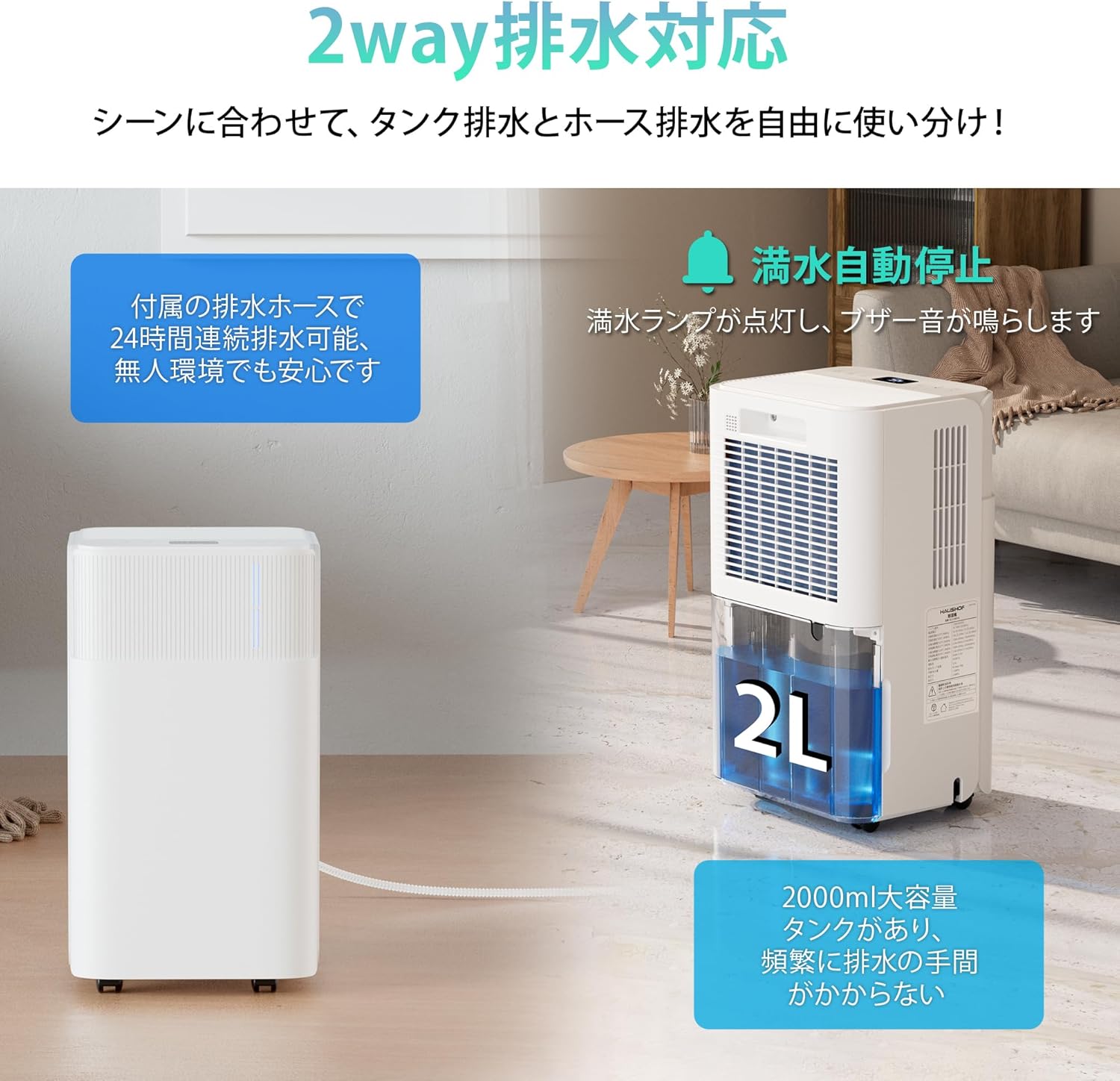
Figure 6.1: The dehumidifier supports both water tank and continuous hose drainage, adapting to various usage scenarios.
7. Maintenance
Regular maintenance ensures the longevity and efficiency of your dehumidifier.
- Cleaning the Air Filter: The air filter should be cleaned every two weeks or more frequently depending on usage. Turn off and unplug the unit. Remove the filter from the back of the unit. Use a vacuum cleaner to remove dust or wash it with warm, soapy water. Ensure the filter is completely dry before reinserting.
- Cleaning the Water Tank: Empty and clean the water tank regularly to prevent mold and bacteria growth. Use mild detergent and rinse thoroughly.
- Cleaning the Exterior: Wipe the exterior of the unit with a soft, damp cloth. Do not use harsh chemicals or abrasive cleaners.
- Storage: If storing the unit for an extended period, ensure the water tank is empty and clean, and the unit is dry. Store it in a cool, dry place, preferably in its original packaging.
8. Troubleshooting
| Problem | Possible Cause | Solution |
|---|---|---|
| Unit does not turn on | No power; Power cord not plugged in; Water tank full or not properly inserted. | Check power connection; Empty and reinsert water tank correctly. |
| No dehumidification | Air filter clogged; Room temperature too low; Humidity setting too high. | Clean air filter; Ensure room temperature is above 5°C (41°F); Lower desired humidity setting. |
| Unit is noisy | Unit not on a level surface; Air filter clogged. | Place unit on a flat surface; Clean air filter. |
| Water leaks from unit | Water tank not properly inserted; Continuous drainage hose is kinked or blocked. | Reinsert water tank; Check and clear drainage hose. |
If the problem persists after trying these solutions, please contact customer support.
9. Specifications
| Feature | Specification |
|---|---|
| Model Number | HH24150AJ |
| Dehumidification Capacity | 12L/Day (at 30°C, 80% RH) |
| Rated Voltage | AC 100V |
| Rated Frequency | 50Hz / 60Hz |
| Max Power Consumption | 250W / 3.0A |
| Noise Level | ≤38dB (A) |
| Water Tank Capacity | Approx. 2.0L |
| Air Volume | 110m³/h |
| Refrigerant / Charge | R134a / 80g |
| Pressure (High / Low) | 2.5 / 1.0 MPa |
| Applicable Area (目安) | Approx. 15m² (Wood: 10 tatami mats, Concrete: 15 tatami mats) |
| Unit Weight | Approx. 10kg |
| Product Dimensions | 25.5cm (D) x 23cm (W) x 44.5cm (H) |
| Other Functions | Sleep Mode, Timer, Auto Shut-off, Auto Defrost, Continuous Drainage |

Figure 9.1: Detailed product specifications and dimensions.
10. Warranty and Support
This HAUSHOF Dehumidifier comes with a 12-month manufacturer's warranty from the date of purchase. In case of initial defects or malfunctions, please contact our customer support team. We are committed to providing prompt and courteous service to ensure your satisfaction.
Package Contents:
- Dehumidifier Main Unit x 1
- Drainage Hose x 1
- Japanese Instruction Manual x 1 (English version provided here)
For further assistance, please refer to the contact information provided with your purchase or visit the official HAUSHOF website.