
1. Introduction
Thank you for choosing the Abolee Pedestal Fan FXH009R. This fan is designed to provide efficient air circulation with its DC motor, offering multiple speed and mode options, along with oscillation and a timer function. Please read this manual thoroughly before use to ensure proper operation, maintenance, and safety.

Image 1.1: Abolee Pedestal Fan FXH009R. This image shows the complete fan unit, highlighting its sleek black design and adjustable height.
2. Safety Instructions
To reduce the risk of fire, electric shock, or injury, please observe the following safety precautions:
- Always unplug the fan before cleaning, servicing, or moving it.
- Do not operate the fan with a damaged cord or plug. If the cord or plug is damaged, contact customer support.
- Keep the fan away from water or moisture. Do not immerse the fan in water.
- Do not insert fingers or any objects through the grille when the fan is operating.
- Ensure the fan is placed on a stable, level surface to prevent tipping.
- This appliance is not intended for use by persons (including children) with reduced physical, sensory or mental capabilities, or lack of experience and knowledge, unless they have been given supervision or instruction concerning use of the appliance by a person responsible for their safety.
- Children should be supervised to ensure that they do not play with the appliance.
- Do not use the fan near curtains, plants, or other objects that could obstruct airflow or be drawn into the fan.
3. Package Contents
Please check the package for the following items:
- Fan Head Assembly
- Adjustable Stand Pole
- Base
- Remote Control
- User Manual (this document)
4. Assembly and Setup
Follow these steps to assemble your Abolee Pedestal Fan:
- Attach the Stand Pole to the Base: Place the adjustable stand pole into the designated slot on the base. Secure it firmly using the provided screw or locking mechanism from underneath the base.
- Attach the Fan Head Assembly: Carefully align the fan head assembly with the top of the stand pole. Push down and twist (if applicable) until it clicks securely into place. Ensure all connections are tight.
- Adjust Height: The fan features a 36-inch adjustable height. Loosen the height adjustment knob on the stand pole, extend or retract the pole to your desired height, and then tighten the knob to secure it.
- Power Connection: Plug the power cord into a standard 120V AC electrical outlet.

Image 4.1: Abolee Pedestal Fan in a living room setting. This image demonstrates the fan's adjustable height and how it fits into a home environment.
5. Operating Instructions
The Abolee Pedestal Fan can be operated using the touch control panel on the fan unit or the included remote control.
5.1 Control Panel and Remote Control
The fan features a large LED touch screen for direct control and comes with a remote control for convenience. Ensure the remote control has working batteries (typically 2x AAA, not always included).

Image 5.1: Remote control for the Abolee Pedestal Fan. This image displays the remote control unit with its various buttons for fan operation.
5.2 Power On/Off
- Press the Power button on the control panel or remote to turn the fan on or off.
5.3 Speed Settings
The fan offers 4 speed settings.
- Press the Speed button (often indicated by fan blade icon or 'S') to cycle through the 4 available speeds. The current speed will be displayed on the LED screen.
5.4 Operating Modes
The fan features 4 operating modes:
- Press the Mode button (often indicated by 'M') to cycle through the following modes:
- Normal Mode: Provides a constant airflow at the selected speed.
- Natural Mode: Simulates natural breeze by varying fan speed intermittently.
- Sleep Mode: Operates at a lower, quieter speed, often gradually decreasing over time for undisturbed sleep.
- AI Smart Mode: Automatically adjusts fan speed based on the ambient room temperature.
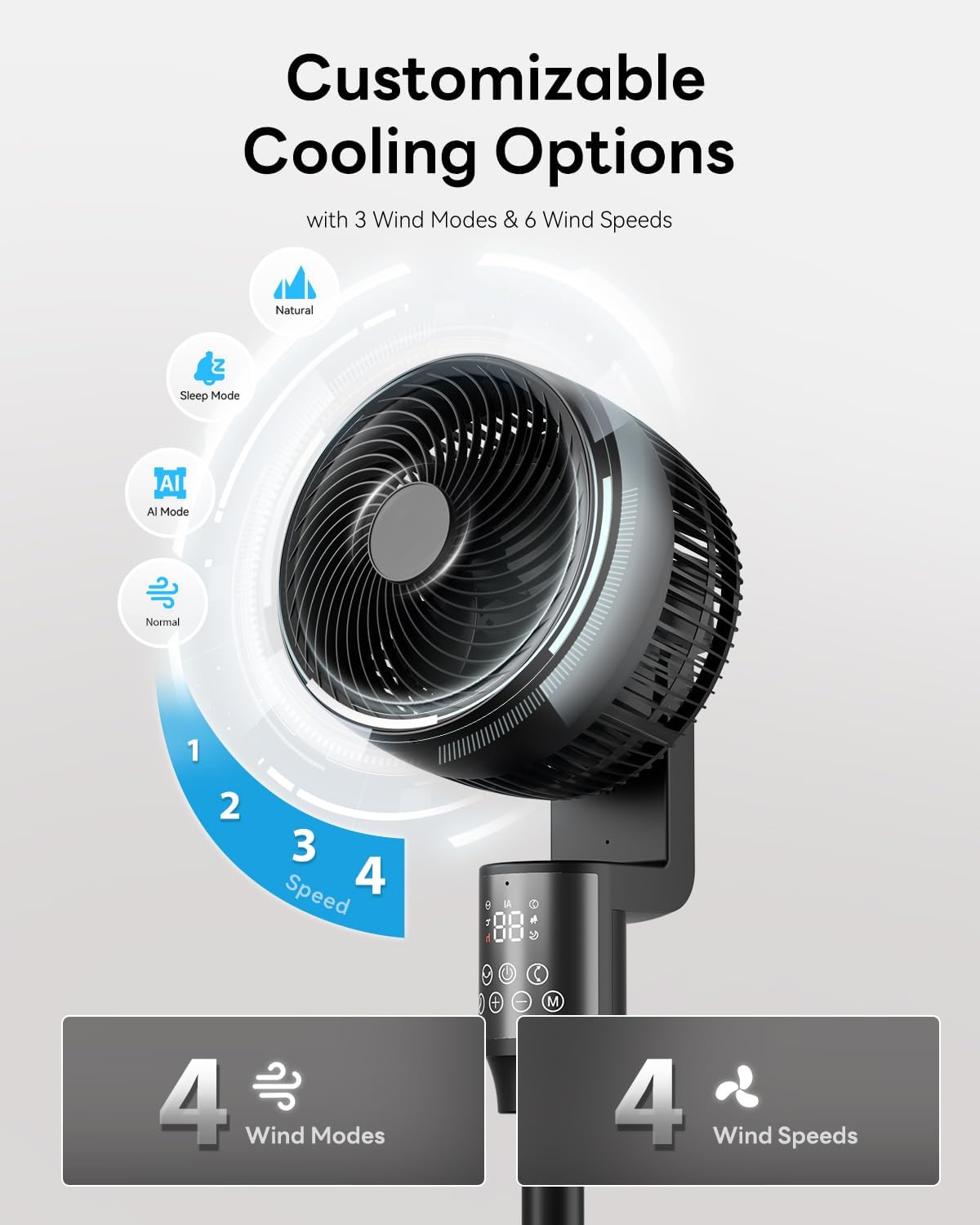
Image 5.2: Close-up of the Abolee Pedestal Fan's control panel. This image illustrates the various modes (Natural, Sleep, AI, Normal) and speed settings available on the fan.
5.5 Oscillation
The fan offers both horizontal and vertical oscillation.
- Horizontal Oscillation (70°): Press the Oscillation button (often indicated by a rotating arrow icon) to activate or deactivate the 70° automatic side-to-side swing.
- Vertical Tilt (90° Manual): The fan head can be manually tilted up to 90° to direct airflow vertically. Adjust the fan head to your desired angle.

Image 5.3: Diagram illustrating the 70° horizontal and 90° vertical oscillation of the Abolee Pedestal Fan. This image visually explains the fan's movement capabilities.
5.6 Timer Function
Set the fan to automatically turn off after a specified period (0-24 hours).
- Press the Timer button (often indicated by a clock icon) repeatedly to set the desired auto-off time in hourly increments. The set time will be displayed on the LED screen.
5.7 Child Lock
The child lock feature prevents unintended changes to settings.
- To activate/deactivate the child lock, press and hold the designated Child Lock button (if available) or a combination of buttons as indicated in the quick start guide.
6. Maintenance
Regular cleaning ensures optimal performance and extends the life of your fan.
- Always unplug the fan before cleaning.
- Cleaning the Exterior: Wipe the exterior surfaces of the fan with a soft, damp cloth. Do not use abrasive cleaners or solvents.
- Cleaning the Grille and Blades: The front grille is removable for easy cleaning. Carefully remove the front grille by twisting or unlatching it (refer to specific instructions if needed). Wipe the fan blades and inside of the grille with a soft, dry or slightly damp cloth to remove dust and debris. Ensure all parts are completely dry before reattaching the grille and operating the fan.
- Storage: When not in use for extended periods, store the fan in a cool, dry place, preferably in its original packaging.
7. Troubleshooting
If you encounter issues with your fan, refer to the following common problems and solutions:
| Problem | Possible Cause | Solution |
|---|---|---|
| Fan does not turn on. | No power supply. | Ensure the power cord is securely plugged into a working outlet. Check the circuit breaker. |
| Remote control not working. | Dead batteries or obstruction. | Replace remote control batteries. Ensure there is no obstruction between the remote and the fan's sensor. |
| Weak airflow. | Fan speed too low or dirty blades/grille. | Increase fan speed. Clean the fan blades and grilles as described in the Maintenance section. |
| Fan makes unusual noise. | Obstruction or loose parts. | Unplug the fan and check for any obstructions in the fan blades or grille. Ensure all parts are securely assembled. |
| Oscillation not working. | Oscillation function not activated. | Press the oscillation button on the control panel or remote. |
If the problem persists after trying these solutions, please contact Abolee customer support.
8. Specifications
| Feature | Detail |
|---|---|
| Model Number | FXH009R |
| Brand | Abolee |
| Color | Black |
| Electric Fan Design | Pedestal Fan / Floor Fan |
| Power Source | AC |
| Product Dimensions (D x W x H) | 14"D x 14"W x 36"H |
| Special Features | Oscillating, Remote Controlled, Timer, Child Lock, AI Smart Mode |
| Controller Type | Remote Control, Touch Panel |
| Number of Speeds | 4 |
| Operating Modes | Normal, Natural, Sleep, AI Smart |
| Noise Level | 23dB (minimum) |
| Wattage | 60 watts |
| Air Flow Capacity | 915 Cubic Feet Per Minute (CFM) |
| Air Throw Distance | Up to 100 feet |
| Voltage | 120 Volts |
| Timer | 0-24 Hours |
| Material | Plastic |
| Certifications | FCC, RoHS, UL |
9. Warranty and Support
9.1 Warranty Information
This Abolee product is covered by a product and labor warranty for 5 years from the date of its original purchase. This warranty covers defects in materials and workmanship under normal use.
The warranty does not cover:
- Damage caused by accident, abuse, misuse, or improper installation.
- Damage caused by unauthorized repairs or modifications.
- Normal wear and tear.
9.2 Customer Support
For warranty claims, technical assistance, or any questions regarding your Abolee Pedestal Fan FXH009R, please contact Abolee customer support through the retailer where the product was purchased or visit the official Abolee website for contact information.