
1. Introduction
The HYELEC HY3010K is a high-precision variable DC power supply designed for various applications including laboratory scientific research, mobile phone repair, electrical maintenance, and DIY projects. It offers adjustable voltage from 0-30V and current from 0-10A, with a 4-digit LED display for accurate monitoring. This manual provides essential information for safe and effective operation of your device.
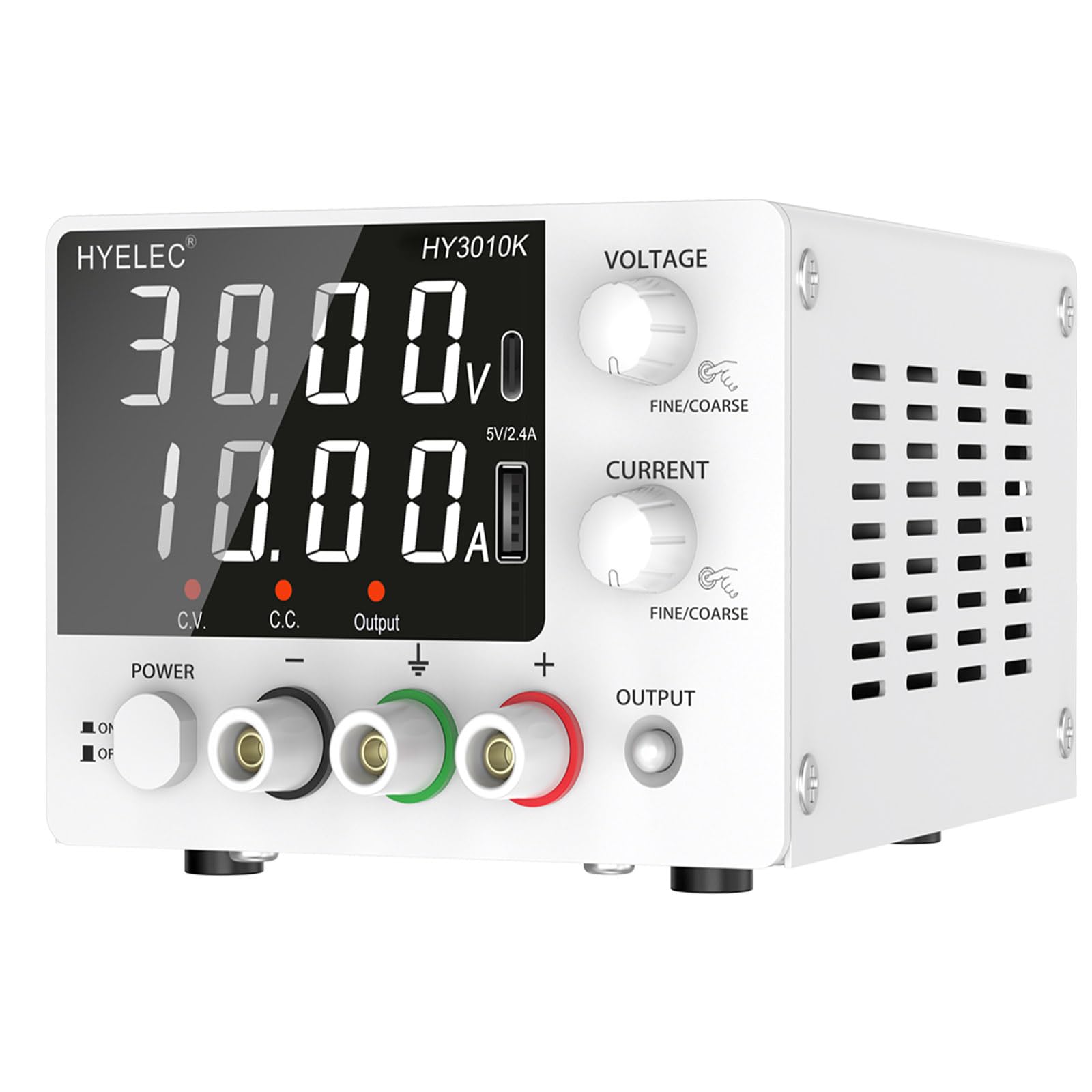
Image 1.1: Front view of the HYELEC HY3010K Variable DC Power Supply.
2. Safety Instructions
To ensure safe operation and prevent damage to the device or injury, please observe the following safety precautions:
- Always connect the power supply to a grounded AC outlet.
- Do not operate the device in wet or damp conditions.
- Ensure proper ventilation; do not block the cooling fan or vents.
- Do not open the casing; there are no user-serviceable parts inside. Refer all servicing to qualified personnel.
- Verify voltage and current settings before connecting to a load to prevent damage to the connected device.
- Use only the provided power cord and output cables.
- Disconnect power before making any connections or disconnections.
3. Package Contents
Verify that all items are present in the package:
- 1 x HYELEC HY3010K DC Power Supply
- 1 x Output Power Cable (with alligator clips)
- 1 x Input Power Cable
- 1 x English User Manual

Image 3.1: Illustration of included accessories: power supply unit, alligator clip cables, power cord, and user manual.
4. Product Features
- High Precision Adjustment: Encoder knob for coarse and fine adjustments of voltage (0.01V resolution) and current (0.01A resolution).
- 4-Digit LED Display: Clear and stable display for voltage and current readings.
- Compact Design: Lightweight (approx. 2.43 lbs) for portability and space-saving.
- Integrated Charging Ports: Features 5V 2.4A USB and Type-C charging ports for small smart devices.
- Multi-Protection Features: Includes surge protection output switch, temperature control fan, and short circuit protection.
- Constant Voltage (CV) & Constant Current (CC) Modes: Automatically switches between modes based on load conditions.
- Durable Performance: Designed for continuous operation, tested for 72-hours uninterrupted at full load.
5. Component Identification
5.1 Front Panel

Image 5.1: Detailed view of the front panel with labeled components.
- Output Voltage Display: Shows the current output voltage.
- Output Current Display: Shows the current output current.
- USB & Type-C Charging Port: Provides 5V/2.4A for charging external devices.
- Voltage Regulation Knob: Adjusts the output voltage. Press to switch between coarse and fine adjustment.
- Current Regulation Knob: Adjusts the output current limit. Press to switch between coarse and fine adjustment.
- Constant Voltage (C.V.) Indicator: Lights up when the power supply is operating in Constant Voltage mode.
- Constant Current (C.C.) Indicator: Lights up when the power supply is operating in Constant Current mode.
- Output Switch: Toggles the power output ON/OFF.
- Power Switch: Turns the main power of the unit ON/OFF.
- Negative Output Terminal (-): Connects to the negative terminal of the load.
- Grounding Terminal (GND): Connects to earth ground for safety.
- Positive Output Terminal (+): Connects to the positive terminal of the load.
5.2 Rear Panel

Image 5.2: Rear view of the power supply, highlighting the cooling fan, power socket, and fuse box.
- Cooling Fan: Activates automatically to dissipate heat, ensuring stable operation.
- Power Socket: For connecting the input power cable.
- Fuse Box: Contains the protective fuse.
6. Setup
Follow these steps to set up your HYELEC HY3010K DC Power Supply:
- Placement: Place the power supply on a stable, level surface with adequate ventilation. Ensure the cooling fan and vents are unobstructed.
- Power Connection: Connect the provided input power cable to the power socket on the rear panel of the unit and then to a grounded AC outlet (104~127V AC, 60Hz).
- Initial Power On: Turn on the main power switch on the front panel. The LED display will illuminate.
- Output Cable Connection: Connect the output power cables (with alligator clips) to the positive (+), negative (-), and grounding (GND) terminals as required by your application.
7. Operating Instructions
7.1 Adjusting Voltage and Current
- Set Voltage: Rotate the Voltage Regulation Knob to adjust the desired output voltage. Press the knob to toggle between coarse adjustment (for whole numbers) and fine adjustment (for decimal places).
- Set Current Limit: Rotate the Current Regulation Knob to set the maximum output current limit. Press the knob to toggle between coarse and fine adjustment. This acts as a safety feature to prevent overcurrent to your load.
7.2 Output Control
The power supply features an Output Switch button. This button controls the activation of the output terminals.
- After setting your desired voltage and current limits, press the Output Switch button to enable power delivery to the output terminals. The "Output" indicator will light up.
- To disable the output, press the Output Switch button again. This allows you to connect or disconnect loads safely without live voltage.
7.3 Constant Voltage (CV) and Constant Current (CC) Modes
The HY3010K automatically operates in either Constant Voltage (CV) or Constant Current (CC) mode:
- Constant Voltage (CV) Mode: When the load current is below the set current limit, the power supply maintains the set output voltage. The C.V. indicator will be lit.
- Constant Current (CC) Mode: If the load current attempts to exceed the set current limit, the power supply automatically switches to CC mode, maintaining the set current limit while the output voltage drops. The C.C. indicator will be lit.

Image 7.1: The power supply demonstrating high precision with an external multimeter.
7.4 USB and Type-C Charging
The integrated USB and Type-C ports provide a fixed 5V, 2.4A output for charging compatible smart devices. These ports operate independently of the main variable DC output.
Video 7.1: Demonstration of the power supply's operation, including adjustment and output control.
8. Maintenance
Proper maintenance ensures the longevity and reliable operation of your power supply:
- Cleaning: Use a soft, dry cloth to clean the exterior of the unit. Do not use abrasive cleaners or solvents.
- Ventilation: Regularly check that the cooling fan and air vents are free from dust and obstructions. A temperature-controlled fan automatically activates when the internal temperature reaches 45°C or higher.
- Storage: Store the power supply in a cool, dry environment when not in use.
- Fuse Replacement: If the unit does not power on, check the fuse located in the fuse box on the rear panel. Replace with a fuse of the same type and rating (T6.3AL250V).

Image 8.1: Internal components illustrating the intelligent cooling fan and heat sink for efficient heat dissipation.
9. Troubleshooting
If you encounter issues with your power supply, refer to the following common problems and solutions:
| Problem | Possible Cause | Solution |
|---|---|---|
| No power/display | Power cord not connected, power switch off, blown fuse. | Check power cord, ensure power switch is ON, replace fuse if necessary. |
| No output voltage/current | Output switch is OFF. | Press the Output Switch button to enable output. |
| Voltage drops unexpectedly | Operating in Constant Current (CC) mode due to load exceeding current limit. | Increase the current limit using the Current Regulation Knob or reduce the load. |
| Unit overheats | Blocked ventilation, excessive load. | Ensure vents are clear. Reduce load if operating continuously at maximum capacity. The fan should activate automatically. |
| Inaccurate readings | External interference, calibration needed. | Ensure proper grounding. If persistent, contact technical support for digital calibration guidance. |
10. Specifications
| Parameter | Value |
|---|---|
| Model Name | HY3010K |
| Brand | HYELEC |
| Output Voltage Range | 0-30V DC |
| Output Current Range | 0-10A DC |
| Output Wattage | 300 Watts |
| Voltage Display Precision | 0.01V |
| Current Display Precision | 0.01A |
| Input Voltage | AC 104~127V (60Hz) |
| Connector Type | USB, Type-C (5V 2.4A) |
| Cooling Method | Air (Temperature-controlled fan) |
| Item Dimensions (L x W x H) | 7.67 x 4.52 x 3.15 inches (19.5 x 11.5 x 8 cm) |
| Item Weight | Approx. 2.43 lbs (1100g) |

Image 10.1: Product dimensions for the HYELEC HY3010K.
11. Warranty and Support
HYELEC provides lifetime technical support for this product. If you have any questions, require assistance with troubleshooting, or need further information, please contact HYELEC customer service. Refer to the contact information provided with your purchase or visit the official HYELEC website for support details.
