
NKPU SY75-Brown
User Manual for NKPU 52 Inch Modern Ceiling Fan with Lights
Model: SY75-Brown | Brand: NKPU
1. Introduction
Thank you for choosing the NKPU 52 Inch Modern Ceiling Fan with Lights. This fan is designed to provide optimal air circulation and adjustable lighting for both indoor and outdoor spaces. It features an ultra-quiet, energy-saving DC reversible motor, convenient remote and mobile app control, and dimmable LED lighting with adjustable color temperatures. This manual provides detailed instructions for installation, operation, maintenance, and troubleshooting to ensure safe and efficient use of your new ceiling fan.

Figure 1: NKPU 52 Inch Modern Ceiling Fan with Lights.
2. Safety Instructions
- Always turn off power at the circuit breaker before installation, cleaning, or maintenance.
- Ensure all electrical connections comply with local codes and ordinances.
- The fan must be mounted to a structurally sound ceiling joist or outlet box capable of supporting the fan's weight.
- Keep hands, clothing, and other objects clear of the fan blades when the fan is in operation.
- Do not use the fan with a dimmer switch not specifically designed for ceiling fans.
- This fan is suitable for both indoor and outdoor (covered patio) use. Ensure it is not directly exposed to water.
3. Package Contents
Verify that all components are present and undamaged before beginning installation:
- 1 x Ceiling Fan Motor Housing
- 5 x Fan Blades (double-sided, Brown and Wood Grain)
- 1 x LED Light Kit
- 1 x Remote Control
- 1 x Remote Control Holder
- 1 x Instruction Manual
- Installation Hardware Kit (screws, wire nuts, etc.)
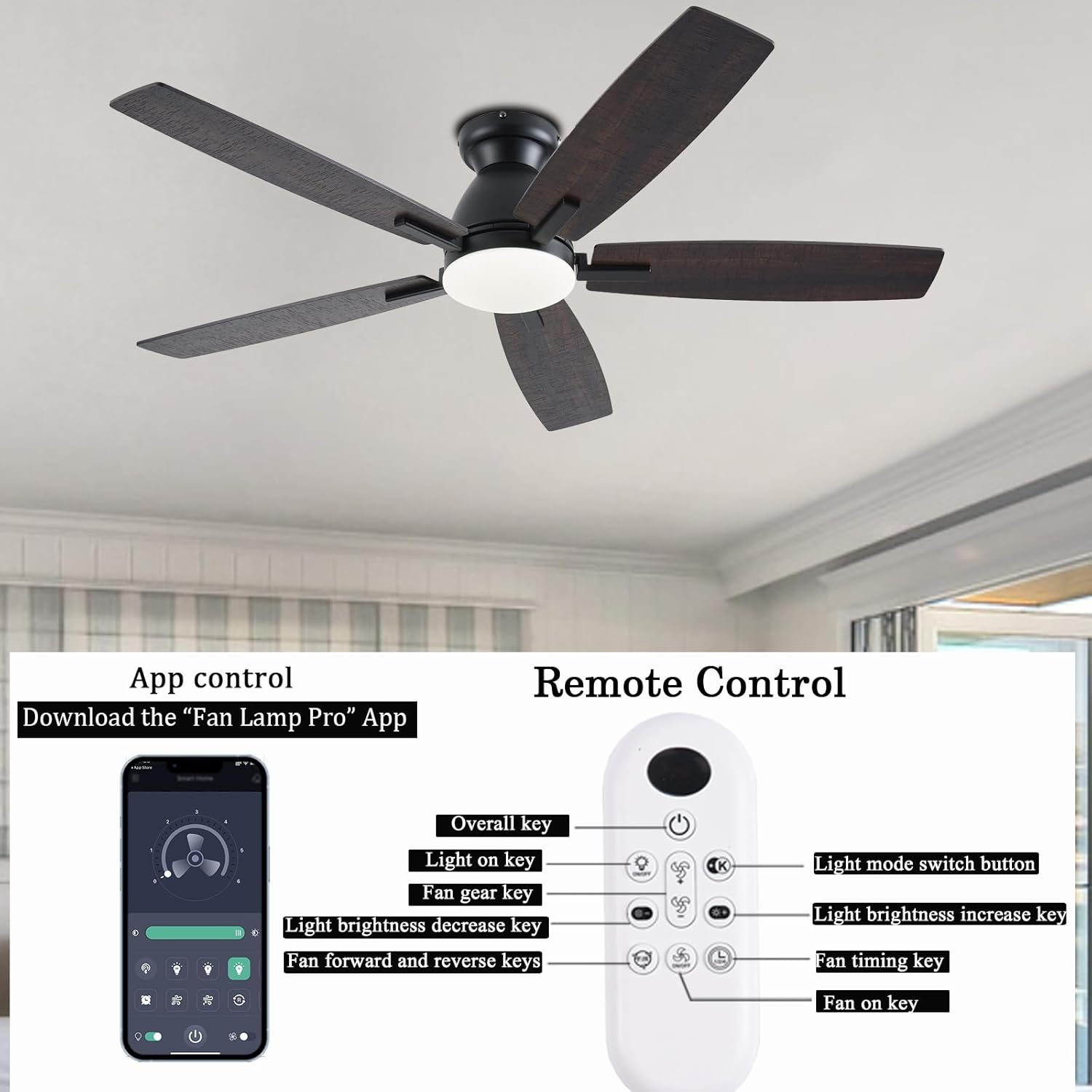
Figure 2: Remote control and mobile app interface for fan operation.
4. Setup and Installation
The NKPU ceiling fan is designed for ultra-easy installation. While detailed installation videos are available, follow these general steps:
- Turn Off Power: Before starting, ensure the power supply to the ceiling fan location is turned off at the circuit breaker.
- Mounting Bracket Installation: Securely attach the mounting bracket to the ceiling joist or an approved electrical outlet box.
- Wiring Connections: Connect the fan's electrical wires to the household wiring according to the provided wiring diagram in the full instruction manual.
- Attach Fan Body: Carefully lift and attach the fan motor housing to the mounting bracket.
- Blade Attachment: Attach the five fan blades to the motor housing. The blades are double-sided, allowing you to choose between a brown or wood-grain finish.
- Light Kit Installation: Install the LED light kit to the bottom of the fan.

Figure 3: Fan dimensions (52 inches wide, 14.17 inches high) and flush mount option.

Figure 4: The fan features double-sided blades, offering two distinct aesthetic options.
5. Operating Instructions
5.1 Remote Control Operation
The included remote control allows for convenient operation of all fan functions:
- On/Off: Press the power button to turn the fan and light on or off.
- Fan Speed: Select from 6 fan speeds (Levels 1-2 for comfortable wind, 3-4 for medium wind, 5-6 for strong wind).
- Light Control: Turn the light on/off, and adjust brightness from 10% to 100%.
- Color Temperature: Cycle through 3 color temperatures: 3000K (Warm Light), 4000K (Natural Light), and 6000K (Cool Light).
- Reversible Motor: Switch between forward (downdraft for summer cooling) and reverse (updraft for winter heat circulation) modes.
- Timer: Set a timer for automatic fan shutdown.
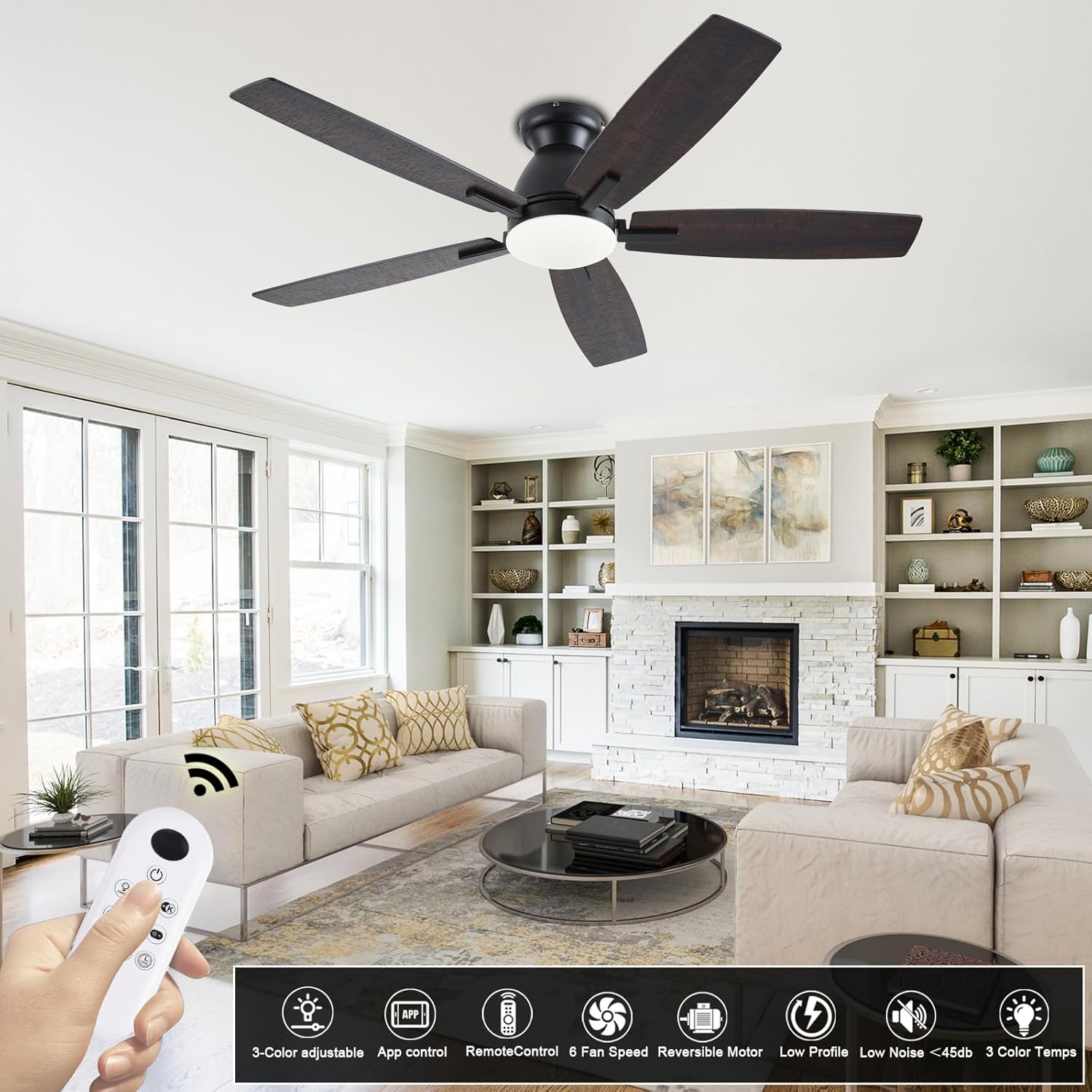
Figure 5: The fan can be conveniently controlled via the included remote.

Figure 6: The integrated LED light offers 3 color temperatures (3000K, 4000K, 6000K) and 10-100% dimming.

Figure 7: The reversible DC motor allows for both summer (downdraft) and winter (updraft) modes to optimize air circulation.
5.2 Mobile App Control
For advanced control, download the "Fan Lamp Pro" app. Scan the QR code provided in the full manual or visit http://www.jasonghost.com/fanlamppro/ to download the app.
App Pairing Steps:
- Completely disconnect the power supply to the ceiling fan (via the wall switch).
- Turn on Bluetooth and the "Fan Lamp Pro" app on your phone.
- Wait 10 seconds, then turn on the power switch of the ceiling fan.
- Press the Bluetooth pairing button in the app 5 to 6 times consecutively.
- If pairing is successful, the lights on the ceiling fan will flash. This process must be completed within 30 seconds after the fan is powered on.
- If pairing fails after 30 seconds, turn off the power and repeat the steps above.

Figure 8: Visual guide for pairing the fan with the "Fan Lamp Pro" mobile application.
6. Maintenance
- Cleaning: To clean the fan, wipe with a soft, damp cloth. Do not use abrasive cleaners or solvents.
- Blade Care: Periodically check the fan blades for dust accumulation and clean them to maintain optimal airflow.
- Connections: Ensure all screws and electrical connections remain tight.
7. Troubleshooting
| Problem | Possible Cause | Solution |
|---|---|---|
| Fan/Light does not turn on. | No power, remote battery dead, fan not paired. | Check circuit breaker. Replace remote battery. Re-pair remote/app (refer to Section 5.2). |
| Fan makes excessive noise. | Loose blades, improper mounting, unbalanced blades. | Ensure all blade screws are tight. Verify fan is flush and level with the ceiling. Check for any obstructions. |
| Remote control not responding. | Battery issue, pairing lost. | Replace remote battery. Re-pair the remote with the fan. |
| App pairing issues. | Incorrect pairing sequence, Bluetooth off. | Follow the app pairing steps precisely (Section 5.2). Ensure phone's Bluetooth is enabled. |
8. Specifications
| Feature | Detail |
|---|---|
| Brand | NKPU |
| Model Name | BR-SY75 |
| Size | 52 inch |
| Color | Brown |
| Material | Metal |
| Indoor/Outdoor Usage | Indoor, Outdoor (covered) |
| Power Source | AC/DC |
| Voltage | 110 Volts |
| Wattage | 60 watts |
| Control Method | App, Remote, Wall Switch |
| Special Features | Adjustable Height, Adjustable Tilt, App Operable, LED Light, Remote Controlled, Reversible DC Motor |
| Item Weight | 11.52 pounds |
| Product Dimensions | 16.53 x 12.59 x 6.69 inches |

Figure 9: The DC motor significantly reduces energy consumption compared to traditional AC motors.

Figure 10: The fan operates at a low noise level (as low as 30dB), ensuring a quiet environment.
9. Warranty and Support
NKPU prioritizes customer satisfaction. This product comes with a 24-month worry-free warranty. We also offer 24-hour after-sales support. If you encounter any problems during the installation or use of your ceiling fan, please do not hesitate to contact us. We are dedicated to serving you wholeheartedly.
Ask a question about this manual
Ask about setup, troubleshooting, compatibility, parts, safety, or missing instructions. Manuals+ will review the question and use this page’s manual context to help answer it.