
Introduction
This manual provides comprehensive instructions for the TEMGO 36V (38.4V) 100Ah LiFePO4 Lithium Golf Cart Battery. It covers installation, operation, maintenance, and troubleshooting to ensure safe and efficient use of your battery system. Please read this manual thoroughly before installation and use.
Setup and Installation
1. Unpacking and Component Verification
Carefully unpack all components and verify that the following items are included:
- TEMGO 36V (38.4V) 100Ah LiFePO4 Battery
- 42.6V 20A Charger
- 2.8-inch LCD Touch Display
- Retention Strap
If any components are missing or damaged, please contact TEMGO customer support immediately.
2. Compatibility Check
This battery is compatible with most 36V golf carts and low-speed utility carts that use a standard 36V controller system. It is crucial to verify your golf cart's controller voltage and overall system compatibility before installation. This battery is not compatible with golf carts originally equipped with lithium batteries that require CAN/communication protocols.
3. Physical Installation
The TEMGO LiFePO4 battery is designed to be lighter and more compact than traditional lead-acid batteries, often fitting into the space previously occupied by multiple lead-acid units.
- Battery Placement: Position the battery securely within the golf cart's battery compartment.
- Tray Modification (if necessary): Some older golf cart battery trays may have internal brackets or tabs that interfere with the new battery's fit. These may need to be removed or modified (e.g., by grinding) to ensure the battery sits flush and securely.
- Securing the Battery: Use the provided retention strap to firmly secure the battery in place, preventing movement during operation.

Image: TEMGO 36V 100Ah LiFePO4 battery showing dimensions (10.59"D x 20.67"W x 8.66"H), weight (61.73 lbs), and M8 bolt terminals.

Image: Illustration of the TEMGO LiFePO4 battery installed in a golf cart, highlighting its compact size and lighter weight compared to traditional lead-acid batteries.
4. Wiring Connections
Before making any connections, ensure the golf cart's power is completely off.
- Disconnect Old Batteries: If replacing lead-acid batteries, carefully disconnect them. It is recommended to tape and label wires as they are disconnected to correctly identify positive (+) and negative (-) terminals for the new battery.
- Connect TEMGO Battery: Connect the golf cart's main positive and negative cables to the corresponding terminals on the TEMGO battery. Ensure all connections are tight and secure.
- EZGO TXT Specific Wiring: For EZGO TXT golf carts, the original red wire from the charging port (part of the old lockout system) needs to be cut from the port. Attach an eyelet to this red wire and connect it to the positive battery post of the TEMGO battery. This bypasses the old lockout system, which is not needed with the new TEMGO charger.
5. LCD Display and Charger Installation
- LCD Display: Mount the 2.8-inch LCD touch display in a convenient and visible location on your golf cart's dashboard. Connect it to the battery system as per the included wiring instructions.
- Charger: The 42.6V 20A charger can be mounted on the golf cart for convenience. Ensure it is installed in a location that allows for proper ventilation and easy access for charging.

Image: Overview of the TEMGO Golf Cart Battery Kit, showing the 38.4V 100Ah battery, 42.6V 20A charger, LCD screen, connection cables, screws, and retention strap.
Video: Official TEMGO Golf Cart Battery installation and feature overview. This video demonstrates the physical installation process and highlights key features of the battery system.
Operating Instructions
1. Battery Monitoring
The TEMGO battery system offers two convenient ways to monitor its status:
- LCD Touch Display: The 2.8-inch LCD screen provides real-time data including voltage, current, temperature, and power. It also allows for one-tap control of charge and discharge functions.
- Bluetooth APP: The integrated Bluetooth-enabled 200A Battery Management System (BMS) allows for real-time monitoring via a dedicated mobile application. This app provides detailed battery statistics and protection status.
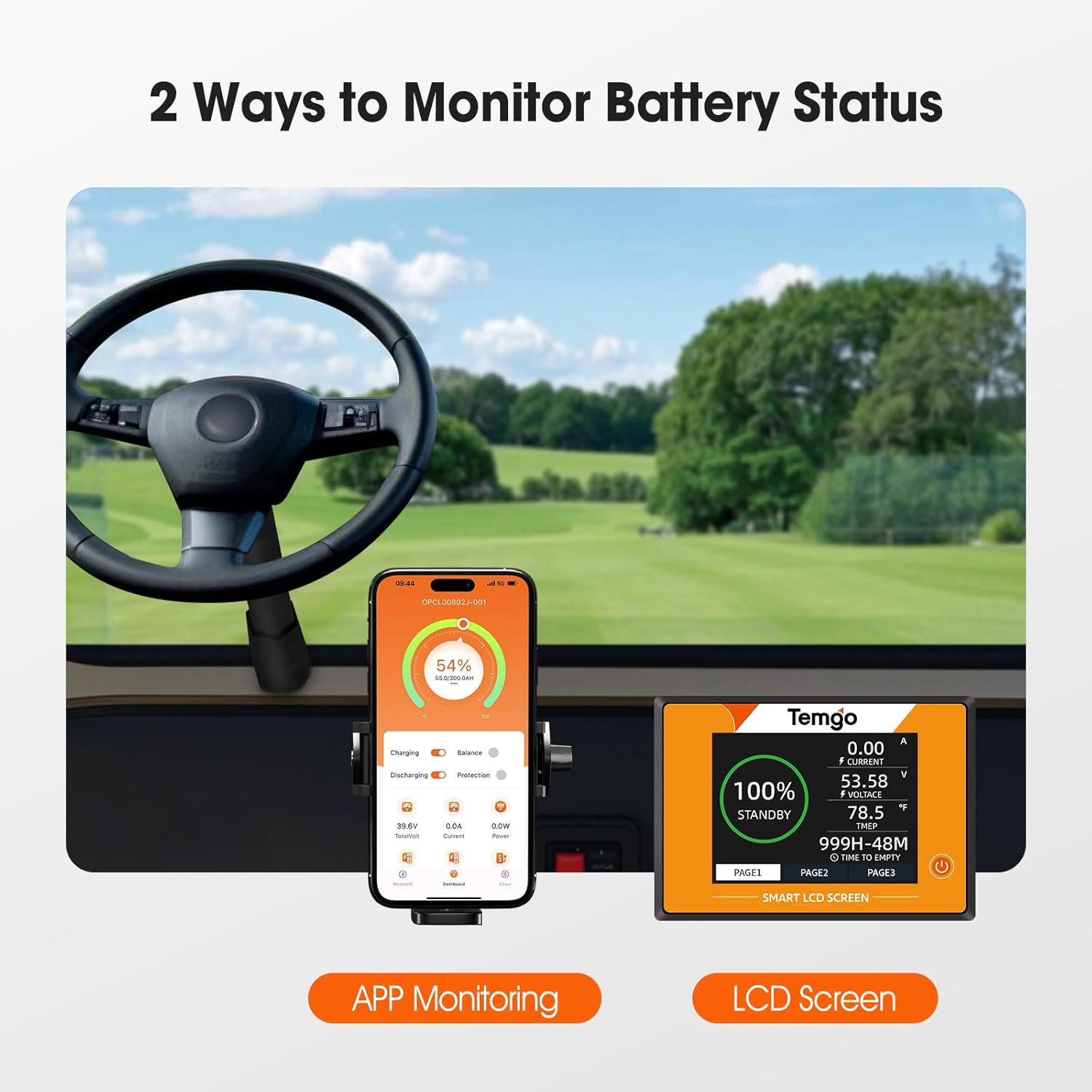
Image: Depicts a golf cart dashboard with both a mobile phone displaying the TEMGO app and the LCD screen showing battery status, illustrating the dual monitoring options.

Image: A hand interacting with the TEMGO touchscreen display mounted on a golf cart dashboard, showing its one-tap control functionality for monitoring voltage, current, temperature, and power.
2. Charging the Battery
Use only the dedicated 42.6V 20A charger provided with your TEMGO battery. Connect the charger to a standard AC power outlet and then to the battery's charging port. The battery can be charged from 0% to 100% in approximately 5-6 hours.
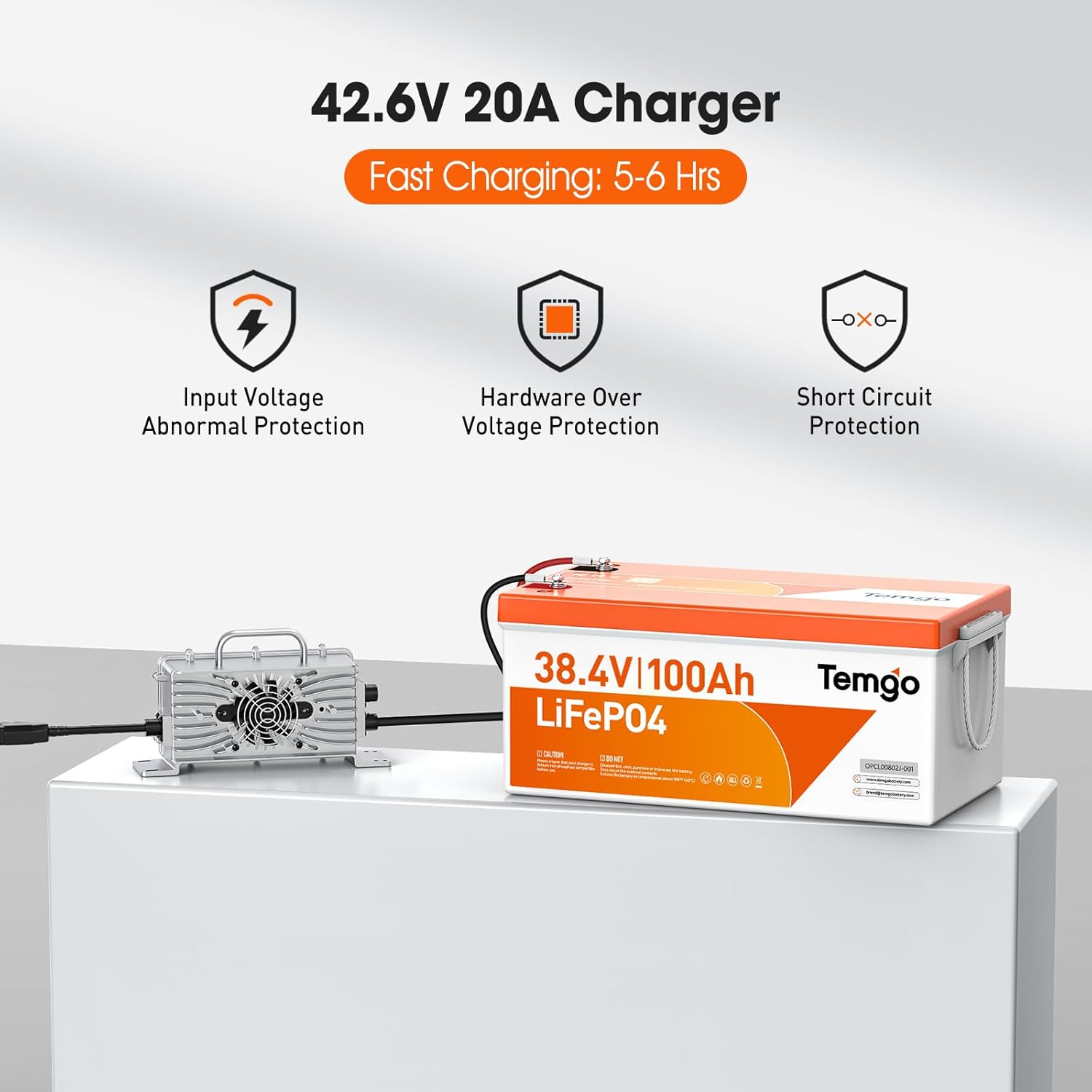
Image: The TEMGO 42.6V 20A charger connected to the 38.4V 100Ah LiFePO4 battery, indicating fast charging capability within 5-6 hours and built-in protections.
3. Scalable Capacity (Parallel Connection)
The TEMGO 36V (38.4V) 100Ah LiFePO4 battery supports parallel connection of up to 4 units. This allows for expanding the total energy capacity to 15.36kWh, making it suitable for various applications beyond golf carts, such as RVs, home energy storage, and remote power systems. Consult a qualified technician for parallel wiring configurations.
Maintenance
TEMGO LiFePO4 batteries are designed for low maintenance, offering a significant advantage over traditional lead-acid batteries. To ensure optimal performance and longevity, follow these general guidelines:
- Regular Inspection: Periodically check the battery terminals for cleanliness and ensure all connections are tight. Loose or corroded connections can affect performance.
- Cleaning: Keep the battery surface clean and free from dust, dirt, and debris. Use a dry cloth for cleaning. Do not use harsh chemicals or abrasive materials.
- Storage: If the battery will not be used for an extended period, store it in a cool, dry place. The battery features low-temperature cut-off protection, stopping discharge below -4°F (-20°C) and charging below 32°F (0°C). For optimal storage, maintain temperatures above 32°F (0°C).

Image: Illustrates the low-temperature cut-off protection feature of the TEMGO battery, showing that it stops discharging below -4°F (-20°C) and stops charging below 32°F (0°C), with optimal storage above 32°F (0°C).
Troubleshooting
If you encounter issues with your TEMGO battery, refer to the following troubleshooting steps:
1. Battery Not Charging
- Check Connections: Ensure the charger is securely connected to both the battery's charging port and a functional AC power outlet.
- Power Source: Verify that the power outlet is active and supplying power. Test with another device if unsure.
- Charger Status: Observe the charger's indicators (if any) and listen for the charging fan. If the fan is not running or indicators suggest an issue, the charger itself may be faulty.
- Extension Cords: If using an extension cord, ensure it is in good condition and rated for the charger's power requirements. Faulty extension cords can prevent proper charging.
2. Cart Performance Issues (Overheating/Damage)
When upgrading from lead-acid to a high-power lithium battery, the existing golf cart's electrical system (controller, motor, solenoid, wiring) may not be adequately rated for the increased power output of the LiFePO4 battery. Symptoms may include:
- Controller, motor, or solenoid overheating.
- Cart shutting down unexpectedly.
- Melted wires or damaged electrical components.
If you experience these issues, especially with lifted golf carts or those equipped with heavy-duty tires, it is highly recommended to consult a qualified golf cart technician. Upgrading the golf cart's electrical components (e.g., to a 500A solenoid, 400A controller, and 2-gauge wiring) may be necessary to safely handle the battery's power output and prevent damage.
3. Bluetooth Connectivity Issues
- Enable Bluetooth: Ensure Bluetooth is enabled on your mobile device and the TEMGO battery.
- App Restart: Close and restart the TEMGO mobile application.
- Battery Restart: If issues persist, try cycling the power on the battery (if applicable) or disconnecting and reconnecting it briefly.
Specifications
| Feature | Specification |
|---|---|
| Brand | TEMGO |
| Model Number | TM384100 |
| Battery Type | LiFePO4 (Lithium Iron Phosphate) |
| Nominal Voltage | 36V (38.4V) |
| Capacity | 100Ah |
| Max Continuous Discharge Current | 200A |
| Peak Discharge Current | 600A (for 3 seconds) |
| Max Power Output | 7.68kW |
| Cycle Life | 5000+ deep cycles (80% DOD) |
| Battery Management System (BMS) | Integrated 200A Smart BMS (Overcharge, Over-discharge, Short Circuit, Temperature Protection) |
| Monitoring | Bluetooth APP, 2.8-inch LCD Touch Display |
| Charger | 42.6V 20A (Included) |
| Charging Time (0-100%) | 5-6 hours |
| Item Weight | 61.7 pounds |
| Product Dimensions (D x W x H) | 10.59" x 20.67" x 8.66" |
| Terminal Type | M8 |
| Waterproof Rating | IP65 |
| Parallel Connection | Up to 4 units |
Warranty Information
The TEMGO 36V (38.4V) 100Ah LiFePO4 Lithium Golf Cart Battery comes with a manufacturer's warranty. For specific details regarding the warranty period, coverage, and claims process, please contact TEMGO customer support directly.
Additionally, extended protection plans (2-Year, 3-Year, and Complete Protect) may be available for purchase separately. These plans are not part of the standard manufacturer's warranty and offer additional coverage options.
Customer Support
For technical assistance, product inquiries, or customer service, please contact TEMGO US. Our support team is available to help with any questions or issues you may have.
You can also visit the official TEMGO Store on Amazon for more products and information: TEMGO Amazon Store