
1. Introduction
Thank you for choosing the sharge Flow Mini 2 Portable Charger. This compact and versatile power bank is designed to provide fast and convenient charging for your mobile devices, featuring built-in cables and interchangeable connectors for both iOS and USB-C devices. Please read this manual carefully to ensure proper use and optimal performance of your device.

Image: The sharge Flow Mini 2 portable charger, highlighting its compact design and built-in cable.
2. Package Contents
Verify that all items are present in your package:
- 1x sharge Flow Mini 2 Power Bank
- 1x User Manual
- 2x Interchangeable Connectors (1x USB-C, 1x Lightning)

Image: Contents of the sharge Flow Mini 2 package, including the power bank, user manual, and interchangeable connectors.
3. Product Overview
The sharge Flow Mini 2 features a transparent design, an integrated charging cable, and a slot for interchangeable connectors. An orange button indicates the power status and initiates charging.

Image: Top-down view of the sharge Flow Mini 2, showing the built-in USB-C cable, the slot for the interchangeable connector, and the power button.
Key Features:
- 22.5W Max Output: Fast charging for various devices.
- Built-in Cable: Integrated USB-C cable for convenience.
- Interchangeable Connectors: Includes both USB-C and Lightning connectors for broad compatibility.
- Compact Design: Smaller than a film roll, designed for portability.
- Safety Protections: Multiple safety features including overvoltage, undervoltage, short-circuit, overcurrent, overload, and overtemperature protection.
4. Setup
4.1 Initial Charging of the Power Bank
Before first use, fully charge your sharge Flow Mini 2. You can charge it using either the built-in USB-C cable or by plugging it directly into a USB-C power adapter using the USB-C connector.
- Using the Built-in Cable: Unfold the built-in USB-C cable and connect it to a USB-A port on a power adapter or computer.
- Using the USB-C Connector: Attach the USB-C connector to the power bank's charging port and plug it into a USB-C power adapter.
The LED indicators on the side will show the charging status. All four LEDs lit indicate a full charge.

Image: Two methods of recharging the power bank: using the USB-C connector directly into a wall adapter, and using the built-in USB-C cable connected to a charging block.
4.2 Attaching Interchangeable Connectors
The sharge Flow Mini 2 comes with interchangeable USB-C and Lightning connectors. Choose the appropriate connector for your device.
- Pull out the desired connector from its storage slot.
- Plug the connector into the designated port on the power bank.
- Ensure the connector is securely seated before use.

Image: Step-by-step guide showing how to pull out a connector, plug in a new one, and then connect it to a smartphone for charging.
5. Operating Instructions
5.1 Charging Your Device
The sharge Flow Mini 2 supports charging for both iOS and USB-C devices.
- For USB-C Devices:
- Use the built-in USB-C cable.
- Alternatively, use the attached USB-C connector.
- For Lightning Devices:
- Attach the Lightning connector to the power bank.
- Connect the appropriate connector or built-in cable to your device's charging port.
- Press the orange power button on the side of the power bank to initiate charging. The LED indicators will illuminate to show the remaining battery level.
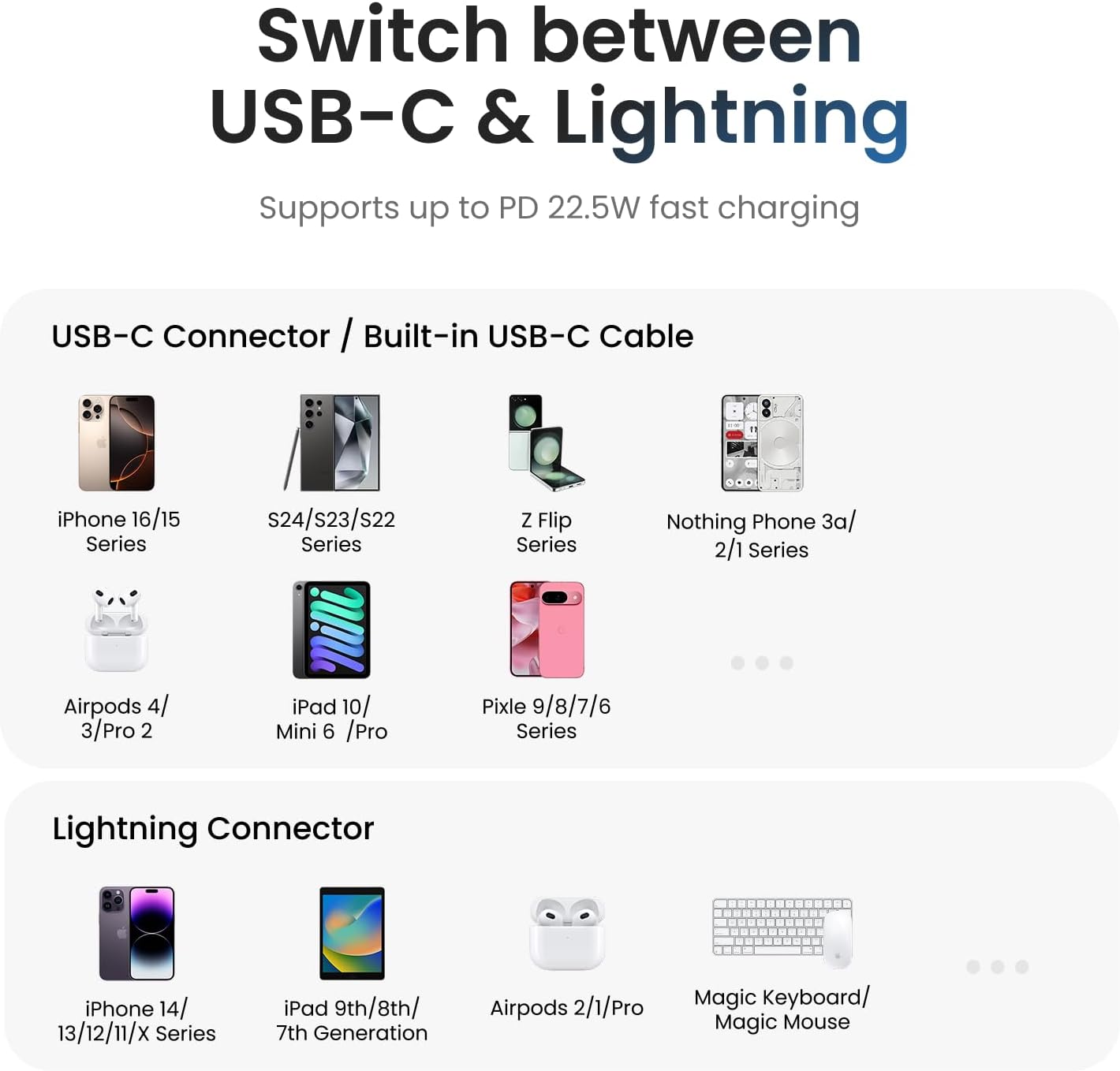
Image: Diagram illustrating the compatibility of the sharge Flow Mini 2 with various USB-C and Lightning devices, including iPhones, Galaxies, iPads, and AirPods.
5.2 Charging Multiple Devices (Pass-Through Charging)
The sharge Flow Mini 2 can charge two devices simultaneously. It also supports pass-through charging, allowing you to charge the power bank itself while it charges another device.

Image: The sharge Flow Mini 2 simultaneously charging a smartphone via its attached connector and a pair of wireless earbuds via its built-in cable.

Image: The sharge Flow Mini 2 being recharged by a wall adapter while simultaneously charging a smartphone, demonstrating pass-through charging functionality.
5.3 Checking Battery Level
Press the orange power button once to view the current battery level indicated by the four LED lights on the side of the power bank.
6. Maintenance
- Cleaning: Use a soft, dry cloth to clean the power bank. Avoid using harsh chemicals or abrasive materials.
- Storage: Store the power bank in a cool, dry place away from direct sunlight and extreme temperatures.
- Battery Care: To prolong battery life, fully charge the power bank at least once every three months if not in regular use.
- Avoid Drops: Protect the device from drops and impacts.
7. Troubleshooting
| Problem | Possible Cause | Solution |
|---|---|---|
| Power bank not charging device. |
|
|
| Power bank not recharging. |
|
|
| Slow charging speed. |
|
|
8. Specifications
| Feature | Detail |
|---|---|
| Model Number | T1 |
| Battery Capacity | 5000 Milliamp Hours (mAh) |
| Max Output | 22.5W (PD 20W for iPhone 16/15) |
| Input | USB-C (via built-in cable or connector) |
| Connectors | Built-in USB-C cable, Interchangeable USB-C and Lightning connectors |
| Product Dimensions | 3.1 x 1.3 x 0.99 inches (79.4 x 33.5 x 25.1 mm) |
| Item Weight | 3.52 ounces (100 grams) |
| Special Features | 22.5W Max input/Output, Built-in Cable, USB-C & Lightning Connectors, Pass-through charging, Airplane-safe |

Image: Technical drawing showing the dimensions of the sharge Flow Mini 2 portable charger.
9. Safety Information
Please read and follow these safety guidelines to prevent damage to the product or injury to yourself:
- Do not expose the power bank to extreme temperatures (hot or cold), direct sunlight, or high humidity.
- Do not disassemble, modify, or attempt to repair the device.
- Keep away from water and other liquids.
- Do not drop, puncture, or apply excessive force to the power bank.
- Keep out of reach of children.
- Dispose of the product according to local regulations for electronic waste.
- The power bank is equipped with multiple safety protections:
- Overvoltage protection
- Undervoltage protection
- Short-circuit protection
- Overcurrent protection
- Overload protection
- Overtemperature protection

Image: Graphic illustrating the superior safety features of the sharge Flow Mini 2, including various protection mechanisms.
10. Warranty and Support
The sharge Flow Mini 2 Portable Charger comes with a 1-year friendly customer service and support warranty.
For technical support, warranty claims, or other inquiries, please contact sharge customer service through their official channels or the retailer where the product was purchased.
Manufacturer: Sharge Technology (Shenzhen) Co., Ltd.