
SIBRILLE LB-8058
SIBRILLE RGB Floor Lamp Instruction Manual
Model: LB-8058
1. Introduction
Thank you for choosing the SIBRILLE RGB Floor Lamp. This 36W LED dimmable standing lamp features three independently swiveling lights, offering a wide range of color-changing options and stepless dimming. Designed for versatility, it enhances the ambiance of living rooms, bedrooms, gaming rooms, and offices. This manual provides essential information for safe setup, operation, and maintenance of your new floor lamp.
2. Safety Information
Please read all instructions carefully before assembly and use. Keep this manual for future reference.
- Ensure the lamp is unplugged from the power outlet before assembly, cleaning, or maintenance.
- Do not operate the lamp with a damaged cord or plug. If damaged, contact customer service.
- This lamp is designed for indoor use only. Do not expose to water or high humidity.
- Keep the lamp away from heat sources and direct sunlight to prevent damage.
- Ensure the base is stable and placed on a flat, level surface to prevent tipping.
- The LED lights are integrated and cannot be replaced by the user.
3. Package Contents
Verify that all components are present before beginning assembly:
- Lamp Head Assembly (with integrated LEDs)
- Lamp Pole Sections (multiple pieces)
- Stable Lamp Base
- Power Adapter
- Remote Control
- Instruction Manual
4. Setup and Assembly
Assembly of your SIBRILLE RGB Floor Lamp is designed to be simple and quick. Follow these steps:
- Attach Lamp Head to Pole: Carefully screw the lamp head assembly onto the first pole section. Ensure it is securely tightened.
- Assemble Pole Sections: Continue screwing the remaining pole sections together, connecting them firmly.
- Insert Pole into Base: Insert the assembled lamp pole into the stable lamp base. Rotate until it is fully seated and stable.
- Connect Power Adapter: Plug the power adapter into the lamp's power input, then plug the adapter into a standard wall outlet.

Figure 4.1: Simple assembly process and sturdy base design.
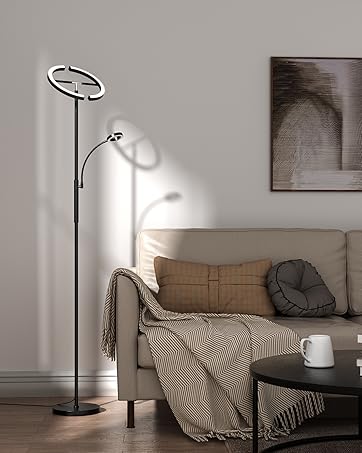
Figure 4.2: Visual guide for connecting lamp components.
5. Operating Instructions
Your SIBRILLE RGB Floor Lamp offers versatile control options for a personalized lighting experience.
5.1. Power On/Off
The lamp can be turned on or off using the remote control or the touch controls on the lamp pole.
5.2. Light Adjustment (RGBCW & Color Temperature)
The 36W RGB floor lamp supports stepless dimming from 10% to 100% brightness and color temperature adjustment from 2700K (warm white) to 6500K (cool white). You can also select from a wide range of RGB colors and dynamic modes.
- Brightness Adjustment: Use the brightness buttons on the remote control or long-press the touch controls on the lamp pole to adjust steplessly.
- Color Temperature Adjustment: Use the color temperature buttons on the remote control to cycle through warm, neutral, and cool white light.
- RGB Color Selection: Access various single RGB colors and dynamic modes (Jumping, Gradienting, Flashing, Smoothing) via the remote control.
- Reading Lamp Mode: A dedicated reading lamp mode is available for optimal illumination during reading or working.

Figure 5.1: Brightness and Color Temperature Adjustment.

Figure 5.2: Explore a spectrum of color options and dynamic lighting modes.
5.3. Independent Control & Rotation
Each of the three lamp heads can be rotated 350 degrees horizontally and 180 degrees vertically, allowing you to direct light precisely where needed. Each light can also be controlled independently for brightness and color.
- Swivel Heads: Manually adjust the direction of each lamp head to illuminate specific areas or create desired lighting effects.
- Individual Control: Use the remote control (buttons 1, 2, 3) or the corresponding touch controls on the lamp pole to adjust each light's settings independently.

Figure 5.3: Flexible lamp head rotation for targeted illumination.

Figure 5.4: Each light can be controlled individually.
5.4. Remote and Touch Control
The lamp can be controlled using the included remote control or the integrated touch controls on the lamp pole.
- Remote Control: Offers full functionality including power, brightness, color temperature, RGB modes, individual light control, and a 1-hour timing function. The remote features a magnetic design for convenient storage on metal surfaces.
- Touch Control: Short press to cycle through color temperatures (3000K, 4000K, 5000K, 6500K, Off). Long press to adjust brightness steplessly. Each light has its own touch control.
- Memory Function: The lamp remembers your last used lighting mode when turned off and on again.

Figure 5.5: Remote and touch control options for comprehensive light management.
Video 5.1: Demonstration of the SIBRILLE Upgraded 3-lights RGBCW Tree Floor Lamp features, including color changing and control options.
6. Maintenance
To ensure the longevity and optimal performance of your SIBRILLE RGB Floor Lamp, follow these simple maintenance guidelines:
- Cleaning: Dust the lamp regularly with a soft, dry cloth. For more stubborn marks, lightly dampen the cloth with water and wipe gently. Do not use abrasive cleaners or solvents.
- Power Off: Always unplug the lamp before cleaning to prevent electrical shock.
- Bulb Replacement: The LED lights are integrated and designed for long-term use. They are not user-replaceable.
- Cord Care: Periodically inspect the power cord for any signs of damage. If the cord is damaged, discontinue use and contact customer support.
7. Troubleshooting
If you encounter any issues with your SIBRILLE RGB Floor Lamp, please refer to the following common problems and solutions:
| Problem | Possible Cause | Solution |
|---|---|---|
| Lamp does not turn on. | No power supply; loose connection; remote control battery low. | Check if the power adapter is securely plugged into the wall outlet and the lamp. Ensure the outlet is functional. Replace remote control batteries if needed. |
| Remote control not working. | Batteries are dead or incorrectly inserted; remote is too far from the lamp. | Replace batteries, ensuring correct polarity. Move closer to the lamp (within 50ft/15m). |
| Lights flicker or dim unexpectedly. | Unstable power supply; internal wiring issue. | Try plugging the lamp into a different outlet. If the problem persists, contact customer service. |
| Cannot change colors or modes. | Incorrect remote button pressed; temporary software glitch. | Refer to the remote control diagram in Section 5.4. Try unplugging the lamp for 30 seconds and plugging it back in to reset. |
If the problem persists after trying these solutions, please contact SIBRILLE customer support for assistance.
8. Specifications
| Feature | Detail |
|---|---|
| Brand | SIBRILLE |
| Model Number | LB-8058 |
| Lamp Type | Floor Lamp |
| Light Source Type | LED |
| Wattage | 36 watts (12W*3) |
| Brightness | 3000 Lumen |
| Color Temperature | 2700K-6500K |
| Control Method | Remote Control, Touch Control |
| Product Dimensions | 12.91"D x 10"W x 68"H |
| Base Material | Metal |
| Shade Material | Polycarbonate |
| Power Source | Corded Electric |
| Voltage | 110 Volts (AC) |
| Item Weight | 8.91 pounds |
| Country of Origin | China |
9. Warranty and Support
SIBRILLE stands behind the quality of its products.
- 2-Year Warranty: Your SIBRILLE RGB Floor Lamp comes with a 2-year warranty from the date of purchase. This warranty covers manufacturing defects and issues arising from normal use.
- Customer Service: If you experience any problems or have questions regarding your lamp, please do not hesitate to contact our customer service team. We are committed to providing a good shopping experience and will resolve issues within 24 hours.
- Contact Information: Please refer to the product packaging or the SIBRILLE official website for the most up-to-date customer support contact details.
Ask a question about this manual
Ask about setup, troubleshooting, compatibility, parts, safety, or missing instructions. Manuals+ will review the question and use this page’s manual context to help answer it.