
Anker A2699G21
Anker Zolo 20W Type C Charger User Manual
Model: A2699G21
1. Introduction
Thank you for choosing the Anker Zolo 20W Type C Charger. This compact and powerful wall adapter is designed to provide fast and efficient charging for a wide range of electronic devices, including smartphones, tablets, and other USB-C compatible gadgets. Please read this manual carefully before using the product to ensure safe and optimal performance.
2. Safety Information
To prevent injury or damage to your device, please observe the following safety precautions:
- Do not expose the charger to liquids, moisture, or extreme temperatures.
- Do not disassemble, modify, or attempt to repair the charger.
- Keep out of reach of children.
- Use only with compatible devices and cables.
- Unplug the charger during lightning storms or when unused for long periods.
- Ensure proper ventilation around the charger during use.

Figure 2.1: The Anker Zolo charger incorporates multiple safety protections, including overcurrent, overvoltage, short circuit, overtemperature, and smart low temperature protection, ensuring safe charging in every use.
3. Setup
Setting up your Anker Zolo charger is straightforward:
- Unpack the charger from its packaging.
- Insert the charger's prongs into a standard wall outlet.
- Connect a compatible USB-C charging cable (not included) to the charger's USB-C port.
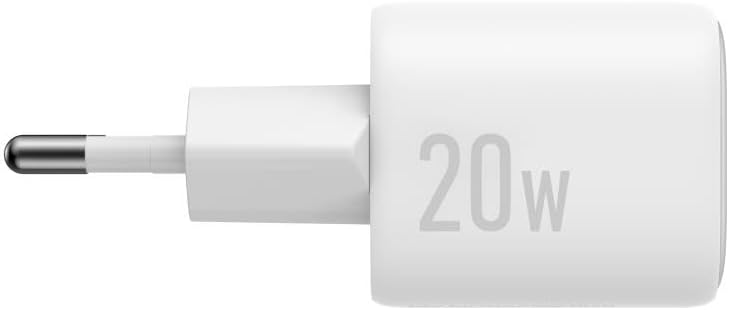
Figure 3.1: The Anker Zolo 20W Type C Charger, ready for connection to a power outlet.
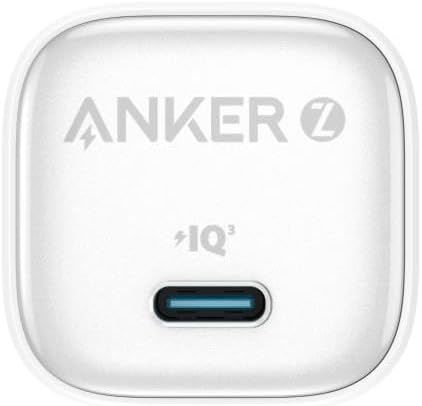
Figure 3.2: The USB-C port on the Anker Zolo charger, where the charging cable is connected.
4. Operating Instructions
Once the charger is plugged into a wall outlet and a cable is connected:
- Connect the other end of the USB-C charging cable to your electronic device (e.g., smartphone, tablet).
- The device should begin charging automatically. The Anker Zolo charger supports fast charging for compatible devices, delivering up to 20W of power.
- When charging is complete, disconnect your device from the cable, and then unplug the charger from the wall outlet.

Figure 4.1: The Anker Zolo charger can be used with a variety of devices, providing a single charging solution for all your needs.

Figure 4.2: The charger provides 20W maximum fast charging, utilizing GaN technology for efficient power delivery.
5. Maintenance
Proper maintenance ensures the longevity of your charger:
- Cleaning: Disconnect the charger from the power outlet before cleaning. Use a soft, dry cloth to wipe the surface. Do not use liquid cleaners or aerosols.
- Storage: Store the charger in a cool, dry place away from direct sunlight and extreme temperatures. Its compact size makes it highly portable.

Figure 5.1: The Anker Zolo charger features a powerful yet mini design, making it highly portable and easy to store.
6. Troubleshooting
If you encounter issues with your Anker Zolo charger, try the following solutions:
- Device not charging:
- Ensure the charger is securely plugged into a working wall outlet.
- Check if the charging cable is properly connected to both the charger and your device.
- Try using a different USB-C cable to rule out a faulty cable.
- Test the charger with a different device to confirm the charger is functioning.
- Slow charging:
- Ensure your device supports fast charging and that you are using a compatible cable.
- Check if your device's battery is extremely low, which can sometimes cause slower initial charging.
- Avoid using your device heavily while charging, as this can slow down the process.
- Charger feels warm:
- It is normal for chargers to become warm during operation, especially during fast charging.
- If the charger becomes excessively hot or emits smoke/odor, immediately unplug it and discontinue use.

Figure 6.1: The Anker Zolo charger features advanced temperature control technology to maintain optimal operating temperatures.
7. Specifications
| Feature | Detail |
|---|---|
| Brand | Anker |
| Model Number | A2699G21 |
| Wattage | 20 watts |
| Power Source | AC |
| Input Voltage | 240 Volt |
| Output Current | 3 Amperes |
| Connectivity Technology | USB (Type C) |
| Number of USB Ports | 1 |
| Material Type | Plastic |
| Color | White |
| Package Dimensions | 14.6 x 10.1 x 3.7 cm |
| Item Weight | 80 grams |
| Country of Origin | China |
8. Warranty and Support
Anker products are designed for reliability and performance. For information regarding warranty coverage, technical support, or customer service, please refer to the official Anker website or contact their customer support directly. Keep your purchase receipt as proof of purchase for warranty claims.
You can visit the Anker Store on Amazon for more information: Anker Store
Related Documents - A2699G21
 |
Anker Zolo 20W Type C A2699 მომხმარებლის სახელმძღვანელო Anker Zolo 20W Type C A2699 დამტენის დეტალური მომხმარებლის სახელმძღვანელო. შეიტყვეთ უსაფრთხოების ზომების, დაყენების, გამოყენების, მოვლისა და პრობლემების მოგვარების შესახებ. |
 |
Anker PowerPort III Nano A2633 USB-C Charger User Manual User manual for the Anker PowerPort III Nano A2633, a 20W USB-C charger. Provides instructions on usage, safety precautions, technical specifications, warranty information, and customer support contacts. |
 |
Anker PowerPort III Nano (A2633) User Manual - Fast Charging Guide Official user manual for the Anker PowerPort III Nano (Model A2633), providing instructions on safe and efficient charging, product specifications, and warranty information. |
 |
Anker Zolo Charger 140W 4-Port PD 3.1 Quick Start Guide Quick start guide for the Anker Zolo Charger, a 140W 4-port USB-C PD 3.1 power adapter. Features and specifications for fast charging multiple devices. |
 |
Anker 20W 2-Port Wall Charger (A2348) User Manual & Specifications Official user manual and specifications for the Anker 20W 2-Port Wall Charger (Model A2348), featuring USB-C and USB-A ports for fast charging. Includes safety, usage, and warranty information. |
 |
Anker 511 Charger (Nano Pro) User Manual and Specifications Comprehensive user manual and technical specifications for the Anker 511 Charger (Nano Pro) (Model A2637), detailing usage, safety, and warranty information. |