
1. Important Safety Information
For your safety and to ensure the longevity of your desk, please adhere to the following guidelines:
- Ensure the desk is properly anchored to the wall to prevent tipping. This is crucial for stability, especially in households with children or pets.
- Do not place heavy items on the desktop or in the drawers that exceed the specified weight limits. The tabletop supports up to 150 lbs, while individual drawers can hold 30–50 lbs. Overloading can compromise the desk's structural integrity.
- Keep all assembly hardware and small parts out of reach of children.
- Assemble the desk on a soft, clean surface to prevent scratches or damage to the finish.
- Regularly check all fasteners to ensure they remain tight. Retighten as necessary.
2. Product Overview
The T4TREAM 59" Executive L Shaped Desk is designed to maximize corner space and enhance productivity in your home office. It features a Victorian style with a distressed antique white finish and a contrasting wood-grain top.
Key Features:
- Efficient L-Shaped Design: Optimizes corner space, providing distinct work areas for various tasks.
- Integrated Charging Station: Includes 2 USB ports and 2 power outlets for convenient device charging.
- Ample Storage: Features multiple drawers (3 box drawers, 1 file drawer) and a large storage cabinet with adjustable shelves.
- Durable Construction: Made from FSC-Certified engineered wood with a 1.18'' thick desktop for stability.
- Elegant Aesthetics: Victorian style with beveled edges and antique hardware.
Components:
The desk consists of a main L-shaped desktop, two pedestal bases housing drawers and a cabinet, and connecting support panels. All necessary hardware for assembly is included.

Figure 2.1: The T4TREAM 59" Executive L Shaped Desk, showcasing its L-shaped design and integrated storage pedestals.

Figure 2.2: Detailed product dimensions (59"W x 59"D x 30"H) and load capacity (150 lbs for tabletop, 30-50 lbs for drawers).
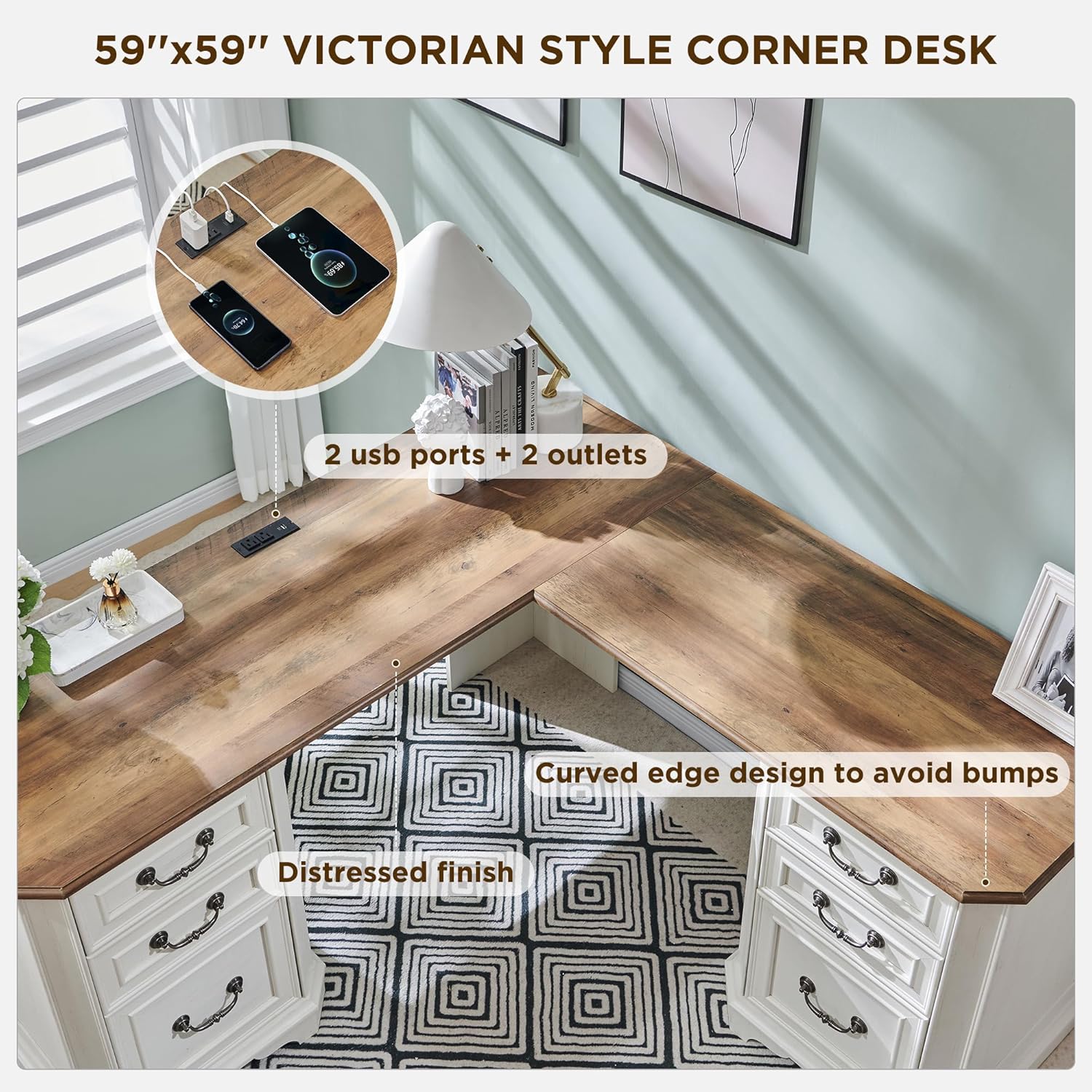
Figure 2.3: View of the built-in charging station, featuring two USB ports and two power outlets for electronic devices.
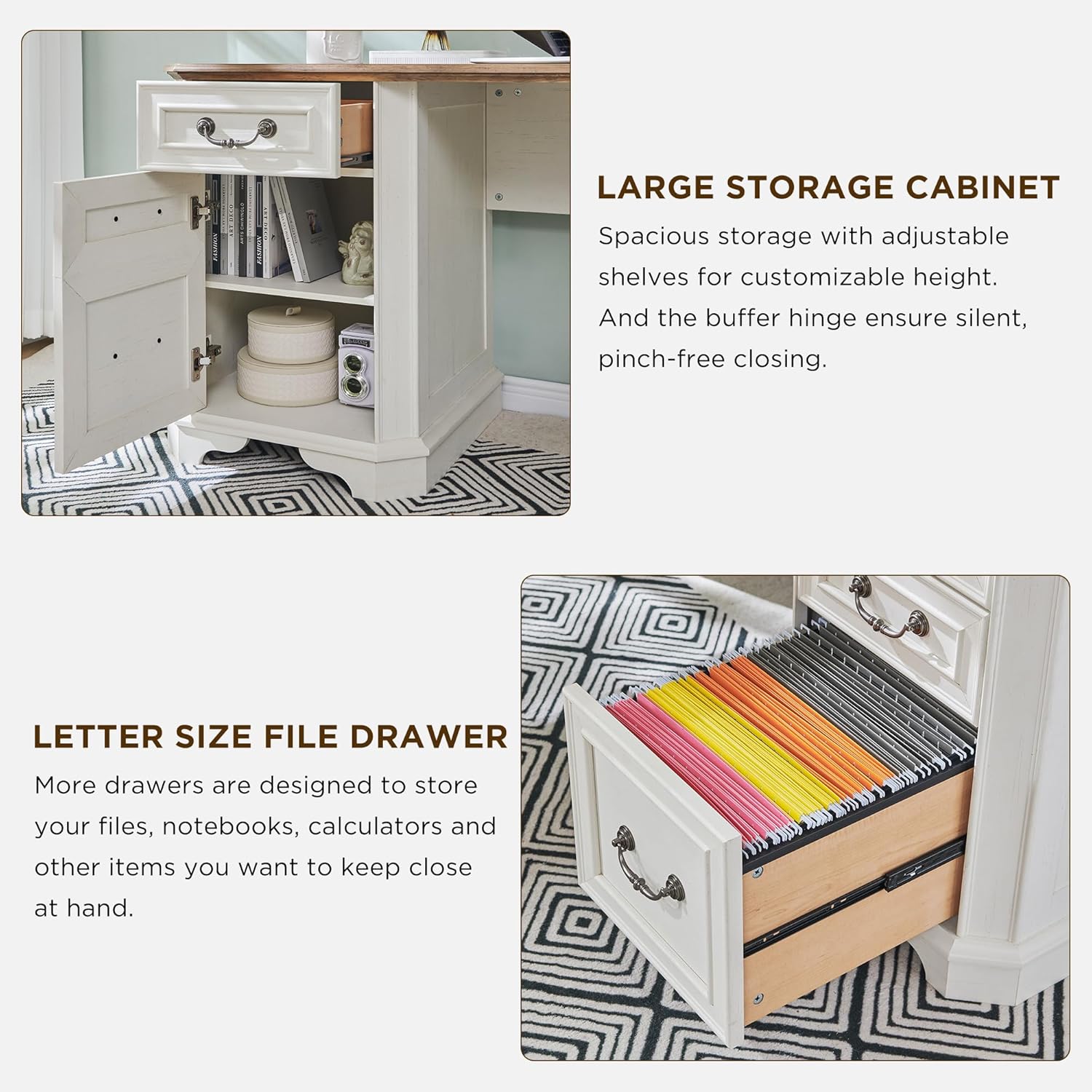
Figure 2.4: Illustration of the spacious storage cabinet with adjustable shelves and the letter-size file drawer designed for organized document storage.
3. Specifications
| Attribute | Detail |
|---|---|
| Brand | T4TREAM |
| Model Number | VSCLSD |
| Product Dimensions | 59"D x 59"W x 30"H |
| Color | Antique White |
| Style | Victorian |
| Base Material | FSC-Certified Engineered Wood |
| Finish Type | Distressed Finish |
| Special Features | Charging Station, Large Storage Cabinet, 3 Box Drawers, 1 File Drawer, Beveled Edge Table Corner |
| Number of Drawers | 4 |
| Number of Cabinets | 2 |
| Assembly Required | Yes |
| Tabletop Load Capacity | Up to 150 lbs |
| Drawer Load Capacity | 30–50 lbs |
4. Setup and Assembly
The T4TREAM L Shaped Desk requires assembly. It is typically shipped in multiple sturdy boxes (often 2 or more) to ensure safe delivery. Please ensure all packages have arrived before beginning assembly.
Assembly Steps:
- Unpack and Verify: Carefully unpack all components and hardware. Refer to the included parts list in your assembly manual to ensure all pieces are present and undamaged.
- Prepare Workspace: Clear a spacious area for assembly. Lay down a blanket or cardboard to protect both the desk components and your floor from scratches.
- Follow Instructions: Adhere strictly to the step-by-step instructions provided in the separate assembly manual. Each part is labeled for easy identification.
- Secure Fasteners: Tighten all screws and cam locks firmly, but do not overtighten, which could strip threads or damage the wood.
- Two-Person Assembly: While some steps can be done alone, assembly is significantly easier and safer with two people, especially when handling larger sections like the desktop.
- Final Placement: Once assembled, carefully move the desk to its desired location. Consider anchoring it to a wall for added stability, as recommended in the safety information.
Note: The assembly process is designed to be straightforward with clear instructions and labeled parts. If you encounter any difficulties, refer to the troubleshooting section or contact customer support.
5. Operating Instructions
Using the Integrated Charging Station:
The desk features a built-in charging station for your electronic devices. To use it:
- Locate the power cord extending from the charging station unit.
- Plug the power cord into a standard wall outlet.
- Connect your devices to the available USB ports or standard power outlets on the charging station.
- Ensure devices are properly seated in the ports for effective charging.
Caution: Do not overload the charging station. Avoid spilling liquids near the charging station to prevent electrical hazards.
Using Drawers and Storage Cabinet:
- Box Drawers: Utilize the three box drawers for storing office supplies, stationery, and other small items.
- File Drawer: The dedicated file drawer is designed to accommodate letter-size hanging files, keeping your documents organized and easily accessible.
- Storage Cabinet: The large storage cabinet features adjustable shelves. To adjust, remove the shelves, reposition the shelf pins to the desired height, and reinsert the shelves. The buffer hinges ensure quiet and pinch-free closing.
- Avoid forcing drawers or cabinet doors if they feel stiff. Check for obstructions.
6. Maintenance and Care
Proper care will help maintain the appearance and functionality of your T4TREAM desk for years to come.
- Cleaning: Wipe surfaces with a soft, damp cloth. Avoid using harsh chemicals, abrasive cleaners, or polishes that may damage the distressed finish.
- Spills: Immediately blot any spills with a clean, dry cloth to prevent staining or moisture damage.
- Sunlight Exposure: Avoid prolonged exposure to direct sunlight, which can cause fading or discoloration of the wood finish.
- Heat and Moisture: Place coasters under hot or cold beverages to protect the desktop from rings and moisture damage.
- Hardware Check: Periodically inspect all screws, bolts, and other fasteners to ensure they are tight. Retighten as needed to maintain structural integrity.
7. Troubleshooting
This section addresses common issues you might encounter with your desk.
- Issue: Desk feels wobbly after assembly.
Solution: Ensure all cam locks and screws are fully tightened. Verify that the desk is placed on a level surface. If not, use shims under the feet to stabilize it. Re-check all connections according to the assembly manual. - Issue: Drawers do not slide smoothly.
Solution: Check that the drawer slides are properly aligned and securely attached to both the drawer and the desk frame. Ensure no debris is obstructing the tracks. Lightly lubricate the slides with a silicone-based lubricant if necessary. - Issue: Charging station is not working.
Solution: Verify that the charging station's power cord is securely plugged into a functional wall outlet. Test the outlet with another device. Ensure your devices are correctly connected to the USB ports or outlets. - Issue: Missing or damaged parts upon delivery.
Solution: Contact T4TREAM customer support immediately with your order details and a description of the missing or damaged parts. They can arrange for replacement parts to be sent. - Issue: Assembly is taking a long time.
Solution: This desk is a substantial piece of furniture and assembly can take several hours. It is recommended to have two people for assembly. Take breaks as needed and follow the instructions step-by-step.
8. Warranty and Support
T4TREAM is committed to providing high-quality products and customer satisfaction. While specific warranty details may vary, generally, products are covered against manufacturing defects.
Contacting Support:
If you have any questions, require assistance with assembly, or need to report a defect, please contact T4TREAM customer support through the retailer where you purchased the product or visit the official T4TREAM website for contact information.
When contacting support, please have the following information ready:
- Your purchase date and order number.
- The product model number (VSCLSD) and ASIN (B0F1TFRRHH).
- A clear description of the issue or question.