
1. Introduction
The AUTOPHIX 7210P+ is an advanced OBD2 diagnostic scanner designed specifically for General Motors (GM) vehicles, including Chevrolet, Buick, and Cadillac models. This tool provides comprehensive system scans and various reset services, enabling users to diagnose and clear fault codes, perform maintenance functions, and monitor vehicle performance. It also supports standard OBD2 functions for most gas-powered vehicles.
2. What's in the Box (Setup)
Upon opening the package, verify that all components are present:
- AUTOPHIX 7210P+ OBD2 Scanner Unit
- USB Cable (for software updates and printing reports)
- User's Manual
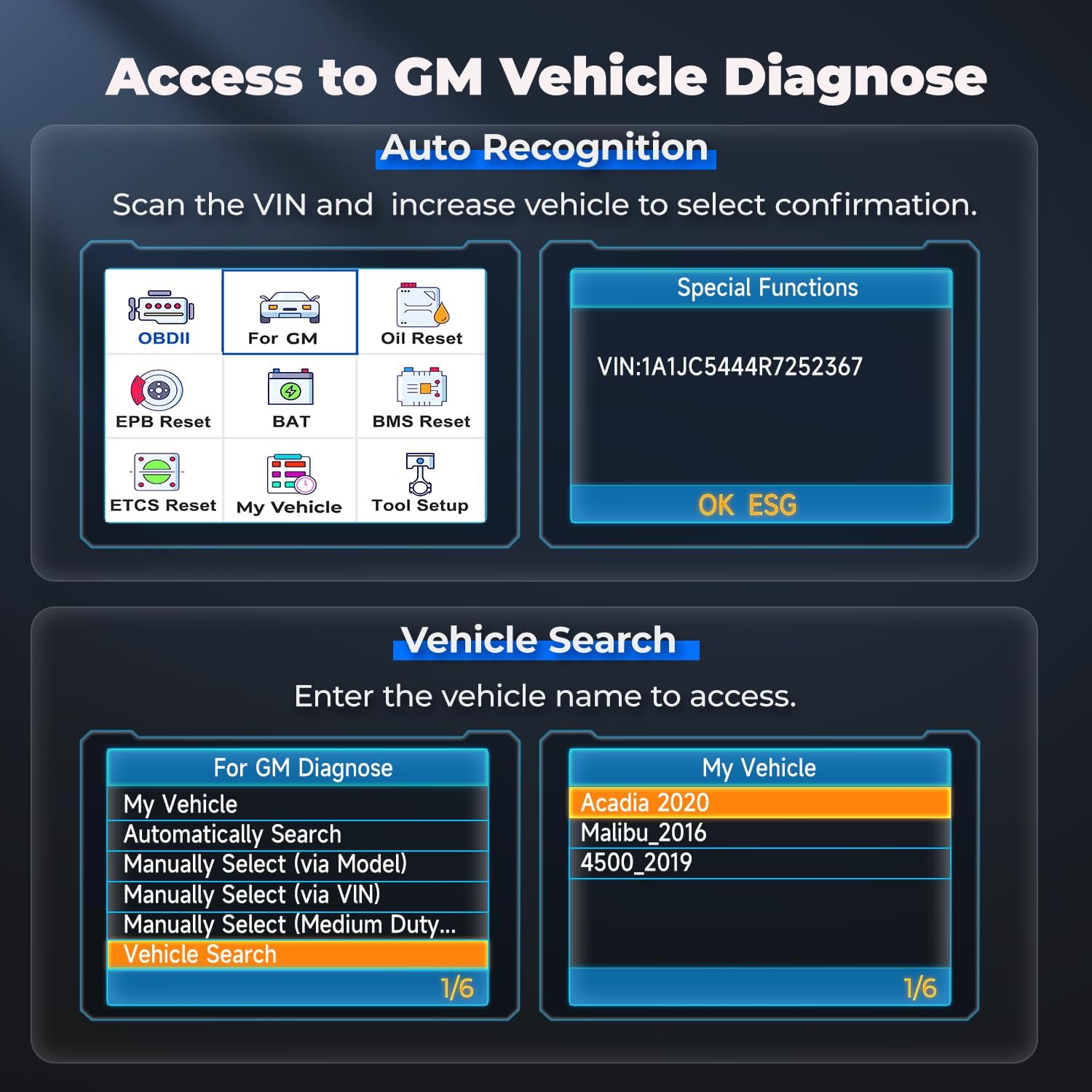
Image: The AUTOPHIX 7210P+ OBD2 Scanner, USB cable, and user manual as included in the package.
3. Operating the Device
3.1. Full System Diagnostics for GM Vehicles
The AUTOPHIX 7210P+ performs comprehensive scans across all major GM vehicle modules. This includes, but is not limited to, the engine, transmission, ABS, airbags (SRS), Body Control Module (BCM), Electronic Power Steering (EPS), Steering Angle Sensor (SAS), Air Conditioning (A/C), radio, parking brake, and fuel pump systems. The specific systems supported may vary based on the vehicle's configuration.

Image: Visual representation of the full system diagnostic capabilities for GM vehicles, covering various modules like Engine, ABS, and Transmission.
After identifying and fixing an issue, the tool allows you to clear the associated fault codes to restore the vehicle's system status.
3.2. Enhanced All-System Reset Functions
This scanner supports various maintenance reset services. It is crucial to repair the underlying fault before attempting to clear codes or perform resets to ensure the function takes effect. Supported services include:
- Oil Reset: Resets the oil service light after an oil change.
- EPB Reset: Electronic Parking Brake reset for brake pad replacement.
- DPF Regeneration: Diesel Particulate Filter regeneration.
- TPMS Reset: Tire Pressure Monitoring System reset.
- EGR Adaptation: Exhaust Gas Recirculation system adaptation.
- ETC Calibration: Electronic Throttle Control calibration.
- Steering Angle Sensor Calibration: Calibrates the steering angle sensor.
- ABS Bleeding: Performs ABS brake bleeding procedures.
- Battery Registration: Registers a new battery with the vehicle's system.
- BMS Reset: Battery Management System reset.
- Gearbox Adaptation: Adapts the transmission control unit.
- Injector Coding: Codes new injectors into the engine control unit.

Image: Overview of the maintenance services supported by the scanner, including oil reset and battery management system reset.
3.3. Standard OBD2 Functions
The scanner includes standard OBD2 functionality for engine diagnosis, compatible with most OBD2 gas cars. Key functions include:
- Read Codes: Retrieves diagnostic trouble codes (DTCs).
- Erase Codes: Clears DTCs and turns off the Check Engine Light.
- Data Stream: Displays live sensor data.
- I/M Readiness: Checks the status of emission-related monitors.
- Vehicle Information: Retrieves vehicle identification number (VIN) and other details.
- Evap System Test: Tests the evaporative emission control system.

Image: Illustration of the scanner's OBD2 functions, demonstrating how to read and clear engine codes and check I/M readiness.
3.4. Battery Check
The device can monitor the vehicle's battery voltage in real-time, providing insights into the battery's health and charging system performance. This helps in understanding the power supply to the vehicle's electrical components and mitigating surges.

Image: The scanner's interface displaying real-time battery voltage and a graphical representation of its performance.
Typical voltage ranges:
- Normal (before starting): 11.8V-12.8V
- Normal (after starting): 13.2V-14.8V
- Too Low (before starting): <10.8V
- Too Low (after starting): 12.8V-13.2V
- Slightly Low (before starting): 10.8V-11.8V
- Too High: >14.8V
3.5. Vehicle Learning Function
The "My Vehicle" feature allows quick access to previously diagnosed vehicles, reducing wait times for repeat diagnostics.

Image: The scanner's "My Vehicle" screen, demonstrating the vehicle learning function for faster access to diagnostic history.
3.6. Repair Shop Mode
A dedicated "Repair Shop Mode" is available, designed for professional use and specific repair personnel requirements.

Image: The scanner's display showing the "Repair Shop Mode" selection.
3.7. Video Demonstration
Video: An official demonstration by Autophix titled "DriveSmart Diagnostics: Spot Issues Before They Break," showcasing the scanner's diagnostic capabilities and user interface.
4. Vehicle Compatibility
The AUTOPHIX 7210P+ is designed for GM vehicles, including Chevrolet, Buick, and Cadillac. It supports most GM vehicles from 1996 to 2020, and select models from 2020 to 2025. Functions may vary by specific vehicle model and year. For compatibility inquiries, please contact customer support with your car's brand, model, year, and the specific issue.

Image: A list of supported GM brands and example models, highlighting the scanner's broad compatibility within the GM family.
5. Maintenance
5.1. Software Updates
The AUTOPHIX 7210P+ comes with lifetime free software updates. Connect the device to a computer using the provided USB cable to perform updates. This ensures the scanner remains compatible with newer vehicle models and receives the latest diagnostic features.
5.2. Device Care
Keep the device clean and dry. Avoid exposing it to extreme temperatures or direct sunlight for extended periods. Store it in a safe place to prevent physical damage.
6. Troubleshooting
If you encounter issues with the scanner, consider the following:
- Device Not Powering On: Ensure the OBD2 connector is securely plugged into the vehicle's diagnostic port. The device draws power from the vehicle.
- Communication Error: Verify that the vehicle's ignition is in the ON position (engine off or running, depending on the test). Check the connection to the OBD2 port. Ensure the vehicle is compatible with the scanner.
- Codes Not Clearing: Fault codes can only be cleared after the underlying vehicle issue has been repaired. Clearing codes without addressing the fault will result in the codes reappearing.
- Function Not Available: Some advanced functions may not be supported by all vehicle models or years. Refer to the compatibility information or contact support.
For persistent issues, refer to the contact information in the Warranty & Support section.
7. Specifications
| Feature | Detail |
|---|---|
| Brand | AUTOPHIX |
| Model Number | 7210Plus+ |
| Screen Size | 2.8 inches |
| Native Resolution | 320x240 |
| Power Source | Vehicle OBD2 Port |
| Automotive Fit Type | Vehicle Specific Fit (GM/Chevy/Buick/Cadillac) |
| Included Components | AUTOPHIX 7210P+ OBD2 Scanner, USB Cable, User's Manual |
8. Warranty & Support
The AUTOPHIX 7210P+ comes with a 2-year warranty. For any product-related issues or technical assistance, please contact AUTOPHIX customer support directly via Amazon Message or email at autophix@163.com.
Important Note: This scan tool does not repair vehicle issues; it only diagnoses them. Fault codes can only be cleared after the vehicle issue is repaired.
