
1. Introduction
Thank you for choosing the UREVO UR9TM0011 2-in-1 Folding Treadmill. This manual provides essential information for the safe and effective use of your new fitness equipment. Please read it thoroughly before operation and retain it for future reference.
2. Safety Instructions
To ensure your safety and prolong the life of your treadmill, please observe the following precautions:
- Always consult with a physician before starting any new exercise program.
- Place the treadmill on a flat, stable surface with adequate clearance around it (at least 2 feet on sides and 6 feet at the rear).
- Keep children and pets away from the treadmill during operation.
- Do not operate the treadmill if it is damaged or malfunctioning.
- Wear appropriate athletic footwear and clothing.
- Use the safety key at all times. Attach it to your clothing before starting your workout.
- Do not step on or off the treadmill while the belt is moving.
- Unplug the treadmill from the power outlet when not in use or before cleaning and maintenance.
- The maximum user weight capacity for this treadmill is 265 pounds. Do not exceed this limit.
3. Product Overview
The UREVO UR9TM0011 is a versatile 2-in-1 folding treadmill designed for both walking and jogging. It features a compact design for easy storage and a powerful motor for effective workouts.
Key Features:
- 9% Manual Incline: Simulate hill climbing to increase calorie burn.
- 17-inch Widened Running Belt: Provides a comfortable and stable surface for walking or jogging.
- LED Display & Remote Control: Track speed, distance, time, and calories, and adjust settings conveniently.
- 2.5 HP Powerful Motor: Supports speeds up to 7.6 MPH (with frame up) and 3.8 MPH (under desk mode).
- Non-assembly & Space-Saving Design: Arrives fully assembled and folds for easy storage.
- Shock Absorption: Built-in silica gel column support helps absorb impact.
Included Components:
- UREVO Strol Lite 2-in-1 Walking Pad Treadmill
- Remote Control
- Safety Key
- User Manual
- L-shaped Wrench
- Battery (x2)
- Lubricating Oil
- Power Cord

Image: Contents of the UREVO UR9TM0011 Treadmill package.
4. Setup
The UREVO UR9TM0011 treadmill arrives fully assembled. Follow these steps to prepare it for use:
- Unboxing: Carefully remove the treadmill and all accessories from the packaging.
- Placement: Place the treadmill on a firm, level surface. Ensure there is ample space around the unit for safe operation and movement.
- Unfolding (if applicable): If the handle is folded down, gently lift it into the upright position until it locks securely.
- Power Connection: Plug the power cord into a grounded electrical outlet.
- Safety Key: Attach the safety key to the designated slot on the console. The treadmill will not operate without the safety key in place.
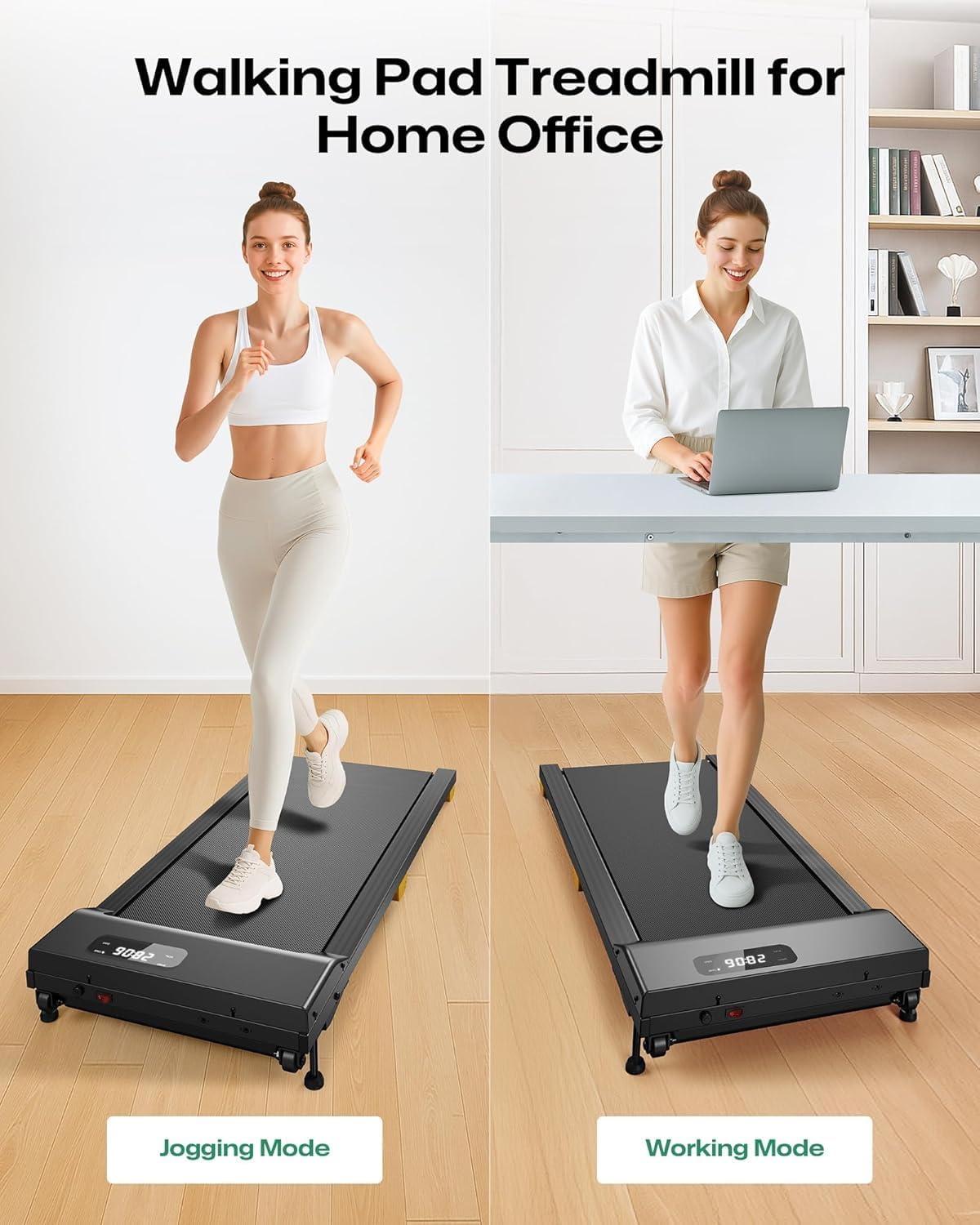
Image: Treadmill in jogging mode (handle up) and walking pad mode (handle down) for home office use.
5. Operating Instructions
Familiarize yourself with the controls and functions before beginning your workout.
5.1 Power On/Off
- To power on, ensure the safety key is in place and press the power button on the console or remote.
- To power off, press the stop button on the console or remote, then remove the safety key and unplug the unit.
5.2 Using the LED Display and Remote Control
The LED display shows real-time workout data. The remote control allows for convenient adjustments.
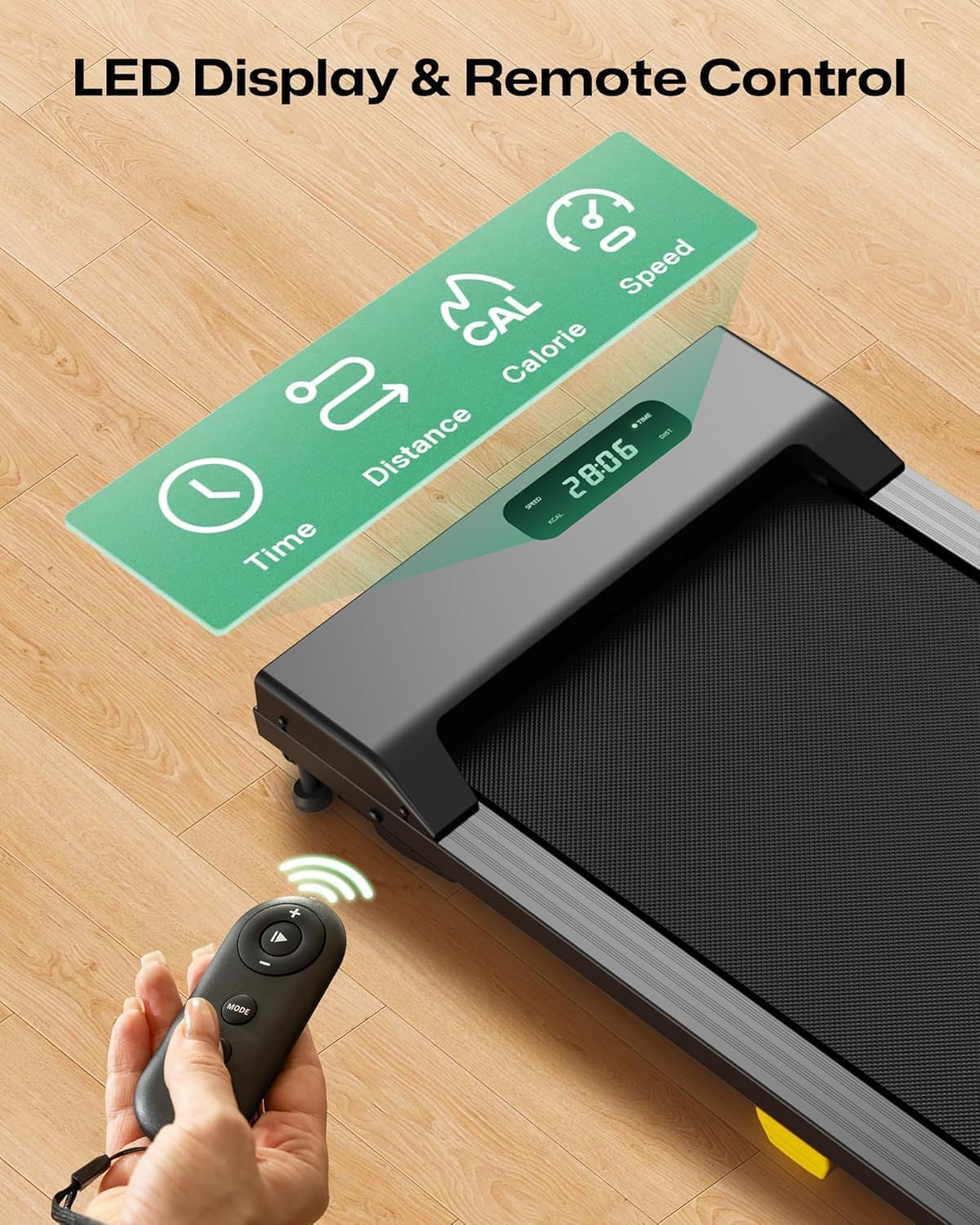
Image: LED display and remote control for the UREVO treadmill.

Image: Detailed view of the LED display metrics: Speed, Calories, Time, and Step (Distance).
5.3 Adjusting Speed
Speed can be adjusted using the console buttons or the remote control.

Image: Two methods for adjusting treadmill speed: console controls and remote control.
- Console: Use the '+' and '-' buttons for fine adjustments, or the quick speed buttons (e.g., 3 MPH, 6 MPH) for preset speeds.
- Remote Control: Use the speed increase/decrease buttons. The remote allows speeds up to 3.8 MPH in walking pad mode. For higher speeds (up to 7.6 MPH), the handle must be in the upright position, and adjustments can be made via the console.
5.4 Manual Incline Adjustment
The treadmill features a manual 0-9% incline. To adjust the incline:
- Ensure the treadmill is off and unplugged.
- Locate the incline adjustment points at the rear of the treadmill.
- Manually lift or lower the rear of the treadmill to the desired incline level. Ensure both sides are set equally.
- Verify the treadmill is stable before resuming operation.

Image: Illustration of the 9% manual incline feature for increased calorie expenditure.
6. Maintenance
Regular maintenance ensures optimal performance and longevity of your treadmill.
6.1 Lubrication
The running belt requires periodic lubrication to reduce friction and wear. Use the provided lubricating oil.
- Frequency: Lubricate every 3 months or after 100 hours of use, whichever comes first.
- Procedure:
- Turn off and unplug the treadmill.
- Loosen the belt tension by turning the rear rollers counter-clockwise with the L-shaped wrench.
- Lift the edge of the running belt and apply a small amount of silicone lubricant evenly onto the center of the deck.
- Tighten the belt tension by turning the rear rollers clockwise until the belt is snug but not overly tight.
- Plug in the treadmill and run it at a low speed (e.g., 1 MPH) for 5 minutes to distribute the lubricant.
6.2 Cleaning
- Wipe down the treadmill surfaces with a damp cloth after each use. Avoid abrasive cleaners.
- Periodically vacuum under the treadmill to prevent dust buildup.
6.3 Belt Adjustment
If the running belt shifts to one side or slips, it may need adjustment.
- Centering: If the belt drifts to the left, turn the left rear roller bolt clockwise in quarter-turn increments. If it drifts to the right, turn the right rear roller bolt clockwise. Run the treadmill at a low speed and observe the belt's position. Adjust until centered.
- Tension: If the belt slips during use, it may be too loose. Turn both rear roller bolts clockwise in quarter-turn increments to increase tension. Do not overtighten.
7. Troubleshooting
Refer to this section for common issues and their solutions.
| Problem | Possible Cause | Solution |
|---|---|---|
| Treadmill does not power on. | Power cord not plugged in; Safety key not in place; Circuit breaker tripped. | Ensure power cord is securely plugged in; Insert safety key fully; Check household circuit breaker. |
| Running belt stops or slips. | Belt too loose; Belt needs lubrication. | Adjust belt tension (see Section 6.3); Lubricate the running belt (see Section 6.1). |
| Unusual noise during operation. | Loose parts; Belt friction; Motor issue. | Check for and tighten any loose bolts; Lubricate the belt; If noise persists, contact customer support. |
| Remote control not working. | Dead batteries; Obstruction. | Replace remote control batteries; Ensure no obstructions between remote and treadmill sensor. |
If you encounter issues not listed here or if problems persist, please contact UREVO customer support.
8. Specifications
Detailed specifications for the UREVO UR9TM0011 Treadmill:
| Feature | Specification |
|---|---|
| Model Number | UR9TM0011 |
| Brand | UREVO |
| Product Dimensions (D x W x H) | 26.4" x 53.1" x 5.1" |
| Folded Size | 53.1" x 26.4" x 5.1" |
| Material | Aluminum, Alloy Steel |
| Maximum Speed | 7.6 MPH (with handle up) |
| Minimum Speed | 0.6 MPH |
| Maximum Horsepower | 2.5 HP |
| Maximum Weight Recommendation | 265 Pounds |
| Maximum Incline Percentage | 9% (Manual) |
| Deck Width | 17 Inches |
| Display Type | LED |
| Metrics Measured | Distance, Speed, Time, Calories |
| Power Source | Corded Electric (730 Watts) |
| Assembly Required | No |
9. Warranty and Support
The UREVO UR9TM0011 Treadmill comes with a 12-Month Warranty from the date of purchase. This warranty covers manufacturing defects and malfunctions under normal use.
For warranty claims, technical assistance, or any questions regarding your product, please contact UREVO customer support. Keep your purchase receipt as proof of purchase.
Please refer to the contact information provided in your original packaging or on the official UREVO website for the most up-to-date support channels.


