
1. Important Safety Information
Please read all instructions carefully before operating this appliance and retain for future reference. Failure to follow these instructions may result in electric shock, fire, or serious injury.
- Ensure the appliance is placed on a stable, level surface.
- Do not block air inlets or outlets.
- Do not immerse the unit, power cord, or plug in water or other liquids.
- Unplug the appliance before cleaning, refilling water, or performing any maintenance.
- Keep out of reach of children and pets.
- Use only with the specified voltage (220 Volts).
- Do not operate with a damaged cord or plug.
2. Product Overview
The Gree Portable Desert Air Conditioner (Model KSWD-04T65RDG) is a versatile 4-in-1 appliance designed for year-round comfort. It functions as an air conditioner, heater, humidifier, and air purifier.
Key Features:
- 4-in-1 Functionality: Combines cooling, heating, humidifying, and air purifying with a fragrance dispenser.
- Powerful Performance: 2100W heating capacity and 55W cooling power.
- Large Water Tank: 5-liter capacity for extended operation.
- Sleek Design: Tower-style construction with a modern aesthetic.
- Intuitive Controls: Easy adjustment of temperature, fan speed, and operation modes.
- Four-way Air Flow: Vertical louvre design ensures even air distribution.
Components:
Familiarize yourself with the main components of your unit:

Image 2.1: Front View of the Gree Portable Desert Air Conditioner. This image displays the front of the unit, highlighting the air outlet grille and the water level indicator at the bottom.
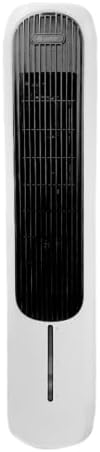
Image 2.2: Angled View of the Gree Portable Desert Air Conditioner. This image shows the unit from an angle, providing a better view of its tower design and the control panel area at the top.
- Control Panel: Located at the top of the unit for setting adjustments.
- Air Outlet Grille: Front-facing louvres for air distribution.
- Water Tank: Removable tank for water and ice (for cooling) or fragrance.
- Air Filter: Located at the rear or side for air purification.
- Power Cord: For connecting to an electrical outlet.
3. Setup
3.1 Unpacking
- Carefully remove the unit from its packaging.
- Inspect the unit for any signs of damage. If damaged, do not operate and contact customer support.
- Remove all packing materials and dispose of them responsibly.
3.2 Placement
- Place the air conditioner on a firm, level surface.
- Ensure there is at least 20 cm of clear space around the unit for proper air circulation.
- Avoid placing the unit near heat sources, direct sunlight, or in areas with excessive dust.
3.3 Filling the Water Tank (for Cooling/Humidifying)
- Ensure the unit is unplugged from the power outlet.
- Locate the water tank, typically at the bottom of the unit.
- Carefully pull out the water tank.
- Fill the tank with clean, cool water up to the "MAX" indicator line. Do not overfill.
- For enhanced cooling, you may add ice packs or ice cubes to the water tank.
- If using the fragrance feature, add a few drops of essential oil to the designated fragrance compartment (refer to specific model details if available).
- Slide the water tank back into the unit until it clicks securely into place.
3.4 Power Connection
- Plug the power cord into a standard 220V electrical outlet.
- Ensure the outlet is properly grounded.
4. Operating Instructions
The control panel allows you to manage all functions of your Gree Portable Desert Air Conditioner.
4.1 Control Panel Overview
The control panel typically includes buttons for Power, Mode, Fan Speed, Timer, and Oscillation. Refer to the specific icons on your unit's control panel.
4.2 Basic Operation
- Power On/Off: Press the Power button to turn the unit on or off.
- Select Mode: Press the Mode button repeatedly to cycle through the available functions:
- Cooling Mode: Uses water evaporation to cool the air. Ensure the water tank is filled.
- Heating Mode: Provides warm air.
- Humidifying Mode: Adds moisture to the air. Ensure the water tank is filled.
- Air Purifying Mode: Circulates air through the filter.
- Adjust Fan Speed: Press the Fan Speed button to select desired fan intensity (e.g., Low, Medium, High).
- Oscillation: Press the Oscillation button to activate or deactivate the automatic swing function of the vertical louvres for wider air distribution.
- Timer: Use the Timer button to set an automatic shut-off time. Refer to the display for timer settings.
5. Maintenance
Regular maintenance ensures optimal performance and extends the lifespan of your appliance.
5.1 Cleaning the Water Tank
- Unplug the unit before cleaning.
- Remove the water tank.
- Empty any remaining water.
- Clean the tank with a soft cloth and mild detergent. Rinse thoroughly with clean water.
- Allow the tank to air dry completely before reinserting.
- Clean the water tank at least once a week during regular use to prevent mold and mildew growth.
5.2 Cleaning the Air Filter
- Unplug the unit.
- Locate and remove the air filter (usually at the back or side of the unit).
- Gently brush off any dust or debris. For a deeper clean, rinse the filter under running water.
- Ensure the filter is completely dry before reinserting it into the unit.
- Clean the air filter every two weeks or more frequently if used in dusty environments.
5.3 Exterior Cleaning
- Wipe the exterior of the unit with a soft, damp cloth.
- Do not use abrasive cleaners or solvents.
5.4 Storage
- If storing the unit for an extended period, ensure the water tank is empty and clean, and the filter is dry.
- Store the unit in a cool, dry place, away from direct sunlight.
6. Troubleshooting
Before contacting customer support, please refer to the following common issues and solutions:
| Problem | Possible Cause | Solution |
|---|---|---|
| Unit does not power on. | No power supply; Power cord not properly connected. | Check if the unit is plugged into a live 220V outlet; Ensure the power cord is securely connected. |
| No cooling effect. | Water tank is empty; Air filter is clogged; Room size too large. | Fill the water tank; Clean the air filter; Ensure the unit is appropriate for the room size. |
| Weak airflow. | Air inlet/outlet blocked; Air filter clogged. | Clear any obstructions; Clean the air filter. |
| Unusual noise. | Unit not on a level surface; Foreign object inside. | Place the unit on a stable, level surface; Unplug and inspect for foreign objects. |
| Water leakage. | Water tank not properly installed; Water tank overfilled. | Ensure the water tank is securely in place; Do not overfill the water tank. |
If the problem persists after attempting these solutions, please contact customer support.
7. Specifications
| Model Number | KSWD-04T65RDG |
| Brand | Gree |
| Type | Portable Desert Air Conditioner (4-in-1) |
| Functions | Cooling, Heating, Humidifying, Air Purifying |
| Water Tank Capacity | 5 Liters |
| Heating Power | 2100W |
| Cooling Power | 55W |
| Voltage | 220 Volts |
| Noise Level | 14 Decibels |
| Product Dimensions (D x W x H) | 35 x 100 x 60 cm |
| Item Weight | 40 Kilograms |
| Color | White |
| Special Features | Four-way Air Flow, Fragrance Feature |
8. Warranty and Support
For warranty information and customer support, please refer to the documentation provided at the point of purchase or contact your retailer. This product may be eligible for extended warranty plans offered by third-party providers; consult your retailer for details.
When contacting support, please have your model number (KSWD-04T65RDG) and purchase date available.


