
Important Safety Instructions
Please read all instructions carefully before using this product and retain them for future reference. Follow all warnings and instructions marked on the product.
- Do not expose this appliance to rain, moisture, or extreme temperatures.
- Do not block any ventilation openings. Install in accordance with the manufacturer's instructions.
- Do not install near any heat sources such as radiators, heat registers, stoves, or other apparatus (including amplifiers) that produce heat.
- Protect the power cord from being walked on or pinched, particularly at plugs, convenience receptacles, and the point where they exit from the appliance.
- Only use attachments/accessories specified by the manufacturer.
- Unplug this appliance during lightning storms or when unused for long periods of time.
- Refer all servicing to qualified service personnel. Servicing is required when the apparatus has been damaged in any way, such as power-supply cord or plug is damaged, liquid has been spilled or objects have fallen into the apparatus, the apparatus has been exposed to rain or moisture, does not operate normally, or has been dropped.
Package Contents
Verify that all items listed below are included in your package. If any items are missing or damaged, please contact customer support.

Image: The LARKSOUND L210 Sound Bar and Subwoofer are shown alongside all included accessories: an AUX Cable, an Optical Cable, a Remote Control, this User Manual, a Wall Mount Template, Mount Screws, and an Extra-long Bracket.
- LARKSOUND Sound Bar (L210)
- Wired Subwoofer
- Remote Control (2 AAA batteries not included)
- AUX Cable
- Optical Cable
- Wall Mount Template
- Mount Screws
- Extra-long Bracket
- User Manual (this document)
Product Overview
Sound Bar Components

Image: The LARKSOUND L210 Sound Bar and its wired Subwoofer are displayed, along with the remote control.

Image: An internal view illustrating the speaker components within the 2.1 channel soundbar and the subwoofer.
The sound bar features a sleek, low-profile design, allowing it to fit neatly under most televisions without obstructing the screen.
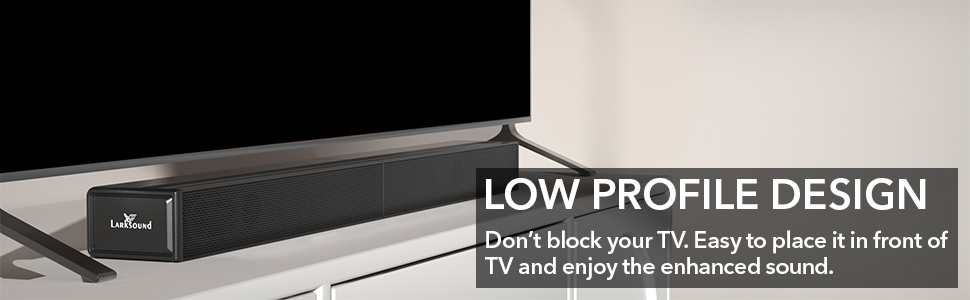
Image: The soundbar is positioned discreetly beneath a television, demonstrating its low-profile design.
Subwoofer Details
The wired subwoofer is designed to deliver powerful low-end bass, enhancing your audio experience. Its side-firing design helps maintain a compact footprint.

Image: An exploded diagram illustrating the internal components and side-firing design of the subwoofer.
Connectivity Ports and Controls
The sound bar offers multiple connection options and integrated controls for ease of use.

Image: A detailed view of the soundbar's control panel and rear input ports, highlighting options for HDMI, USB, Optical, AUX, and Bluetooth connectivity.
- HDMI (ARC) Port: For connecting to a TV supporting Audio Return Channel.
- Optical Input: For digital audio connection.
- AUX Input: For analog audio connection using a 3.5mm cable.
- USB Port: For playing audio files from a USB drive.
- Bluetooth: For wireless audio streaming from compatible devices.
- Control Buttons: Power, Input Selection, Volume Up/Down.
Setup
1. Placement Options
The sound bar can be placed on a tabletop or mounted on a wall.
- Tabletop Placement: Position the sound bar on a stable, flat surface directly in front of your TV. Ensure the subwoofer is placed nearby, ideally on the floor for optimal bass performance.
- Wall Mounting: Use the provided wall mount template, screws, and brackets to securely attach the sound bar to a wall. Ensure the wall can support the weight of the sound bar.

Image: The soundbar is shown mounted on a wall beneath a television, with the subwoofer positioned on the floor.
2. Connecting the Sound Bar Sections
The sound bar comes in two detachable sections for flexible placement. Follow these steps to connect them:
- Plug the audio connector from one main unit into the audio input port on the other main unit.
- Align the arrow on the sticker of one unit to the edge of the other main unit.
- Merge the two main units together.
- Move the two main units until they lock securely into one line.
Note: The sound bar will not function if split and the audio connector is unplugged.
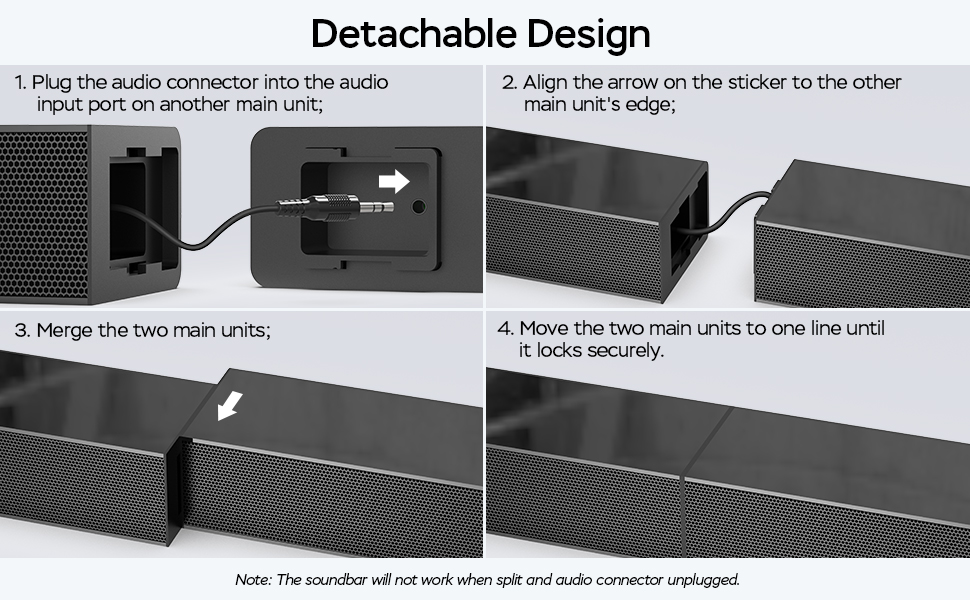
Image: A visual guide demonstrating the four steps to connect the two detachable sections of the soundbar.
3. Connecting to Audio Sources
Choose one of the following methods to connect your sound bar to your TV or other audio devices:
- HDMI (ARC) Connection:
Connect an HDMI cable (not included) from the HDMI (ARC) port on the sound bar to the HDMI (ARC) port on your TV. This allows you to control the sound bar volume with your TV remote. Ensure your TV's audio output is set to PCM and any Dolby/DTS settings are turned OFF. - Optical Connection:
Connect the provided Optical cable from the OPTICAL port on the sound bar to the Optical output port on your TV or audio device. Select 'Optical' input on the sound bar. - AUX Connection:
Connect the provided AUX cable from the AUX port on the sound bar to the 3.5mm audio output port on your TV or audio device. Select 'AUX' input on the sound bar. - USB Connection:
Insert a USB drive containing audio files into the USB port on the sound bar. The sound bar will automatically switch to USB input and begin playback. - Bluetooth Connection:
Refer to the 'Bluetooth Pairing' section under Operating Instructions for detailed steps.

Image: The soundbar is shown connected to a television using an HDMI cable, illustrating the HDMI-CEC feature for TV remote control.
4. Power Connection
Connect the power adapter to the sound bar's power input and then plug it into a wall outlet. Connect the wired subwoofer to the sound bar's subwoofer output port.
Operating Instructions
1. Power On/Off
Press the Power button on the remote control or on the sound bar to turn the unit on or off.
2. Input Selection
Press the Input button on the remote control or on the sound bar to cycle through available input sources: HDMI (ARC), Optical, AUX, USB, and Bluetooth.
3. Volume Control
Use the Volume Up (+) and Volume Down (-) buttons on the remote control or on the sound bar to adjust the volume level.
4. Sound Modes
The sound bar features specialized EQ modes to optimize audio for different content types.

Image: Visual representation of the three specialized sound modes: Dialogue, Movie, and Music, each with an example of content suited for that mode.

Image: Text descriptions detailing the characteristics and benefits of the Music, Movie, and Dialog sound modes.
- Music Mode: Provides an immersive sound effect, ideal for listening to music.
- Movie Mode: Enhances surround sound effects, optimizing the movie-watching experience.
- Voice Mode (Dialogue): Improves clarity of spoken dialogue, making conversations easier to understand.
- Normal Mode: Standard audio setting for general use.
Press the corresponding button on the remote control to select your desired sound mode.
5. Night Mode
Activate Night Mode to instantly reduce the volume by 50%, allowing for late-night viewing without disturbing others.

Image: A remote control highlighting the Night Mode button, with an illustration of its function to reduce volume by 50% for quiet listening.
Press the Night Mode button on the remote control to toggle this feature on or off.
6. Bluetooth Pairing
To stream audio wirelessly from your smartphone, tablet, or other Bluetooth-enabled device:
- Press the Bluetooth button on the remote control or the sound bar to switch to Bluetooth input. The indicator light will flash, indicating pairing mode.
- On your device, enable Bluetooth and search for available devices.
- Select "LARKSOUND L210" from the list of devices.
- Once connected, the indicator light on the sound bar will stop flashing and remain solid. You can now play audio from your device through the sound bar.

Image: Two individuals are shown enjoying music, illustrating the soundbar's capability to stream audio wirelessly via Bluetooth 5.0 from a smartphone.
Troubleshooting
If you encounter issues with your LARKSOUND L210 Sound Bar, please refer to the following common problems and solutions:
| Problem | Possible Cause | Solution |
|---|---|---|
| No power | Power cord not connected; Power outlet not active | Ensure power cord is securely plugged into the sound bar and a working wall outlet. |
| No sound | Incorrect input selected; Volume too low; Mute activated; Incorrect TV audio settings | Select the correct input source. Increase volume. Deactivate mute. Ensure TV audio output is set correctly (e.g., PCM for Optical/HDMI ARC). |
| Sound distortion | Volume too high; Poor audio source quality; Loose cable connection | Reduce volume. Try a different audio source. Check all cable connections. |
| Remote control not working | Batteries depleted; Obstruction between remote and sound bar; Remote not aimed correctly | Replace AAA batteries. Remove any obstructions. Aim remote directly at the sound bar's sensor. |
| Bluetooth pairing fails | Sound bar not in pairing mode; Device too far; Device already connected to another unit | Ensure sound bar is in Bluetooth pairing mode. Move device closer. Disconnect from other Bluetooth devices. |
| Subwoofer not producing bass | Subwoofer cable loose; Subwoofer not powered | Ensure the wired subwoofer cable is securely connected to the sound bar. Check subwoofer power connection. |
Specifications
| Feature | Detail |
|---|---|
| Model Name | 2.1 CH Soundbar with Subwoofer (L210) |
| Speaker Type | Soundbar |
| Surround Sound Channel Configuration | 2.1 |
| Connectivity Technology | Auxiliary, Bluetooth 5.0, HDMI (ARC), Optical, USB |
| Bluetooth Range | Up to 33 Feet (10 meters) |
| Subwoofer Connectivity | Wired |
| Speaker Maximum Output Power | 160 Watts |
| Frequency Response | 20 KHz (Max) |
| Soundbar Dimensions (D x W x H) | 4.13" x 30.98" x 2.36" |
| Subwoofer Dimensions (D x W x H) | 6.7" x 5.9" x 13.0" |
| Power Source | Corded Electric |
| Remote Control Batteries | 2 AAA batteries (not included) |
| Mounting Type | Table Top/Wall Mount |
| Color | Black |
Maintenance
To ensure the longevity and optimal performance of your sound bar:
- Cleaning: Use a soft, dry cloth to clean the surfaces of the sound bar and subwoofer. Do not use liquid cleaners or aerosol sprays.
- Ventilation: Ensure that the ventilation openings are not blocked to prevent overheating.
- Storage: If storing the unit for an extended period, unplug it from the power outlet and store it in a cool, dry place.
- Avoid Moisture: Keep the sound bar and subwoofer away from water and high humidity.
Warranty and Support
This LARKSOUND product comes with a limited warranty. For detailed warranty information, product support, or to inquire about replacement parts, please refer to the warranty card included in your package or contact LARKSOUND customer service.
Please have your model number (L210) and purchase information ready when contacting support.
