
1. Introduction
Thank you for choosing the ModernMate 71" Standing Executive Desk, Model F1. This manual provides essential information for the safe assembly, operation, and maintenance of your new electric height-adjustable desk. Please read these instructions thoroughly before beginning assembly or operation to ensure proper use and to maximize the lifespan of your product. Keep this manual for future reference.
2. Safety Information
Important Safety Instructions:
- Always follow the assembly instructions carefully to avoid injury.
- Ensure the desk is properly anchored to prevent tipping.
- Do not attempt to lift the desk when it is at its maximum height or carrying heavy loads, as this could cause injury or damage to the desk.
- Keep children and pets away from the desk during operation.
- Do not place liquids directly on the control panel or power outlet.
- Disconnect power before cleaning or maintenance.
3. Package Contents
Your ModernMate Standing Executive Desk is delivered in multiple packages for safe transport and easier handling. Please verify that all components are present before beginning assembly.
- Desktop (One-Piece 71" x 30")
- Desk Frame (Alloy Steel)
- Motorized Lifting Columns
- Control Panel (Hand Control)
- Power Adapter
- Integrated Storage Units (Left and Right)
- Privacy Panel
- Assembly Hardware (screws, bolts, etc.)
- Installation Instructions Manual

Image: The ModernMate desk components are shipped in three separate packages to ensure protection during transit and facilitate lighter lifting during setup.
4. Assembly Instructions
Assembly of the ModernMate Standing Executive Desk requires careful attention to detail. While the process is designed to be straightforward with the provided instructions, it can be time-consuming. We recommend having a second person assist with assembly, especially for handling the large desktop and frame components.
- Refer to the dedicated Installation Instructions booklet included in your package for detailed, step-by-step guidance.
- Lay out all components and hardware before starting.
- Use appropriate tools. While some basic tools may be included, using your own standard tools (e.g., screwdrivers, wrenches) can significantly expedite the process.
- Do not overtighten screws, as this may damage the material.
- Ensure all connections are secure before proceeding to the next step.
If you encounter any confusion during assembly, please refer to the customer service contact information provided in this manual.
5. Setup and Initial Use
After successful assembly, follow these steps for initial setup:
- Position the Desk: Place the desk in your desired location, ensuring there is enough clearance for height adjustment and access to power outlets.
- Connect Power: Plug the power adapter into the desk's control box, then plug the adapter into a standard wall outlet.
- Initial Calibration (if necessary): Some electric desks require an initial calibration. Refer to the specific instructions in your Installation Instructions booklet for details on how to perform this, typically involving lowering the desk to its lowest point and holding the down button.
- Test Operation: Use the control panel to test the up and down movement of the desk.
6. Operating Instructions
Height Adjustment
The ModernMate Standing Executive Desk features an electric height adjustment system, allowing you to seamlessly switch between sitting and standing positions.
- Adjusting Height: Use the Up (▲) and Down (▼) buttons on the control panel to move the desk to your desired height. The desk can be adjusted from approximately 27.9 inches to 45.7 inches (excluding desktop thickness).
- Quiet Operation: The lifting mechanism operates quietly, with noise levels below 50 dB, comparable to falling leaves.
Memory Presets
The control panel includes two memory buttons to save your preferred sitting and standing heights for quick adjustments.
- Set a Memory Position: Adjust the desk to your desired height using the Up/Down buttons.
- Press the M button, then press either 1 or 2 within 3 seconds. The display will show 'S-1' or 'S-2' to confirm the position is saved.
- Recall a Memory Position: Simply press the saved memory button (1 or 2), and the desk will automatically move to the stored height.
Built-in Charging Station
The desk is equipped with a built-in power outlet for convenient charging of your devices. This typically includes standard AC outlets and USB ports.
- Plug your devices directly into the integrated power strip located on the desk surface.
- Ensure the desk is powered on for the charging station to function.

Image: Close-up view of the desk's control panel with memory presets and the integrated power outlet for charging devices.

Image: Illustration comparing the quiet operation of the ModernMate desk motor (less than 50dB) to other common sounds.
7. Features Overview
Spacious One-Piece Desktop
The desk features a large 71" x 30" one-piece desktop, providing ample space for multiple monitors, laptops, and work materials without seams or interruptions.

Image: Overhead view highlighting the 71"x30" dimensions of the seamless, one-piece desktop, contrasting it with typical two-piece designs.
Integrated Storage System
The executive desk is designed with integrated under-desk storage solutions to keep your workspace organized.
- Left Side Storage: Features open shelves suitable for books, decorative items, or small office supplies.
- Right Side Storage: Provides a dedicated space large enough to accommodate a computer tower or other larger equipment.
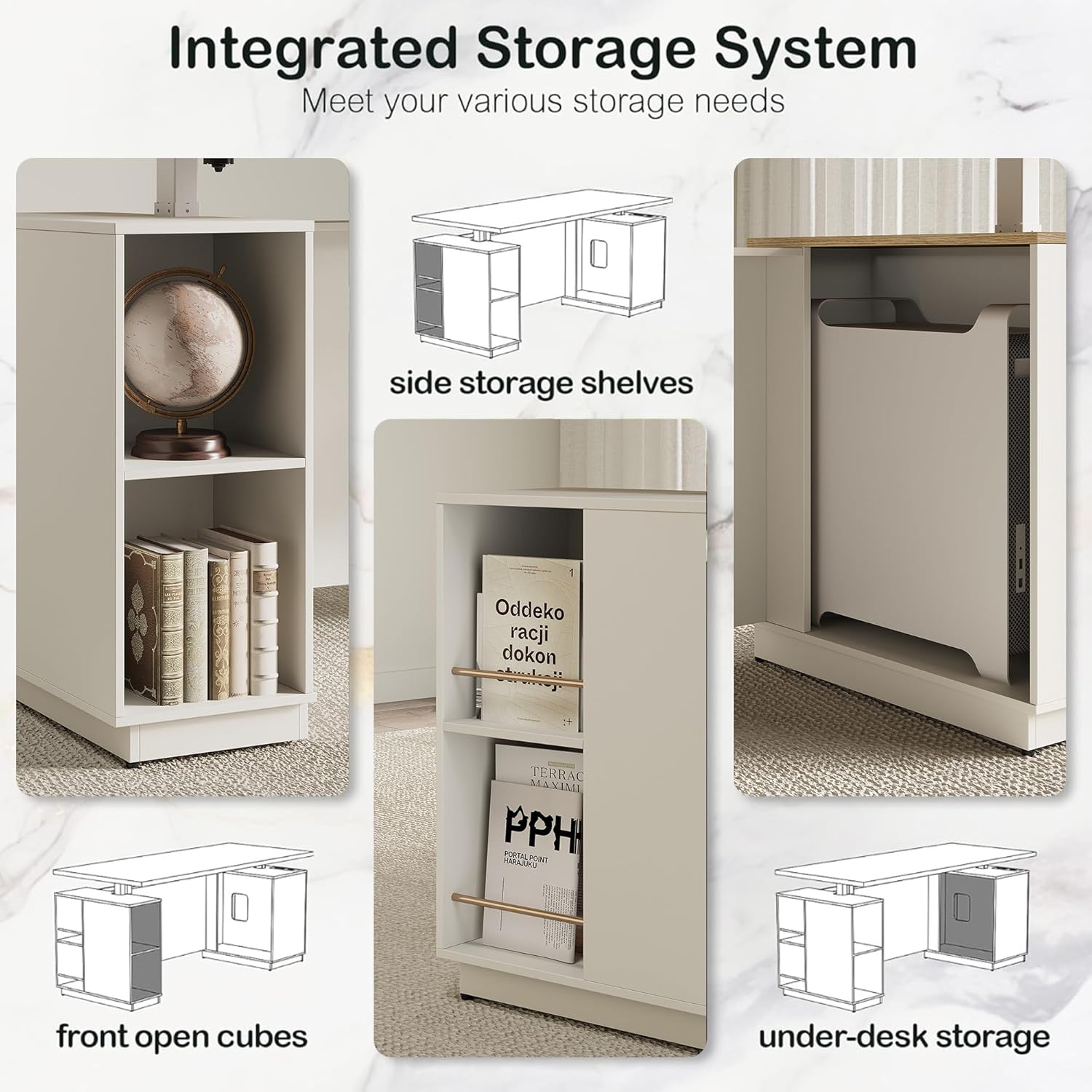
Image: Detailed views of the integrated storage system, showing side storage shelves, front open cubes, and under-desk storage compartments.
Expended Front Privacy Panel
A privacy panel is integrated into the front of the desk, offering a comfortable and private working environment.

Image: The desk with its extended front privacy panel, illustrating how it creates a more secluded workspace compared to desks without this feature.
Ultimate Stability
Constructed from cold-rolled steel, the desk frame is designed for durability and stability, supporting up to 176 pounds. The motor is tested for 50,000 lift cycles, ensuring long-lasting reliability.
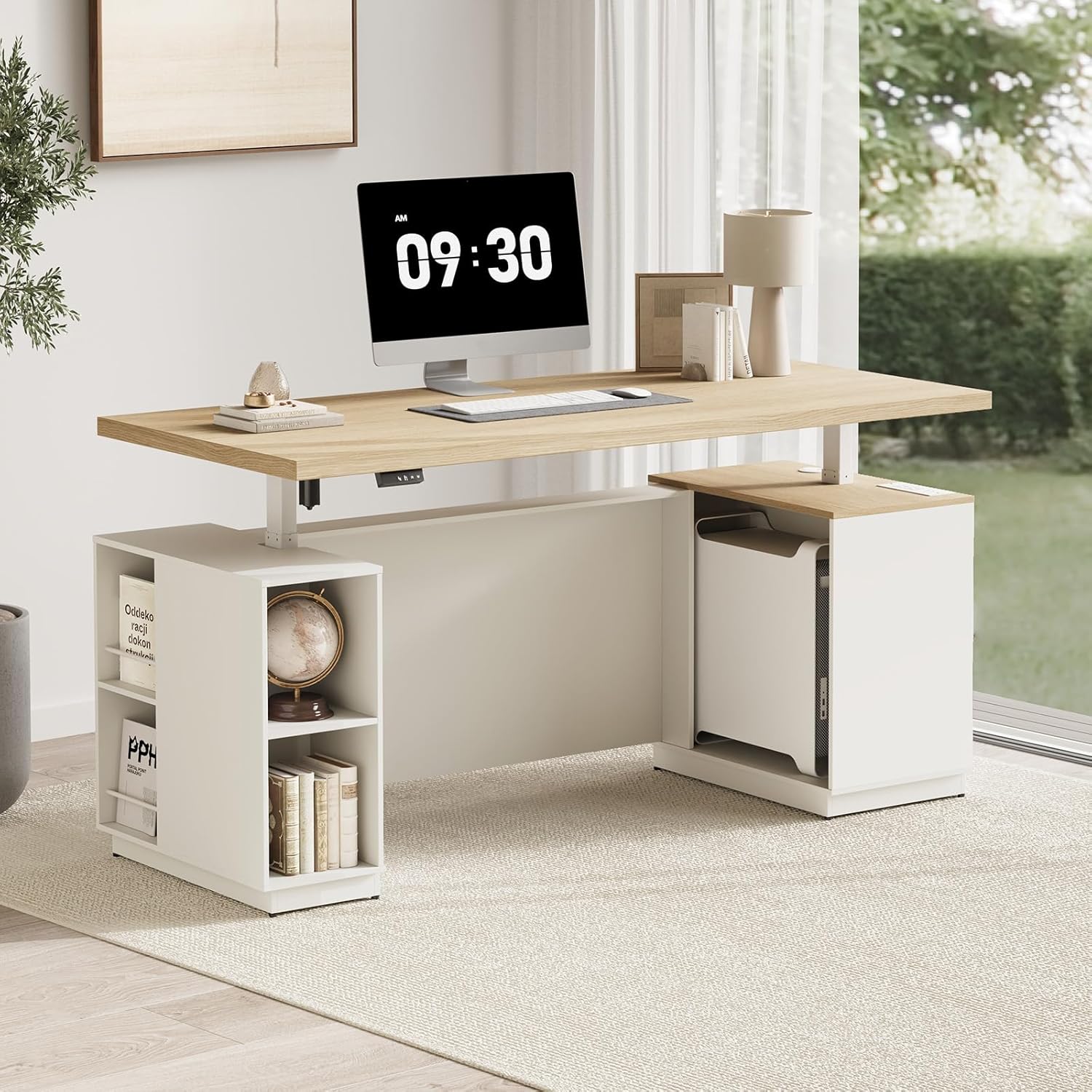
Image: A full view of the ModernMate 71-inch Standing Executive Desk in a home office setting, showcasing its design and integrated features.
8. Specifications

Image: Diagram illustrating the desk's dimensions and a table detailing the frame's performance specifications.
| Feature | Detail |
|---|---|
| Brand | ModernMate |
| Model Number | F1 |
| Product Dimensions (D x W x H) | 30"D x 71"W x 27.9"H |
| Adjustable Height Range | 27.9" to 45.7" (excluding desktop) |
| Color | Light Walnut (Desktop), White (Base) |
| Style | Modern |
| Base Material | Alloy Steel |
| Top Material Type | Engineered Wood |
| Maximum Weight Recommendation | 176 Pounds |
| Noise Control | <50 dB |
| Special Features | Adjustable Height, Built-in Outlet, Integrated Storage, Privacy Panel |
| Included Components | Hand Control, Installation Instructions, Power Adapter, Standing Desk |
| Item Weight | 154 Pounds |
| Number of Shelves | 2 (open shelves) |
| Required Assembly | Yes |
| Includes All Assembly Tools | No (some basic tools may be included, but not all) |
9. Maintenance
To ensure the longevity and optimal performance of your ModernMate Standing Executive Desk, follow these maintenance guidelines:
- Cleaning: Wipe the desk surfaces with a soft, damp cloth. Avoid harsh chemicals or abrasive cleaners that could damage the finish. For the frame, use a dry or slightly damp cloth.
- Motor Care: The electric motor is designed for maintenance-free operation. Avoid obstructing the lifting columns or forcing the desk to move if it encounters an obstacle.
- Cable Management: Periodically check and organize cables to prevent tangles or damage, especially those connected to the power outlet and control panel.
- Hardware Check: Occasionally inspect all screws and bolts to ensure they remain tight. Retighten if necessary, but do not overtighten.
10. Troubleshooting
If you experience issues with your ModernMate Standing Executive Desk, refer to the following common troubleshooting tips:
- Desk Not Moving:
- Check if the power adapter is securely plugged into both the desk and the wall outlet.
- Ensure the wall outlet is functional by testing it with another device.
- Perform a reset/calibration (refer to your Installation Instructions booklet for specific steps, usually involving holding the down button at the lowest position).
- Uneven Movement:
- Ensure the desk is not overloaded beyond its maximum weight capacity (176 lbs).
- Check for any obstructions under or around the desk columns.
- Perform a reset/calibration.
- Noise During Operation:
- A slight hum is normal during operation. If the noise is excessive or unusual, check for loose components or obstructions.
- Ensure the desk is on a level surface.
- Control Panel Not Responding:
- Verify power connection.
- Disconnect power for 10-15 seconds, then reconnect to reset the system.
For persistent issues or problems not covered here, please contact ModernMate customer service.
11. Warranty and Support
The ModernMate 71" Standing Executive Desk (Model F1) comes with a Limited Warranty. Details regarding the terms and duration of this warranty are typically provided in the separate warranty documentation included with your purchase or can be obtained by contacting ModernMate customer service.
Customer Service:
If you have any questions, require assistance with assembly, or need support for your product, please do not hesitate to contact ModernMate customer service. Our team is available to help you with any concerns.
Contact information can usually be found on the ModernMate website or within your product packaging.


