
DAJA A8
DAJA A8 20W Diode Desktop Laser Engraver Machine User Manual
Model: A8 | Brand: DAJA
1. Introduction
The DAJA A8 is a powerful and precise 20W diode laser engraver designed for both beginners and experienced users. Featuring an integrated body design, smart 16MP cameras, and high-speed engraving capabilities, it offers versatility for a wide range of materials including wood, metal, and acrylic. This manual provides essential information for safe and effective operation of your DAJA A8 laser engraver.

Figure 1: DAJA A8 Laser Engraver and Accessories
2. Safety Information
Your safety is paramount when operating the DAJA A8 laser engraver. This machine is classified as a Class 1 laser product, meaning it is safe under normal operating conditions. However, it is crucial to follow all safety guidelines to prevent potential hazards.
- Eye Protection: Always wear the provided safety glasses (green tinted) when the laser is in operation, especially if the protective lid is open or compromised.
- Lid-Open Safety Stop: The machine is equipped with a safety mechanism that automatically stops laser operation if the protective lid is opened during engraving or cutting.
- Flame Alarm Tilt Termination: An integrated flame sensor and tilt sensor will automatically stop the machine if a flame is detected or if the machine is tilted during operation, enhancing safety.
- Ventilation: Ensure adequate ventilation in your workspace to dissipate fumes and smoke generated during the engraving process. Consider using an optional smoking machine for rapid purification.
- Material Compatibility: Only engrave or cut materials specified as safe for laser processing. Avoid highly reflective, flammable, or unknown materials.
- Emergency Stop: Familiarize yourself with the location of the emergency stop button and how to use it in case of an unexpected event.

Figure 2: Key Safety Features and Accessories
3. Setup
The DAJA A8 features an integrated body design, minimizing assembly requirements. It is designed for immediate use upon unboxing.
3.1 Unboxing and Initial Placement
Carefully remove the engraver and all accessories from the packaging. Place the machine on a stable, level surface in a well-ventilated area, away from flammable materials.
3.2 Component Connection
- Laser Module: The 20W laser module is pre-installed. Ensure it is securely in place.
- Air Assist Pump: Connect the provided air assist pump to the designated port on the laser module and the machine. This pump helps remove smoke and debris, improving engraving quality and prolonging component lifespan.
- Power Connection: Connect the power adapter to the machine and a suitable power outlet.
3.3 Software Installation
The DAJA A8 is compatible with various software options, providing flexibility for your design workflow:
- DAJA Laser Software: The official DAJA software offers comprehensive design, editing, laser processing, and machine control functionalities.
- LightBurn: A powerful third-party laser engraving software that supports pre-editing operations and customization.
- Mobile Apps: Control and operate the engraver directly from your mobile device using the dedicated DAJA mobile application.
Install your preferred software on your computer (Windows/Mac OS) or mobile device (Android/iOS) by following the instructions provided with the software or available on the DAJA website.

Figure 3: Software Compatibility
4. Operating Instructions
This section outlines the steps for operating your DAJA A8 laser engraver.
4.1 Powering On and Basic Controls
- Power On: Turn on the machine using the main power switch.
- Emergency Stop: In case of any emergency, press the large red E-STOP button to immediately halt all operations.
4.2 Material Placement and Working Area
The DAJA A8 offers a generous engraving area of 381x343mm. Place your material flat on the honeycomb panel within the working area. Ensure the material is stable and does not move during operation.
4.3 Smart Camera Visualization
The integrated 16MP HD fisheye camera is a key feature for precise positioning. It leverages AI-powered image analysis to automatically detect and outline engraving targets with sub-millimeter accuracy. This allows for simultaneous processing of diverse items within the workspace, significantly reducing setup time.
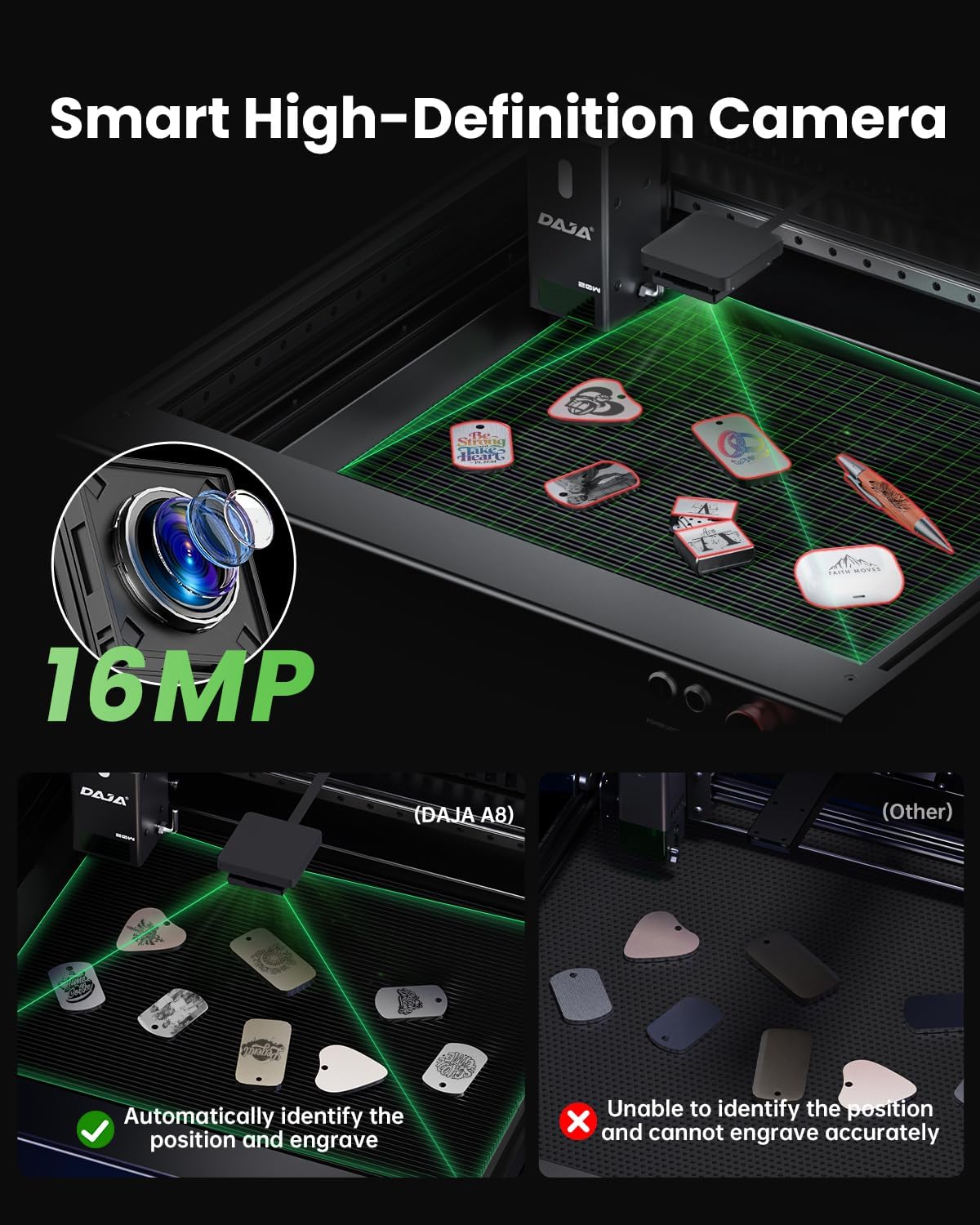
Figure 4: Smart Camera for Precise Positioning
4.4 Engraving and Cutting Capabilities
The 20W high-power blue laser module delivers exceptional stability and reliability. Its ultra-fine laser spot precision of 0.08mm×0.16mm (0.01mm²) ensures crisp details and vivid imagery.
- Cutting: The A8 can cut wood panels up to 16mm thick or acrylic panels up to 8mm thick in a single pass.
- Color Engraving: Transform stainless steel surfaces by etching rich, high-contrast hues, perfect for personalized designs.
- Material Versatility: Engrave and cut over 200 different materials, including wood, metal, acrylic, leather, paper, and more.

Figure 5: High Power Cutting Capability

Figure 6: Ultra-Fine Laser Spot Precision
4.5 Rotary Engraving (Optional Accessory)
For engraving cylindrical objects such as tumblers, bottles, or pens, an optional rotary engraving accessory can be installed. This expands the machine's capabilities to 360° engraving on curved surfaces.
4.6 Official Product Video
Watch the official product video for a visual guide on the DAJA A8's features and operation:
Video 1: DAJA A8-20W All-in-One Laser Engraving Machine for DIY. This video demonstrates the machine's features, including laser power, precision, safety mechanisms, and various engraving applications on different materials.
5. Maintenance
Regular maintenance ensures optimal performance and longevity of your DAJA A8 laser engraver.
- Cleaning the Laser Lens: Periodically clean the laser lens with a soft, lint-free cloth and lens cleaning solution to maintain engraving quality.
- Cleaning the Working Area: Remove any debris, dust, or residue from the honeycomb panel and the machine's interior after each use. The integrated air pump helps in debris removal during operation.
- Air Pump Maintenance: Ensure the air pump is free from obstructions and operating efficiently. Clean its filter if applicable.
- General Cleaning: Wipe down the exterior of the machine with a damp cloth. Avoid using harsh chemicals.
6. Troubleshooting
If you encounter issues with your DAJA A8, refer to the following common troubleshooting tips:
| Problem | Possible Cause | Solution |
|---|---|---|
| Laser not firing or weak output | Loose connection, dirty lens, incorrect power settings, material too far/close | Check all cable connections. Clean the laser lens. Adjust laser power and speed settings in software. Ensure proper focus distance. |
| Engraving/Cutting is inaccurate or distorted | Material movement, incorrect camera calibration, loose belts/rails | Secure the material firmly. Recalibrate the smart camera. Check for any loose components on the dual-axis guide rail. |
| Software not connecting to machine | USB cable issue, driver not installed, software version mismatch | Try a different USB port or cable. Reinstall software drivers. Ensure software is up-to-date and compatible with your OS. |
| Excessive smoke or odor | Poor ventilation, air assist not active, material type | Improve room ventilation. Ensure air assist pump is connected and running. Consider using the optional smoking machine. Verify material is suitable for laser engraving. |
If the problem persists, please contact DAJA customer support for further assistance.
7. Specifications
| Feature | Specification |
|---|---|
| Brand | DAJA |
| Model | A8 |
| Laser Type | 455 nm Diode Laser |
| Laser Power | 20,000 mW (20W) |
| Laser Level | Class 1 |
| Laser Spot Size | 0.08mm × 0.16mm |
| Engraving Speed | Up to 600mm/s |
| Camera | 16MP HD Fisheye Camera (160° FOV) |
| Working Area | 381mm × 343mm |
| Product Dimensions | 29.53 x 19.69 x 13.78 inches |
| Item Weight | 39.8 pounds |
| Material Compatibility | Wood, Metal, Acrylic, Leather, Paper, etc. |
| Software Compatibility | DAJA Laser, LightBurn, Mobile Apps |
| Country of Origin | China |
| UPC | 797387257195 |
8. Warranty and Support
For warranty information, technical support, or service inquiries, please refer to the warranty card included with your product or visit the official DAJA website. Keep your purchase receipt as proof of purchase for warranty claims.
Ask a question about this manual
Ask about setup, troubleshooting, compatibility, parts, safety, or missing instructions. Manuals+ will review the question and use this page’s manual context to help answer it.