
1. Getting Started
1.1 What's in the Box
Upon unboxing your OICIIDO Z172 Smart Watch, please verify that all components are present:
- OICIIDO Z172 Smart Watch (1 unit)
- Magnetic Charging Cable (1 unit)
- User Manual (1 unit)
1.2 Initial Charging
Before first use, fully charge your smartwatch. Connect the magnetic charging cable to the charging points on the back of the watch and plug the USB end into a compatible power adapter (not included). A full charge typically takes 2.5-3 hours.
1.3 App Installation and Device Pairing
To unlock the full functionality of your OICIIDO Z172 Smart Watch, you must pair it with your smartphone via the dedicated application. The application name is "TechWear".
- Download the App: Scan the QR code in the included user manual or search for "TechWear" in your smartphone's app store (available for iOS 9.0+ and Android 5.0+).
- Create Profile: Open the app and follow the on-screen instructions to set up your personal profile.
- Add Device: Navigate to the "Device" section within the app and select "Add a Device".
- Select Your Watch: The app will scan for nearby devices. Choose your OICIIDO Z172 Smart Watch from the scanning list. The MAC address on the watch's "About" page can help identify your device.
- Confirm Pairing: Follow any prompts on both your phone and watch to confirm the pairing.
2. Product Overview
The OICIIDO Z172 Smart Watch features a 2.01-inch HD screen and a comfortable silicone strap, designed for all-day wear and various activities.

Image 1: Main view of the OICIIDO Z172 Smart Watch, showcasing its square display and black silicone strap.

Image 2: The smart watch screen illustrating Bluetooth 5.3 call functionality, message notifications from various apps, and the AI voice control interface.
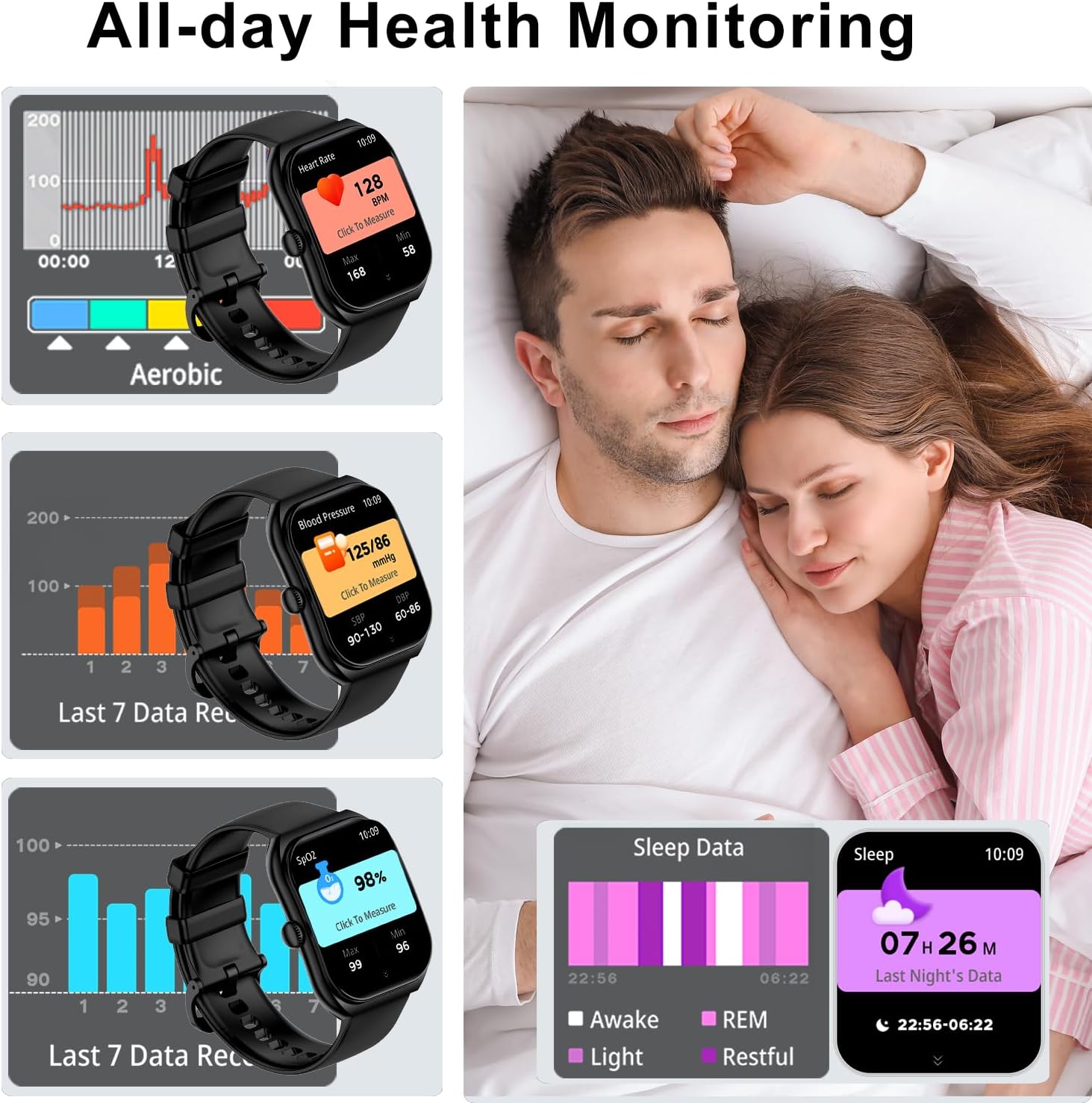
Image 3: Visual representation of the watch's all-day health monitoring capabilities, including graphs for heart rate, blood pressure, SpO2, and detailed sleep data.

Image 4: A comprehensive display of the numerous functions available on the smart watch, such as activity tracking, messages, phone calls, exercise, relaxation, find phone, calculator, games, camera shutter, sleep, heart rate, stress, weather, exercise records, cycle tracking, settings, blood pressure, SpO2, music player, AI voice, timer, alarm, stopwatch, and flashlight.
3. Operating Instructions
3.1 Communication Features
- Bluetooth 5.3 Calls: The watch supports making and receiving calls directly from your wrist. Access recent calls, a dial pad, and contacts through the watch interface. Ensure your watch is connected via Bluetooth to your phone.
- Message Alerts: Receive notifications from various applications such as Facebook, WhatsApp, Instagram, and SMS. Note: Replying to messages directly from the watch is not supported.
3.2 AI Voice Control
Utilize the integrated AI voice assistant for hands-free control. With HD speakers and a microphone, you can issue voice commands to control music playback, check weather forecasts, set alarms, and more.
3.3 Display and Customization
The 2.01-inch HD screen offers clear visuals. Personalize your watch with over 130 pre-designed watch faces available in the "TechWear" app, or upload your own photos to create custom backgrounds.
3.4 Health Monitoring
The OICIIDO Z172 provides comprehensive health tracking:
- Heart Rate Monitoring: 24-hour continuous heart rate tracking via an advanced optical sensor.
- SpO2 Measurement: On-demand blood oxygen saturation measurement.
- Sleep Quality Detection: Monitors deep sleep, light sleep, and awake times to provide insights into your sleep patterns.
- Menstrual Cycle Tracking: A dedicated feature for women to track and predict menstrual cycles.
All health data can be reviewed in detail within the "TechWear" application.
3.5 Fitness Tracking
The watch supports over 123 sports modes, catering to a wide range of indoor and outdoor activities including running, cycling, walking, basketball, yoga, and skiing. During exercise, the activity tracker records real-time data such as steps, distance, and calories burned.
3.6 Additional Functions
The OICIIDO Z172 Smart Watch includes a variety of utility features:
- Timer and Stopwatch
- Alarm Clock
- Sedentary Reminder
- Music Control
- Weather Forecast
- Brightness Adjustment
- Remote Camera Control
- Calculator
- Find Phone function
- Do Not Disturb mode
4. Maintenance and Care
4.1 Water Resistance
The OICIIDO Z172 Smart Watch has a 1ATM water and dust resistant rating. This means it is resistant to splashes, rain, and can withstand sweat during workouts. It is suitable for daily use like washing hands or being caught in the rain. Do not wear the watch while swimming or showering, as prolonged exposure to water or high-pressure water jets may damage the device. Ensure the watch is thoroughly dry before charging.
4.2 Cleaning
To maintain the watch's appearance and functionality:
- Wipe the screen and strap regularly with a soft, dry cloth.
- If necessary, use a slightly damp cloth for cleaning, then dry thoroughly.
- Avoid using harsh chemicals or abrasive materials.
4.3 Battery Care
To prolong battery life:
- Charge the watch fully before its first use.
- Avoid completely draining the battery frequently.
- Store the watch in a cool, dry place when not in use for extended periods.
5. Troubleshooting
If you encounter issues with your OICIIDO Z172 Smart Watch, please refer to the following common solutions:
- Watch Not Turning On: Ensure the watch is fully charged. Press and hold the side button for several seconds.
- Pairing Issues: Ensure Bluetooth is enabled on your phone and the watch is within range. Restart both the watch and your phone, then attempt pairing again through the "TechWear" app.
- No Notifications: Check the app settings to ensure notifications are enabled for the desired applications. Verify that the watch is properly connected via Bluetooth.
- Inaccurate Health Readings: Ensure the watch is worn snugly on your wrist, not too tight or too loose. Clean the sensors on the back of the watch.
- Short Battery Life: Reduce screen brightness, disable unnecessary features, and ensure the watch is not constantly searching for a Bluetooth connection.
For further assistance, please consult the "TechWear" app's help section or contact OICIIDO customer support.
6. Specifications
| Feature | Detail |
|---|---|
| Model Number | Z172 |
| Screen Size | 2.01 Inches |
| Operating System Compatibility | iOS 9.0+, Android 5.0+ |
| Connectivity | Bluetooth 5.3 |
| Battery Capacity | 350 Milliamp Hours |
| Typical Usage Battery Life | 7-9 days |
| Charging Time | 2.5-3 hours |
| Water Resistance Rating | 1ATM |
| Memory Storage Capacity | 64 MB |
| Item Weight | 4.2 ounces |
| Special Features | Bluetooth Calls, Message/App Notifications, 123+ Sports Modes, Heart Rate/Blood Oxygen Monitor, Sleep Tracker, Pedometer, Find Phone, DIY Watch Face, Weather, Alarm Clock, Remote Camera, Music Control, Stopwatch, Timer, Brightness Adjustment, Sedentary/Drinking Water Reminder, Do Not Disturb mode, AI Voice Assistant |
7. Warranty and Support
For information regarding warranty coverage, returns, or technical support, please refer to the documentation provided with your purchase or visit the official OICIIDO website. Customer service contact details are typically available within the "TechWear" application or on the product packaging.