
1. Important Safety Instructions
Please read all instructions carefully before using the GUGTTR Under Desk Elliptical. Retain this manual for future reference.
- Ensure the elliptical is placed on a stable, level surface during use.
- Keep children and pets away from the equipment during operation.
- Consult a physician before starting any new exercise program, especially if you have pre-existing health conditions.
- Do not stand on the elliptical. This device is designed for seated use only.
- Keep hands and feet clear of all moving parts to prevent injury.
- Unplug the elliptical from the power outlet when not in use or before cleaning.
- Do not use the elliptical if the power cord or plug is damaged.
- Use only the power adapter supplied with the unit.
2. Product Overview
The GUGTTR Under Desk Elliptical is a compact, electric seated pedal exerciser designed for low-impact workouts. It features adjustable speeds, multiple operating modes, and a display monitor to track your progress. Its quiet operation allows for use in various environments without disturbance.
Key Components
- Main Unit with Display Monitor
- Non-slip Pedals
- Remote Control
- Power Adapter


3. Setup
The GUGTTR Under Desk Elliptical comes 100% pre-assembled, requiring no installation. Simply unpack the unit and place it in your desired location.
Placement
- Place the elliptical on a flat, stable surface.
- Ensure there is sufficient space around the unit for comfortable leg movement.
- For under-desk use, verify that your desk height allows for unrestricted leg motion while seated.
- Connect the power adapter to the elliptical and then to a suitable power outlet.

4. Operating Instructions
The elliptical offers both manual and automatic operating modes, controlled via the main unit or the remote control.
Control Panel and Remote Control
The main unit features a display and control buttons. A remote control is also provided for convenient operation without bending down.

Starting and Stopping
- Press the Start/Stop button on the main unit or remote to begin or end a workout session.
Manual Mode
In Manual Mode, you can adjust the speed and pedal direction.
- Press the MODE button to select Manual Mode (indicated by 'HA' on the display).
- Use the SPEED +/- buttons to select one of 12 adjustable speeds.
- Press the DIRECTION button to switch between forward and backward pedaling.
Auto Mode
Auto Mode offers pre-programmed workouts with automatic speed and direction adjustments for 30 minutes.
- Press the MODE button to cycle through Auto Modes:
- P1: Soft Mode - Gentle exercise.
- P2: Walking Mode - Moderate intensity.
- P3: Exercise Mode - Higher intensity.

5. Display Monitor Functions
The integrated LCD screen displays various metrics to help you track your workout progress.
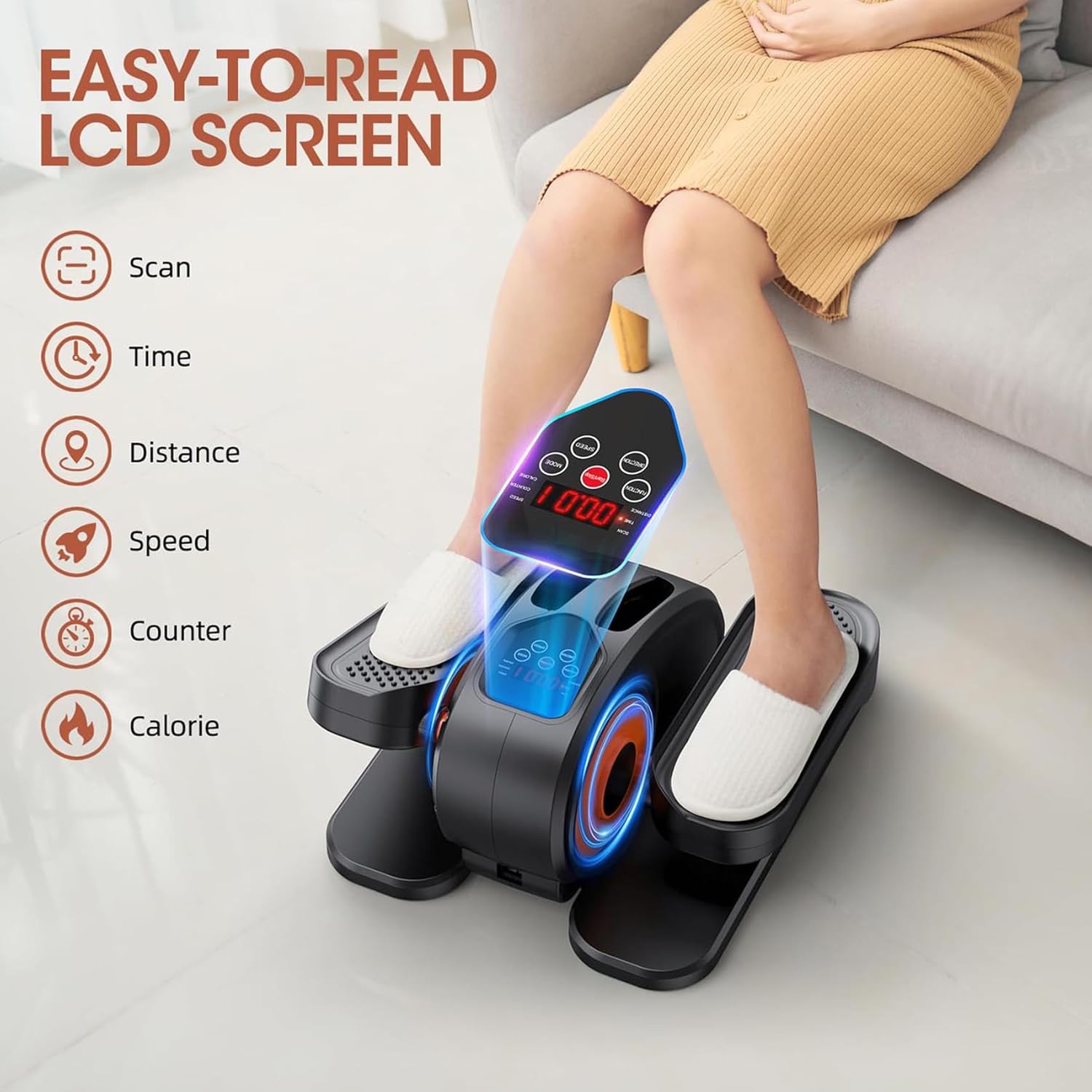
Metrics Displayed
- SCAN: Automatically cycles through all metrics.
- TIME: Duration of your current workout session.
- DISTANCE: Estimated distance covered.
- SPEED: Current pedaling speed.
- COUNTER: Total number of pedal rotations.
- CALORIE: Estimated calories burned.
Press the FUNCTION button on the main unit or remote to manually cycle through the display metrics.
6. Maintenance
Regular maintenance ensures the longevity and optimal performance of your elliptical.
Cleaning
- Wipe down the unit with a soft, damp cloth after each use to remove dust and sweat.
- Do not use abrasive cleaners or solvents, as these may damage the finish.
- Ensure the unit is unplugged before cleaning.
Lubrication
While the unit is designed for smooth operation, occasional lubrication may be beneficial. Refer to the official user manual (PDF link provided on the product page) for specific lubrication points and recommended frequency, as detailed instructions are not universally applicable without product-specific guidance.
7. Troubleshooting
If you encounter issues with your elliptical, refer to the following common solutions.
Remote Control Not Responding
- Check Batteries: Ensure the remote control batteries are correctly inserted and have sufficient charge. Replace if necessary.
- Line of Sight: Make sure there is a clear line of sight between the remote control and the elliptical's sensor.
- Proximity: Operate the remote control within a reasonable distance from the elliptical.
Unit Not Powering On
- Power Connection: Verify that the power adapter is securely plugged into both the elliptical and a working electrical outlet.
- Power Outlet: Test the outlet with another device to ensure it is functional.
Unusual Noises During Operation
- Check for Obstructions: Ensure no foreign objects are caught in the moving parts.
- Level Surface: Confirm the elliptical is on a stable, level surface to prevent wobbling.
- Lubrication: If a persistent squeaking or grinding noise occurs, consult the official PDF manual for specific lubrication instructions.
8. Specifications
| Feature | Specification |
|---|---|
| Model Name | EB026 |
| Brand | GUGTTR |
| Color | Orange |
| Product Dimensions (LxWxH) | 17.3"D x 14"W x 8.9"H |
| Material | Vinyl |
| Resistance Mechanism | Magnetic |
| Number of Resistance Levels | 12 |
| Item Weight | 7.3 Kilograms |
| UPC | 735881198903 |
| Date First Available | July 10, 2023 |
9. Warranty and Support
Warranty Information
The GUGTTR Under Desk Elliptical (Model EB026) comes with a 1-Year Warranty from the date of purchase. This warranty covers manufacturing defects and issues arising from normal use.
Customer Support
For any questions, concerns, or warranty claims regarding your GUGTTR Under Desk Elliptical, please contact GUGTTR customer service. Refer to the product packaging or the official GUGTTR website for the most current contact information.