
1. Important Safety Instructions
Please read all instructions carefully before using this fan and retain them for future reference. Failure to follow these instructions may result in electric shock, fire, or serious personal injury.
- Always unplug the fan from the power outlet before cleaning, servicing, or moving it.
- Do not insert fingers or any other objects through the grille when the fan is operating.
- Ensure the fan is placed on a stable, level surface to prevent it from tipping over.
- Do not use the fan in wet or damp locations, such as bathrooms or laundry areas.
- Keep the power cord away from heated surfaces and do not run it under carpeting.
- This appliance is not intended for use by persons (including children) with reduced physical, sensory or mental capabilities, or lack of experience and knowledge, unless they have been given supervision or instruction concerning use of the appliance by a person responsible for their safety.
- Children should be supervised to ensure that they do not play with the appliance.
2. Product Overview
The YWangQiang Automatic Oscillation Pedestal Fan is designed to provide efficient air circulation with adjustable settings. It features a pure copper motor for durability and quiet operation, 5 bionic wing fan blades for softer wind, and a high-density metal mesh cover for safety.

Figure 2.1: Front view of the YWangQiang Pedestal Fan, showcasing its orange blades and protective grille.

Figure 2.2: Close-up view of the fan blades, highlighting the 5 bionic wing design for optimized airflow.
Components:
- Fan Head (includes motor, blades, front and rear grilles)
- Control Panel
- Column Tube (adjustable height)
- Base/Chassis
- Power Cord
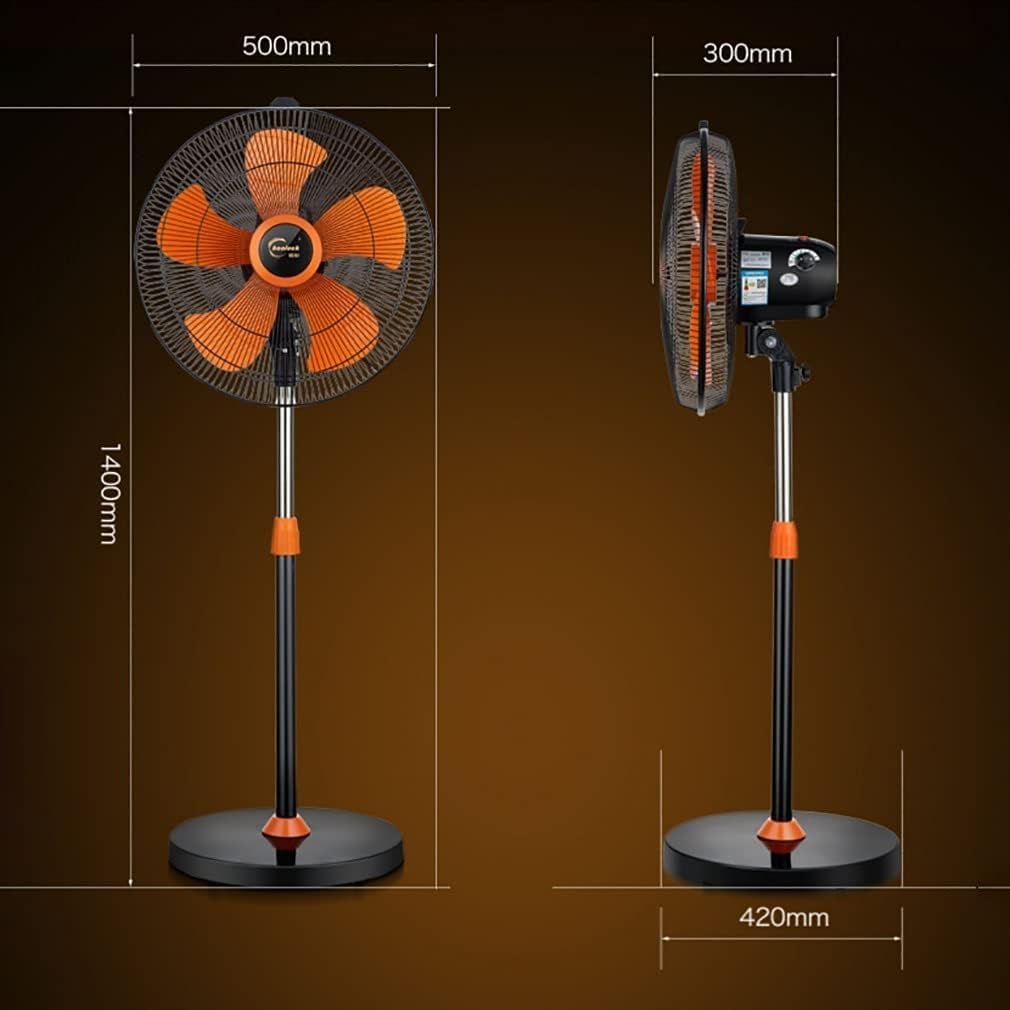
Figure 2.3: Dimensional view of the YWangQiang Pedestal Fan, showing its height of 1400mm, fan head width of 500mm, and base depth of 420mm.
3. Setup and Assembly
Follow these steps to assemble your YWangQiang Pedestal Fan:
- Unpack Components: Carefully remove all parts from the packaging. Verify that all components listed in the packing details are present: fan main body, column tube, front and rear grille, fan blade, net hoop, chassis (base), and this manual.
- Assemble the Base: Attach the column tube to the chassis (base). Ensure it is securely fastened.
- Attach Fan Head: Mount the fan main body (motor housing) onto the top of the column tube. Secure it with the provided fasteners.
- Install Fan Blade: Carefully place the fan blade onto the motor shaft. Secure it with the blade cap, ensuring it is tightened in the correct direction (usually counter-clockwise).
- Attach Rear Grille: Place the rear grille onto the motor housing, aligning the mounting holes. Secure it with the net hoop.
- Attach Front Grille: Position the front grille over the rear grille and secure it using the clips or screws provided, ensuring the grilles are tightly closed for safety.
- Position the Fan: Place the assembled fan on a firm, level surface. Ensure there is adequate space around the fan for proper air circulation and oscillation.
4. Operating Instructions
Your YWangQiang Pedestal Fan offers multiple settings for customized comfort.

Figure 4.1: Close-up of the fan's control panel, showing the power switch and rotary dial for speed and oscillation settings.
- Power On/Off: Plug the fan into a standard electrical outlet. Use the red "Press to switch" button on the control panel to turn the fan ON or OFF.
- Adjusting Fan Speed: Rotate the large dial on the control panel to select your desired fan speed. The fan offers 3 distinct speed settings.
- Activating Oscillation: To enable the automatic 120° oscillation feature, press down the oscillation knob located on top of the motor housing. Pull the knob up to stop oscillation and direct airflow in a fixed direction.
- Adjusting Tilt Angle: The fan head can be manually tilted up or down by approximately 30°. Loosen the adjustment knob on the side of the fan head, set the desired angle, and then tighten the knob to secure it.

Figure 4.2: Illustration of the fan's 120° left and right oscillation capability and 30° up and down tilt adjustment.
For optimal cooling, position the fan to enhance air circulation, especially when used in conjunction with an air conditioner.
5. Maintenance and Cleaning
Regular cleaning will help maintain the fan's performance and extend its lifespan.
- Before Cleaning: Always unplug the fan from the power outlet before attempting any cleaning or maintenance.
- Exterior Cleaning: Wipe the exterior surfaces of the fan with a soft, damp cloth. Do not use abrasive cleaners or solvents, as they may damage the finish.
- Grille and Blades: To clean the fan blades and inside the grilles, you may need to carefully remove the front grille. Use a soft brush or a vacuum cleaner with a brush attachment to remove dust and debris. Ensure all parts are dry before reassembling and operating the fan.
- Storage: If storing the fan for an extended period, cover it to protect it from dust and store it in a cool, dry place.
6. Troubleshooting
If you encounter any issues with your fan, please refer to the following common problems and solutions:
| Problem | Possible Cause | Solution |
|---|---|---|
| Fan does not turn on. | No power supply; Fan unplugged; Power switch off. | Check if the power cord is securely plugged into a working outlet. Ensure the power switch is in the 'ON' position. |
| Weak or no airflow. | Fan speed set too low; Grilles or blades are dirty. | Increase the fan speed setting. Clean the fan blades and grilles as described in the Maintenance section. |
| Fan makes unusual noise. | Loose parts; Obstruction in blades; Fan not on a stable surface. | Unplug the fan and check for any loose components or obstructions. Ensure the fan is on a stable, level surface. |
| Oscillation not working. | Oscillation knob not engaged. | Press down the oscillation knob on top of the motor housing to activate oscillation. |
If the problem persists after attempting these solutions, please contact customer support.
7. Specifications
| Feature | Detail |
|---|---|
| Product Name | Pedestal Fan |
| Model Number | B0F1MHQGZJ |
| Brand | YWangQiang |
| Rated Power | 140W |
| Air Volume Gear | 3 Gears |
| Mode of Operation | Mechanical |
| Fan Type | Floor Fan |
| Net Weight | 10.5 KG |
| Gross Weight | 10 KG |
| Machine Size (L x W x H) | 500mm x 420mm x 1400mm (approx.) |
| Oscillation | 120° Automatic |
| Tilt Adjustment | 30° Manual |
| UPC | 744114062256 |
Note: Due to manual measurement, actual size and data may vary slightly. Please refer to the actual product.
8. Warranty and Customer Support
For warranty information or technical assistance, please contact the manufacturer or your retailer. Keep your purchase receipt as proof of purchase.
Manufacturer: YWangQiang
For support inquiries, please refer to the contact information provided at the point of purchase or on the product packaging.