
Aeitto CB23D-C
Aeitto Nugget Ice Maker User Manual
Model: CB23D-C
Brand: Aeitto
Introduction
This manual provides essential information for the safe and efficient operation of your Aeitto Nugget Ice Maker. Please read it thoroughly before first use and retain it for future reference.

Image: The Aeitto Nugget Ice Maker, a compact countertop appliance, shown next to a glass of iced beverage.
Safety Instructions
Always follow basic safety precautions when using electrical appliances to reduce the risk of fire, electric shock, and injury to persons.
- Ensure the appliance is placed on a stable, level surface.
- Do not immerse the appliance, cord, or plug in water or other liquids.
- Unplug from outlet when not in use and before cleaning.
- Do not operate any appliance with a damaged cord or plug.
- Keep children away from the ice maker.
- Use only potable water for ice production.
Product Overview
Key Features:
- Strong Ice Production Capacity: Up to 55 lbs/day (summer) or 80 lbs/day (winter).
- Chewable & Crunchy Nugget Ice: Softer, tooth-friendly ice.
- Rapid Ice Release: First batch in 5 minutes, 3X faster release.
- Automatic Cycle Ice Production: Stops when full, resumes when ice level drops.
- 2 Ways To Refill Water: Manual and automatic (direct water pipe connection).
- Auto-Cleaning Function: Simplifies maintenance.

Image: The ice maker alongside a bar chart illustrating its superior ice production capacity compared to other models.

Image: A visual representation of the rapid ice release feature, showing ice nuggets falling from the machine.

Image: A comparison graphic highlighting the benefits of soft nugget ice (better taste, tooth-friendly, faster making) against traditional hard ice cubes.
Setup
Unpacking:
Carefully remove the ice maker and all accessories from the packaging. Check for any damage during transit. Retain packaging for future transport if needed.
Placement:
Place the ice maker on a flat, stable, and heat-resistant surface, away from direct sunlight or heat sources. Ensure adequate ventilation around the unit.
Water Refill Options:
- Manual Water Refill: Open the water inlet and pour potable water directly into the reservoir.
- Automatic Water Refill: Connect the provided hose to the water inlet tube on the back of the unit and to a suitable water pipe connection. Ensure all connections are secure to prevent leaks.

Image: An illustration demonstrating the two methods for water refilling: manual pouring into the top reservoir and automatic connection via a hose to a water supply.
Operating Instructions
Control Panel:
The control panel features intuitive buttons and indicator lights:
- POWER: On/Off button.
- SOFT ICE: Selects the ice production mode.
- CLEAN: Initiates the self-cleaning cycle (hold for 3 seconds).
- POWER Indicator: Illuminates when the unit is on.
- ADD WATER Indicator: Illuminates when water needs to be refilled.
- ICE FULL Indicator: Illuminates when the ice basket is full.

Image: A detailed view of the ice maker's control panel, showing the power, soft ice, and clean buttons, along with power, add water, and ice full indicators.
Making Ice:
- Ensure the water reservoir is filled.
- Press the POWER button to turn on the unit.
- The unit will begin the ice-making process automatically. The first batch of ice will be ready in approximately 5 minutes.
- The ICE FULL indicator will light up when the ice basket is full, and the machine will pause production.
- The machine will automatically resume ice production when the ice level drops below the infrared sensor.

Image: A diagram illustrating the automatic ice cycling process, where an induction infrared sensor detects ice levels to pause and resume production.
Maintenance
Self-Cleaning Function:
The ice maker features an auto-cleaning function to help maintain hygiene and prevent limescale buildup.
- Ensure the water reservoir is filled with clean water.
- Press and hold the CLEAN button for 3 seconds to activate the self-cleaning cycle.
- The machine will run through a cleaning process. Once complete, drain any remaining water.
For effective limescale removal, descaling agents may be required periodically.
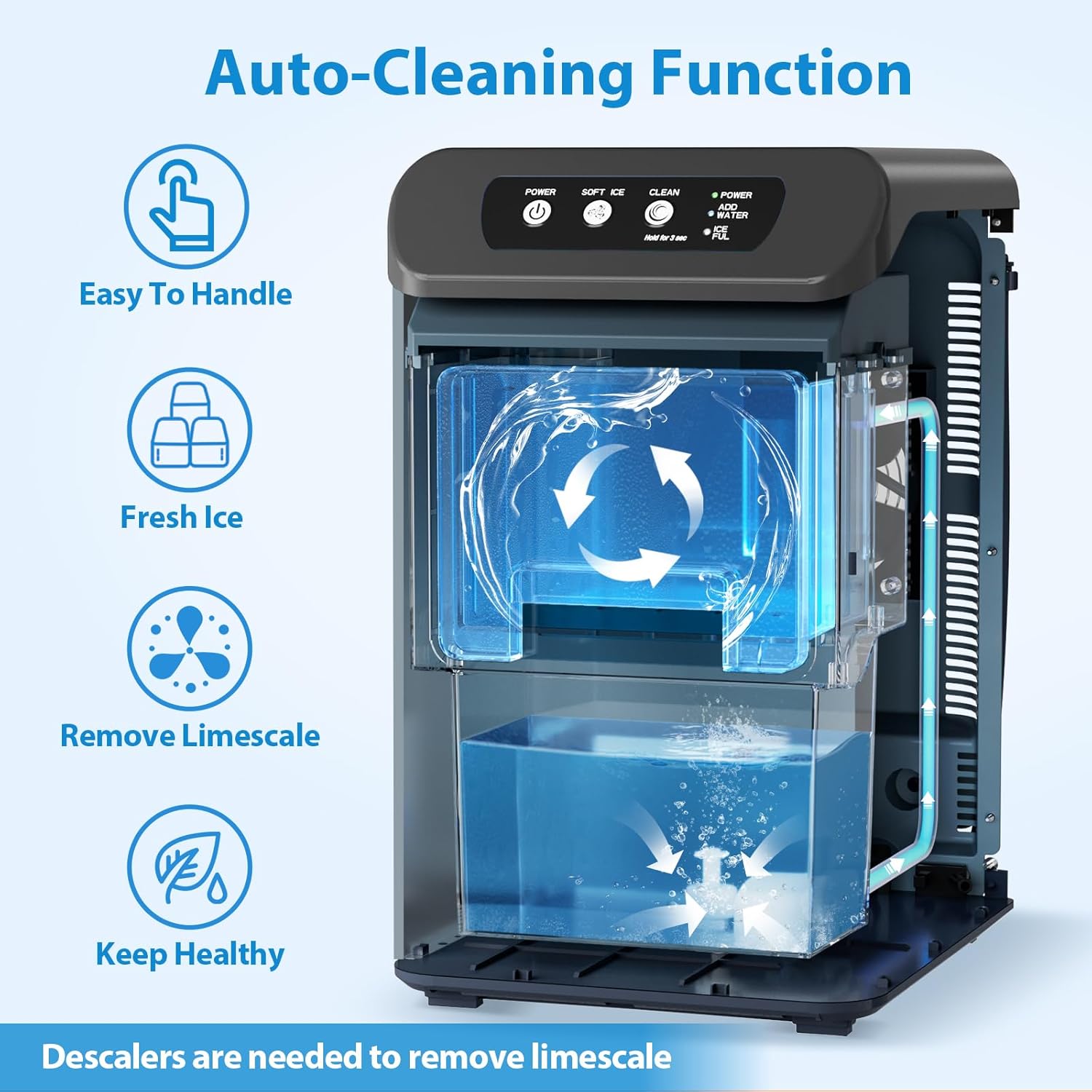
Image: A cutaway diagram showing the internal water circulation during the auto-cleaning function, emphasizing ease of handling, fresh ice, limescale removal, and health benefits.
Regular Cleaning:
- Wipe the exterior with a soft, damp cloth.
- Clean the ice basket and water reservoir regularly with mild soap and water. Rinse thoroughly.
- Ensure all parts are dry before reassembling and operating.
Troubleshooting
| Problem | Possible Cause | Solution |
|---|---|---|
| Ice maker not producing ice. | No water in reservoir; power off; ambient temperature too high. | Refill water; check power connection; ensure proper ventilation. |
| "ADD WATER" indicator is on. | Water level is low. | Add water to the reservoir. |
| "ICE FULL" indicator is on. | Ice basket is full. | Remove ice from the basket. |
| Unusual noise during operation. | Normal compressor operation; unit not level. | Ensure unit is on a stable, level surface. If noise persists or is excessive, contact support. |
Specifications
| Feature | Detail |
|---|---|
| Model Name | CB23D-C |
| Product Dimensions | 13.2"D x 9.6"W x 15.8"H |
| Weight | 34.35 Pounds |
| Capacity | 3.3 Pounds (ice basket) |
| Refrigerant | R290a |
| Manufacturer | Aeitto |
| First Available | March 1, 2025 |
What's in the Box
- Nugget Ice Maker x1
- Ice Scoop x1
- Tray x1
- Water Inlet Tube x1
- Faucet Connector x1
Warranty and Support
For warranty information and customer support, please refer to the warranty card included with your product or visit the official Aeitto website. Keep your purchase receipt for warranty claims.
For further assistance, you may contact Aeitto customer service directly.
Ask a question about this manual
Ask about setup, troubleshooting, compatibility, parts, safety, or missing instructions. Manuals+ will review the question and use this page’s manual context to help answer it.