
1. Product Overview
The Furmax Fabric Gaming Chair is designed to provide optimal comfort and support for extended periods of sitting, whether for gaming, work, or relaxation. Crafted with high-quality, breathable technical fabric, this chair offers enhanced comfort compared to traditional materials. It features an ergonomic design with adjustable components to suit individual needs.
Key Features:
- Premium Quality Fabric: Soft, skin-friendly, and breathable for long-lasting comfort.
- Ergonomic Design: High-back, body-hugging shape with elastic molded sponge cushioning for optimal back and shoulder support.
- Massage Lumbar Support: Built-in massage function to help relieve lower back fatigue.
- Adjustable Recline: Backrest adjusts from 90° to 135° for various activities.
- Retractable Footrest: Extendable footrest for full-body support and relaxation.
- 360-Degree Swivel: Provides full mobility.
- Durable Construction: Equipped with a sturdy Class-3 gas lift and BIFMA certified metal base.

Figure 1: Furmax Fabric Gaming Chair (Blue)
2. Safety Information
Please read all safety warnings and instructions carefully before assembly and use to prevent injury and damage to the product.
- Do not exceed the maximum weight recommendation of 270 pounds (122 kg).
- Always assemble the chair according to the instructions provided to ensure stability and safety.
- Keep small parts away from children during assembly to prevent choking hazards.
- Ensure all screws and bolts are tightened securely before use and periodically check for looseness.
- Avoid standing on the chair or using it as a step stool.
- Do not use abrasive cleaners or harsh chemicals on the chair's fabric or frame.
3. Product Dimensions and Components
Understanding the chair's dimensions and main components is essential for proper assembly and use.

Figure 2: Product Dimensions. Backrest: 23.6" (W) x 29.5" (H). Overall: 23.6" (W) x 23.6" (D) x 49.2" (H). Recommended Height: 5'3"-6'13". Max Load: 270 lbs.
Main Components:
- Backrest with integrated headrest and lumbar support
- Seat cushion with retractable footrest
- Armrests (linkage design)
- Gas lift cylinder
- Star base with casters
- Assembly hardware (screws, bolts, tools)
4. Setup and Assembly
Assembly typically requires two people and takes approximately 30-60 minutes. Follow the included assembly manual for detailed, step-by-step instructions. Below is a general overview of the process:
- Unpack Components: Carefully remove all parts from the packaging and verify against the parts list.
- Assemble Base: Attach the casters to the star base. Insert the gas lift cylinder into the center hole of the base.
- Attach Armrests to Seat: Secure the armrests to the underside of the seat cushion using the provided hardware.
- Attach Backrest to Seat: Connect the backrest to the seat assembly, ensuring proper alignment and tightening all bolts.
- Connect Seat to Base: Place the assembled seat and backrest onto the gas lift cylinder.
- Install Lumbar and Headrest Pillows: Attach the adjustable lumbar support and headrest pillows using their integrated straps.
- Final Check: Ensure all connections are secure and the chair is stable before first use.
5. Operating Instructions
Height Adjustment:
To adjust the chair's height, locate the lever on the right side, beneath the seat. Pull the lever up while sitting to lower the chair, or pull it up while standing to raise it. Release the lever at the desired height.
Backrest Recline:
The backrest can be reclined from 90° (upright) to 135° (reclined). Pull the recline lever, typically located on the left side of the seat, and lean back to the desired angle. Release the lever to lock the position.

Figure 3: Recline positions for various activities.
Retractable Footrest:
To extend the footrest, pull it out from beneath the seat. To retract, push it back in until it is fully stored. The footrest provides additional support when reclining.

Figure 4: User utilizing the retractable footrest for relaxation.
Massage Lumbar Support:
The lumbar support pillow includes a built-in massage function. Connect the USB cable from the lumbar pillow to a compatible USB power source (e.g., power bank, computer USB port). Use the integrated controller to activate and adjust the massage intensity.

Figure 5: Massage lumbar support detail.
Adjustable Headrest and Lumbar Pillows:
Both the headrest and lumbar support pillows are removable and adjustable. You can slide them up or down along the straps on the backrest to find the most comfortable position for your neck and lower back.
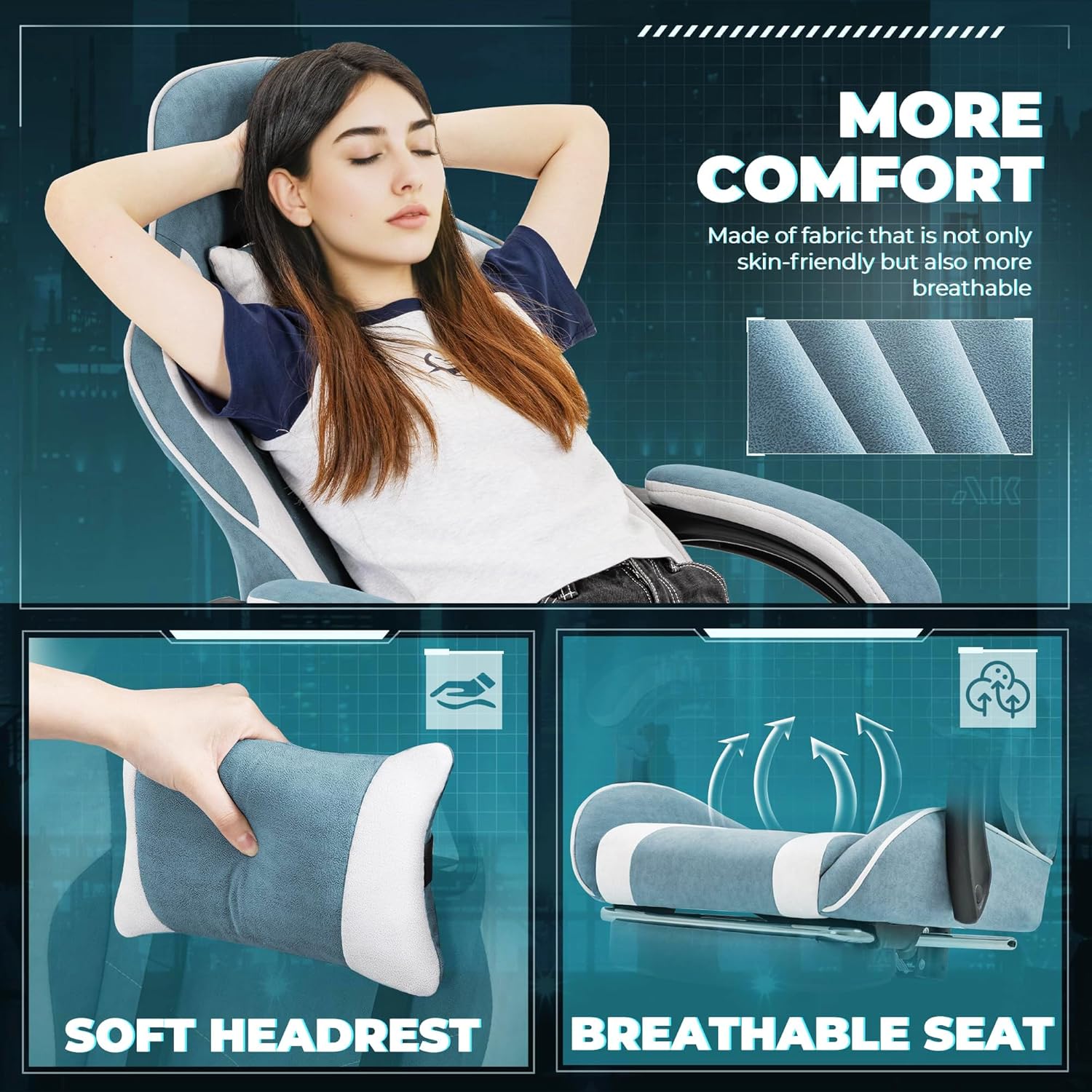
Figure 6: Soft headrest and breathable seat for enhanced comfort.
6. Maintenance
Regular maintenance helps prolong the life and appearance of your Furmax Gaming Chair.
- Cleaning Fabric: For general cleaning, use a soft cloth dampened with mild soap and water. Gently wipe the fabric surfaces. Avoid saturating the fabric.
- Spot Cleaning: For spills, blot immediately with a clean, dry cloth. For stubborn stains, use a fabric cleaner suitable for upholstery, following the product instructions.
- Frame and Base: Wipe metal and plastic parts with a damp cloth.
- Casters: Periodically clean hair and debris from the casters to ensure smooth rolling.
- Hardware Check: Every few months, check all screws and bolts to ensure they are tight. Re-tighten if necessary.
- Avoid Direct Sunlight: Prolonged exposure to direct sunlight can cause fabric fading.
7. Troubleshooting
If you encounter issues with your chair, refer to the common problems and solutions below:
| Problem | Possible Cause | Solution |
|---|---|---|
| Chair is wobbly/unstable | Loose screws or bolts. | Check and tighten all assembly hardware. Ensure the base is properly attached to the gas lift. |
| Height adjustment not working | Gas lift cylinder malfunction or lever issue. | Ensure the lever is fully engaged. If the issue persists, the gas lift may need replacement. Contact customer support. |
| Backrest does not recline/lock | Recline mechanism stuck or damaged. | Check for obstructions. Ensure the recline lever is functioning correctly. Avoid forcing the recline. |
| Massage function not working | USB power issue or internal wiring. | Ensure the USB cable is securely connected to a working power source. Try a different USB port or power bank. |
| Casters not rolling smoothly | Debris (hair, lint) caught in casters. | Turn the chair over and remove any debris from the caster wheels. |
8. Specifications
| Attribute | Detail |
|---|---|
| Brand | Furmax |
| Model Name | OCRC0420 |
| Color | Blue |
| Product Dimensions (D x W x H) | 26"D x 26"W x 49.2"H |
| Backrest Dimensions (W x H) | 23.6"W x 29.5"H |
| Maximum Weight Recommendation | 270 Pounds (122 kg) |
| Material | Breathable Fabric, Sponge Fill |
| Back Style | High Back |
| Reclining Position Count | 2 (90° to 135°) |
| Included Components | Adjustable Headrest, Adjustable Footrest, Massage Lumbar Support |
| Item Weight | 37.5 pounds (17 kg) |
| Country of Origin | China |
9. Warranty and Support
Furmax offers protection plans for this product, including 2-Year and 3-Year options, as well as a Complete Protect plan. For detailed information regarding warranty coverage, claims, or technical support, please refer to the documentation included with your purchase or visit the official Furmax website. You may also contact Furmax customer service directly for assistance with any product-related inquiries.