
Introduction
The Delumu Bluetooth Smart Tags are designed to help you locate your valuable items using Google's Find My Device app on Android devices. These tags offer accurate positioning, a loud alert feature, and a robust design to ensure your belongings are always within reach or traceable.
Key Features:
- Google Certified: Seamlessly integrates with Google Find My Device for reliable tracking (Android 9 and higher).
- Accurate Positioning: Provides real-time proximity display in meters and a loud beep for quick location.
- Easy Setup: Quick pairing process, typically within 30 seconds.
- Privacy Protection: Encrypted and anonymous data transmission ensures your location data remains private.
- Durable Design: IP66 waterproof rating protects against splashes and rain.
- Long-lasting Battery: Replaceable CR2032 battery provides approximately one year of use.
- Extended Range: Bluetooth range up to 100 meters (350 feet), with Google Find My network for wider area tracking.
- Compact and Discreet: Small size and included keyring allow for easy attachment to various items.

Image: Delumu Bluetooth Smart Tags (4-pack) with accessories.
Setup Guide
Package Contents
- Delumu Bluetooth Smart Tags (4 units)
- Keyrings (4 units)
- Silicone Protective Cases (4 units)
- CR2032 Batteries (pre-installed, 4 units)
Initial Setup and Pairing
- Download the App: Download the official "Google Find My Device" app from the Google Play Store on your Android smartphone or tablet.
- Activate Tag: Ensure your Smart Tag is powered on. (Typically, they are active out of the box or require a single press to activate).
- Enable Bluetooth: On your Android device, ensure Bluetooth is enabled.
- Pairing: Open the Google Find My Device app. Place the Smart Tag near your Android phone. A pairing window should automatically appear on your screen. Follow the on-screen prompts to complete the pairing process. This usually takes about 30 seconds.
- Name Your Tag: Once paired, you can assign a custom name to each tag (e.g., "Keys," "Wallet," "Luggage") within the app for easy identification.
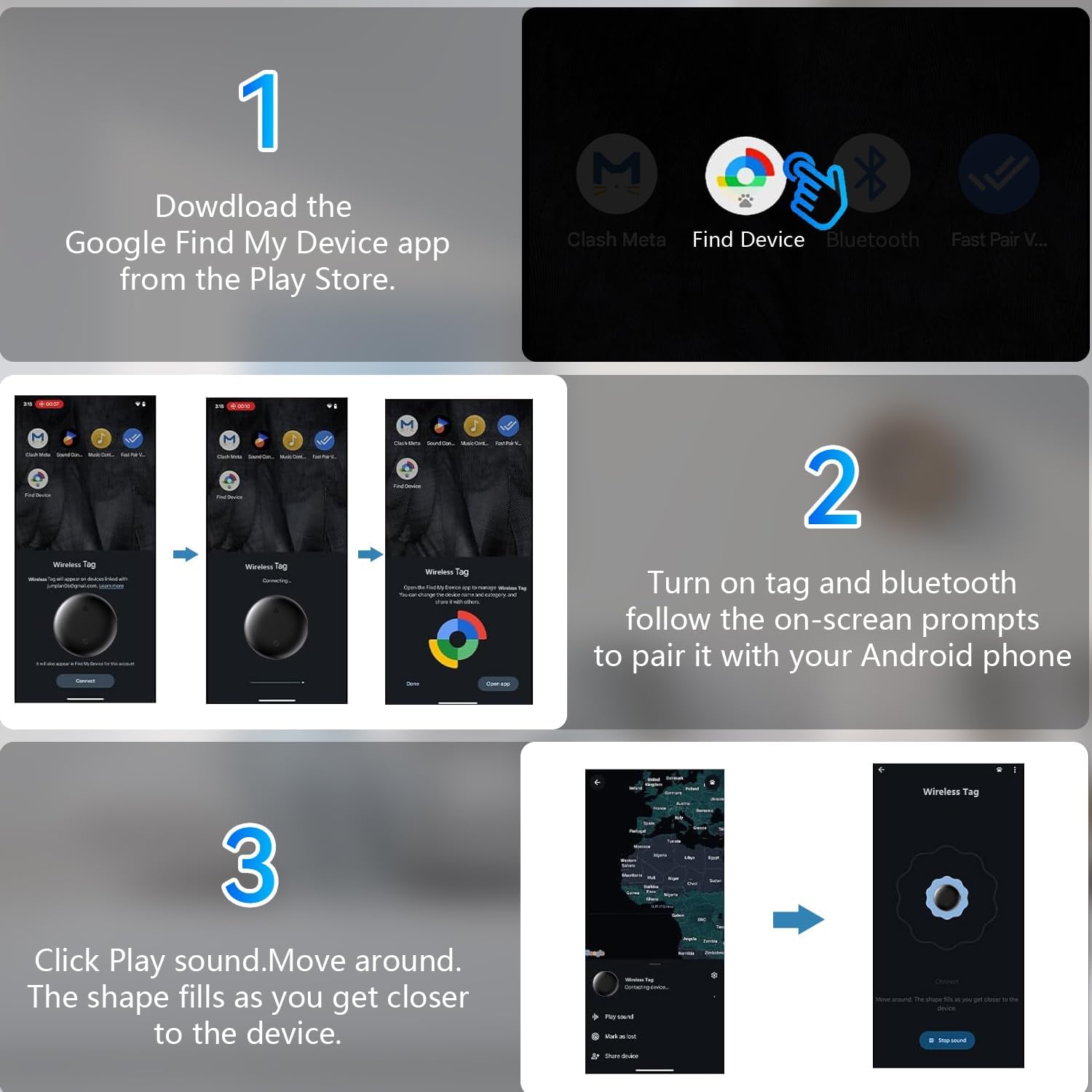
Image: Visual guide for downloading the app and pairing the Smart Tag.
Operating Your Smart Tags
Locating Nearby Items
When your item is within Bluetooth range (up to 100 meters or 350 feet), you can use the Google Find My Device app to locate it.
- Open the App: Launch the Google Find My Device app on your Android device.
- Select Tag: Choose the specific Smart Tag you wish to locate from your list of paired devices.
- Play Sound: Tap the "Play Sound" option within the app. The Smart Tag will emit a loud sound (80-100dB) to help you pinpoint its exact location.
- Proximity Display: The app may also display a real-time proximity indicator, showing you the distance in meters to your item, guiding you closer.

Image: Using the 'Play Sound' feature to locate items.
Locating Far Away Items
If your item is outside the Bluetooth range of your device, the Google Find My Device network can assist in locating it.
- Network Tracking: The Google Find My Device network utilizes other Android devices to anonymously detect your Smart Tag's location.
- View on Map: You can view the last known location of your Smart Tag on a map within the Google Find My Device app. Location updates typically occur within 2-3 minutes, even in crowded areas.

Image: The Smart Tag works with the Google Find My Device network.
Care and Maintenance
Battery Replacement
Each Delumu Smart Tag uses a replaceable CR2032 coin cell battery, which typically lasts for approximately one year. When the battery is low, you will receive a notification in the Google Find My Device app.
- Locate the battery compartment on the back of the Smart Tag.
- Carefully open the compartment using a small tool or by twisting the back cover (refer to product packaging for specific instructions if available).
- Remove the old CR2032 battery.
- Insert a new CR2032 battery with the positive (+) side facing up.
- Close the battery compartment securely.
Water Resistance
The Delumu Smart Tags feature an IP66 waterproof rating. This means they are protected against strong jets of water and dust ingress. They can withstand water splashes and rain, making them suitable for outdoor use and accidental exposure to water. However, they are not designed for prolonged submersion.

Image: Delumu Smart Tag demonstrating IP66 water resistance.
Troubleshooting
Common Issues and Solutions
- Tag Not Pairing:
- Ensure your Android device's Bluetooth is enabled and the tag is powered on and within close proximity.
- Restart your Android phone and try the pairing process again.
- Advanced Pairing Tip: If the tag doesn't appear automatically, open the Google Find My Device app, then manually toggle your phone's Bluetooth off and on while remaining in the app. This can sometimes prompt the device to find the tag.
- Inaccurate Location or Slow Updates:
- Ensure your Android device has a stable internet connection (Wi-Fi or mobile data) and location services are enabled for the Google Find My Device app.
- Location accuracy can be affected by environmental factors (e.g., dense buildings, underground areas).
- For out-of-range items, updates rely on the Google Find My network, which may have slight delays.
- Tag Not Emitting Sound:
- Check the battery level of the Smart Tag in the Google Find My Device app. Replace the battery if it's low.
- Ensure your phone's volume is turned up and the tag is within Bluetooth range.
- Tag Disconnecting Frequently:
- Ensure there are no significant obstructions between your phone and the tag.
- Check for interference from other Bluetooth devices.
- Update your Google Find My Device app to the latest version.
Product Specifications
| Feature | Specification |
|---|---|
| Product Dimensions | 1.25 inch (32mm) diameter, 0.38 inch (9.6mm) thickness |
| Item Weight | 2 ounces (per tag) |
| Connectivity | Bluetooth |
| Bluetooth Range | Up to 100 meters / 350 feet |
| Battery Type | CR2032 (replaceable) |
| Battery Life | Approximately 1 year |
| Water Resistance | IP66 (Dust tight, protected against strong jets of water) |
| Sound Level | 80-100 dB |
| Material | Plastic, Silicone |
| Compatibility | Android 9 and higher (Not compatible with iOS or Huawei devices) |
| Manufacturer | Delumu |

Image: Detailed dimensions and key specifications of the Smart Tag.
Warranty and Customer Support
For warranty information, technical assistance, or any questions regarding your Delumu Bluetooth Smart Tags, please contact Delumu customer support. Refer to the product packaging or the retailer's website for specific contact details.
Manufacturer: Delumu