
1. Introduction
This manual provides essential information for the proper setup, operation, and maintenance of your JBL Boombox 4 portable Bluetooth speaker. Please read this guide thoroughly before using the product to ensure optimal performance and safety.
The JBL Boombox 4 is designed to deliver powerful audio with deep bass. It features AI Sound Boost technology for optimized sound output, extended playtime, and multi-speaker connection capabilities via Auracast. The speaker is also rated IP68 for water and dust resistance, making it suitable for various environments.
2. Safety Information
Please observe the following safety guidelines:
- Do not expose the speaker to extreme temperatures or direct sunlight for prolonged periods.
- Ensure the charging port cover is securely closed when the speaker is exposed to water or dust.
- Do not attempt to disassemble or modify the speaker. This may void the warranty and pose a safety risk.
- Use only the provided AC power cord for charging.
- Keep the speaker away from medical devices.
3. What's in the Box
Verify that all items are present in the packaging:
- JBL Boombox 4 Speaker
- AC power cord (AC plug and quantity may vary by region)
- Quick Start Guide
- Safety Sheet
- Warranty Card
4. Product Overview
4.1. Speaker Components
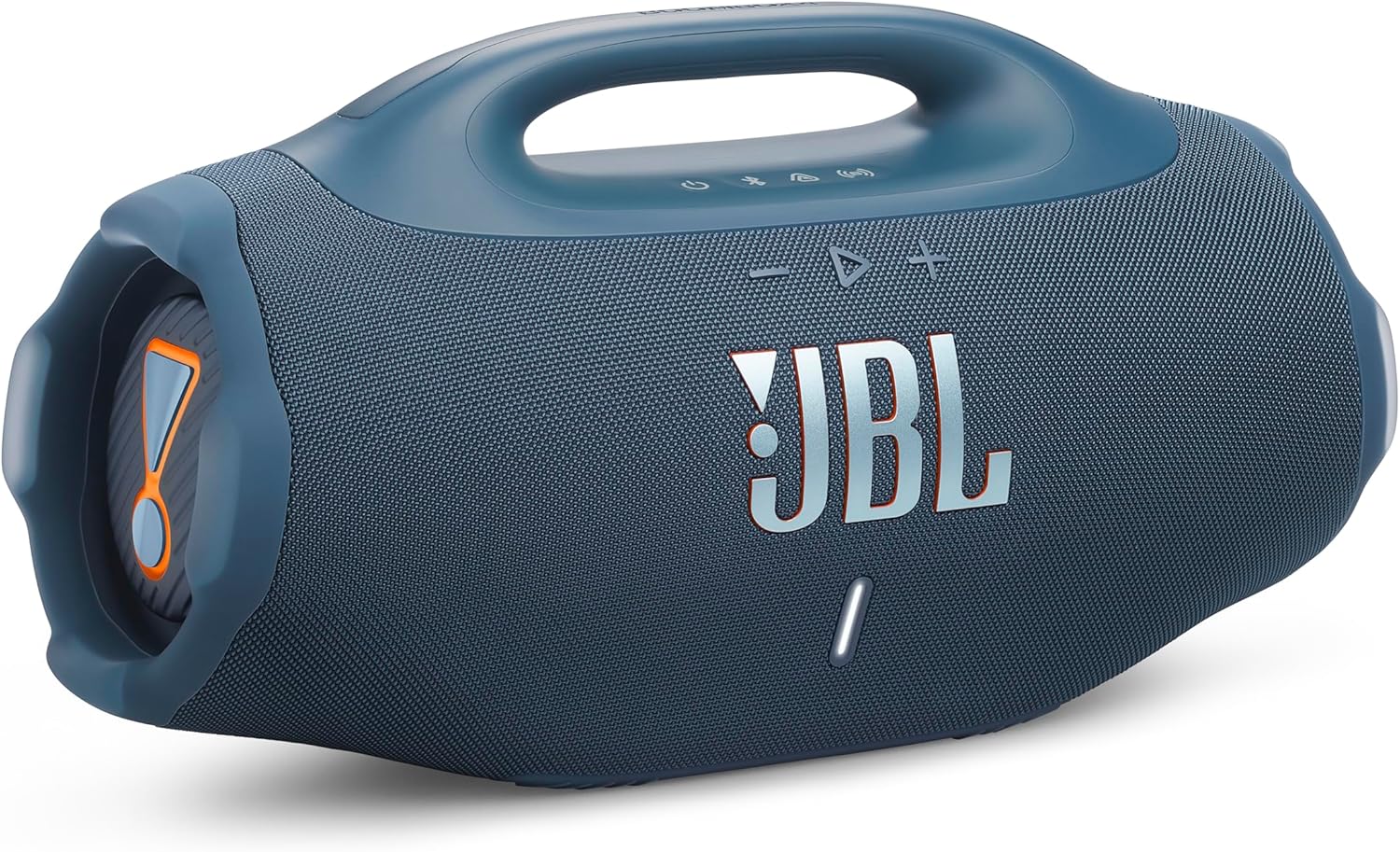
Figure 1: Front view of the JBL Boombox 4 speaker, showcasing its robust design and front grille.

Figure 2: Side view of the JBL Boombox 4, illustrating the passive radiator for enhanced bass.
4.2. Control Buttons and Indicators

Figure 3: Top panel controls of the JBL Boombox 4.
- Power Button: Press to turn the speaker on or off.
- Bluetooth Button: Press to enter Bluetooth pairing mode.
- Auracast Button: Press to initiate Auracast multi-speaker connection.
- Volume Down (-): Decreases the volume.
- Play/Pause Button (>): Plays or pauses audio playback.
- Volume Up (+): Increases the volume.
- Bass Boost Button: Toggles between Deep Bass and Punchy Bass modes.
- Battery Indicator: Displays the current battery level.
4.3. Ports

Figure 4: Rear panel ports of the JBL Boombox 4.
- AC Power Input: Connect the provided AC power cord for charging the speaker.
- USB-C Port: Used for lossless audio playback from compatible devices.
5. Setup
5.1. Charging the Speaker
- Open the protective cover on the rear of the speaker to access the AC power input.
- Connect the provided AC power cord to the speaker's AC power input.
- Plug the other end of the AC power cord into a wall outlet.
- The battery indicator will show charging status. Ensure the speaker is fully charged before first use for optimal battery life.
- Close the protective cover securely after charging to maintain water and dust resistance.
5.2. Power On/Off
- To power on the speaker, press the Power button on the top panel.
- To power off the speaker, press and hold the Power button until the speaker turns off.
5.3. Bluetooth Pairing
- Power on the JBL Boombox 4.
- Press the Bluetooth button on the top panel. The Bluetooth indicator will flash, indicating pairing mode.
- On your mobile device, navigate to Bluetooth settings and select "JBL Boombox 4" from the list of available devices.
- Once connected, the Bluetooth indicator on the speaker will remain solid.
6. Operating Instructions
6.1. Music Playback
- Play/Pause: Press the Play/Pause button once.
- Skip Track Forward: Double-press the Play/Pause button.
- Skip Track Backward: Triple-press the Play/Pause button.
- Volume Adjustment: Use the Volume Up (+) and Volume Down (-) buttons.
6.2. Bass Boost Modes
The JBL Boombox 4 offers two bass boost settings:
- Deep Bass Mode: Press the Bass Boost button once. The JBL Horn mark will glow orange. This mode provides a pronounced low-end response.
- Punchy Bass Mode: Press the Bass Boost button twice. The JBL Horn mark will turn white. This mode offers a tighter and more energetic bass response.
6.3. Auracast Multi-Speaker Connection
Auracast allows you to connect multiple Auracast-enabled JBL speakers for a wider sound stage or to cover a larger area with synchronized audio.
- Ensure all speakers are powered on and within range.
- On the primary speaker (the one connected to your audio source), press the Auracast button.
- On the secondary speakers you wish to connect, press their respective Auracast buttons.
- The speakers will automatically connect and synchronize audio playback.
6.4. Lossless Audio Playback (USB-C)
For high-fidelity audio, connect a compatible device to the speaker's USB-C port using a USB-C to USB-C cable (not included). Ensure your audio source supports lossless audio content.
6.5. Waterproof and Dustproof Usage (IP68)
The JBL Boombox 4 is rated IP68, meaning it is protected against dust ingress and can withstand immersion in water up to 1.5 meters for up to 30 minutes. Always ensure the rear port cover is securely closed before exposing the speaker to water or dust.
7. Maintenance
7.1. Cleaning
To clean the speaker, use a soft, damp cloth. Do not use abrasive cleaners or solvents. Ensure the speaker is dry before charging or using it in wet environments.
7.2. Battery Replacement
The JBL Boombox 4 features a replaceable battery. If the battery life significantly diminishes over time, a replacement battery can be purchased separately. Refer to the official JBL support resources for instructions on how to replace the battery safely.
8. Troubleshooting
- No Power: Ensure the speaker is charged. Connect it to a power source using the provided AC cord.
- No Sound: Check the volume levels on both the speaker and your connected device. Ensure the device is properly paired via Bluetooth.
- Bluetooth Pairing Issues: Make sure the speaker is in pairing mode (Bluetooth indicator flashing). Try unpairing and re-pairing the device. Ensure no other devices are actively connected to the speaker.
- Auracast Connection Issues: Ensure all speakers are Auracast-enabled and within range. Try restarting the connection process.
For further assistance, refer to the official JBL support website.
9. Specifications
| Feature | Specification |
|---|---|
| Model Name | JBL Boombox 4 |
| Speaker Type | Portable Speaker |
| Connectivity Technology | Bluetooth |
| Special Features | Bass Boost, Dustproof, Portable, Waterproof (IP68) |
| Speaker Maximum Output Power | 65 Watts |
| Product Dimensions (D x W x H) | 19.9" x 8.4" x 10.4" |
| Item Weight | 13 Pounds |
| Woofer Diameter | 123 Millimeters |
| Tweeter Diameter | 20 Millimeters |
| Batteries Required | 1 Lithium Polymer battery |
| Manufacturer | JBL |
10. Warranty and Support
For warranty information, please refer to the Warranty Card included in your product packaging. For technical support, product registration, or additional resources, visit the official JBL website or contact their customer service.
JBL Official Website: www.jbl.com


