
JBL JBLBOOMBOX4BLKAM
JBL Boombox 4 - Instruction Manual
Model: JBLBOOMBOX4BLKAM
Product Overview
The JBL Boombox 4 is a powerful, portable, and waterproof speaker designed to deliver massive JBL Pro Sound with deep, thumping bass. It features AI Sound Boost for optimized audio, extended playtime, and multi-speaker connection capabilities via Auracast™.

Figure 1: Front angled view of the JBL Boombox 4, showcasing its robust design and handle.
Key features include:
- JBL Pro Sound with AI Sound Boost: Delivers powerful audio with deep bass and real-time sound optimization for less distortion.
- Extended Playtime: Up to 34 hours of audio playback, with an additional 6 hours via Playtime Boost.
- Durable Design: IP68 waterproof and dustproof rating ensures resilience in various environments.
- Multi-speaker Connection: Auracast™ technology allows for stereo pairing or connecting multiple compatible JBL speakers.
- Bass Boost Settings: Two distinct bass modes (Deep Bass and Punchy Bass) to customize your listening experience.
- Lossless Audio Playback: USB-C port for high-fidelity audio connection to compatible devices.
- Sustainable Materials: Constructed with recycled plastic and fabric, and packaged in FSC-certified paper.
- Replaceable Battery: Designed for user-replaceable battery for extended product life (battery sold separately).
What's in the Box
Upon unboxing your JBL Boombox 4, ensure all the following components are present:
- JBL Boombox 4 Speaker
- AC power cord (AC plug and quantity may vary by region)
- Quick Start Guide
- Safety Sheet
- Warranty Card
Setup
1. Initial Charging
Before first use, it is recommended to fully charge your JBL Boombox 4. Connect the provided AC power cord to the speaker's power input port and then to a wall outlet. The battery indicator lights will show charging progress.

Figure 2: Rear view of the JBL Boombox 4, highlighting the power input and connectivity ports.
2. Powering On/Off
To power on the speaker, press the Power button located on the top panel. Press and hold the Power button again to power off.
3. Bluetooth Pairing
- Turn on the JBL Boombox 4.
- Press the Bluetooth button on the top panel. The Bluetooth indicator will flash, indicating it's in pairing mode.
- On your mobile device or computer, enable Bluetooth and search for available devices.
- Select "JBL Boombox 4" from the list of devices.
- Once connected, the Bluetooth indicator will glow solid.
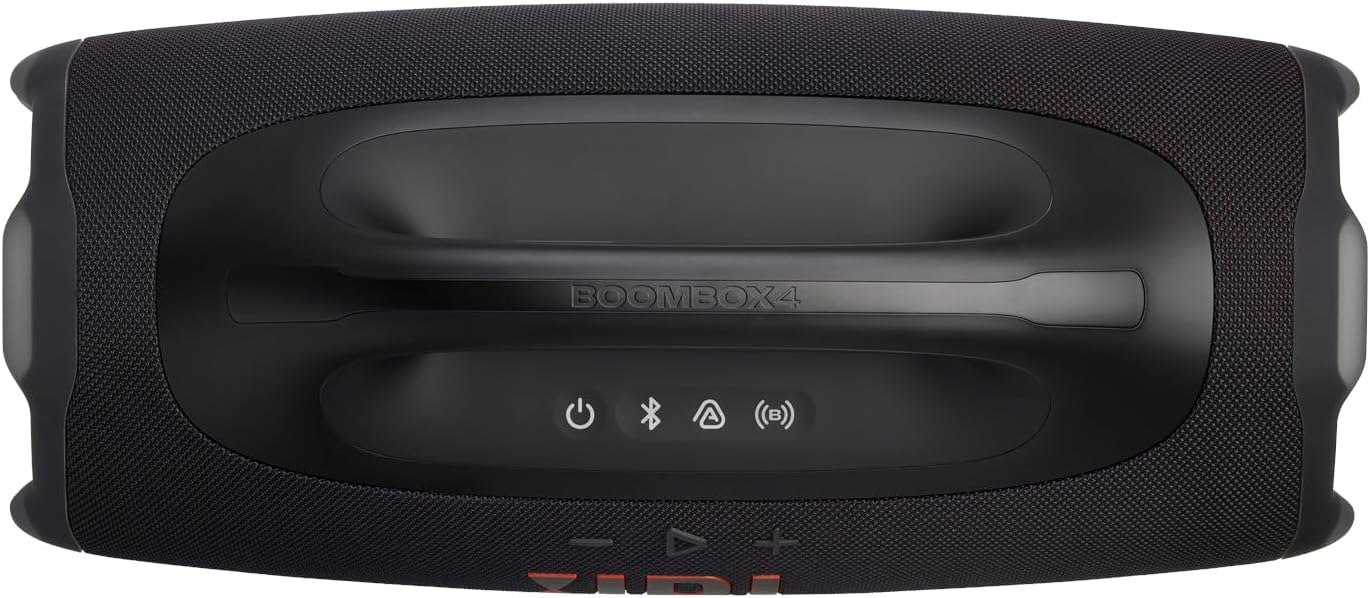
Figure 3: Top view of the JBL Boombox 4, displaying the power, Bluetooth, Auracast, and volume controls.
Operating Instructions
Basic Controls
- Power Button: Press to turn on/off.
- Bluetooth Button: Press to enter pairing mode.
- Volume Buttons (-/+): Press to decrease or increase volume.
- Play/Pause Button: Press to play or pause audio. Double-press for next track.
Bass Boost Settings
The JBL Boombox 4 offers two bass modes:
- Deep Bass Mode: Press the Bass Boost button (JBL Horn mark) once. The JBL Horn mark will glow orange, providing a deeper, more resonant bass.
- Punchy Bass Mode: Press the Bass Boost button twice. The JBL Horn mark will turn white, delivering a tighter, more energetic bass.
Auracast™ Multi-Speaker Connection
Auracast™ allows you to connect multiple compatible JBL speakers for a wider sound stage or to cover a larger area with the same playlist.
- Ensure all speakers are powered on.
- On the primary speaker (connected to your device), press the Auracast button.
- On the secondary speakers, press their respective Auracast buttons.
- The speakers will automatically connect, and audio will play simultaneously across all connected units.

Figure 4: The JBL Boombox 4 in an outdoor setting, demonstrating its portability and suitability for group listening.
Lossless Audio Playback (USB-C)
For the highest audio fidelity, connect your JBL Boombox 4 to a compatible laptop or audio device using a USB-C cable. This allows for lossless audio playback, provided your source device and content support it.
Maintenance
Cleaning
To clean your JBL Boombox 4, use a soft, damp cloth. Avoid using harsh chemicals or abrasive materials, as these may damage the speaker's finish or components. Ensure all port covers are securely closed before cleaning or exposing to water.
Waterproof and Dustproof (IP68)
The JBL Boombox 4 is rated IP68, meaning it is protected against dust ingress and can withstand immersion in water up to 1.5 meters for up to 30 minutes. While designed for durability, it is recommended to rinse the speaker with fresh water after exposure to saltwater or chlorinated water, and allow it to air dry completely before charging.

Figure 5: The JBL Boombox 4 demonstrating its waterproof capability by being partially submerged in water.
Battery Replacement
The JBL Boombox 4 features a user-replaceable battery to extend its lifespan. The replacement battery is sold separately. Refer to the detailed instructions provided with the replacement battery for the correct procedure. It typically involves three simple steps to swap out the battery.
Troubleshooting
| Problem | Possible Cause | Solution |
|---|---|---|
| No power | Battery drained; Power cord not connected | Charge the speaker; Ensure power cord is securely connected to speaker and outlet. |
| Cannot pair via Bluetooth | Speaker not in pairing mode; Device Bluetooth off; Interference | Press Bluetooth button to enter pairing mode; Enable Bluetooth on your device; Move speaker closer to device; Restart both devices. |
| No sound | Volume too low; Muted; Incorrect source; Bluetooth disconnected | Increase volume on speaker and device; Check if speaker is muted; Re-pair Bluetooth; Ensure correct input if using USB-C. |
| Auracast™ connection issues | Speakers out of range; Not all speakers in Auracast mode | Ensure speakers are within range; Press Auracast button on all speakers to initiate connection. |
Specifications
| Feature | Detail |
|---|---|
| Model Name | JBL Boombox 4 |
| Item Model Number | JBLBOOMBOX4BLKAM |
| Speaker Type | Portable Speaker |
| Product Dimensions (D x W x H) | 8.4"D x 19.9"W x 10.4"H |
| Item Weight | 13 Pounds |
| Woofer Diameter | 123 Millimeters |
| Tweeter Diameter | 20 Millimeters |
| Speaker Maximum Output Power | 65 Watts |
| Water Resistance Level | IP68 (Waterproof and Dustproof) |
| Bluetooth Version | 5.4 |
| Battery Type | Lithium Polymer (1 required) |
| Connectivity Technology | Bluetooth, USB-C (for lossless audio) |
| UPC | 050036413220 |
Warranty and Support
Warranty Information
Your JBL Boombox 4 comes with a Warranty Card included in the box. Please refer to this card for detailed information regarding the warranty period, coverage, and terms and conditions specific to your region.
Customer Support
For technical assistance, troubleshooting beyond this manual, or warranty claims, please visit the official JBL support website or contact their customer service. Contact details can typically be found on the Warranty Card or the JBL official website.
Note: Keep your proof of purchase for warranty purposes.
Related documentsJBLBOOMBOX4BLKAM


Ask a question about this manual
Ask about setup, troubleshooting, compatibility, parts, safety, or missing instructions. Manuals+ will review the question and use this page’s manual context to help answer it.