
EVERSOLO DMP-A6 Master Gen 2-Black
Eversolo DMP-A6 Master Gen 2-Black Hi-Fi Music Streamer User Manual
Model: DMP-A6 Master Gen 2-Black
Introduction
This manual provides comprehensive instructions for the setup, operation, and maintenance of your Eversolo DMP-A6 Master Gen 2-Black Hi-Fi Music Streamer. Please read this manual thoroughly before using the device to ensure optimal performance and longevity.
The Eversolo DMP-A6 Master Gen 2-Black is an advanced Hi-Fi music streamer designed for high-fidelity audio playback. It features an upgraded Op-amp Chip OPA1612 for enhanced sound output and a newly designed linear power supply for ultra-low noise operation. It supports a wide range of audio formats and streaming services, offering versatile connectivity options for integration into various audio systems.
Safety Information
Always adhere to the following safety guidelines to prevent damage to the device or personal injury:
- Do not expose the device to water or excessive moisture.
- Ensure proper ventilation to prevent overheating. Do not block ventilation openings.
- Use only the provided power cable and accessories.
- Do not attempt to open or repair the device yourself. Refer all servicing to qualified personnel.
- Keep the device away from direct sunlight, heat sources, and strong magnetic fields.
- Clean the device with a soft, dry cloth. Avoid using abrasive cleaners or solvents.
Package Contents
Verify that all items are present in the packaging:
- Eversolo DMP-A6 Master Gen 2-Black Unit
- Power Cable
- USB Cable
- Screwdriver (for internal storage installation, if applicable)
- User Manual (this document)
- Trigger Cable
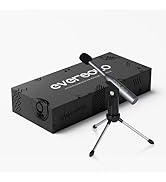
Image: Illustration of the Eversolo DMP-A6 Master Gen 2-Black package contents.
Setup
1. Physical Placement
Place the DMP-A6 Master Gen 2-Black on a stable, flat surface with adequate ventilation. Ensure there is sufficient space around the unit for airflow, especially at the rear and sides where heat dissipation occurs.
2. Power Connection
Connect the provided power cable to the AC inlet on the rear of the unit and then to a suitable power outlet. Ensure the power switch is in the OFF position before connecting.
3. Audio Connections
The DMP-A6 Master Gen 2-Black offers various audio input and output options:
- Analog Outputs: Use XLR or RCA outputs to connect to active speakers or power amplifiers.
- Digital Outputs: Optical, Coaxial, and HDMI (for audio only, no video output).
- Digital Inputs: Coaxial, Optical, Type-C USB, and HD Bluetooth for connecting external digital audio sources.
- HDMI ARC: Connect your TV's HDMI ARC port to the DMP-A6's HDMI ARC input to transmit TV audio directly.

Image: Rear panel connections of the DMP-A6 Master Gen 2-Black.
4. Network Connection
Connect the unit to your network via Ethernet cable for the most stable connection, or use the built-in Wi-Fi for wireless connectivity. A stable network connection is essential for streaming services and firmware updates.
5. Initial Power On
After all connections are made, switch on the power. The device will boot up, and the 6-inch LCD color touchscreen will display the initial setup wizard.
Operating Instructions
1. User Interface and Control
The DMP-A6 Master Gen 2-Black can be controlled via its integrated 6-inch LCD color touchscreen or through the dedicated mobile application for Android and iOS devices.

Image: Front panel and touchscreen display.
2. Mobile Application
Download the official Eversolo mobile application from your device's app store. The app provides comprehensive control over the streamer, including music playback, settings adjustment, and personalized playlist management.

Image: Eversolo mobile application interface.
3. Music Playback and Streaming
The device supports a wide array of music services and streaming protocols:
- Integrated Services: Access Amazon Music, TIDAL, Qobuz, HIRESAUDIO, Deezer, Tuneln Radio, and more directly from the device.
- Wireless Streaming: Compatible with Roon Ready, TIDAL Connect, and DLNA for seamless streaming from compatible devices and servers.
- Local/Network Playback: Play music files from local drives (USB) or network storage (NAS). The device supports cross-platform addition of music files.
- Supported Formats: Plays almost all ultra-high sampling master recording formats, including FLAC, WAV, APE, DSD512 (dsf/.dff/.iso/.dst) stereo/multichannel, and MQA.
Image: Supported music services and streaming platforms.
4. Advanced Features
- EOS Audio Engine: Utilizes an innovative audio processing engine that bypasses SRC limitations for high-resolution audio direct output.
- HDMI ARC & TRIGGER: HDMI ARC allows direct TV audio transmission. The TRIGGER function enables linked devices to automatically power on/off with the streamer.
- Professional EQ: Fine-tune your audio output with the built-in professional equalizer.
- OPA1612 Op-amp Chip: Features an upgraded Op-amp chip for a warmer voice output and improved audio quality.
- Ultra-Low Noise Linear Power Supply: Ensures a clean audio signal with noise levels below 40uV.

Image: Key technical features and specifications.
Maintenance
1. Cleaning
Regularly clean the exterior of the unit with a soft, dry, lint-free cloth. Do not use liquid cleaners, aerosols, or solvents, as they may damage the finish or internal components.
2. Firmware Updates
Eversolo frequently releases firmware updates to improve performance, add features, and fix bugs. It is recommended to keep your device's firmware up to date. Updates can typically be performed directly through the device's settings menu when connected to the internet.
3. Storage
If storing the device for an extended period, disconnect it from power and store it in a cool, dry place, away from direct sunlight and extreme temperatures.
Troubleshooting
| Problem | Possible Cause | Solution |
|---|---|---|
| No power | Power cable not connected; Power switch off; Power outlet issue. | Ensure power cable is securely connected. Check power switch. Test power outlet with another device. |
| No sound output | Incorrect audio output selected; Cables not connected properly; Amplifier/speaker issue. | Verify correct output in settings. Check all audio cable connections. Test amplifier/speakers with another source. |
| Cannot connect to network | Incorrect Wi-Fi password; Router issue; Ethernet cable disconnected. | Re-enter Wi-Fi password. Restart router. Check Ethernet cable connection. |
| Streaming services not loading | Poor internet connection; Service outage; App issue. | Check internet speed. Verify service status online. Restart the streamer and the app. |
| Device unresponsive | Temporary software glitch. | Perform a soft reset by holding the power button, or disconnect power for 30 seconds and reconnect. |
If the problem persists after attempting these solutions, please contact Eversolo customer support.
Specifications
| Feature | Detail |
|---|---|
| Model Name | DMP-A6 Master Gen 2-Black |
| Dimensions (L x W x H) | 10.63 x 7.36 x 5.34 inches (approx.) |
| Weight | 9.24 pounds |
| Operating System | Android 11 (deeply tailored system) |
| Display | 6-inch LCD Color Touchscreen |
| RAM | 4 GB |
| Connectivity | Bluetooth, Ethernet, HDMI, IR |
| Audio Inputs | Coaxial, Optical, Type-C USB, HD Bluetooth |
| Audio Outputs | HDMI (audio only), USB, Optical, Coaxial, XLR, RCA |
| Supported Streaming Services | Amazon Music, Deezer, HIRESAUDIO, Qobuz, Tidal, Tuneln Radio, Roon Ready, TIDAL Connect, DLNA |
| Supported Audio Formats | FLAC, WAV, APE, DSD512, MQA, PCM768kHz/32Bit |
| Special Features | Professional EQ, Roon Ready, Squeezelite, TIDAL Connect, HDMI ARC, TRIGGER, OPA1612 Op-amp, Ultra-Low Noise Linear Power Supply |
Warranty and Support
Warranty Information
The Eversolo DMP-A6 Master Gen 2-Black typically comes with a 1-year limited warranty from the date of purchase. This warranty covers manufacturing defects and workmanship under normal use. Please retain your proof of purchase for warranty claims.
The warranty does not cover damage caused by misuse, accident, unauthorized modification, improper installation, or natural disasters. For detailed warranty terms and conditions, please refer to the official Eversolo website or contact their customer service.
Customer Support
For technical assistance, troubleshooting, or warranty inquiries, please contact Eversolo customer support through their official channels. You can typically find contact information on the Eversolo website, including support forums, email addresses, or phone numbers.
Eversolo aims to provide monthly firmware updates and encourages users to submit comments or questions via their official service channels (website forum, Facebook, Instagram, or email) for prompt responses.
Related documentsDMP-A6 Master Gen 2-Black


Ask a question about this manual
Ask about setup, troubleshooting, compatibility, parts, safety, or missing instructions. Manuals+ will review the question and use this page’s manual context to help answer it.