1. Introduction
The COWAY Airmega 50 is a compact and efficient air purifier designed to enhance air quality in spaces up to 450 sq. ft. This manual provides essential information for setting up, operating, and maintaining your device to ensure optimal performance and a healthier indoor environment.

Figure 1: COWAY Airmega 50 Air Purifier
2. Product Features
- 360° Air Intake with 3-Stage Filtration: Effectively captures 99.999% of ultra-fine particles as small as 0.01 microns, including allergens, viruses, smoke, and odors.
- Compact and Powerful: Designed to cover areas up to 500 sq. ft. with a small footprint, certified as Energy Star Most Efficient 2025.
- Sleep Mode, Nightlight, Timer: Features whisper-quiet operation at 18.4 dB for undisturbed sleep, a gentle nightlight, and a programmable timer.
- Auto Mode & Real-Time Air Quality Indicator (AQI): Automatically adjusts fan speed based on detected air quality, displayed via a 4-color LED indicator.
- Long-Lasting Filter: Filters last up to 8 months with a convenient filter replacement indicator.

Figure 2: 360° Air Intake for comprehensive coverage.
3. Setup
3.1 Unboxing and Filter Preparation
- Carefully remove the air purifier from its packaging.
- Locate the filter compartment, usually at the bottom or side of the unit.
- Remove all protective plastic wrapping from the filters before installation.

Figure 3: Illustration of the 3-Stage Filtration System.
3.2 Filter Installation
The Airmega 50 utilizes a 3-stage filtration system. Ensure filters are correctly oriented and securely placed back into the unit. The filters are not separable and can be damaged by water.
Video 1: Demonstrates the installation of the genuine filter for the Airmega 50.
3.3 Placement
Place the air purifier on a flat, stable surface. Ensure there is adequate space around the unit for optimal air circulation. Avoid placing it directly against walls or furniture that might obstruct air intake or output.
4. Operating Instructions
4.1 Control Panel Overview
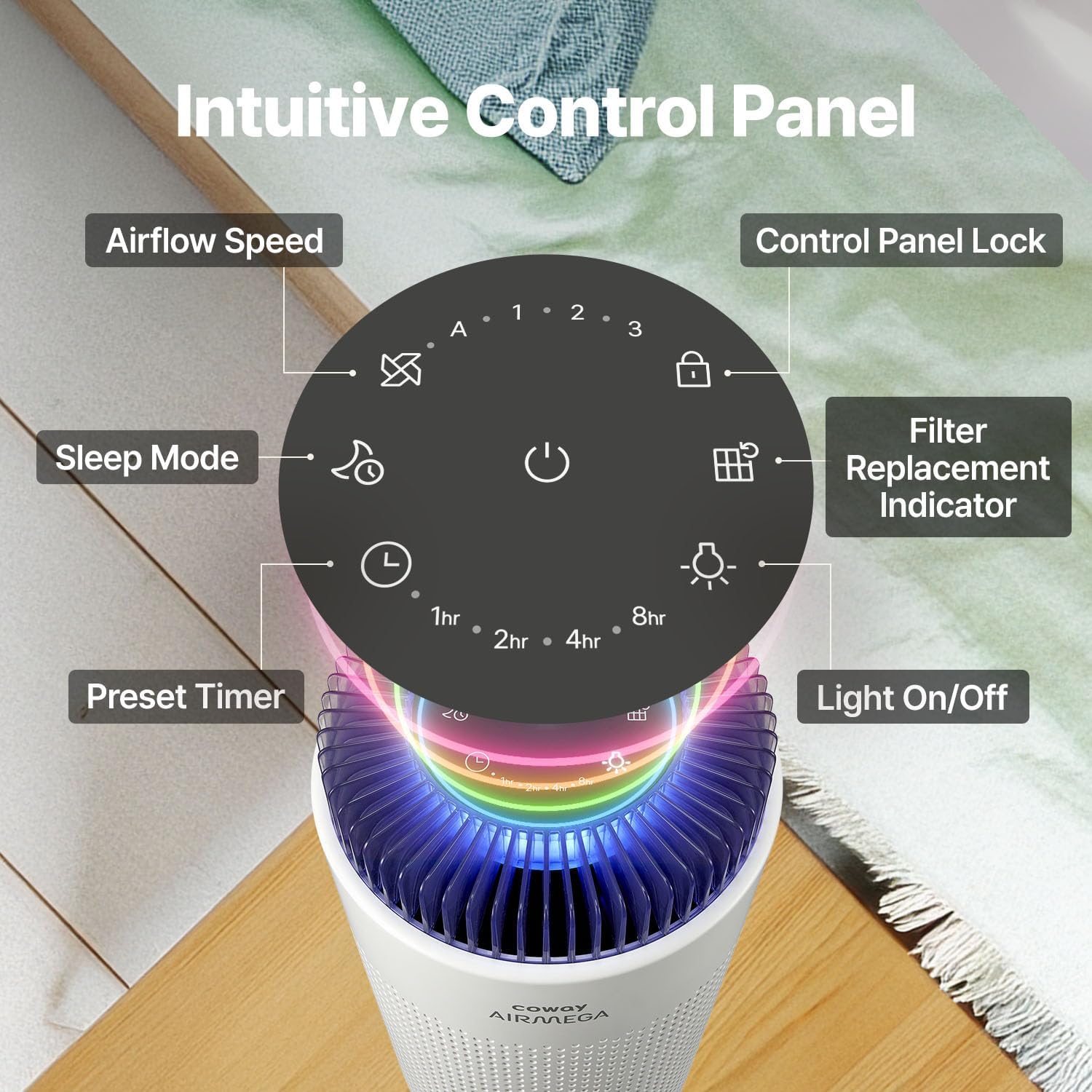
Figure 4: Intuitive Touch Control Panel with various function buttons.
4.2 Modes and Settings
- Power Button: Press to turn the unit On/Off.
- Fan Speed: Select from multiple fan speeds (1, 2, 3) or Auto Mode.
- Auto Mode: The purifier intelligently adjusts airflow based on real-time air quality.
- Sleep Mode: Activates whisper-quiet operation and dims indicator lights for undisturbed rest.
- Timer: Set the unit to operate for 1, 2, 4, or 8 hours before automatically shutting off.
- Night Light: Toggle the gentle night light On/Off.
- Control Panel Lock: Press and hold for 3 seconds to lock/unlock the control panel.

Figure 5: Auto Mode and Air Quality Indicator in action.
4.3 Air Quality Indicator (AQI)
The 4-color AQI light provides real-time feedback on your indoor air quality:
- Blue: Good Air Quality
- Green: Moderate Air Quality
- Yellow: Bad Air Quality
- Red: Very Bad Air Quality
Video 2: Explains the meaning of the Air Quality Indicator (AQI) colors.
5. Maintenance
5.1 Filter Replacement
The filter replacement indicator light will illuminate when it's time to replace the filter, typically every 8 months. Always use Genuine COWAY Filters for optimal performance and to maintain warranty validity.

Figure 6: Importance of using Genuine COWAY Replacement Filters.
5.2 Pre-Filter Cleaning
The vacuumable pre-filter should be cleaned periodically for ideal performance. Simply remove it from the unit and vacuum off accumulated dust and debris. Do not wash the filters with water as they are non-washable and can be severely damaged.

Figure 7: Maintenance tips for filters, including vacuuming the pre-filter.
6. Troubleshooting
If you encounter any issues with your COWAY Airmega 50, please refer to the full troubleshooting guide available on the official COWAY website or contact customer support for assistance.
7. Specifications
| Feature | Detail |
|---|---|
| Model Number | AP-0425C |
| Color | White |
| Product Dimensions | 7"D x 7"W x 12"H |
| Item Weight | 3.5 pounds |
| Floor Area Coverage | Up to 500 Square Feet |
| Noise Level | 18.4 Decibels |
| Particle Retention Size | 0.01 Micron |
| Controller Type | Touch |
| Wattage | 14 watts |
| UPC | 826439001308 |
| Contaminant Filtration | Allergens, Viruses, Smoke, Odors |
| Special Features | AQI, Auto & Sleep Mode, Filter Replacement Indicator, Night Light |
| Certifications | CARB Certified, Energy Star Certified |

Figure 8: Airmega 50 dimensions in comparison to Airmega 100.
8. Warranty and Support
The COWAY Airmega 50 comes with a 3-year warranty. For detailed warranty information, product support, or to purchase genuine replacement filters, please visit the official COWAY website or contact their customer service.
Video 3: A promotional video from Coway USA, Inc. showcasing the benefits of fresh air in a home environment.


