
My Derma Dream VisaSculpt
My Derma Dream VisaSculpt Facial Device
User Manual
Introduction
Thank you for choosing the My Derma Dream VisaSculpt Facial Device. This manual provides essential information for the safe and effective use of your device. Please read it thoroughly before first use and retain it for future reference.
The VisaSculpt Facial Device is a powered cosmetic device intended for facial and skin rejuvenation. It operates without penetrating the skin and is not designed for medical purposes. This device is classified under Class 1 by the FDA, as per 21 CFR 878.4590.
Safety Information
- This device is for cosmetic use only and is not intended for medical diagnosis, treatment, or prevention of any disease.
- Do not use on broken, irritated, or infected skin.
- Consult a physician before use if you have any pre-existing skin conditions, medical implants, or are pregnant.
- Keep out of reach of children.
- Do not immerse the device in water. Clean with a damp cloth only.
- Use only the provided charging cable.
Package Contents
- My Derma Dream VisaSculpt Facial Device
- USB Charging Cable
- User Manual
Device Overview

Image 1: Front view of the My Derma Dream VisaSculpt Facial Device. It features a white ergonomic body with two chrome-plated massage spheres at the top and control buttons on the front.

Image 2: Side view of the My Derma Dream VisaSculpt Facial Device, showcasing its contoured design.
Setup
- Initial Charge: Before first use, fully charge the device. Connect the USB charging cable to the charging port located at the bottom of the device and plug the other end into a compatible USB power adapter (not included). The charging indicator light will illuminate. A full charge typically takes 2-3 hours.
- Clean the Device: Wipe the massage spheres with a soft, damp cloth before and after each use. Ensure the device is completely dry before charging or storing.
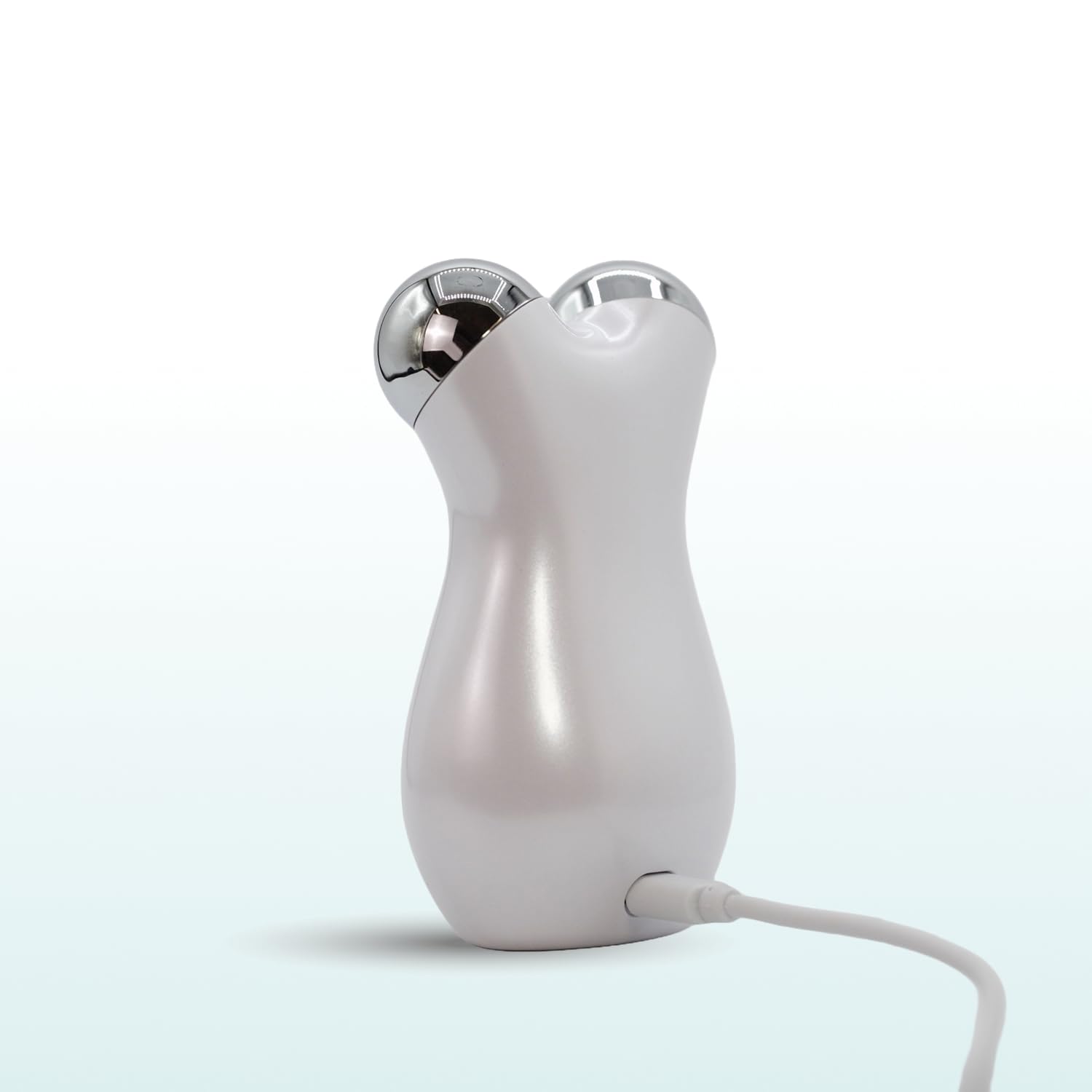
Image 3: The My Derma Dream VisaSculpt Facial Device with its charging cable connected to the bottom port.
Operating Instructions
- Prepare Your Skin: Cleanse your face and neck thoroughly. For optimal results and smooth gliding, apply a thin layer of your preferred serum, gel, or moisturizer to the areas you intend to treat.
- Power On: Press and hold the power button (usually located on the front of the device) for a few seconds until the device activates.
- Select Mode/Intensity: If your device has multiple modes or intensity levels, press the mode selection button (if available) to cycle through options. Refer to the indicator lights for the selected setting.
- Begin Treatment: Gently glide the massage spheres over your skin in an upward and outward motion. Focus on areas such as the jawline, cheeks, forehead, and neck. Maintain light pressure; avoid pressing too hard.
- Recommended Usage: Use for 5-10 minutes per session, 3-5 times a week. Consistency is key for visible results.
- Power Off: After your session, press and hold the power button until the device turns off.
Maintenance
- Cleaning: After each use, wipe the device, especially the massage spheres, with a soft, damp cloth. Do not use abrasive cleaners or immerse the device in water.
- Storage: Store the device in a cool, dry place, away from direct sunlight and moisture. Keep it in its original packaging or a protective pouch to prevent damage.
- Battery Care: To prolong battery life, avoid fully discharging the device frequently. Charge it when the battery indicator is low.
Troubleshooting
| Problem | Possible Cause | Solution |
|---|---|---|
| Device does not turn on. | Battery is depleted. | Charge the device fully using the provided USB cable. |
| Device does not charge. | Charging cable or adapter is faulty; improper connection. | Ensure the cable is securely connected to both the device and the power source. Try a different USB port or adapter. |
| No sensation or weak sensation during use. | Insufficient conductive medium (serum/gel); low battery. | Apply more serum or gel to the skin. Ensure the device is fully charged. |
| Device makes unusual noise. | Normal operational sound; internal component issue. | Some operational sounds are normal. If the noise is excessive or new, discontinue use and contact customer support. |
Specifications
| Feature | Detail |
|---|---|
| Model Name | VisaSculpt |
| Brand | My Derma Dream |
| Color | White |
| Item Weight | 0.27 Kilograms (approximately 9.59 ounces) |
| Package Dimensions | 5.24 x 3.62 x 2.44 inches |
| Batteries | 2 Lithium Ion batteries required (included) |
| UPC | 850063274500 |
| ASIN | B0F1GDF59J |
Warranty and Support
My Derma Dream is committed to product quality. For warranty information or technical support, please refer to the contact details provided on the product packaging or visit the official My Derma Dream website.
You can also visit the My Derma Dream Store on Amazon for additional product information and support resources.
Related documentsVisaSculpt

Ask a question about this manual
Ask about setup, troubleshooting, compatibility, parts, safety, or missing instructions. Manuals+ will review the question and use this page’s manual context to help answer it.