
EMOS E0091
EMOS DAB+ Radio with Bluetooth and Dual Power Supply
Model: E0091
Introduction
Thank you for choosing the EMOS DAB+ Radio. This portable digital radio offers a clear and stable listening experience with DAB+ and FM tuning, Bluetooth connectivity, and convenient features like an alarm clock and sleep timer. Its dual power supply makes it ideal for both home and on-the-go use. Please read this manual carefully before operating the device to ensure proper use and maintenance.
Safety Information
- Do not expose the device to rain, moisture, or extreme temperatures.
- Avoid placing the radio near heat sources or in direct sunlight.
- Do not disassemble or modify the device. Refer all servicing to qualified personnel.
- Use only the specified power adapter (USB-C) or batteries (4x AA, not included).
- Keep out of reach of children.
Package Contents
Please check that all items are present:
- 1x EMOS DAB+ Radio (Model E0091)
- 1x USB-C Charging Cable
- 1x User Manual
Product Overview

Front view of the EMOS DAB+ Radio, showing the TFT LCD color display, speaker grille, and control buttons.
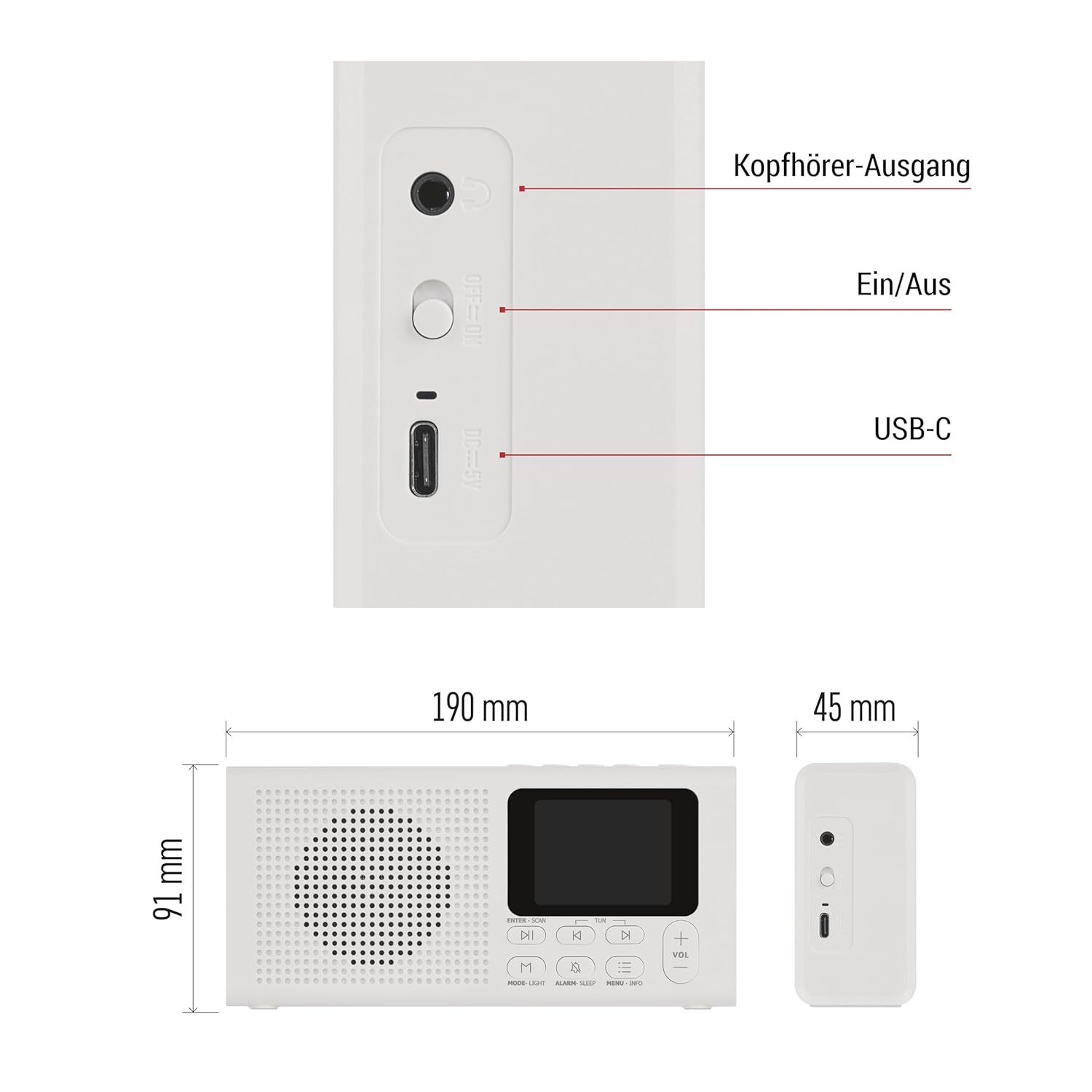
Side view of the radio, highlighting the headphone output, On/Off switch, and USB-C port, along with product dimensions.
Controls and Ports:
- TFT LCD Color Display: Shows station information, time, and menu options.
- Antenna: Extendable telescopic antenna for optimal radio reception.
- Power On/Off Switch: Located on the side.
- USB-C Port: For power supply.
- Headphone Output (3.5mm): For private listening.
- Volume +/- Buttons: Adjust audio volume.
- Navigation Buttons (Left/Right/Up/Down/Enter): For menu navigation and selection.
- Mode/Light Button: Switches between DAB, FM, and Bluetooth modes; adjusts display backlight.
- Alarm/Sleep Button: Accesses alarm and sleep timer settings.
- Menu/Info Button: Accesses system menu and displays station information.
- Preset Buttons (1-4): Quick access to stored favorite stations.
Setup
Power Supply:

The radio supports both USB-C power and AA battery operation for versatile use.
- USB-C Power: Connect the supplied USB-C cable to the radio's USB-C port and plug the other end into a compatible USB power adapter (not included) or a powered USB port.
- Battery Power: For portable use, insert 4x AA batteries (not included) into the battery compartment located on the back of the radio. Ensure correct polarity.
Antenna:
Extend the telescopic antenna fully for optimal reception of DAB+ and FM radio signals.
Initial Power On:
Slide the On/Off switch to the 'On' position. The display will light up, and the radio will typically start in the last used mode or initiate a DAB+ scan.
Operating Instructions
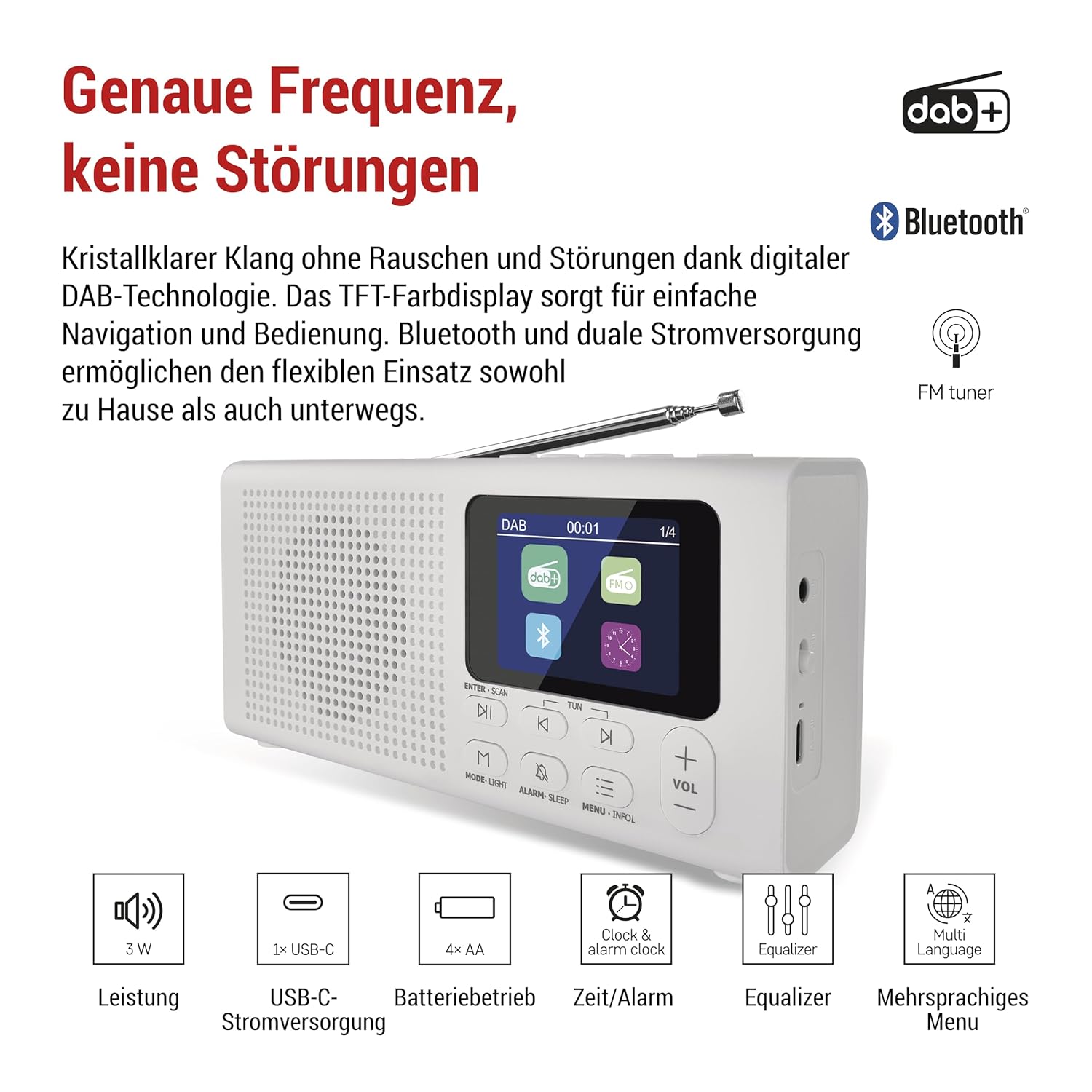
Enjoy crystal-clear sound without noise or interference thanks to digital DAB+ technology.

Versatile features including alarm, sleep timer, headphone support, multi-language menu, and equalizer.
Switching Modes:
Press the MODE/LIGHT button repeatedly to cycle through DAB+, FM, and Bluetooth modes.
DAB+ Radio Operation:
- Switch to DAB+ mode.
- The radio will automatically scan for available stations on first use. To perform a full scan manually, press MENU/INFO, navigate to 'Full Scan' and press ENTER.
- Use the navigation buttons to browse the list of available stations. Press ENTER to select a station.
- To save a station to a preset, press and hold one of the Preset (1-4) buttons until 'Preset Saved' appears. To recall a preset, simply press the corresponding Preset (1-4) button.
FM Radio Operation:
- Switch to FM mode.
- Press and hold the ENTER/SCAN button to auto-scan and save available FM stations.
- Use the navigation buttons to tune to a specific frequency or select a saved station.
- To save an FM station to a preset, follow the same steps as for DAB+ presets.
Bluetooth Operation:
- Switch to Bluetooth mode. The display will show 'Pairing' or 'Waiting for connection'.
- Enable Bluetooth on your mobile device (smartphone, tablet, etc.).
- Search for 'EMOS E0091' in your device's Bluetooth list and select it to pair.
- Once paired, you can play audio from your device through the radio.
Alarm Clock:
- Press the ALARM/SLEEP button.
- Navigate to 'Alarm Setup' and press ENTER.
- Set the alarm time, source (Buzzer, DAB, FM), and frequency (Once, Daily, Weekdays, Weekends).
- Confirm settings to activate the alarm.
Sleep Timer:
- Press the ALARM/SLEEP button.
- Navigate to 'Sleep Timer' and press ENTER.
- Select the desired sleep duration (e.g., 15, 30, 60 minutes). The radio will automatically turn off after the set time.
Equalizer:
In any audio mode, press MENU/INFO and navigate to 'Equalizer' to adjust bass, treble, and other sound settings to your preference.
Headphone Use:
Plug 3.5mm headphones into the headphone output jack on the side of the radio for private listening. The internal speaker will be muted automatically.
Maintenance
- Clean the radio with a soft, dry cloth. Do not use abrasive cleaners or solvents.
- If using batteries, remove them if the radio will not be used for an extended period to prevent leakage.
- Keep the antenna clean and free from obstructions.
Troubleshooting
| Problem | Possible Cause / Solution |
|---|---|
| Radio does not power on. | Ensure the On/Off switch is in the 'On' position. Check USB-C cable connection or replace batteries. |
| Poor radio reception (DAB+/FM). | Fully extend the telescopic antenna. Try repositioning the radio. Perform a full scan for stations. |
| Bluetooth not connecting. | Ensure the radio is in Bluetooth pairing mode. Make sure Bluetooth is enabled on your device and it's within range. Forget the device on your phone and try pairing again. |
| No sound. | Check volume level. Ensure headphones are not plugged in if you want sound from the speaker. |
Specifications
| Feature | Detail |
|---|---|
| Brand | EMOS |
| Model Number | E0091 |
| Color | White |
| Connectivity Technology | Bluetooth |
| Tuner Technology | DAB/DAB+/FM |
| Power Source | Battery Powered (USB-C or 4x AA batteries) |
| Supported Radio Bands | FM |
| Display Type | TFT |
| Item Weight | 400 g |
| Product Dimensions | 19L x 4.5W x 9H cm |
| Special Features | DAB+ Technology, Portable, Alarm Clock and Timer, Rechargeable (via USB-C) |
| Included Components | 1x DAB Radio, 1x USB-C Charging Cable, User Manual |
Warranty and Support
EMOS products are designed for reliability and performance. This product comes with a standard manufacturer's warranty. For detailed warranty information, technical support, or service inquiries, please refer to the contact information provided on the EMOS official website or your point of purchase. Please retain your proof of purchase for warranty claims.
Related documentsE0091


Ask a question about this manual
Ask about setup, troubleshooting, compatibility, parts, safety, or missing instructions. Manuals+ will review the question and use this page’s manual context to help answer it.