
EMOS E0090
EMOS DAB+ Radio with Bluetooth User Manual
Model: E0090
1. Introduction
Thank you for choosing the EMOS DAB+ Radio with Bluetooth, model E0090. This portable digital radio offers crystal clear sound quality with DAB+ technology, traditional FM radio, and Bluetooth connectivity for streaming audio from your devices. It features a TFT LCD color display, an alarm clock, a sleep timer, and multiple preset options for your favorite stations. With its dual power supply capability, you can enjoy your music both at home and on the go.
This manual provides detailed instructions for setting up, operating, and maintaining your radio. Please read it thoroughly before first use to ensure proper function and safety.

Figure 1.1: EMOS DAB+ Radio E0090
The EMOS DAB+ Radio E0090 is a compact and portable digital radio, shown here from the front with its telescopic antenna extended. The color display clearly shows various mode icons, including DAB, FM, Bluetooth, and a clock, indicating its versatile functionalities.
2. Safety Instructions
Please observe the following safety precautions to prevent damage to the device or injury to yourself:
- Do not expose the device to rain, moisture, or extreme temperatures.
- Avoid placing the device near heat sources such as radiators, stoves, or other heat-producing appliances.
- Do not block any ventilation openings. Ensure proper airflow around the device.
- Use only the specified power sources (USB-C cable or AA batteries).
- Do not attempt to disassemble or modify the device. Refer all servicing to qualified personnel.
- Keep out of reach of children.
- Dispose of batteries properly according to local regulations.
3. Package Contents
Ensure all items are present in the package:
- 1x EMOS DAB+ Radio (Model E0090)
- 1x USB-C Charging Cable (150 cm)
- 1x User Manual
Note: 4x AA batteries are required for portable use and are not included.
4. Product Overview
4.1. Front and Top Panel
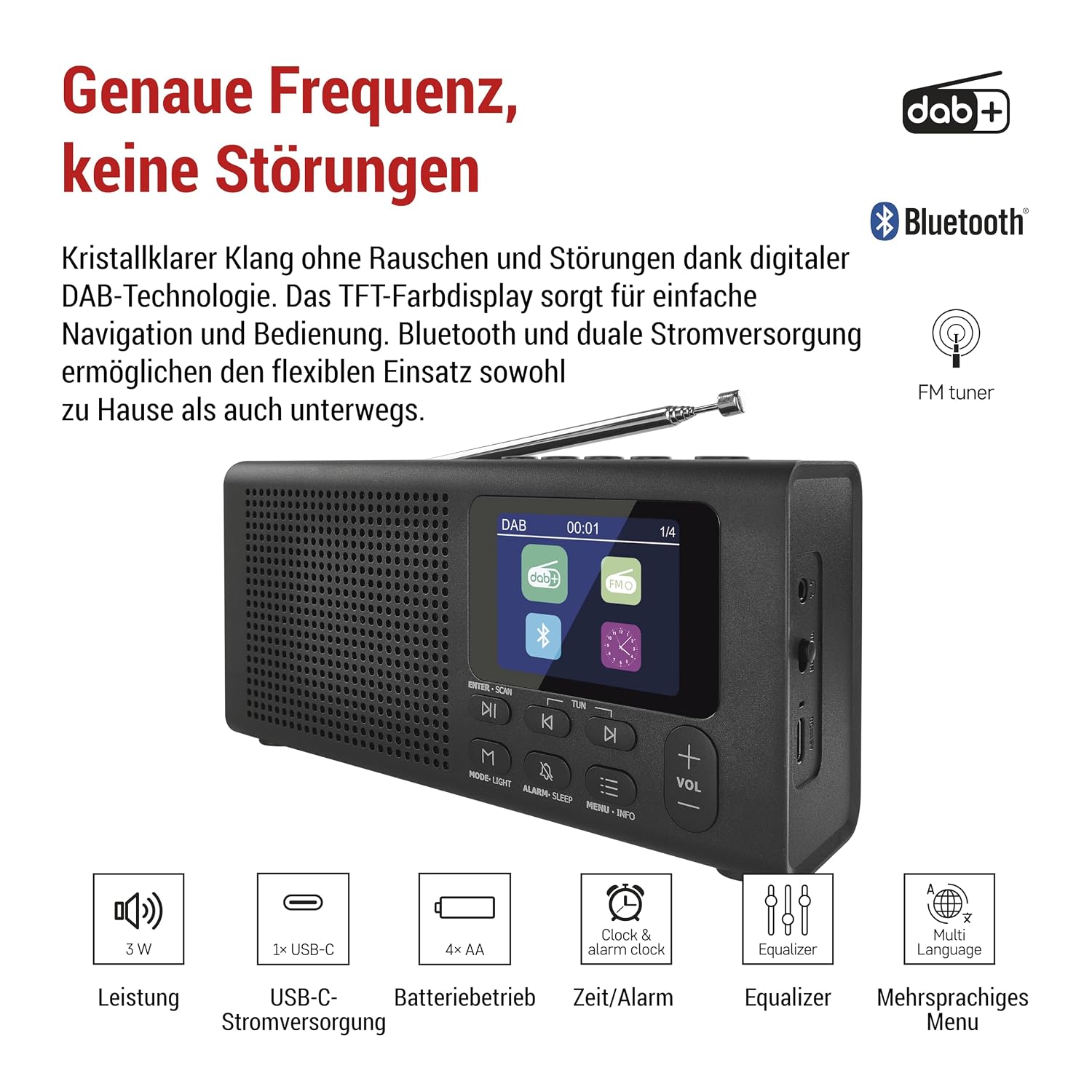
Figure 4.1: Key Features and Controls
This image highlights the key features of the EMOS DAB+ Radio E0090, including its support for DAB+ and FM radio, Bluetooth connectivity, 3W audio output, USB-C power, AA battery compatibility, built-in clock and alarm, equalizer settings, and multi-language menu. The front panel features the speaker grille and the TFT color display, surrounded by control buttons.
- TFT LCD Color Display: Shows station information, time, menu options, and settings.
- Speaker: Audio output.
- Control Buttons:
- ENTER/SCAN: Confirm selection or initiate station scan.
- PREV/NEXT (|<>|): Navigate through menus or change stations.
- MODE/LIGHT: Switch between DAB, FM, Bluetooth modes; short press for backlight.
- ALARM/SLEEP: Set alarm or sleep timer.
- MENU/INFO: Access main menu or display station information.
- +/- VOL: Adjust volume.
- 1, 2, 3, 4: Quick dial preset buttons.
- Telescopic Antenna: For optimal radio reception.
4.2. Side and Rear Panel

Figure 4.2: Side Panel and Dimensions
This image provides a detailed view of the radio's side panel, clearly labeling the headphone output, the On/Off switch, and the USB-C port. Below, the product dimensions are shown as 190mm (length) x 91mm (height) x 45mm (width), illustrating its compact design.
- Headphone Output (3.5mm jack): For private listening.
- ON/OFF Switch: Main power switch.
- USB-C Port: For power supply via the included USB-C cable.
- Battery Compartment: Located on the rear, for 4x AA batteries.
5. Setup
5.1. Powering the Radio
The EMOS DAB+ Radio offers two power options:
- USB-C Power Supply:
Connect the included USB-C cable to the USB-C port on the side of the radio. Plug the other end into a compatible USB power adapter (not included) or a USB port on a computer. This method is ideal for continuous use at home or in the office.
- Battery Operation:
For portable use, open the battery compartment on the rear of the radio. Insert 4x AA batteries (not included), ensuring correct polarity (+/-). Close the compartment securely. The radio can now be used outdoors or in locations without a power outlet.

Figure 5.1: Dual Power Supply Options
This illustration demonstrates the dual power supply capabilities of the EMOS DAB+ Radio. It shows the open battery compartment for inserting 4x AA batteries for portable use, and the USB-C cable connected to a power adapter for continuous operation indoors. This flexibility allows for convenient listening in various environments.
5.2. Antenna Positioning
Extend the telescopic antenna fully for optimal reception, especially when using DAB+ or FM radio modes. Adjust its direction to improve signal strength if needed.
6. Operating Instructions
6.1. Turning On/Off
Slide the ON/OFF switch on the side of the radio to the "ON" position to power on the device. To turn it off, slide the switch to the "OFF" position.
6.2. DAB+ Radio Operation
- Select DAB Mode: Press the MODE/LIGHT button until "DAB" is displayed.
- Scan for Stations: The radio will automatically perform a full scan for DAB+ stations upon first use. To initiate a scan manually, press and hold the ENTER/SCAN button.
- Select Station: Use the PREV/NEXT buttons to browse through available stations. Press ENTER/SCAN to select a station.
- Store Presets: To save a station to a quick dial preset (1-4), tune to the desired station, then press and hold the corresponding quick dial button (1, 2, 3, or 4) until "Preset Saved" appears. To recall a preset, simply short press the corresponding button.
- Information Display: Press MENU/INFO repeatedly to cycle through various information such as program type, signal strength, time, and date.
6.3. FM Radio Operation
- Select FM Mode: Press the MODE/LIGHT button until "FM" is displayed.
- Scan for Stations: Press and hold the ENTER/SCAN button to auto-scan and save available FM stations.
- Manual Tuning: Short press PREV/NEXT buttons to fine-tune the frequency.
- Select Station: Use the PREV/NEXT buttons to browse through saved stations or manually tuned frequencies. Press ENTER/SCAN to select.
- Store Presets: Similar to DAB+ mode, tune to the desired FM station, then press and hold a quick dial button (1-4) to save. Short press to recall.
6.4. Bluetooth Pairing
- Select Bluetooth Mode: Press the MODE/LIGHT button until "Bluetooth" is displayed. The radio will enter pairing mode, indicated by a flashing Bluetooth icon.
- Enable Bluetooth on Your Device: On your smartphone, tablet, or other Bluetooth-enabled device, go to the Bluetooth settings and enable Bluetooth.
- Connect: Look for "EMOS E0090" in the list of available devices and select it to pair. Once connected, the Bluetooth icon on the radio's display will stop flashing.
- Play Audio: You can now play audio from your connected device through the radio.
6.5. Alarm and Sleep Timer
- Setting Alarm: Press and hold the ALARM/SLEEP button to enter alarm settings. Use PREV/NEXT to adjust time and other options, and ENTER/SCAN to confirm.
- Setting Sleep Timer: Short press the ALARM/SLEEP button repeatedly to cycle through sleep timer options (e.g., 15, 30, 45, 60, 90, 120 minutes, or OFF). The radio will automatically turn off after the selected duration.

Figure 6.1: Usage Scenarios
This collage illustrates various ways the EMOS DAB+ Radio can be used: for relaxed listening at home, utilizing the sleep timer function for falling asleep to music, sharing audio via headphones, and enjoying personalized sound with the equalizer settings. It highlights the radio's versatility for different user needs.
6.6. Headphone Use
Plug 3.5mm headphones into the headphone output jack on the side of the radio for private listening. The internal speaker will automatically mute when headphones are connected.
6.7. Equalizer Settings
Access the equalizer settings through the MENU button. Use PREV/NEXT to select preset equalizer modes (e.g., Normal, Classic, Jazz, Pop, Rock) or a custom setting. Press ENTER/SCAN to confirm your selection. This allows you to adjust bass, treble, and other audio characteristics to your preference.
6.8. Language Settings
To change the display language, navigate to the "System Settings" or "Language" option within the main MENU. Use PREV/NEXT to select your desired language and ENTER/SCAN to confirm.
7. Maintenance
- Cleaning: Wipe the radio with a soft, dry cloth. Do not use abrasive cleaners or solvents.
- Storage: If storing the radio for an extended period, remove the batteries to prevent leakage. Store in a cool, dry place.
- Antenna Care: Handle the telescopic antenna gently to avoid bending or breaking.
8. Troubleshooting
| Problem | Possible Cause | Solution |
|---|---|---|
| No power / Radio does not turn on. |
|
|
| Poor radio reception (DAB+/FM). |
|
|
| Bluetooth pairing fails. |
|
|
| No sound from speaker/headphones. |
|
|
9. Specifications
| Feature | Detail |
|---|---|
| Brand | EMOS |
| Model Number | E0090 |
| Color | Black |
| Connectivity Technology | Bluetooth, Auxiliary |
| Tuner Technology | DAB/DAB+/FM |
| Power Source | Battery Powered (4x AA required), USB-C |
| Display Type | TFT LCD Color Display |
| Special Features | DAB+ Technology, Portable, Alarm Clock, Sleep Timer, Rechargeable (via USB-C) |
| Product Dimensions (L x W x H) | 19 cm x 4.5 cm x 9 cm |
| Item Weight | 400 g |
| Included Components | 1x DAB Radio, 1x USB Charging Cable, User Manual |
10. Warranty and Support
EMOS products are designed for reliability and performance. For information regarding warranty terms and conditions, please refer to the warranty card included with your purchase or visit the official EMOS website. For technical support, troubleshooting assistance, or spare parts, please contact EMOS customer service through their official channels.
You can find more information about EMOS and their product range by visiting the EMOS Store on Amazon.
Related documentsE0090


Ask a question about this manual
Ask about setup, troubleshooting, compatibility, parts, safety, or missing instructions. Manuals+ will review the question and use this page’s manual context to help answer it.