
6870C-0442B
Generic TV Logic Board User Manual
Model: 6870C-0442B for LG 32/37 ROW2.1 Displays
Introduction
This manual provides essential information for the installation, operation, and maintenance of the Generic 6870C-0442B TV Logic Board. This component is designed as a replacement part for compatible LG 32-inch and 37-inch displays utilizing the ROW2.1 architecture, such as the LED32EC330J3D model. Please read these instructions carefully before proceeding with any installation or repair to ensure proper function and safety.
Safety Precautions
- Disconnect Power: Always ensure the television is completely disconnected from the main power supply before beginning any work.
- Electrostatic Discharge (ESD): Wear an anti-static wrist strap and work on an ESD-safe mat to prevent damage to sensitive electronic components.
- Professional Installation: Installation should ideally be performed by a qualified technician. Incorrect installation can lead to further damage to the television or personal injury.
- Handle with Care: Logic boards contain delicate components. Avoid touching integrated circuits and connectors directly.
Setup and Installation
This section outlines the general steps for replacing a TV logic board. Specific disassembly and reassembly procedures may vary depending on the exact television model. Refer to your television's service manual for detailed instructions.
- Preparation:
- Ensure the television is unplugged and has been off for at least 10 minutes to allow capacitors to discharge.
- Gather necessary tools: screwdrivers (Phillips, flathead), plastic prying tools, anti-static wrist strap, ESD mat.
- Access the Logic Board:
- Carefully place the TV face down on a soft, clean surface to protect the screen.
- Remove the back cover of the television by unscrewing all retaining screws.
- Locate the existing logic board. It is typically a long, narrow board connected to the display panel via ribbon cables.
- Disconnect Cables:
- Gently disconnect all ribbon cables and power cables from the old logic board. Pay close attention to the orientation of the ribbon cables.
- Use plastic prying tools to release any locking mechanisms on the ribbon cable connectors. Avoid pulling directly on the cables.
- Remove Old Board:
- Unscrew the mounting screws holding the old logic board in place.
- Carefully lift and remove the old board.
- Install New Board:
- Position the new 6870C-0442B logic board in the same location as the old one.
- Secure it with the mounting screws. Do not overtighten.
- Reconnect all ribbon cables and power cables, ensuring they are fully seated and locked into their respective connectors. Double-check the orientation of the ribbon cables.
- Initial Test:
- Before reattaching the back cover, carefully plug in the TV and power it on to verify basic functionality (e.g., backlight, display of a test pattern or menu).
- If the TV powers on and displays correctly, proceed to the next step. If not, immediately power off, unplug, and recheck all connections.
- Reassembly:
- Once functionality is confirmed, unplug the TV again.
- Reattach the back cover, ensuring all screws are replaced.
- Place the TV back in its normal operating position.

Image 1: Top view of the Generic 6870C-0442B TV Logic Board, showing various integrated circuits, capacitors, and connectors. This is the main component being installed.
Operation
The 6870C-0442B logic board is a critical component responsible for processing video signals and controlling the display panel. Once correctly installed, its operation is integrated into the television's overall functionality. There are no user-adjustable settings directly on the logic board itself.
Upon successful installation, the television should power on and display images as expected. Any adjustments to picture settings, input selection, or other TV functions are performed via the television's remote control and on-screen menu, as per the original TV manufacturer's instructions.
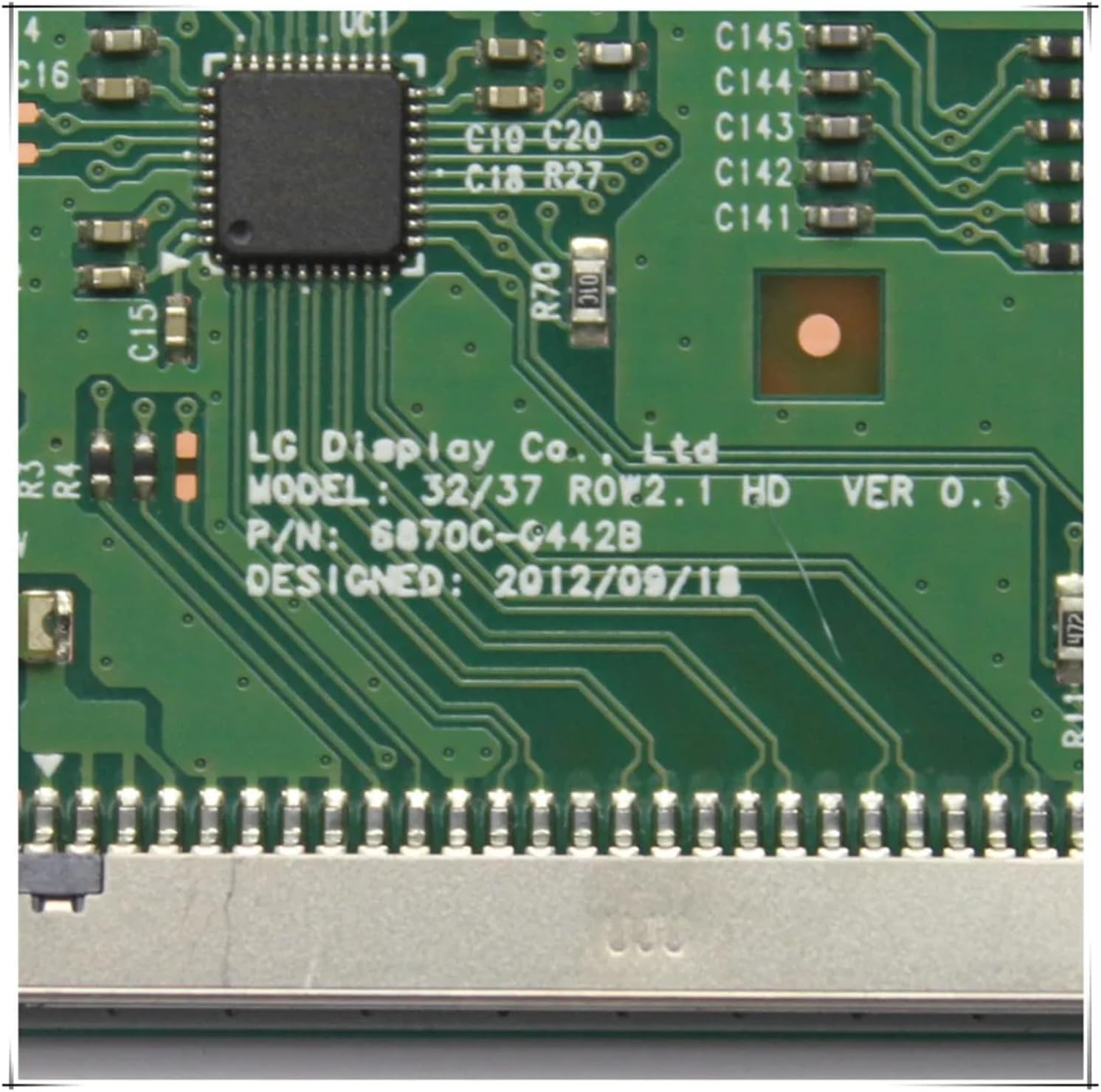
Image 2: A close-up view of the logic board, highlighting the "LG Display Co. Ltd." branding and the model number "6870C-0442B" printed on the circuit board. This confirms the board's identity and compatibility.
Maintenance
The 6870C-0442B logic board is a sealed electronic component and requires no routine user maintenance. To ensure its longevity and proper function:
- Keep Clean: Ensure the television's ventilation openings are free from dust and obstructions to allow for proper heat dissipation.
- Avoid Liquids: Prevent any liquids from coming into contact with the television, as this can cause short circuits and damage to internal components, including the logic board.
- Stable Environment: Operate the television in a stable environment, avoiding extreme temperatures or high humidity.

Image 3: A side view of the logic board, focusing on one of the ribbon cable connectors. This type of connector is crucial for transmitting data between the logic board and the display panel.
Troubleshooting
If you encounter issues after installing the 6870C-0442B logic board, consider the following troubleshooting steps:
- No Power/No Display:
- Ensure all power cables are securely connected to the TV and the wall outlet.
- Verify that all ribbon cables on the logic board are fully seated and locked. Even a slightly loose connection can prevent proper operation.
- Check the TV's power supply board for any visible damage or blown fuses (if accessible and you are qualified to inspect).
- Distorted Image/Incorrect Colors:
- This often indicates an issue with the ribbon cables connecting the logic board to the display panel. Power off, unplug, and carefully reseat these cables.
- Ensure the correct logic board model (6870C-0442B) was installed for your specific TV model (LG 32/37 ROW2.1). Incompatibility can cause display issues.
- Intermittent Issues:
- Intermittent problems can sometimes be caused by poor connections. Recheck all cable connections.
- Ensure the TV is not overheating. Poor ventilation can lead to unstable operation.
- No Audio:
- While the logic board primarily handles video, it also processes audio signals. Check external audio connections (e.g., HDMI, optical).
- Verify TV audio settings are correct.
If troubleshooting steps do not resolve the issue, it is recommended to consult a professional television repair technician.

Image 4: A detailed view of another connector on the logic board, emphasizing the precision required when connecting ribbon cables. Proper alignment and secure locking are essential for functionality.
Specifications
| Feature | Detail |
|---|---|
| Model Number | 6870C-0442B |
| Compatible TV Sizes | LG 32-inch / 37-inch |
| Compatible Panel Type | ROW2.1 HD (e.g., LED32EC330J3D) |
| Manufacturer | Generic |
| Item Model Number (Amazon) | OBDBUWCZZ-6870C-0442B |
| Package Dimensions | 7.87 x 3.94 x 3.94 inches |
| Item Weight | 1.76 pounds |
| Condition | 80%-90% New (as per product title) |

Image 5: The underside of the logic board, showing the solder points and circuit traces. This view is typically not exposed during normal operation but is part of the overall component.
Warranty and Support
As this product is a replacement part from a generic manufacturer, specific warranty details may vary depending on the retailer or seller from whom it was purchased. Please refer to your purchase documentation or contact the seller directly for information regarding warranty coverage and return policies.
For technical support beyond the scope of this manual, it is recommended to consult a qualified electronics repair technician or refer to online resources and forums dedicated to TV repair for your specific LG model.
Ask a question about this manual
Ask about setup, troubleshooting, compatibility, parts, safety, or missing instructions. Manuals+ will review the question and use this page’s manual context to help answer it.