
Introduction
This manual provides detailed instructions for the assembly, operation, and maintenance of your GRUSIGN 51" Sideboard Buffet Cabinet. Please read this manual thoroughly before assembly and use to ensure proper function and safety. Keep this manual for future reference.

Image: The GRUSIGN 51" Sideboard Buffet Cabinet, showcasing its dark grey finish, three drawers, two doors, open shelving, and integrated charging station. The cabinet is styled as a coffee bar.
Safety Information
- Always follow assembly instructions carefully.
- Do not exceed the weight limits for shelves (50 lbs) or the overall unit (860 lbs).
- Install the anti-tip kit to prevent accidental tipping, especially in households with children or pets.
- Keep small parts and packaging materials away from children.
- Ensure all connections for the charging station are secure and used with compatible devices.
Package Contents
Before beginning assembly, verify that all parts and hardware listed below are present. If any items are missing or damaged, please contact customer support.
Components:
- Cabinet Panels (Top, Bottom, Sides, Back)
- Drawer Components (Fronts, Sides, Backs, Bottoms)
- Door Panels
- Adjustable Shelves
- Charging Station Unit
- Wine Rack Inserts (if applicable)
Hardware:
- Screws, dowels, cam locks, and other fasteners
- Drawer slides
- Door hinges
- Handles/Knobs
- Anti-tip kit (straps, anchors, screws)
- Shelf pins
A detailed parts list with quantities will be provided in the separate assembly guide included with your product.
Assembly Instructions
Assembly is required for this product. Please follow the step-by-step instructions provided in the separate assembly manual included in your package. Ensure you have adequate space and the necessary tools (e.g., screwdriver, hammer) before starting.
Key Assembly Steps:
- Unpack and Identify Parts: Lay out all components and hardware, comparing them against the parts list.
- Assemble the Main Frame: Connect the bottom, side, and back panels to form the basic structure.
- Install Drawers: Assemble drawer boxes and attach drawer slides to both the drawers and the cabinet frame.
- Attach Doors: Secure hinges to the doors and then to the cabinet frame. Adjust as needed for proper alignment.
- Insert Shelves: Place shelf pins into desired holes and position the adjustable shelves.
- Install Charging Station: Integrate the charging station into its designated slot, ensuring proper wiring and connection to a power source.
- Attach Anti-Tip Kit: Secure the anti-tip device to the back of the cabinet and to a wall stud, following the specific instructions provided with the kit.

Image: Detailed product dimensions (13.8"D x 51.2"W x 37.5"H) and individual weight capacities for the top (280 lbs), open shelf (70 lbs), drawers (70 lbs each), and adjustable shelves (50 lbs each).

Image: Close-up view of the anti-tip kit installation and the adjustable shelf mechanism, highlighting the flexibility in shelf placement.
Setup
Placement:
Choose a level and stable surface for the cabinet. Ensure there is sufficient clearance for opening doors and drawers. This cabinet is suitable for dining rooms, kitchens, and living rooms. Avoid placing the cabinet in direct sunlight or near heat sources to prevent material damage.

Image: Examples of the cabinet's versatile use as a kitchen storage cabinet, a bar cabinet, and a buffet cabinet in various room settings.
Initial Use:
Once assembled and placed, ensure the anti-tip kit is securely installed. Before loading the cabinet, check that all screws are tightened and doors/drawers operate smoothly. Connect the charging station to a wall outlet.
Operating Instructions
Storage Compartments:
- Drawers: Utilize the three smooth-gliding drawers for storing smaller items, cutlery, or linens.
- Doors: The two cabinet doors conceal spacious compartments. The internal shelves are adjustable, allowing you to customize storage height for various items like dishware, mugs, or small appliances.
- Open Shelf: The open shelf provides easy access storage for frequently used items or decorative pieces.
- Wine Rack: The central open section includes dedicated slots for wine bottles, if configured with the wine rack inserts.
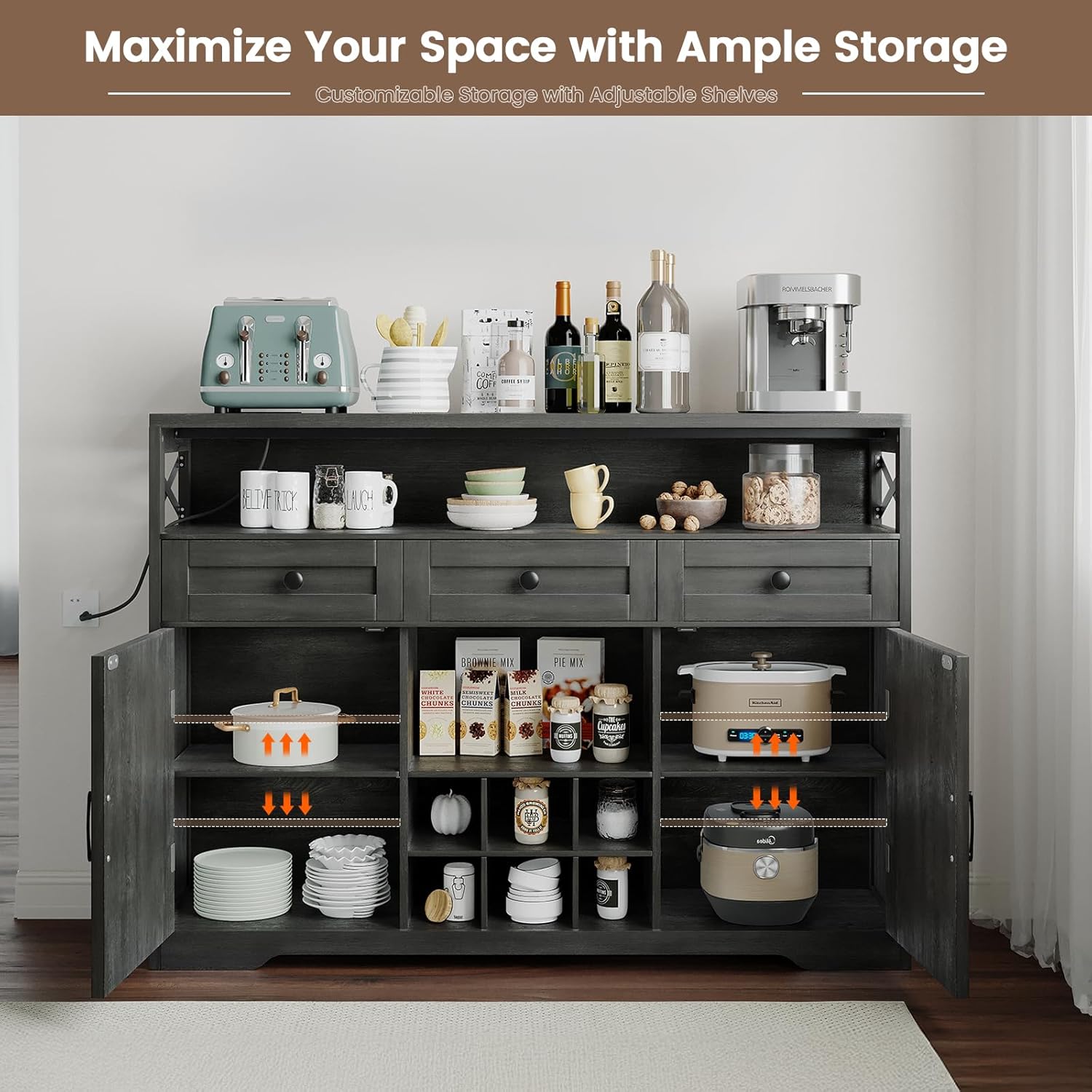
Image: The interior of the cabinet demonstrating the adjustable shelves and various storage configurations for kitchen and dining items.

Image: Close-up details of the built-in charging station (2 AC outlets, 1 USB, 1 USB-C), the open shelf for easy access, the extra drawer storage, and the open storage section for organization.
Charging Station:
The integrated charging station features 2 standard AC outlets, 1 USB port, and 1 USB-C port. Plug the cabinet's power cord into a wall outlet. Use the charging ports to power small kitchen appliances or charge electronic devices. Ensure devices are compatible with the provided power output.
Maintenance
Cleaning:
The engineered wood surface is designed to be water, scratch, and stain-resistant. For general cleaning, wipe the surface with a soft, damp cloth. Avoid using harsh chemicals or abrasive cleaners, which can damage the finish. Promptly wipe up any spills to prevent staining.

Image: Demonstrations of the engineered wood's waterproof, stain-resistant, and anti-scratch properties, showing water beading, a key not scratching the surface, and easy cleaning of a spill.
Care:
- Periodically check all fasteners and tighten them if necessary to maintain stability.
- Avoid dragging the cabinet when moving it; always lift it to prevent damage to the legs and floor.
- Do not place excessively hot items directly on the surface without protection.
Troubleshooting
- Issue: Cabinet feels wobbly or unstable.
Solution: Ensure the cabinet is on a level surface. Check and tighten all assembly screws. Verify that the anti-tip kit is properly installed and secured to the wall.
- Issue: Drawers do not slide smoothly.
Solution: Check that the drawer slides are correctly aligned and installed. Ensure no objects are obstructing the slides. Lubricate slides with a silicone-based lubricant if needed.
- Issue: Doors are misaligned or do not close properly.
Solution: Adjust the door hinges. Most hinges allow for minor adjustments in height, depth, and side-to-side movement. Refer to the hinge manufacturer's instructions if specific adjustments are unclear.
- Issue: Charging station is not working.
Solution: Ensure the cabinet's power cord is securely plugged into a functional wall outlet. Check if the wall outlet itself is receiving power (test with another device). Verify that the charging station unit is correctly installed within the cabinet. If issues persist, contact customer support.
Specifications
| Brand | GRUSIGN |
| Model Name | BG-ZRSM-DNW |
| Color | Dark Grey |
| Product Dimensions | 13.8"D x 51.2"W x 37.5"H |
| Item Weight | 104.7 Pounds |
| Material | Engineered Wood |
| Weight Limit (Overall) | 860 Pounds |
| Weight Limit (Each Shelf) | 50 Pounds |
| Number of Shelves | 7 (including fixed and adjustable) |
| Special Features | Adjustable Shelf, Anti-Tipping, Dustproof, Scratch Resistant, Stain Resistant, Built-in Charging Station (2 AC, 1 USB, 1 USB-C) |
| Assembly Required | Yes |
| Room Type | Dining Room, Kitchen, Living Room |
Warranty and Support
GRUSIGN products are manufactured with quality and durability in mind. While specific warranty details are not provided in this document, please refer to the warranty card included with your purchase or contact GRUSIGN customer support for information regarding warranty coverage and service.
For assistance with assembly, missing parts, or any product-related inquiries, please contact GRUSIGN customer service through the retailer where the product was purchased or via the contact information provided in your product packaging.
Please retain your proof of purchase for warranty claims.