
1. Introduction
Thank you for choosing the Grandder Electric Standing Desk. This manual provides essential information for the safe and efficient assembly, operation, and maintenance of your new desk. Please read it thoroughly before use and retain it for future reference.
2. Safety Warnings
- Always secure the desk to the floor to prevent tipping.
- Do not exceed the weight limit of 220 lbs (approximately 100 kg).
- Be cautious when using the electric height adjustment feature to avoid injury or damage to equipment.
- Ensure all cables are properly managed to prevent tripping hazards or entanglement during height adjustments.
- Keep children and pets away from the desk during operation.
3. Product Features
- Extra Spacious Desktop: A large 47.2 x 31.5 inch (32"D x 47"W) workspace provides ample room for multiple monitors, laptops, and accessories.
- Smooth Electric Height Adjustment: Effortlessly switch between sitting and standing positions with a touch of a button. The desk offers a height range from 28 inches to 45.6 inches.
- Memory Presets: Two programmable height memory presets allow for quick transitions to your preferred sitting and standing heights.
- Stable & Durable Construction: Built with a premium industrial-grade steel frame and a powerful lift motor, supporting up to 220 lbs. The T-shaped leg design ensures superior stability.
- Quiet Operation: Enjoy smooth and silent transitions with noise levels under 45 dB, ideal for any home or office environment.
- Advanced Anti-Collision Technology: The desk automatically stops and reverses if obstacles are detected during height adjustment, protecting your equipment and ensuring user safety.
- Functional Details: Includes two headphone hooks and replaceable casters for easy mobility. Lockable wheels allow you to secure the desk in place.
4. Setup and Assembly
The Grandder Electric Standing Desk is designed for easy assembly. A detailed manual with embedded screw holes is included for hassle-free installation. All necessary tools, including Allen wrenches and a screwdriver, are provided.
4.1 Assembly Steps Overview
- Prepare the Desktop: Lay the desktop pieces face up on a soft, clean surface to prevent scratches. Insert the wooden pegs and secure the metal brackets to join the desktop halves.
- Assemble the Frame: Attach the side brackets to the main frame components.
- Install Legs and Motor: Secure the legs to the frame, ensuring the feet are facing upwards initially. Install the motor and feed the connecting rod through the frame.
- Attach Base to Desktop: Carefully flip the assembled frame onto the underside of the desktop. Align the pre-drilled holes and secure the frame to the desktop using the provided screws.
- Connect Control Panel: Install the control panel underneath the desktop. Plug the motor cable and power cable into the designated ports on the control panel.
- Install Feet/Casters: Decide whether to use the stationary foot pegs or the replaceable casters. Twist off the foot pegs if you opt for casters, then twist on the wheels. Ensure casters are locked if you want the desk to remain stationary.
- Attach Headphone Hooks: Screw the two headphone hooks onto either side of the desk frame as desired.

Figure 4.1: Visual overview of the desk assembly process.
Video 4.1: A quick demonstration of the assembly process for the Grandder Standing Desk, highlighting the ease of putting it together.
5. Operating Instructions
The Grandder Electric Standing Desk features an intuitive control panel for seamless height adjustments.
5.1 Control Panel Functions
- Up/Down Arrows: Use these buttons to manually adjust the desk height to your desired level.
- Memory Presets (1 & 2): Press and hold a memory button (e.g., '1' for sitting, '2' for standing) until the display flashes to save the current height. To recall a saved height, simply press the corresponding memory button.
- Anti-Collision System: The desk is equipped with an advanced anti-collision feature. If the desk encounters an obstacle during movement, it will automatically stop and reverse slightly to prevent damage.

Figure 5.1: The control panel with LED display and memory presets.

Figure 5.2: The anti-collision system ensures safe height adjustments.
5.2 Mobility and Stability
- Casters: If you have installed the casters, unlock them to move the desk freely. Lock the casters to secure the desk in your desired position.
- Headphone Hooks: Utilize the integrated hooks to keep your headphones, bags, or cables organized and off your workspace.
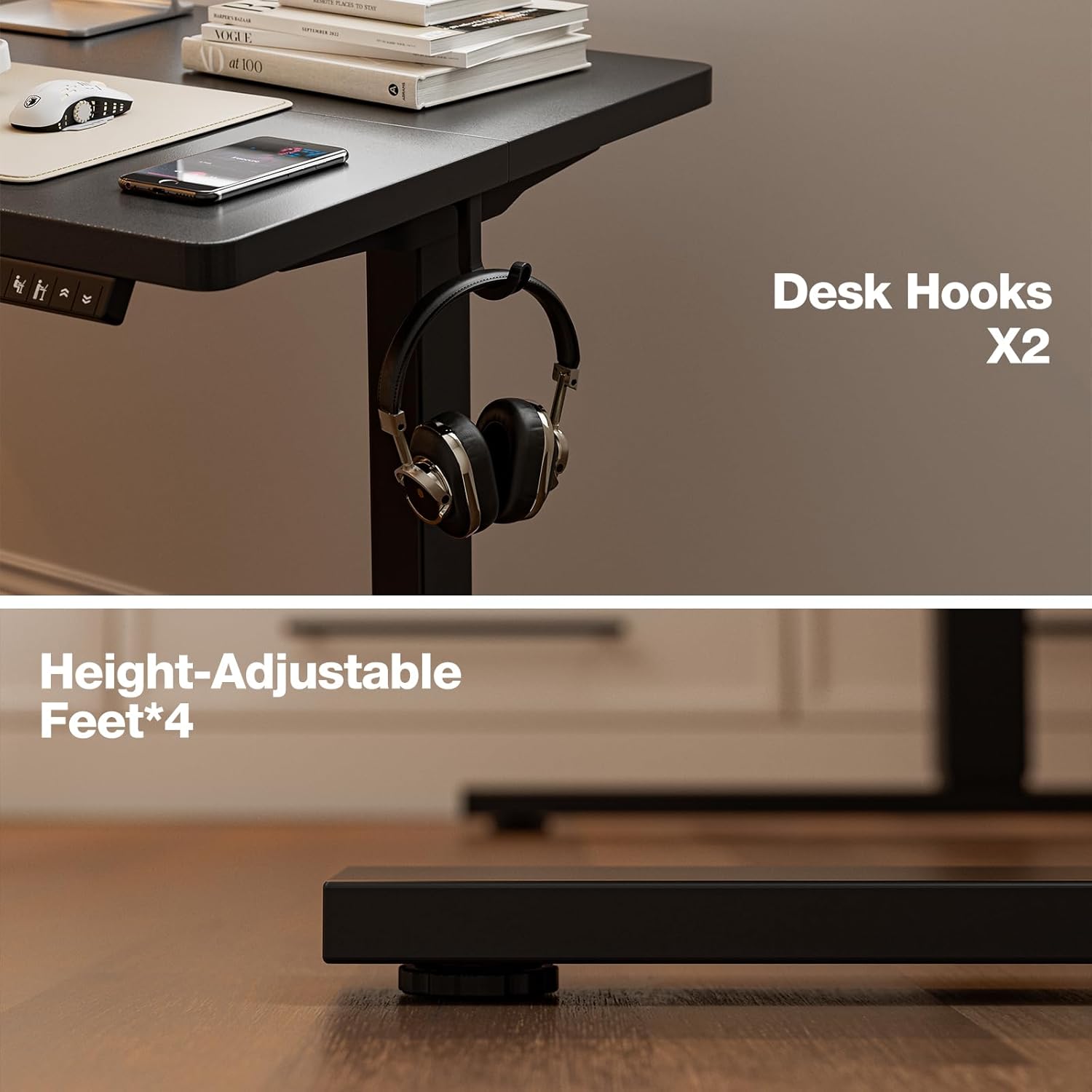
Figure 5.3: Desk hooks and height-adjustable feet for convenience.
6. Maintenance
To ensure the longevity and optimal performance of your Grandder Electric Standing Desk, follow these simple maintenance guidelines:
- Regular Cleaning: Wipe the desktop and frame with a soft, damp cloth. Avoid harsh chemicals or abrasive cleaners that could damage the finish.
- Cable Management: Periodically check and organize cables to prevent tangling or damage, especially during height adjustments.
- Inspect Connections: Ensure all screws and connections remain tight. Re-tighten if necessary.
- Motor Care: The electric motor is designed for durability and requires no special maintenance. Avoid obstructing its movement or exposing it to excessive moisture.
7. Troubleshooting
If you encounter any issues with your Grandder Electric Standing Desk, please refer to the following common troubleshooting tips:
- Desk Not Moving: Check if the power cord is securely plugged into both the desk and a working power outlet. Ensure no cables are pinched or obstructing the motor.
- Uneven Height: If the desk appears uneven, manually adjust the height using the up/down arrows to its lowest and then highest points a few times to re-synchronize the motors.
- Error Code on Display: Refer to the detailed assembly manual for specific error code interpretations and solutions. Often, unplugging the desk for 10-15 seconds and plugging it back in can reset the system.
- Anti-Collision Triggering Frequently: Ensure there are no objects near the desk that could be triggering the anti-collision sensor. If the issue persists, consult the full manual for sensor sensitivity adjustments.
For further assistance, please contact Grandder customer support.
8. Specifications
| Feature | Detail |
|---|---|
| Brand | Grandder |
| Model Number | AU-A204-47B |
| Desktop Dimensions (W x D) | 47.2 x 31.5 inches (120 x 80 cm) |
| Height Adjustment Range | 28 inches to 45.6 inches |
| Weight Capacity | Up to 220 lbs |
| Lifting Mechanism | Electric |
| Noise Level | Under 45 dB |
| Desktop Material | Engineered Wood (Laminated) |
| Frame Material | Industrial-Grade Steel |
| Color | Black |
| Special Features | 2 Memory Presets, Anti-Collision, Headphone Hooks, Replaceable/Lockable Casters |
| Item Weight | 40 Pounds |
9. Warranty & Support
The Grandder Electric Standing Desk comes with a Lifetime Warranty. For any warranty claims, technical support, or further inquiries, please refer to the contact information provided in your product packaging or visit the official Grandder website.