
Introduction
Thank you for choosing the CoolJumper Open Ear Bluetooth 5.4 Earbuds. These earbuds are designed to provide a comfortable audio experience while allowing you to remain aware of your surroundings. Featuring an ergonomic open-ear design and advanced Bluetooth 5.4 technology, they are ideal for sports and daily use. Each earbud weighs approximately 0.26 ounces, ensuring a lightweight and comfortable fit for extended wear.
What's in the Box
Please verify that all components are present in your package:
- 2 x CoolJumper Open Ear Bluetooth 5.4 Headphones
- 1 x Charging Case
- 1 x User Manual
- 1 x USB-C Charging Cable
- 1 x Packaging Box
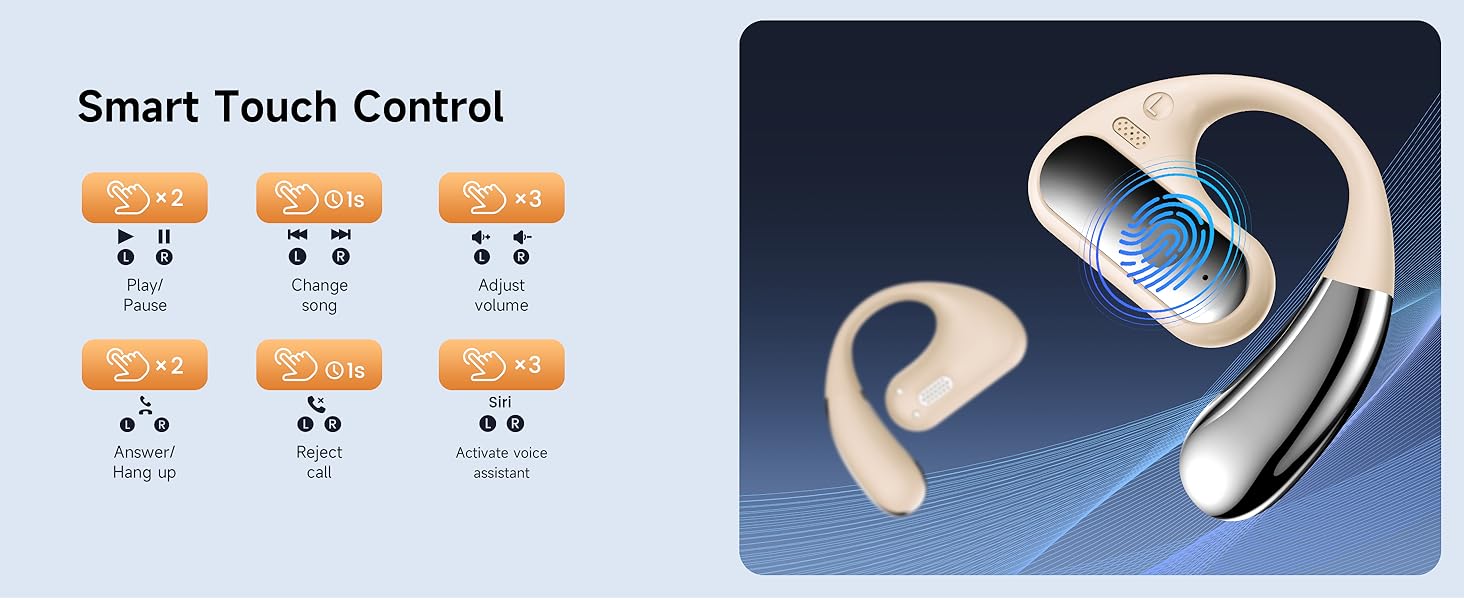
Image: Package contents of the CoolJumper Open Ear Bluetooth Earbuds.
Setup
1. Charging the Earbuds and Case
Before first use, fully charge the earbuds and the charging case. The charging case provides an additional 32 hours of playtime, and a full charge takes approximately 1.5 hours via the included Type-C cable.
- Place the earbuds into the charging case.
- Connect the USB-C cable to the charging case and a power source.
- The LED digital display on the case will show the charging status and battery levels.
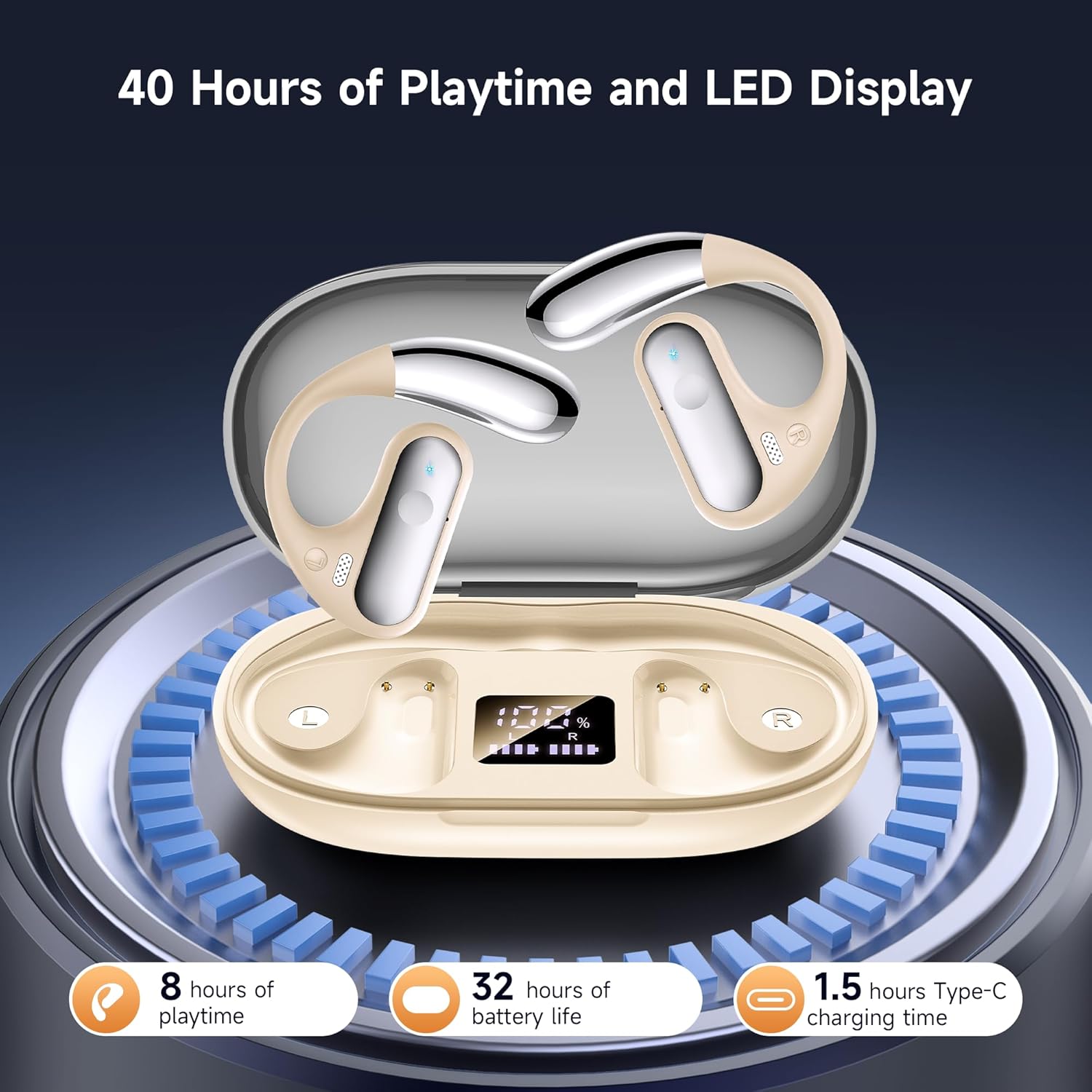
Image: Earbuds in charging case displaying battery levels.
2. Wearing the Earbuds
The ergonomic open-ear design ensures comfort and awareness of your surroundings. Follow these steps for optimal fit:
- Hang the end of the earbud onto your earbone.
- Rotate the earbud and slide it behind your ear.
- Adjust the earbud to a comfortable and secure position.
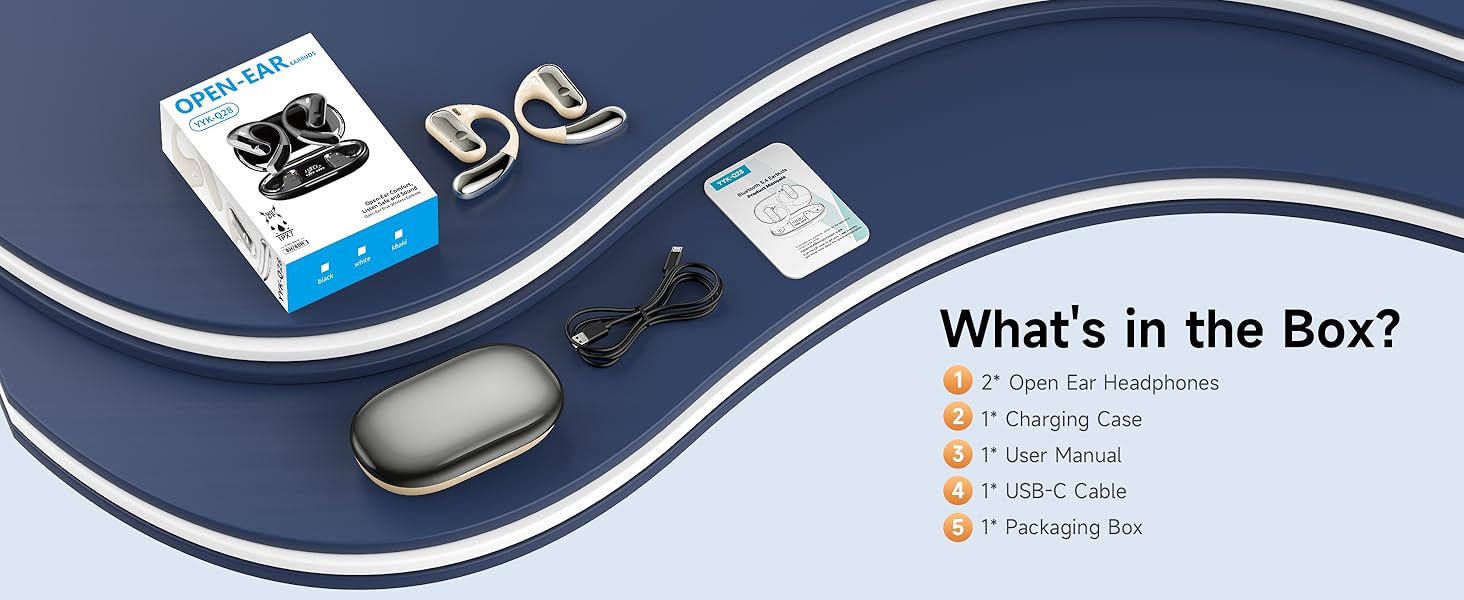
Image: Visual guide for wearing the earbuds.
3. Bluetooth Pairing
The earbuds feature automatic one-step pairing for convenience.
- Open the charging case. The earbuds will automatically enter pairing mode.
- On your device (smartphone, tablet, etc.), enable Bluetooth.
- Search for "YYK-Q28" in the list of available Bluetooth devices and select it to connect.
- Once paired, the earbuds will automatically connect to your device when removed from the case for future use.

Image: Earbuds pairing with a smartphone.
Operating Instructions
The earbuds are equipped with flexible touch controls. Refer to the diagram below for specific functions:

Image: Smart Touch Control functions.
- Play/Pause: Double-tap (L or R earbud).
- Switch Song: Long press 1s (L for previous, R for next).
- Adjust Volume: Triple-tap (L for volume down, R for volume up).
- Answer/Hang Up Call: Double-tap (L or R earbud).
- Reject Call: Long press 1s (L or R earbud).
- Activate Voice Assistant (Siri): Triple-tap (L or R earbud).
Maintenance
Cleaning
To maintain optimal performance and hygiene, regularly clean your earbuds and charging case.
- Use a soft, dry, lint-free cloth to wipe the earbuds and charging case.
- Avoid using abrasive materials, solvents, or chemical cleaners.
- Do not immerse the earbuds or case in water, despite their water resistance.
Storage
When not in use, store the earbuds in their charging case to protect them from dust and damage.
- Store in a cool, dry place away from extreme temperatures.
- Avoid direct sunlight and high humidity.
Water Resistance
The earbuds are rated IP7 waterproof and sweatproof, making them suitable for workouts and light rain. However, they are not designed for swimming or submersion in water.

Image: Earbuds demonstrating IP7 waterproof rating.
Troubleshooting
If you encounter issues with your CoolJumper earbuds, try the following solutions:
- No Sound: Ensure earbuds are charged, connected to your device, and volume is up on both the earbuds and your device.
- Cannot Pair: Make sure Bluetooth is enabled on your device and the earbuds are in pairing mode. Try turning Bluetooth off and on again on your device.
- Intermittent Connection: Ensure there are no obstructions between the earbuds and your device. Move closer to your device. Avoid strong electromagnetic interference.
- Charging Issues: Check if the charging cable is securely connected. Ensure the charging case has power. Clean the charging contacts on both the earbuds and the case.
- Earbuds Not Responding: Place both earbuds back into the charging case, close the lid, wait a few seconds, then open the lid and try again.
Specifications
| Feature | Detail |
|---|---|
| Model Name | Q28-B-02 |
| Connectivity Technology | Wireless (Bluetooth 5.4) |
| Bluetooth Version | 5.4 |
| Earpiece Shape | Open Ear |
| Audio Driver Type | Bone Conduction Driver |
| Battery Life (Earbuds) | Up to 8 hours |
| Total Playtime (with Case) | Up to 40 hours |
| Charging Time | 1.5 hours (case) |
| Control Method | Touch |
| Water Resistance Level | Waterproof (IP7) |
| Item Weight (Earbud) | 0.26 ounces (approx.) |
| Compatible Devices | Almost all Bluetooth-enabled devices (iOS, Android, Windows) |
| UPC | 762304857383 |
Warranty and Support
CoolJumper products are designed for reliability and performance. For specific warranty details, please refer to the warranty card included in your product packaging or visit the official CoolJumper website. If you require technical assistance or have questions regarding your earbuds, please contact CoolJumper customer support through the retailer where the product was purchased or via the contact information provided on the official brand website.
For more information, visit the CoolJumper Store on Amazon.

