
AMPBANK H128
AMPBANK H128 Handheld Thermal Camera User Manual
Model: H128 | Brand: AMPBANK
1. Introduction
The AMPBANK H128 Handheld Thermal Camera is an advanced infrared imaging device designed for precise temperature measurement and thermal analysis. It features a 240x240 TISR resolution, a 25Hz frame rate, and a wide temperature range, making it suitable for various inspection tasks. Its robust design ensures durability in challenging environments.

Figure 1: AMPBANK H128 Handheld Thermal Camera
This manual provides essential information for setting up, operating, and maintaining your H128 thermal camera.
2. Setup
2.1 Unboxing and Initial Inspection
Upon receiving your H128 thermal camera, carefully unbox the device and inspect all components for any signs of damage. The package should include the thermal camera, a USB-C charging cable, and this user manual.
Video 1: Unboxing and initial overview of a similar thermal camera model.
2.2 Charging the Device
The H128 thermal imager is equipped with a built-in rechargeable Lithium Ion battery. Before first use, ensure the device is fully charged.
- Locate the USB-C charging port on the top of the device.
- Connect the supplied USB-C cable to the camera and a compatible power adapter (not included).
- The charging indicator will show the charging status. A full charge provides up to 24 hours of continuous operation.

Figure 2: The H128 features a 2900mAh rechargeable battery and a Type-C charging port for extended use.
2.3 Powering On/Off
To power on the device, press and hold the power button located on the control panel until the screen illuminates. To power off, press and hold the power button again until the device shuts down.
3. Operating Instructions
3.1 Basic Operation and Menu Navigation
The H128 features an intuitive interface with navigation buttons below the screen. A short press of the power button typically accesses the main menu. Use the arrow buttons to navigate through options and the OK button to confirm selections.
Video 2: Demonstration of menu navigation and settings adjustment on a similar thermal camera.
3.2 Temperature Measurement
The H128 provides precise temperature measurements with 0.1°C resolution and ±3% accuracy. You can adjust distance and emissivity settings for various materials to enhance precision.

Figure 3: The H128 offers high accuracy and a wide temperature range from -4℉ to 842℉.
3.3 TISR Resolution and Frame Rate
Equipped with TISR technology, the H128 enhances thermal imaging clarity from 128x128 to 240x240 resolution. A 25Hz frame rate ensures smooth, real-time imagery for inspections.

Figure 4: TISR technology enhances the thermal image resolution to 240x240 pixels.
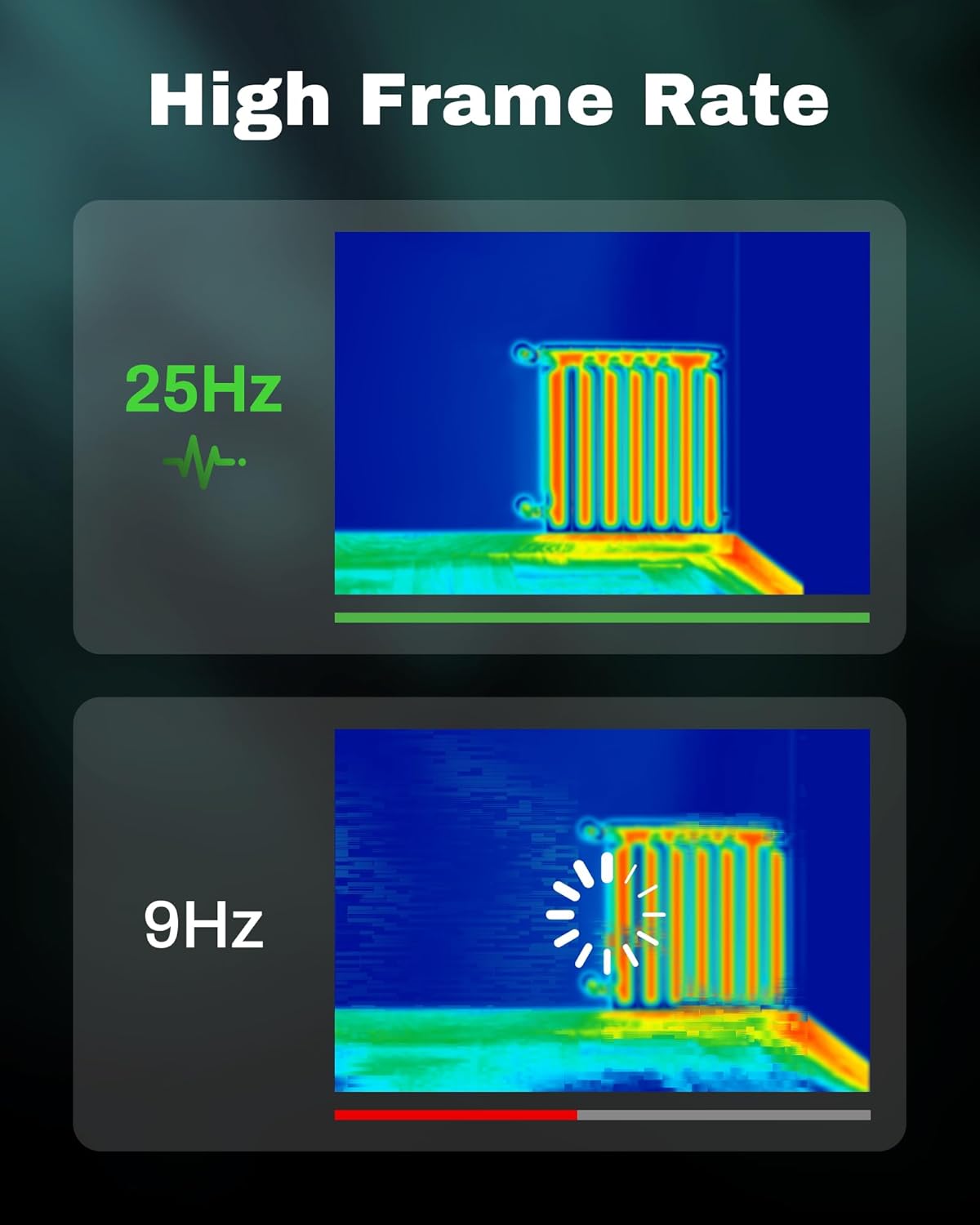
Figure 5: A 25Hz frame rate provides smooth thermal video, compared to lower frame rates like 9Hz.
3.4 Thermal Palettes
The H128 offers multiple thermal palettes to visualize temperature differences effectively. These can be selected from the menu to suit different inspection needs.

Figure 6: Choose from various thermal palettes such as Iron Red, Black Hot, Rainbow, White Hot, and Red Hot.
3.5 Temperature Alarm
The device includes a temperature alarm feature that highlights hot and cold spots, allowing for instant anomaly detection.

Figure 7: The H128 can identify hot spots, cold spots, and center spots, with a high/low temperature alarm.
3.6 Image and Video Capture
Capture thermal images or record video by pressing the trigger button. Captured media is stored internally and can be reviewed via the device's album or transferred to a computer.
Video 3: A comprehensive demonstration of thermal imaging applications and features.
4. Maintenance
4.1 Cleaning
To clean the device, use a soft, dry cloth. For the lens, use a specialized lens cleaning cloth and solution. Avoid abrasive materials or harsh chemicals.
4.2 Storage
Store the thermal camera in a cool, dry place away from direct sunlight and extreme temperatures. Ensure the device is fully charged before long-term storage.
5. Troubleshooting
- Device not powering on: Ensure the battery is charged. Connect to a power source and try again.
- Inaccurate temperature readings: Check and adjust emissivity settings for the material being measured. Ensure the measurement distance is appropriate.
- Screen freezing: Occasionally, the screen might briefly freeze. If this persists, try restarting the device.
- Image transfer issues: Ensure the device is powered off before connecting to a PC for file transfer.
6. Specifications
- Model: H128
- Thermal Resolution: 240x240 (TISR enhanced from 128x128)
- Frame Rate: 25Hz
- Temperature Range: -4℉ to 842℉ (-20℃ to 450℃)
- Temperature Accuracy: ±3% or ±3℃ (whichever is greater)
- Thermal Sensitivity (NETD): 40mk
- Battery Life: Up to 24 hours (continuous working time)
- Battery Type: 1 Lithium Ion battery (included)
- Protection Level: IP65
- Drop Test: Withstands 6.56-foot (2m) drop
- Connectivity: USB-C for charging and data transfer
- Dimensions: 26.4 x 18.6 x 9.8 cm
- Weight: 480 g
7. Warranty
Please refer to the product packaging or manufacturer's website for detailed warranty information. Typically, electronic devices come with a limited warranty covering manufacturing defects.
8. Support
For technical support, troubleshooting assistance, or product inquiries, please contact AMPBANK customer service. Refer to your product packaging or the official AMPBANK website for contact details.
Related documentsH128

Ask a question about this manual
Ask about setup, troubleshooting, compatibility, parts, safety, or missing instructions. Manuals+ will review the question and use this page’s manual context to help answer it.