
1. Introduction
This manual provides detailed instructions for the operation and maintenance of your EZON T031 GPS Running Watch. Please read this manual thoroughly before using the watch to ensure proper function and to maximize your experience.
2. What's in the Box
Upon opening your EZON T031 GPS Running Watch package, you should find the following items:
- EZON T031 GPS Running Watch
- Charging Cable
- User Manual (this document)

Image: The EZON T031 GPS Running Watch, charging cable, and user manual as packaged in the box.
3. Product Overview
The EZON T031 is a GPS-enabled running watch designed for tracking various fitness metrics. It features a clear digital display and multiple buttons for navigation and function control.
3.1 Watch Components
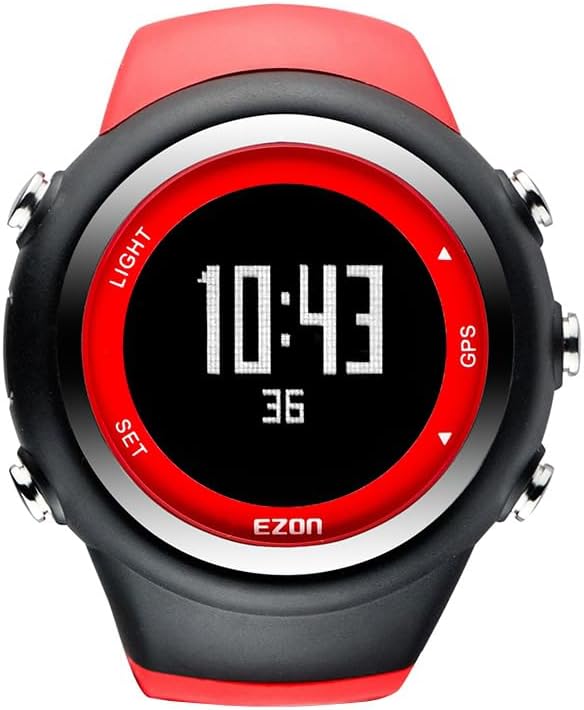
Image: Front view of the EZON T031 GPS Running Watch.
3.2 Button Functions

Image: Diagram illustrating the functions of each button on the EZON T031 GPS Running Watch.
- LIGHT Button: Press to activate the backlight for 5 seconds.
- SET Button: Press to view time, day of week, month-date, second, and battery level. Hold for 2-3 seconds to enter setting screens (TIME-DATE → ALARM → USER).
- GPS Button: Hold for 2-3 seconds to enter GPS mode.
- Up/Down Arrows: Used for navigation within menus and adjusting settings.
4. Initial Setup
4.1 Charging the Watch
Before first use, fully charge your EZON T031 GPS Running Watch using the provided charging cable. Connect the cable to the watch and a standard USB power source. The battery icon on the display will indicate charging status.
4.2 GPS Auto Time Synchronization
The watch features a built-in GPS receiver that automatically synchronizes the time based on your set city. This ensures accurate time display without manual adjustments.

Image: The watch automatically calibrates time via GPS.
4.3 Personalized Profile Input
For accurate fitness data, input your personal details. Navigate to the 'USER' settings via the SET button. Enter your height, weight, age, and gender. Select your preferred units (imperial or metric). The watch will use this information to tailor fitness monitoring.
5. Operating Modes
5.1 Time Mode
This is the default display mode, showing the current time, date, and day of the week. Use the SET button to cycle through additional time-related information.
5.2 GPS Mode (Exercise Tracking)
To begin tracking an exercise:
- Hold the GPS button for 2-3 seconds to enter GPS mode.
- Wait for the GPS signal to acquire. A cold start may take approximately 1 minute, while a hot start (re-connection) is instant.
- Once GPS is locked, the watch will begin tracking your activity.
- During exercise, the watch displays real-time data such as distance, pace, speed, and calories burned.
- After your run, tap any button to view detailed workout data. The watch saves the last 10 exercise records.

Image: The watch records and displays running data, helping users track progress and improve exercise effectiveness.
5.3 Stopwatch and Lap Tracking
The stopwatch function supports both countdown and lap timer modes. The maximum stopwatch time is 99 hours, 59 minutes, and 59 seconds.
- To enter Stopwatch mode, press the appropriate button (refer to the button diagram in Section 3.2).
- The watch automatically records lap data, including duration, pace, distance, and average speed.
- Up to 50 laps of data can be saved.

Image: The watch's stopwatch function with lap timekeeping capabilities.
5.4 Alarm Mode
When an alarm is activated, the watch will chime for approximately 20 seconds. Press any button to stop the chime.
6. Key Features
6.1 Advanced GPS for Precise Tracking
The EZON T031 is equipped with advanced GPS technology for accurate and reliable positioning during your runs, hikes, or outdoor activities. It offers a cold start time of approximately 1 minute and an instant hot start for quick re-connection.

Image: The watch features a built-in GPS chip for superior accuracy in tracking.
6.2 Phone-Free, Standalone Operation
With its integrated GPS module, the EZON T031 operates independently, allowing you to track your workouts without needing to carry your phone.

Image: The watch allows for phone-free, standalone operation during exercise.
6.3 5ATM Water Resistance
The running watch is water-resistant up to 5ATM, making it suitable for daily activities such as washing hands, showering, and swimming. Important: Do not wear the watch while diving or in a sauna. Do not press any buttons while the watch is submerged in water.

Image: The watch is 5ATM water resistant, suitable for swimming but not for diving or pressing buttons underwater.
6.4 Backlight Display
The watch features a backlight display to ensure clear visibility of your data in low-light conditions, making night runs and outdoor activities more convenient.

Image: The watch's backlight display for enhanced visibility in low-light conditions.
6.5 Long-Endurance Battery Life
The EZON T031 is designed for extended use, offering up to 90 days of standby time and 6 hours with continuous GPS tracking. This reduces the need for frequent charging.

Image: The watch's long-endurance battery life, providing extended usage between charges.
6.6 Official Product Videos
GPS Running Watch T031 Overview
Video: An overview of the EZON T031 GPS Running Watch, demonstrating its features and use in various activities.
GPS Running Watch Accuracy for Distance, Speed and Pace
Video: A demonstration of the EZON T031 GPS Running Watch's accuracy in tracking distance, speed, and pace.
7. Maintenance
7.1 Cleaning
Regularly clean your watch with a soft, damp cloth. Avoid using harsh chemicals or abrasive materials, as these can damage the watch's finish and components. Ensure the charging contacts are clean and dry before charging.
7.2 Storage
When not in use for extended periods, store the watch in a cool, dry place. Avoid extreme temperatures and direct sunlight. It is recommended to charge the watch periodically to maintain battery health.
8. Troubleshooting
If you encounter issues with your EZON T031 GPS Running Watch, please refer to the following common problems and solutions:
| Problem | Possible Cause | Solution |
|---|---|---|
| Watch does not turn on | Low battery | Charge the watch for at least 30 minutes. |
| GPS signal acquisition is slow | First use or moved to a new location; obstructed view of sky | Ensure you are in an open outdoor area. Wait for up to 1 minute for a cold start. |
| Inaccurate fitness data | Incorrect user profile settings | Verify and update your height, weight, age, and gender in the 'USER' settings. |
| Display is dim or unreadable | Backlight not activated; low battery | Press the LIGHT button. Charge the watch if the battery is low. |
| Watch not responding | Temporary software glitch | Perform a soft reset by holding all buttons for 10 seconds (if applicable, refer to specific model reset instructions). |
9. Specifications
| Feature | Detail |
|---|---|
| Model Number | T031B02 |
| Screen Size | 1.2 Inches |
| GPS | Built-in GPS |
| Water Resistance | 5 ATM |
| Battery Capacity | 220 Milliamp Hours |
| Battery Type | Lithium Polymer |
| Connectivity | Bluetooth |
| Operating System | RTOS |
| Memory Storage | 16 MB |
| Item Weight | 5.28 ounces |
| Package Dimensions | 4.37 x 2.99 x 2.91 inches |
10. Warranty and Support
EZON provides a 1-year free replacement policy and lifetime support for its products. For any issues or inquiries, please contact EZON Official customer service. Details regarding the 30-day return policy are available through your purchase platform.
Image: EZON's customer support and warranty information.


