
Introduction
Thank you for choosing the YWangQiang 12X50 Monocular Telescope. This manual provides essential information for the proper setup, operation, and maintenance of your monocular. Please read these instructions carefully before use to ensure optimal performance and longevity of your device.
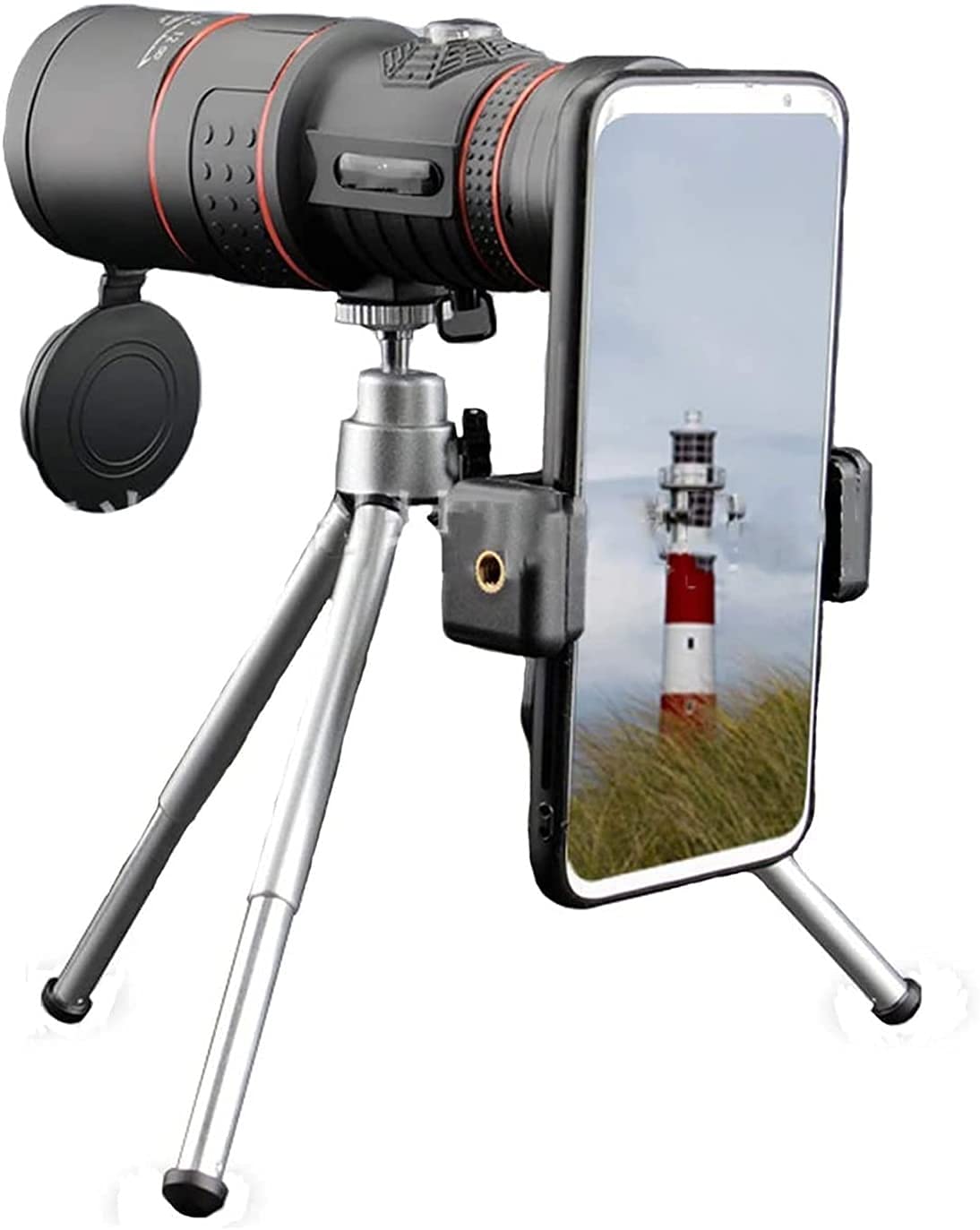
Image: The YWangQiang 12X50 Monocular Telescope, a compact optical device designed for enhanced viewing.
Product Overview
The YWangQiang 12X50 Monocular Telescope is designed for clear, magnified viewing, suitable for various outdoor activities. It features a 12X magnification and a 50mm objective lens for a wide field of view.
Key Features:
- 12X Magnification: Brings distant objects 12 times closer.
- 50mm Objective Lens: Provides a bright and wide field of view.
- BAK-4 Prism & Fully Multi-Coated Lens: Ensures superior light transmission (up to 99.5%) for high contrast and resolution images.
- Life Waterproof Design: Built-in lens dust cover and O-ring sealed optics protect against dust, moisture, and debris, making it suitable for various weather conditions.
- Ergonomic Design: Allows for comfortable, one-handed operation and a non-slip grip.
- Smartphone Compatibility: Includes a smartphone holder for capturing and sharing images.

Image: Illustration of the Premium BAK-4 Prism and Full Multi-coated Lens technology, highlighting improved color and image transfer compared to single-coated lenses.
Setup
Initial Use:
- Remove the objective lens cap and eyepiece cap.
- Hold the monocular with one hand.
- Look through the eyepiece.
- Adjust the focus wheel until the image is clear (refer to "Operating Instructions - Focusing").
Attaching the Smartphone Adapter (Optional):
- Secure the smartphone adapter to the eyepiece of the monocular. Ensure it is firmly attached.
- Place your smartphone into the adapter, aligning the phone's camera lens with the monocular's eyepiece.
- Adjust the phone's position within the adapter until the monocular's view fills the phone screen without vignetting.
- For stable viewing and photography, it is recommended to mount the monocular (with adapter and phone) onto a tripod.

Image: The monocular mounted on a tripod with a smartphone attached via an adapter, demonstrating a stable setup for observation and photography.
Operating Instructions
Focusing the Monocular:
The monocular features a dual focusing system for precise image clarity.
- Point the monocular towards your desired object.
- Look through the eyepiece.
- Rotate the main focus wheel (usually the larger, central wheel) until the image appears generally clear.
- For fine-tuning and sharper detail, rotate the secondary focus wheel (often smaller, near the eyepiece) until the image is perfectly crisp.

Image: Diagram illustrating the dual focusing system of the monocular, showing the two distinct focus adjustment points for coarse and fine focusing.
Using with a Smartphone:
- Ensure your smartphone is securely attached to the monocular via the adapter.
- Open your smartphone's camera application.
- Adjust the monocular's focus as described above until the image on your phone screen is clear.
- Use your phone's camera controls to take photos or record videos.
Maintenance
- Cleaning Lenses: Use a soft, lint-free cloth specifically designed for optical lenses. Gently wipe the lens surfaces. For stubborn smudges, use a small amount of lens cleaning fluid applied to the cloth, not directly to the lens.
- Body Cleaning: Wipe the monocular body with a soft, damp cloth. Avoid harsh chemicals or abrasive cleaners.
- Storage: Store the monocular in a dry, cool place, away from direct sunlight and extreme temperatures. Always replace the lens caps when not in use to protect the optics from dust and scratches.
- Water Resistance: While the monocular is life waterproof, it is not designed for submersion. Avoid prolonged exposure to heavy rain or dropping it into water. If it gets wet, wipe it dry immediately.
Troubleshooting
| Problem | Possible Cause | Solution |
|---|---|---|
| Image is blurry or out of focus. | Improper focus adjustment. | Adjust the main and secondary focus wheels until the image is clear. |
| Dark spots or dust visible in the view. | Dust on the lens surfaces. | Gently clean the objective and eyepiece lenses with a soft, lint-free optical cloth. |
| Image appears dim. | Low light conditions or dirty lenses. | Ensure lenses are clean. Use in adequate lighting. |
| Smartphone camera view shows a black circle (vignetting). | Smartphone camera not perfectly aligned with the monocular eyepiece. | Adjust the smartphone's position within the adapter until the view fills the screen. |
Specifications
| Magnification | 12X |
| Objective Lens Diameter | 50mm |
| Eyepiece Diameter | 18mm |
| Prism Material | BAK4 |
| Lens Coating | Fully Multi-Coated (FMC) |
| Light Transmittance | Up to 99.5% |
| Waterproof Level | Life Waterproof |
| ASIN | B0F1FGTVN6 |
| UPC | 744113987277 |
| Manufacturer | YWangQiang |
Safety Information
- Do Not Look Directly at the Sun: Never look directly at the sun through the monocular, as this can cause severe and permanent eye damage.
- Keep Out of Reach of Children: This device is not a toy. Supervise children when they are using the monocular.
- Avoid Extreme Temperatures: Do not expose the monocular to extreme heat or cold, as this can damage the optical components and body materials.
- Handle with Care: Avoid dropping or subjecting the monocular to strong impacts, which can affect its optical alignment and structural integrity.
Warranty and Support
Specific warranty information for the YWangQiang 12X50 Monocular Telescope is not provided within this manual. For details regarding warranty coverage or customer support, please refer to the product packaging, the retailer's website where the product was purchased, or contact YWangQiang customer service directly.
Manufacturer: YWangQiang